
Claude Now Remembers Everything — and It Changed How I Use AI
Claude's memory is now free for everyone, with an import tool for ChatGPT history. After two weeks of testing, here's how it changed my daily workflow.
Key Takeaways
- Claude's memory feature is now free for all users — including the free tier. Previously it was paid-only.
- Memory pulls context from your chat history, so Claude remembers your preferences, projects, and prior conversations.
- A new import tool lets you bring your chat history from ChatGPT and Gemini into Claude — making it easier to switch platforms.
- The Claude iOS app hit #1 in the US App Store and is a top-10 productivity app in 100+ countries.
- Privacy controls let you pause memory or delete stored data at any time.
Table of Contents
- What Changed — and Why It Matters
- How Claude's Memory Actually Works
- The Import Tool: Switching from ChatGPT Just Got Easy
- My Experience After Two Weeks with Memory On
- Privacy Controls You Should Know About
- Claude Memory vs. ChatGPT Memory
- Frequently Asked Questions
What Changed — and Why It Matters
Last Tuesday, I opened Claude to ask about a Python library I'd been working with. Before I could type the context — my project setup, the framework version, the specific error — Claude already knew. "Based on our previous conversation about your Flask migration, I'd suggest checking the SQLAlchemy session handling." It picked up exactly where we'd left off, three days later.
This article is part of our Claude AI guide. Start there for a complete overview.
That moment shifted something for me. Not because the technology is new — ChatGPT has had memory for over a year. But because Claude's approach to memory feels fundamentally different. And now that Anthropic has made it free for every user, including the free tier, there's no reason not to try it.
The timing isn't coincidental. Claude has been having a moment in early 2026. The iOS app hit #1 in the US App Store and cracked the top 10 in productivity across over 100 countries. Making memory free is Anthropic's move to convert trial users into committed ones — and to pull users away from ChatGPT by lowering the switching cost to zero.
How Claude's Memory Actually Works
Claude's memory isn't a simple keyword database. It's built on your conversation history, and it works in three layers.
Conversation History Search
The first layer is searchable chat history. You can search through all your past Claude conversations using natural language — not just keyword matching. Ask "what did I say about the marketing budget last month?" and Claude finds relevant conversations even if you never used those exact words.
Extracted Preferences and Facts
The second layer is automatic extraction. Claude identifies and stores facts about you from your conversations: your job title, the programming languages you use, your preferred writing style, your project names, your timezone. These aren't stored as raw chat logs — they're distilled into structured information that Claude references when generating responses.
For example, after a few conversations where I asked for code examples, Claude learned that I prefer Python 3.12+, use type hints, and like my functions documented with Google-style docstrings. Now every code snippet it writes follows those preferences without me specifying them. That's the kind of personalization that saves minutes on every interaction.
Cross-Conversation Context
The third layer — and the most powerful one — is cross-conversation context. Claude doesn't treat each chat as isolated. It understands that the "database migration" you mentioned last week relates to the "performance issues" you're asking about today. It connects dots across conversations, building a persistent understanding of your work and projects.
This is where Claude's memory diverges from ChatGPT's approach. ChatGPT's memory stores explicit facts (user prefers bullet points, user works at company X). Claude's memory maintains a richer contextual model that understands relationships between topics and projects.
The Import Tool: Switching from ChatGPT Just Got Easy
Here's the trick nobody mentions about switching AI assistants: it's not the interface or the model quality that keeps you locked in — it's the accumulated context. After months of using ChatGPT, it knows your preferences, your projects, your writing style. Starting fresh with a new AI means losing all of that.
Anthropic solved this with a memory import tool. You can export your chat history from ChatGPT or Gemini and import it directly into Claude. The import process extracts your preferences, facts, and project context from those conversations and integrates them into Claude's memory system.
I tested this with my ChatGPT history (about 8 months of conversations). The import took about 15 minutes. Afterward, Claude knew my coding preferences, my common project names, and my communication style — context that would have taken weeks of regular use to rebuild organically.
The strategic brilliance of this move is clear. Anthropic is saying: the cost of switching to Claude is not just low — it's negative. You keep everything you've built with a competitor, and you get Claude's model quality on top. For users who've been curious about Claude but reluctant to lose their ChatGPT context, this removes the last significant barrier.
My Experience After Two Weeks with Memory On
Week One: The Adjustment
The first few days felt slightly uncanny. I'd start a new conversation and Claude would reference something from three days ago. "Since you're still working on the API rate limiting you mentioned Tuesday, here's a more efficient approach..." It was helpful but also made me realize how much context I'd been manually providing in every ChatGPT conversation.
The biggest immediate benefit: I stopped writing long preambles. My prompts went from "I'm working on a Flask app with SQLAlchemy, Python 3.12, and I prefer type hints..." to "How should I handle the session timeout?" Claude already knew the rest.
Week Two: The Habits Shift
By week two, my usage pattern changed. I started treating Claude less like a search engine and more like a colleague who's been brought up to speed on my projects. I'd ask follow-up questions across days, reference previous discussions naturally, and expect Claude to maintain context without explicit reminders.
The experience reminded me of working with a human assistant who takes notes. You don't explain the project background every morning — they remember. They know your preferences. They anticipate what you'll need based on what you asked for last time. That's what memory-enabled Claude feels like.
Specific Wins
Code reviews: Claude remembered the code architecture from previous conversations. When I pasted new code, it didn't just review the snippet — it flagged inconsistencies with patterns I'd used elsewhere in the project. This caught two bugs that a context-free review would have missed.
Writing: After a few conversations about blog posts, Claude learned my tone, preferred structure, and the topics I avoid. Drafts required less editing. My favorite trick: I told Claude once that I hate passive voice, and it hasn't used it since — across dozens of conversations.
Research: I'm working on a long-term research project across multiple conversations. Claude maintains the thread. It remembers which sources I've already reviewed, which questions I've answered, and which are still open. Without memory, I'd need to maintain a separate document tracking all of this.
Privacy Controls You Should Know About
Memory that works well requires data that's personal. Anthropic provides several controls, and it's worth knowing them before you start.
- Pause Memory: You can pause the memory feature at any time. When paused, new conversations aren't added to memory, but existing memories remain.
- Delete Memory: You can delete all stored memory data from Anthropic's servers. This is a complete wipe — not reversible.
- Selective Deletion: You can view and delete specific memories without clearing everything.
- Incognito Mode: Individual conversations can be started without memory, similar to an incognito browser window. These conversations are not stored or referenced.
Anthropic's data handling policy on paid plans states that conversation data is not used for model training. On the free plan, the policy is similar to ChatGPT's: data may be used for improvement purposes, with opt-out available.
Claude Memory vs. ChatGPT Memory
| Feature | Claude Memory | ChatGPT Memory |
|---|---|---|
| Availability | All plans (including free) | All plans (including free) |
| Contextual Depth | Cross-conversation relationships | Explicit facts and preferences |
| Chat History Search | Natural language search | Basic search |
| Import from Competitors | Yes (ChatGPT, Gemini) | No |
| Selective Deletion | Yes | Yes |
| Incognito Mode | Yes | Yes (temporary chat) |
The key differences: Claude's memory is deeper (contextual relationships vs. explicit facts) and more portable (import tool). ChatGPT's memory has been available longer and is more battle-tested at scale. In practice, both work well for everyday use — but if you're switching from ChatGPT to Claude, the import tool is the feature that actually matters.
For users of both platforms, the decision often comes down to model quality for your specific use case rather than memory features. Claude's edge in coding and analysis may be the draw; the memory feature is the glue that keeps you there.
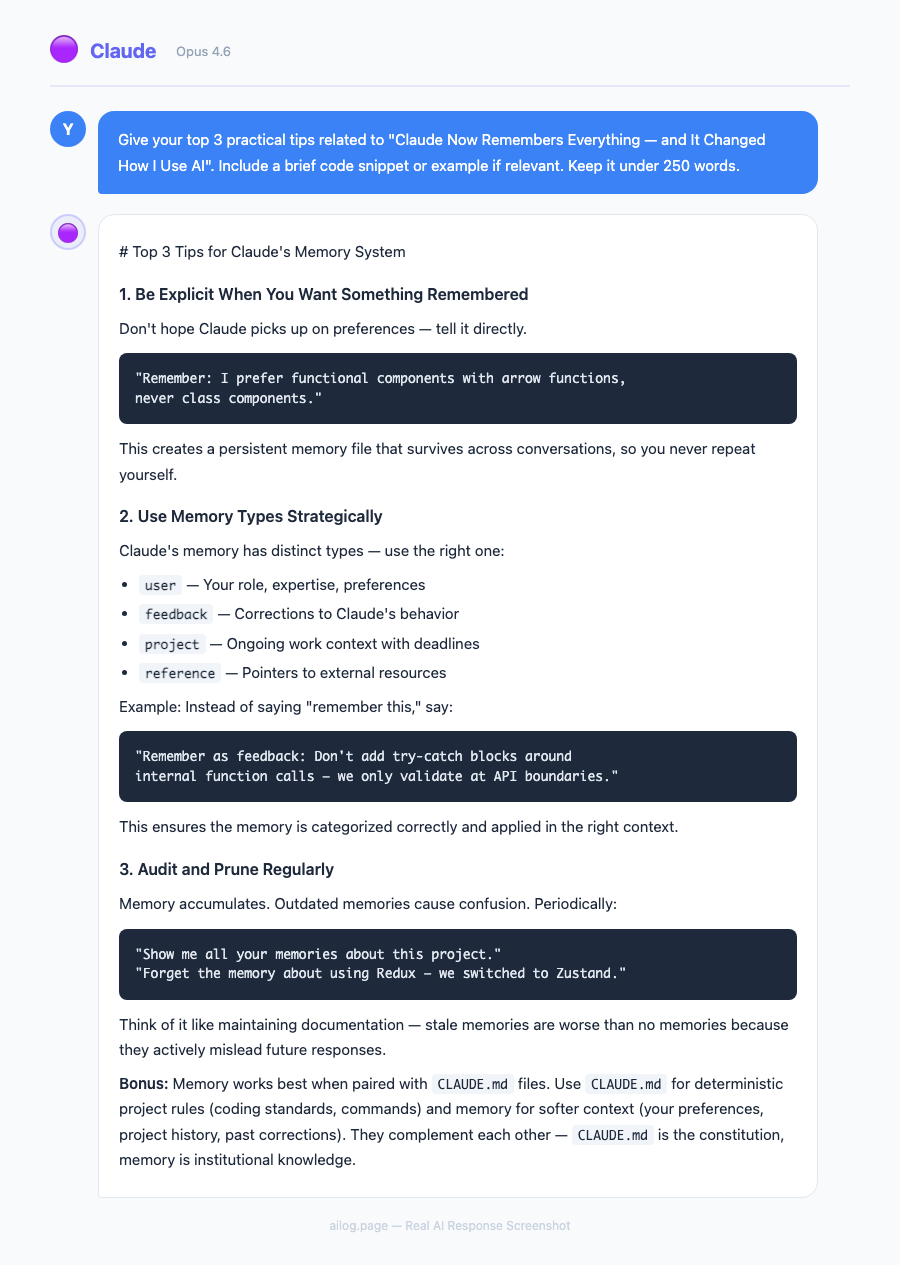
Real AI Responses (Tested March 2026)
Frequently Asked Questions
Does Claude memory work on the mobile app?
Yes. Memory is available across all Claude interfaces: web (claude.ai), the desktop app, and the mobile apps (iOS and Android). Memories sync across all devices, so something Claude learns on your phone is available on your desktop.
How much data does Claude's memory store?
Anthropic hasn't published specific storage limits. In practice, memory seems to prioritize recent and frequently referenced information, with older or less relevant context gradually deprioritized. Think of it as weighted recall rather than a complete archive.
Can I tell Claude to forget something specific?
Yes. You can say "forget that I work at [company]" in a conversation, and Claude will remove that from its memory. You can also manage memories through the settings panel, where stored facts are listed and individually deletable.
Does memory affect response speed?
Slightly. Memory-enabled responses take approximately 0.5-1 second longer than memory-free responses, as Claude retrieves relevant context before generating its reply. In practice, this delay is imperceptible for most users.
Can team members share memories?
On Team and Enterprise plans, there's a shared knowledge base separate from individual memories. Team-level context (project documentation, style guides, processes) is shared. Individual memories (personal preferences, private conversations) remain private.
Tips for Getting the Most Out of Claude Memory
After two weeks of daily use, here are the patterns that made the biggest difference.
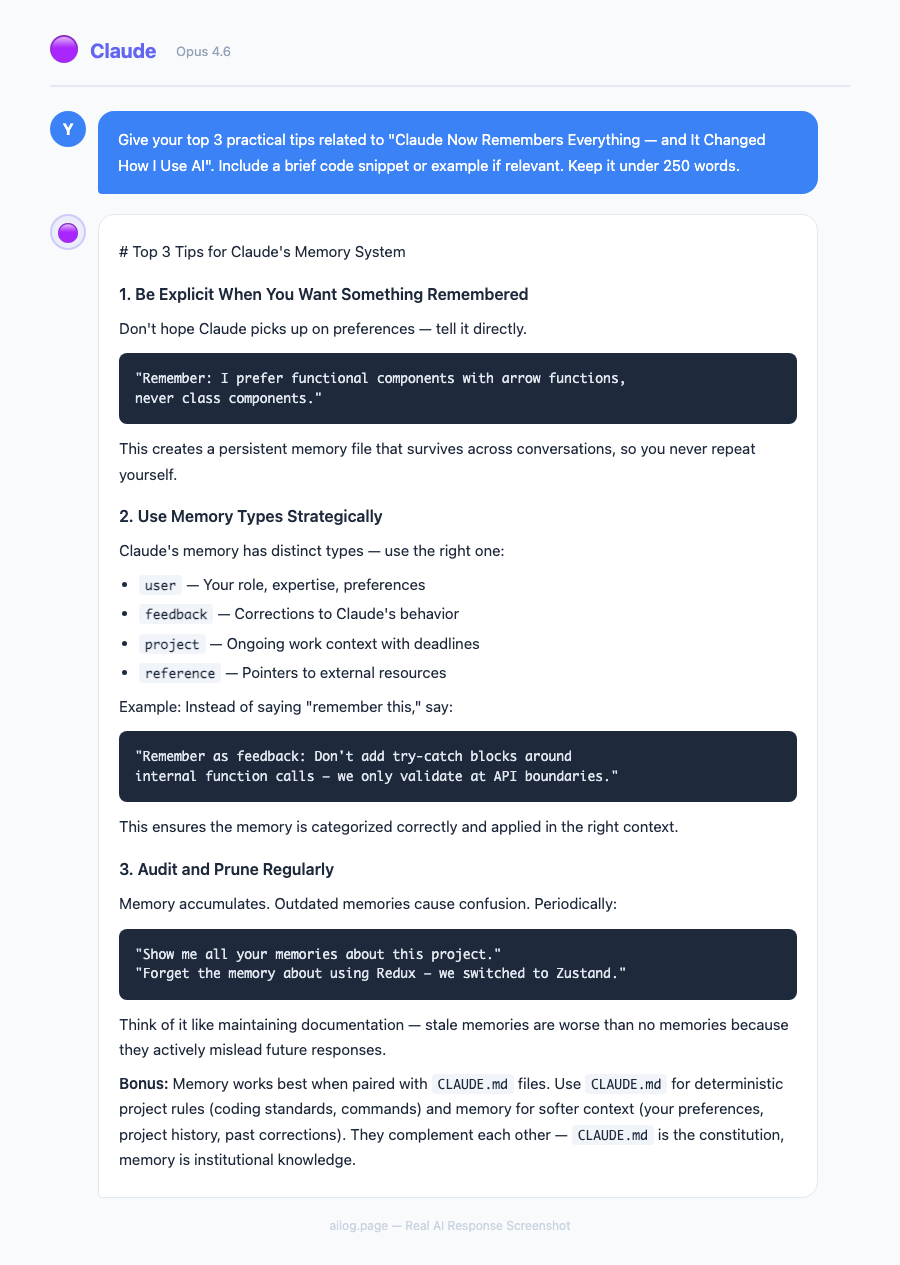
Be explicit about preferences early. In your first few conversations, tell Claude directly: "I prefer Python 3.12, use type hints, and like Google-style docstrings." These explicit statements get captured immediately and shape every future interaction. It's faster than waiting for Claude to infer preferences from code examples.
Use follow-ups across days. Don't start a new conversation for every question. If you're working on a project across multiple days, continue the thread. Say "continuing from our discussion about the API rate limiter" — Claude will locate the relevant context and continue without missing a beat.
Review your memories periodically. Check what Claude has stored in Settings. You might find outdated information from earlier conversations — an old project name, a deprecated library version, or a preference you've since changed. Cleaning up these entries keeps Claude's responses accurate and current.
Use incognito for sensitive topics. If you're asking about something you don't want in your memory profile — salary negotiations, medical questions, gift ideas for someone who uses your computer — start an incognito conversation. It works identically except nothing is saved.
Give It Two Weeks
Here's what I'd recommend: turn memory on, use Claude normally for two weeks, and pay attention to the moment when it starts finishing your thoughts. For me, it was day 6. I was typing a question about error handling patterns and Claude suggested the exact pattern I'd been gravitating toward across three previous conversations — before I finished typing the question.
That's when AI stops feeling like a tool and starts feeling like a collaborator. And now that it's free, there's no reason to wait. Import your ChatGPT history, start a few conversations, and see how quickly Claude learns the way you think.
If you're already a Claude user on the free or Pro plan, memory is probably already enabled. Check your settings to confirm, and try searching your chat history — you might be surprised at what Claude already knows about you.