
I'm a Teacher Who Started Using Claude for Lesson Plans. My Prep Time Dropped 60%.
Key Takeaways
- Claude can generate complete, standards-aligned lesson plans in 2-3 minutes — turning a 45-minute planning task into a quick iteration cycle
- The Projects feature lets you upload your syllabus, rubrics, and curriculum standards once, then reference them across every planning session
- Differentiation is where Claude saves the most time: one prompt can produce tiered activities for struggling, on-level, and advanced students
- Claude writes better rubrics than most template generators because it can align criteria to specific learning objectives you define
- Anthropic's partnership with Teach For All (100,000+ educators across 63 countries) signals long-term investment in education features
Table of Contents
- What My Planning Process Looked Like Before Claude
- My Daily Claude Planning Workflow
- Lesson Plan Prompts That Actually Work
- Differentiation in Minutes, Not Hours
- Rubrics and Assessments
- Subject-Specific Tips (English, Math, Science, History)
- Claude vs Dedicated Teacher AI Tools
- Frequently Asked Questions
What My Planning Process Looked Like Before Claude
I teach 11th-grade English at a public high school. Before I started using AI for lesson planning, my typical prep routine looked something like this: arrive 45 minutes before first period, open three browser tabs (state standards, the textbook publisher's resource portal, and whatever activity I'd bookmarked from Teachers Pay Teachers last summer), and try to build a coherent 50-minute lesson that hits at least two standards, includes differentiation for my three reading levels, and has some kind of formative assessment built in.
Most days, I'd settle for "good enough" — a lesson that covered the content but wasn't particularly creative or well-differentiated. The students who needed scaffolding got a simplified version of the same worksheet. The advanced students got... the same worksheet, just faster.
I started experimenting with ChatGPT for lesson planning in late 2025. It was helpful but inconsistent — sometimes it generated great discussion questions, other times it suggested activities that wouldn't work in a real classroom of 32 students with one computer cart. When Claude launched its Projects feature and expanded its context window, I switched. That was four months ago, and my prep time has dropped from about 45 minutes per lesson to roughly 15-20 minutes.
That 60% reduction isn't because Claude writes perfect lessons. It writes solid first drafts that I can quickly edit and adapt, which is fundamentally different from starting from scratch every morning.
My Daily Claude Planning Workflow
Here's what my morning planning actually looks like now. I'm sharing this in detail because the workflow matters more than any single prompt.
Step 1: Open my Claude Project (30 seconds). I have a project called "English 11 - Spring 2026" that contains my uploaded syllabus, the Common Core ELA standards for grades 11-12, my school's rubric template, a class roster with reading level notes (no student names — I use codes), and my unit calendar. Claude references all of this context automatically in every conversation.
Step 2: Request the lesson plan (2-3 minutes). I type something like: "Tomorrow is Day 3 of the persuasive writing unit. Students analyzed an editorial yesterday. I need a 50-minute lesson on writing thesis statements with a formative exit ticket. Tier the main activity for my three groups." Claude generates a complete lesson plan with timing, materials, activities, discussion questions, and a tiered writing exercise.
Step 3: Edit and adapt (10-15 minutes). This is the part AI can't do. I read through the plan, adjust timing based on how yesterday's class went, swap out the example editorial for one I know will engage my 3rd-period class better, and refine the scaffolding for specific students. Sometimes I'll ask Claude follow-up questions: "Make the exit ticket more specific to the editorial we read yesterday" or "Add sentence starters for the Tier 1 group."
Step 4: Generate supplementary materials (5 minutes, optional). If I need a handout, graphic organizer, or rubric for the day's activity, I ask Claude to create it. I copy the output into a Google Doc, format it, and print.
Total time: about 18 minutes for a differentiated, standards-aligned lesson with materials. Before Claude, this took 45 minutes minimum, and the result was usually less well-differentiated.
Lesson Plan Prompts That Actually Work
I've gone through probably 200 iterations of lesson planning prompts. Most of the generic ones you find online ("Write a lesson plan about X") produce generic, unusable output. Here are the prompt structures that consistently produce plans I can actually teach from.
The Standard Lesson Plan Prompt:
Create a [duration]-minute lesson plan for [grade level] [subject].

Topic: [specific topic]
Standards: [paste relevant standard codes or descriptions]
Prior knowledge: [what students already know/did yesterday]
Class context: [class size, available technology, any constraints]

Include:
1. Opening hook (3-5 minutes) — something that activates prior knowledge
2. Direct instruction (10-12 minutes) — key concepts with examples
3. Guided practice (15 minutes) — structured activity with teacher circulation points
4. Independent practice (12-15 minutes) — tiered for three levels
5. Formative assessment/exit ticket (5 minutes) — specific, measurable
6. Materials list and any prep needed before class
The Differentiation Prompt (my most-used):
Take this activity: [describe the main lesson activity]

Create three versions:
- Tier 1 (below grade level): Include sentence starters, word banks, and reduced complexity. Focus on the core concept only.
- Tier 2 (on grade level): Standard expectations with clear success criteria.
- Tier 3 (above grade level): Extended analysis, additional complexity, connection to broader themes.

All three tiers should look similar in format so students don't feel singled out.
Each version should take approximately the same amount of class time.
The Unit Planning Prompt:
I'm planning a [number]-day unit on [topic] for [grade/subject].

Standards to cover: [list standards]
Final assessment: [describe summative assessment]
Available resources: [textbook chapters, tech access, etc.]

Create a day-by-day outline with:
- Learning objective for each day
- Main activity type (direct instruction, Socratic seminar, workshop, lab, etc.)
- How each day builds toward the final assessment
- Two formative check-points during the unit
- Suggested homework (kept under 20 minutes per night)
The key insight from all of this prompt work: specificity beats length. A 5-line prompt with clear constraints produces better lessons than a 20-line prompt with vague instructions. This aligns with what I've seen in broader prompt engineering research — constraints give the AI something concrete to work with.
Differentiation in Minutes, Not Hours
If you've taught for more than a year, you know that differentiation is the most time-consuming part of planning. Creating three versions of an activity — truly differentiated, not just "easier" and "harder" versions — can take longer than creating the original lesson.
This is where Claude has genuinely changed my practice. Here's a real example from last week.
I was teaching a lesson on rhetorical appeals (ethos, pathos, logos) using Martin Luther King Jr.'s "Letter from Birmingham Jail." The main activity was identifying and analyzing rhetorical appeals in selected passages. Here's what differentiation looked like before and after Claude:
Before Claude: I'd create one worksheet with passage excerpts and questions. For struggling readers, I'd highlight the key sentences. For advanced students, I'd add a comparison question. Total prep time for differentiation: 25 minutes.
With Claude: I asked Claude to create three versions of the analysis activity. In under two minutes, I had:
- Tier 1: Shorter passages with the rhetorical appeal pre-identified. Students explain why the technique is effective using sentence frames ("This example of [appeal] is effective because ___"). Includes a word bank of analytical vocabulary.
- Tier 2: Medium-length passages where students identify the appeal and explain its effectiveness. Includes a model analysis of one passage as reference.
- Tier 3: Full-length passages where students identify multiple appeals within the same passage, analyze how they interact, and compare King's rhetorical strategy to a modern persuasive text.
All three versions had the same visual layout — same fonts, same structure, same number of questions. A student couldn't tell which "tier" they were working on just by looking at the paper. That matters enormously for student dignity and engagement.
The time I saved on differentiation prep I reinvested into what actually requires a human teacher: circulating during the activity, asking probing questions, catching misconceptions in real time, and adjusting my approach for individual students. AI handles the preparation; I handle the teaching.
Rubrics and Assessments
Rubric creation is another area where Claude saves significant time. Most rubric generators I've tried produce generic criteria that don't align with specific assignments. Claude's advantage is that it can see your assignment, your standards, and your grading philosophy in the same context.
Here's my rubric prompt template:
Create a 4-level rubric (Exceeds / Meets / Approaching / Beginning) for this assignment: [describe assignment]

Align to these standards: [paste standards]
Weight these criteria:
- [Criterion 1]: [percentage]
- [Criterion 2]: [percentage]
- [Criterion 3]: [percentage]

For each criterion at each level, write specific, observable descriptors — not vague language like "shows understanding" but concrete actions like "identifies at least three rhetorical appeals and explains their effect on the audience using textual evidence."
The rubrics Claude generates aren't perfect — I usually need to adjust one or two descriptors to match my specific expectations. But they're 85% there, which means I'm spending 5 minutes refining instead of 30 minutes building from scratch.
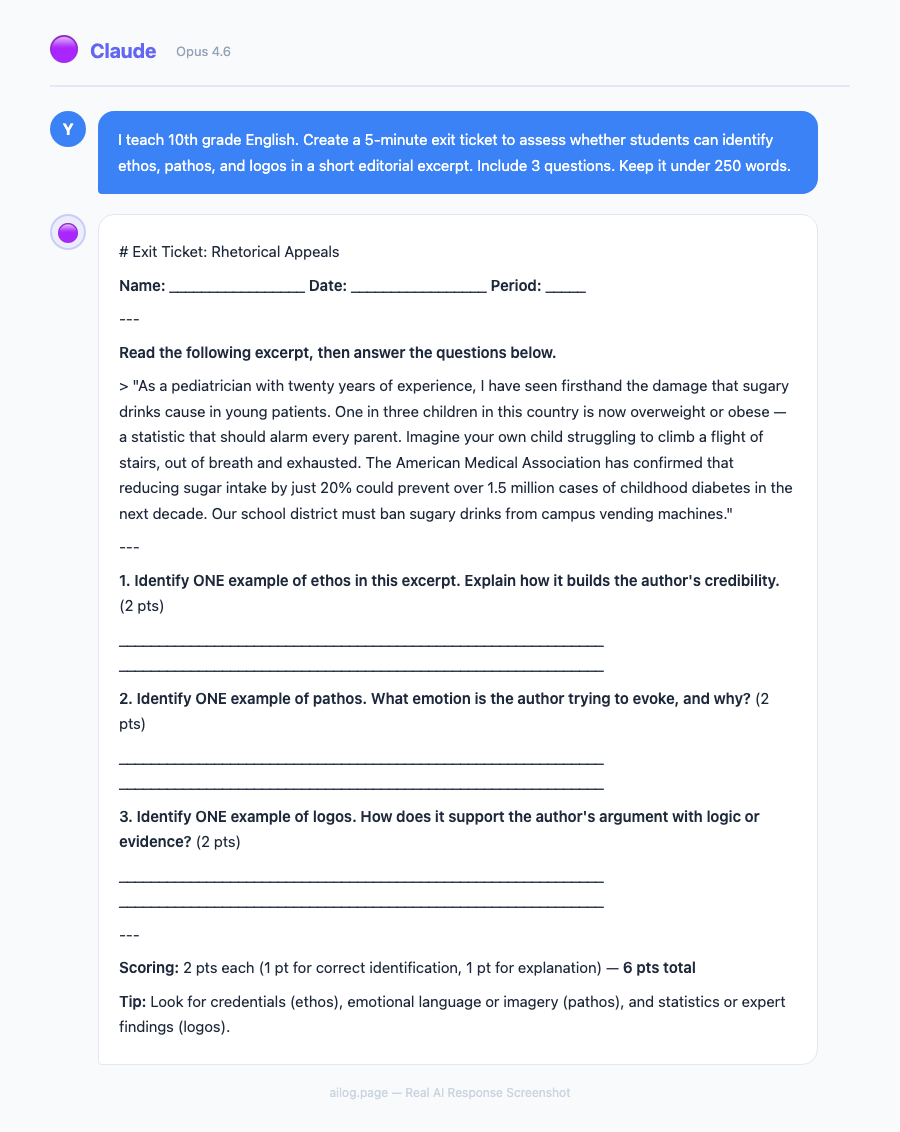
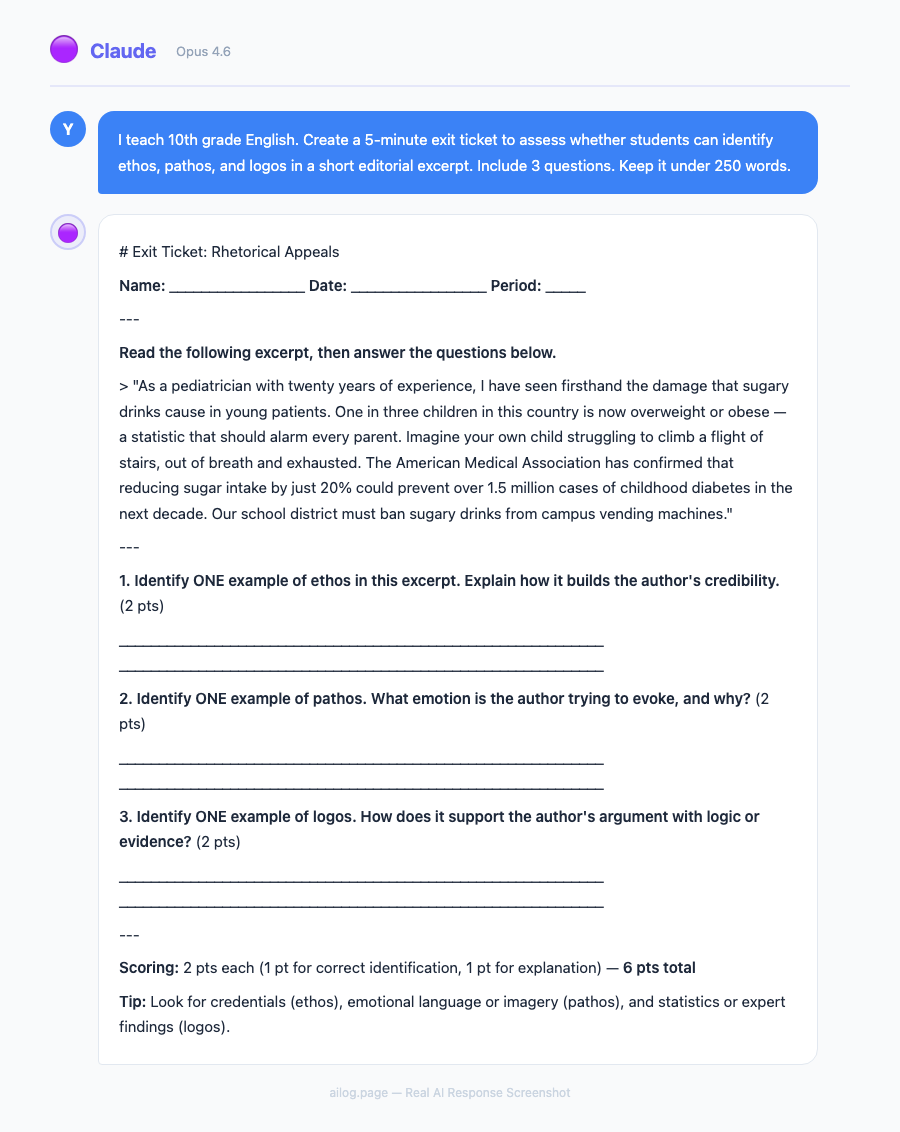
For formative assessments, Claude excels at exit tickets. I ask for 2-3 questions that specifically assess the day's learning objective, and Claude produces questions at the right complexity level. The best part: I can say "make the exit ticket harder than yesterday's — students found it too easy" and Claude adjusts appropriately because it has the context of previous lessons in the Project.
Subject-Specific Tips (English, Math, Science, History)
I teach English, but I've helped colleagues in other departments set up Claude workflows. Here's what works best for each subject area.
English / Language Arts: Claude's strongest subject. It generates excellent discussion questions, writes model paragraphs at different skill levels, creates vocabulary-in-context exercises, and can even produce mentor texts for writing instruction. One tip: always specify the reading level when asking Claude to generate student-facing text. "Write at a Lexile 1000 level" produces noticeably different output than leaving it unspecified.
Math: Use Claude for word problems, not computation. Claude is excellent at generating real-world application problems ("A city planner needs to design a park with these constraints...") and creating scaffolded problem sets that build in complexity. It's less reliable for verifying that multi-step calculations are correct — always check the answer key yourself. My colleague in the math department uses Claude to generate 5 versions of a problem set with the same structure but different numbers, so students can't copy answers.
Science: Claude is strong on lab design and scientific reasoning activities. Ask it to create claim-evidence-reasoning (CER) frameworks for specific lab results, or to generate pre-lab questions that activate relevant prior knowledge. It also writes good science reading comprehension passages at differentiated levels. Be cautious with very recent scientific data — Claude's training data has a cutoff, so verify any specific statistics or recent research findings.
History / Social Studies: Claude excels at creating primary source analysis scaffolds and generating document-based questions (DBQs). It can take a historical event and produce discussion questions at different cognitive levels (recall, analysis, evaluation, synthesis). One powerful use: ask Claude to write a "historical thinking" warm-up where students analyze a source from multiple perspectives. For AP courses, Claude can generate practice free-response questions aligned to the AP framework — just upload the College Board's course description to your Project.
Claude vs Dedicated Teacher AI Tools
You might wonder whether a general-purpose AI like Claude is really better than tools built specifically for teachers. I've tried several dedicated education AI platforms, and the answer is: it depends on what you need.
| Tool | Best For | Price | Limitation |
|---|---|---|---|
| Claude Pro | Flexible planning, differentiation, rubrics, custom workflows | $20/month | No built-in formatting/export to LMS |
| MagicSchool | Pre-built teacher workflows, student-safe AI tools | Free tier / $9.99/month | Less flexible, template-driven output |
| Eduaide | Content generation, assessment creation | Free tier / $7.99/month | Narrower scope than Claude |
| Diffit | Reading level adaptation, vocabulary support | Free / $5/month | Only does reading adaptation, not full planning |
| Brisk | Chrome extension for Google Docs/Slides integration | Free tier / $9.99/month | Browser-only, requires Google Workspace |
My take: if you're comfortable writing prompts and want maximum flexibility, Claude is the most powerful option. If you want click-and-go simplicity, MagicSchool or Eduaide are faster for common tasks like generating quiz questions or vocabulary lists. Many teachers I know use both — Claude for complex planning and differentiation, a dedicated tool for quick, repetitive tasks.
The dedicated tools also have one major advantage for school districts: compliance. MagicSchool and similar platforms are built with student data privacy in mind and often have district-level agreements. Using Claude directly means you need to be careful about not entering identifiable student information — always use codes or pseudonyms, never real student names or IDs.
If you're evaluating AI tools more broadly — not just for teaching — I've compared 12 AI apps worth paying for and included education-adjacent tools that many teachers find useful for productivity outside the classroom.
A Note on Privacy and Ethics
Before you start using Claude (or any AI) for teaching, address the elephant in the room: student privacy.
I follow three strict rules:
- Never enter student names or identifying information. I use codes (S1, S2, etc.) when I need to reference specific students in my planning context. Claude doesn't need to know that "S7" is actually a specific student — it just needs to know that S7 reads at a 7th-grade level and benefits from graphic organizers.
- Don't upload student work for grading. It's tempting to paste in a student essay and ask Claude to grade it. Don't. That student's work becomes part of a training dataset you don't control. Use Claude to generate rubrics and model responses, then grade student work yourself.
- Be transparent with students and parents. I mention in my syllabus that I use AI tools for lesson planning and material creation. Students know their work is never shared with AI systems. Transparency builds trust.
Anthropic has been more proactive than most AI companies about education-specific AI training and has published guidelines for educational use. Their partnership with Teach For All, which reaches over 100,000 teachers across 63 countries, suggests they're investing seriously in this space. That matters for long-term tool reliability — you don't want to build your workflow around a company that might deprioritize education features.
For a broader view of how AI companies handle data, I've written about what happens to everything you type into these systems.
Getting Started: Your First Week with Claude
If you're ready to try this, here's a practical first-week plan:
Day 1: Set up your Claude Project. Create a new Project in Claude and upload your syllabus, the relevant standards document for your subject/grade, and your school's lesson plan template (if you have one). This takes about 15 minutes and saves hours over the following weeks.
Day 2: Generate one lesson plan. Pick tomorrow's lesson — something you'd normally plan from scratch — and use the standard prompt template above. Compare what Claude generates to what you would have created manually. Edit it to match your teaching style.
Day 3: Try differentiation. Take the main activity from today's lesson and ask Claude to create three tiered versions. See if the output actually works for your students' specific needs.
Day 4: Build a rubric. Use the rubric prompt for an upcoming assignment. Compare it to rubrics you've built manually.
Day 5: Reflect and adjust. By now you'll know what Claude does well for your specific teaching context and where it falls short. Adjust your prompts accordingly. Save the prompts that work in a document you can reuse.
The learning curve is about a week. After that, Claude becomes a planning partner you'll wonder how you worked without. Not because it replaces your professional judgment — it doesn't — but because it handles the drafting drudgework that used to eat your mornings.
If you're new to Claude specifically, my power user guide covers the interface, Projects feature, and best practices for getting the most from the platform. And if you've been using ChatGPT and are curious about how the two compare, my model comparison goes deep on where each one excels.
Real AI Responses (Tested March 2026)
Frequently Asked Questions
Does Claude align with Common Core and state standards?
Claude is trained on publicly available standards documents, so it can reference and align to Common Core, NGSS, C3 Framework, and most state-specific standards. However, it doesn't always use the exact standard codes correctly. I recommend uploading your specific standards document to your Claude Project so it references the exact wording rather than relying on its training data. Always verify standard alignment manually before using a lesson plan — standards revisions happen, and Claude's training data may not reflect the most recent changes.
How does Claude handle special education accommodations?
Claude can generate modified materials based on general accommodation types (extended time, simplified text, visual supports, reduced choices). It cannot and should not replace IEP-specific planning — that requires knowledge of individual students that should never be shared with an AI system. Use Claude to generate the base materials, then manually adjust them according to each student's IEP. Several special education teachers I know use Claude to draft accommodation suggestions for IEP meetings, which they then review and personalize.
Will my school district allow me to use Claude?
This varies widely. Some districts have approved specific AI tools (MagicSchool is on many approved lists), while others have blanket AI bans. Before using Claude professionally, check your district's acceptable use policy. If your district hasn't addressed AI yet, propose a pilot program with clear guardrails around student data. Many districts are moving toward AI acceptance with guidelines rather than outright bans — the CoSN (Consortium for School Networking) publishes model AI policies that your district can adopt.
Can students tell when lessons are AI-generated?
In my experience, no — because I don't use Claude's output verbatim. I edit every lesson plan, add my own examples, adjust the language to match how I actually talk in class, and incorporate references to our specific class discussions. The structure might come from Claude, but the personality comes from me. If you're pasting Claude's output directly into handouts without editing, students (especially high schoolers) will notice the generic, slightly-too-polished tone. Always add your voice.
Is the $20/month cost justified for teachers?
If you value your time at even $15/hour and Claude saves you 25 minutes per day on planning (a conservative estimate based on my experience), that's roughly $94 worth of time saved per month during the school year. The subscription pays for itself within the first week. Several teachers in my building split a Claude Team account, which brings the per-person cost down further. The free tier works for occasional use, but the message limits make daily planning frustrating — you'll hit the cap mid-lesson-plan.
Key Takeaways
- Claude can generate complete, standards-aligned lesson plans in 2-3 minutes — turning a 45-minute planning task into a quick iteration cycle
- The Projects feature lets you upload your syllabus, rubrics, and curriculum standards once, then reference them across every planning session
- Differentiation is where Claude saves the most time: one prompt can produce tiered activities for struggling, on-level, and advanced students
- Claude writes better rubrics than most template generators because it can align criteria to specific learning objectives you define
- Anthropic's partnership with Teach For All (100,000+ educators across 63 countries) signals long-term investment in education features
Table of Contents
- What My Planning Process Looked Like Before Claude
- My Daily Claude Planning Workflow
- Lesson Plan Prompts That Actually Work
- Differentiation in Minutes, Not Hours
- Rubrics and Assessments
- Subject-Specific Tips (English, Math, Science, History)
- Claude vs Dedicated Teacher AI Tools
- Frequently Asked Questions
What My Planning Process Looked Like Before Claude
I teach 11th-grade English at a public high school. Before I started using AI for lesson planning, my typical prep routine looked something like this: arrive 45 minutes before first period, open three browser tabs (state standards, the textbook publisher's resource portal, and whatever activity I'd bookmarked from Teachers Pay Teachers last summer), and try to build a coherent 50-minute lesson that hits at least two standards, includes differentiation for my three reading levels, and has some kind of formative assessment built in.
Most days, I'd settle for "good enough" — a lesson that covered the content but wasn't particularly creative or well-differentiated. The students who needed scaffolding got a simplified version of the same worksheet. The advanced students got... the same worksheet, just faster.
I started experimenting with ChatGPT for lesson planning in late 2025. It was helpful but inconsistent — sometimes it generated great discussion questions, other times it suggested activities that wouldn't work in a real classroom of 32 students with one computer cart. When Claude launched its Projects feature and expanded its context window, I switched. That was four months ago, and my prep time has dropped from about 45 minutes per lesson to roughly 15-20 minutes.
That 60% reduction isn't because Claude writes perfect lessons. It writes solid first drafts that I can quickly edit and adapt, which is fundamentally different from starting from scratch every morning.
My Daily Claude Planning Workflow
Here's what my morning planning actually looks like now. I'm sharing this in detail because the workflow matters more than any single prompt.
Step 1: Open my Claude Project (30 seconds). I have a project called "English 11 - Spring 2026" that contains my uploaded syllabus, the Common Core ELA standards for grades 11-12, my school's rubric template, a class roster with reading level notes (no student names — I use codes), and my unit calendar. Claude references all of this context automatically in every conversation.
Step 2: Request the lesson plan (2-3 minutes). I type something like: "Tomorrow is Day 3 of the persuasive writing unit. Students analyzed an editorial yesterday. I need a 50-minute lesson on writing thesis statements with a formative exit ticket. Tier the main activity for my three groups." Claude generates a complete lesson plan with timing, materials, activities, discussion questions, and a tiered writing exercise.
Step 3: Edit and adapt (10-15 minutes). This is the part AI can't do. I read through the plan, adjust timing based on how yesterday's class went, swap out the example editorial for one I know will engage my 3rd-period class better, and refine the scaffolding for specific students. Sometimes I'll ask Claude follow-up questions: "Make the exit ticket more specific to the editorial we read yesterday" or "Add sentence starters for the Tier 1 group."
Step 4: Generate supplementary materials (5 minutes, optional). If I need a handout, graphic organizer, or rubric for the day's activity, I ask Claude to create it. I copy the output into a Google Doc, format it, and print.
Total time: about 18 minutes for a differentiated, standards-aligned lesson with materials. Before Claude, this took 45 minutes minimum, and the result was usually less well-differentiated.
Lesson Plan Prompts That Actually Work
I've gone through probably 200 iterations of lesson planning prompts. Most of the generic ones you find online ("Write a lesson plan about X") produce generic, unusable output. Here are the prompt structures that consistently produce plans I can actually teach from.
The Standard Lesson Plan Prompt:
Create a [duration]-minute lesson plan for [grade level] [subject].

Topic: [specific topic]
Standards: [paste relevant standard codes or descriptions]
Prior knowledge: [what students already know/did yesterday]
Class context: [class size, available technology, any constraints]

Include:
1. Opening hook (3-5 minutes) — something that activates prior knowledge
2. Direct instruction (10-12 minutes) — key concepts with examples
3. Guided practice (15 minutes) — structured activity with teacher circulation points
4. Independent practice (12-15 minutes) — tiered for three levels
5. Formative assessment/exit ticket (5 minutes) — specific, measurable
6. Materials list and any prep needed before class
The Differentiation Prompt (my most-used):
Take this activity: [describe the main lesson activity]

Create three versions:
- Tier 1 (below grade level): Include sentence starters, word banks, and reduced complexity. Focus on the core concept only.
- Tier 2 (on grade level): Standard expectations with clear success criteria.
- Tier 3 (above grade level): Extended analysis, additional complexity, connection to broader themes.

All three tiers should look similar in format so students don't feel singled out.
Each version should take approximately the same amount of class time.
The Unit Planning Prompt:
I'm planning a [number]-day unit on [topic] for [grade/subject].

Standards to cover: [list standards]
Final assessment: [describe summative assessment]
Available resources: [textbook chapters, tech access, etc.]

Create a day-by-day outline with:
- Learning objective for each day
- Main activity type (direct instruction, Socratic seminar, workshop, lab, etc.)
- How each day builds toward the final assessment
- Two formative check-points during the unit
- Suggested homework (kept under 20 minutes per night)
The key insight from all of this prompt work: specificity beats length. A 5-line prompt with clear constraints produces better lessons than a 20-line prompt with vague instructions. This aligns with what I've seen in broader prompt engineering research — constraints give the AI something concrete to work with.
Differentiation in Minutes, Not Hours
If you've taught for more than a year, you know that differentiation is the most time-consuming part of planning. Creating three versions of an activity — truly differentiated, not just "easier" and "harder" versions — can take longer than creating the original lesson.
This is where Claude has genuinely changed my practice. Here's a real example from last week.
I was teaching a lesson on rhetorical appeals (ethos, pathos, logos) using Martin Luther King Jr.'s "Letter from Birmingham Jail." The main activity was identifying and analyzing rhetorical appeals in selected passages. Here's what differentiation looked like before and after Claude:
Before Claude: I'd create one worksheet with passage excerpts and questions. For struggling readers, I'd highlight the key sentences. For advanced students, I'd add a comparison question. Total prep time for differentiation: 25 minutes.
With Claude: I asked Claude to create three versions of the analysis activity. In under two minutes, I had:
- Tier 1: Shorter passages with the rhetorical appeal pre-identified. Students explain why the technique is effective using sentence frames ("This example of [appeal] is effective because ___"). Includes a word bank of analytical vocabulary.
- Tier 2: Medium-length passages where students identify the appeal and explain its effectiveness. Includes a model analysis of one passage as reference.
- Tier 3: Full-length passages where students identify multiple appeals within the same passage, analyze how they interact, and compare King's rhetorical strategy to a modern persuasive text.
All three versions had the same visual layout — same fonts, same structure, same number of questions. A student couldn't tell which "tier" they were working on just by looking at the paper. That matters enormously for student dignity and engagement.
The time I saved on differentiation prep I reinvested into what actually requires a human teacher: circulating during the activity, asking probing questions, catching misconceptions in real time, and adjusting my approach for individual students. AI handles the preparation; I handle the teaching.
Rubrics and Assessments
Rubric creation is another area where Claude saves significant time. Most rubric generators I've tried produce generic criteria that don't align with specific assignments. Claude's advantage is that it can see your assignment, your standards, and your grading philosophy in the same context.
Here's my rubric prompt template:
Create a 4-level rubric (Exceeds / Meets / Approaching / Beginning) for this assignment: [describe assignment]

Align to these standards: [paste standards]
Weight these criteria:
- [Criterion 1]: [percentage]
- [Criterion 2]: [percentage]
- [Criterion 3]: [percentage]

For each criterion at each level, write specific, observable descriptors — not vague language like "shows understanding" but concrete actions like "identifies at least three rhetorical appeals and explains their effect on the audience using textual evidence."
The rubrics Claude generates aren't perfect — I usually need to adjust one or two descriptors to match my specific expectations. But they're 85% there, which means I'm spending 5 minutes refining instead of 30 minutes building from scratch.
For formative assessments, Claude excels at exit tickets. I ask for 2-3 questions that specifically assess the day's learning objective, and Claude produces questions at the right complexity level. The best part: I can say "make the exit ticket harder than yesterday's — students found it too easy" and Claude adjusts appropriately because it has the context of previous lessons in the Project.
Subject-Specific Tips (English, Math, Science, History)
I teach English, but I've helped colleagues in other departments set up Claude workflows. Here's what works best for each subject area.
English / Language Arts: Claude's strongest subject. It generates excellent discussion questions, writes model paragraphs at different skill levels, creates vocabulary-in-context exercises, and can even produce mentor texts for writing instruction. One tip: always specify the reading level when asking Claude to generate student-facing text. "Write at a Lexile 1000 level" produces noticeably different output than leaving it unspecified.
Math: Use Claude for word problems, not computation. Claude is excellent at generating real-world application problems ("A city planner needs to design a park with these constraints...") and creating scaffolded problem sets that build in complexity. It's less reliable for verifying that multi-step calculations are correct — always check the answer key yourself. My colleague in the math department uses Claude to generate 5 versions of a problem set with the same structure but different numbers, so students can't copy answers.
Science: Claude is strong on lab design and scientific reasoning activities. Ask it to create claim-evidence-reasoning (CER) frameworks for specific lab results, or to generate pre-lab questions that activate relevant prior knowledge. It also writes good science reading comprehension passages at differentiated levels. Be cautious with very recent scientific data — Claude's training data has a cutoff, so verify any specific statistics or recent research findings.
History / Social Studies: Claude excels at creating primary source analysis scaffolds and generating document-based questions (DBQs). It can take a historical event and produce discussion questions at different cognitive levels (recall, analysis, evaluation, synthesis). One powerful use: ask Claude to write a "historical thinking" warm-up where students analyze a source from multiple perspectives. For AP courses, Claude can generate practice free-response questions aligned to the AP framework — just upload the College Board's course description to your Project.
Claude vs Dedicated Teacher AI Tools
You might wonder whether a general-purpose AI like Claude is really better than tools built specifically for teachers. I've tried several dedicated education AI platforms, and the answer is: it depends on what you need.
| Tool | Best For | Price | Limitation |
|---|---|---|---|
| Claude Pro | Flexible planning, differentiation, rubrics, custom workflows | $20/month | No built-in formatting/export to LMS |
| MagicSchool | Pre-built teacher workflows, student-safe AI tools | Free tier / $9.99/month | Less flexible, template-driven output |
| Eduaide | Content generation, assessment creation | Free tier / $7.99/month | Narrower scope than Claude |
| Diffit | Reading level adaptation, vocabulary support | Free / $5/month | Only does reading adaptation, not full planning |
| Brisk | Chrome extension for Google Docs/Slides integration | Free tier / $9.99/month | Browser-only, requires Google Workspace |
My take: if you're comfortable writing prompts and want maximum flexibility, Claude is the most powerful option. If you want click-and-go simplicity, MagicSchool or Eduaide are faster for common tasks like generating quiz questions or vocabulary lists. Many teachers I know use both — Claude for complex planning and differentiation, a dedicated tool for quick, repetitive tasks.
The dedicated tools also have one major advantage for school districts: compliance. MagicSchool and similar platforms are built with student data privacy in mind and often have district-level agreements. Using Claude directly means you need to be careful about not entering identifiable student information — always use codes or pseudonyms, never real student names or IDs.
If you're evaluating AI tools more broadly — not just for teaching — I've compared 12 AI apps worth paying for and included education-adjacent tools that many teachers find useful for productivity outside the classroom.
A Note on Privacy and Ethics
Before you start using Claude (or any AI) for teaching, address the elephant in the room: student privacy.
I follow three strict rules:
- Never enter student names or identifying information. I use codes (S1, S2, etc.) when I need to reference specific students in my planning context. Claude doesn't need to know that "S7" is actually a specific student — it just needs to know that S7 reads at a 7th-grade level and benefits from graphic organizers.
- Don't upload student work for grading. It's tempting to paste in a student essay and ask Claude to grade it. Don't. That student's work becomes part of a training dataset you don't control. Use Claude to generate rubrics and model responses, then grade student work yourself.
- Be transparent with students and parents. I mention in my syllabus that I use AI tools for lesson planning and material creation. Students know their work is never shared with AI systems. Transparency builds trust.
Anthropic has been more proactive than most AI companies about education-specific AI training and has published guidelines for educational use. Their partnership with Teach For All, which reaches over 100,000 teachers across 63 countries, suggests they're investing seriously in this space. That matters for long-term tool reliability — you don't want to build your workflow around a company that might deprioritize education features.
For a broader view of how AI companies handle data, I've written about what happens to everything you type into these systems.
Getting Started: Your First Week with Claude
If you're ready to try this, here's a practical first-week plan:
Day 1: Set up your Claude Project. Create a new Project in Claude and upload your syllabus, the relevant standards document for your subject/grade, and your school's lesson plan template (if you have one). This takes about 15 minutes and saves hours over the following weeks.
Day 2: Generate one lesson plan. Pick tomorrow's lesson — something you'd normally plan from scratch — and use the standard prompt template above. Compare what Claude generates to what you would have created manually. Edit it to match your teaching style.
Day 3: Try differentiation. Take the main activity from today's lesson and ask Claude to create three tiered versions. See if the output actually works for your students' specific needs.
Day 4: Build a rubric. Use the rubric prompt for an upcoming assignment. Compare it to rubrics you've built manually.
Day 5: Reflect and adjust. By now you'll know what Claude does well for your specific teaching context and where it falls short. Adjust your prompts accordingly. Save the prompts that work in a document you can reuse.
The learning curve is about a week. After that, Claude becomes a planning partner you'll wonder how you worked without. Not because it replaces your professional judgment — it doesn't — but because it handles the drafting drudgework that used to eat your mornings.
If you're new to Claude specifically, my power user guide covers the interface, Projects feature, and best practices for getting the most from the platform. And if you've been using ChatGPT and are curious about how the two compare, my model comparison goes deep on where each one excels.
Real AI Responses (Tested March 2026)
Frequently Asked Questions
Does Claude align with Common Core and state standards?
Claude is trained on publicly available standards documents, so it can reference and align to Common Core, NGSS, C3 Framework, and most state-specific standards. However, it doesn't always use the exact standard codes correctly. I recommend uploading your specific standards document to your Claude Project so it references the exact wording rather than relying on its training data. Always verify standard alignment manually before using a lesson plan — standards revisions happen, and Claude's training data may not reflect the most recent changes.
How does Claude handle special education accommodations?
Claude can generate modified materials based on general accommodation types (extended time, simplified text, visual supports, reduced choices). It cannot and should not replace IEP-specific planning — that requires knowledge of individual students that should never be shared with an AI system. Use Claude to generate the base materials, then manually adjust them according to each student's IEP. Several special education teachers I know use Claude to draft accommodation suggestions for IEP meetings, which they then review and personalize.
Will my school district allow me to use Claude?
This varies widely. Some districts have approved specific AI tools (MagicSchool is on many approved lists), while others have blanket AI bans. Before using Claude professionally, check your district's acceptable use policy. If your district hasn't addressed AI yet, propose a pilot program with clear guardrails around student data. Many districts are moving toward AI acceptance with guidelines rather than outright bans — the CoSN (Consortium for School Networking) publishes model AI policies that your district can adopt.
Can students tell when lessons are AI-generated?
In my experience, no — because I don't use Claude's output verbatim. I edit every lesson plan, add my own examples, adjust the language to match how I actually talk in class, and incorporate references to our specific class discussions. The structure might come from Claude, but the personality comes from me. If you're pasting Claude's output directly into handouts without editing, students (especially high schoolers) will notice the generic, slightly-too-polished tone. Always add your voice.
Is the $20/month cost justified for teachers?
If you value your time at even $15/hour and Claude saves you 25 minutes per day on planning (a conservative estimate based on my experience), that's roughly $94 worth of time saved per month during the school year. The subscription pays for itself within the first week. Several teachers in my building split a Claude Team account, which brings the per-person cost down further. The free tier works for occasional use, but the message limits make daily planning frustrating — you'll hit the cap mid-lesson-plan.
Key Takeaways
- Claude can generate complete, standards-aligned lesson plans in 2-3 minutes — turning a 45-minute planning task into a quick iteration cycle
- The Projects feature lets you upload your syllabus, rubrics, and curriculum standards once, then reference them across every planning session
- Differentiation is where Claude saves the most time: one prompt can produce tiered activities for struggling, on-level, and advanced students
- Claude writes better rubrics than most template generators because it can align criteria to specific learning objectives you define
- Anthropic's partnership with Teach For All (100,000+ educators across 63 countries) signals long-term investment in education features
Table of Contents
- What My Planning Process Looked Like Before Claude
- My Daily Claude Planning Workflow
- Lesson Plan Prompts That Actually Work
- Differentiation in Minutes, Not Hours
- Rubrics and Assessments
- Subject-Specific Tips (English, Math, Science, History)
- Claude vs Dedicated Teacher AI Tools
- Frequently Asked Questions
What My Planning Process Looked Like Before Claude
I teach 11th-grade English at a public high school. Before I started using AI for lesson planning, my typical prep routine looked something like this: arrive 45 minutes before first period, open three browser tabs (state standards, the textbook publisher's resource portal, and whatever activity I'd bookmarked from Teachers Pay Teachers last summer), and try to build a coherent 50-minute lesson that hits at least two standards, includes differentiation for my three reading levels, and has some kind of formative assessment built in.
Most days, I'd settle for "good enough" — a lesson that covered the content but wasn't particularly creative or well-differentiated. The students who needed scaffolding got a simplified version of the same worksheet. The advanced students got... the same worksheet, just faster.
I started experimenting with ChatGPT for lesson planning in late 2025. It was helpful but inconsistent — sometimes it generated great discussion questions, other times it suggested activities that wouldn't work in a real classroom of 32 students with one computer cart. When Claude launched its Projects feature and expanded its context window, I switched. That was four months ago, and my prep time has dropped from about 45 minutes per lesson to roughly 15-20 minutes.
That 60% reduction isn't because Claude writes perfect lessons. It writes solid first drafts that I can quickly edit and adapt, which is fundamentally different from starting from scratch every morning.
My Daily Claude Planning Workflow
Here's what my morning planning actually looks like now. I'm sharing this in detail because the workflow matters more than any single prompt.
Step 1: Open my Claude Project (30 seconds). I have a project called "English 11 - Spring 2026" that contains my uploaded syllabus, the Common Core ELA standards for grades 11-12, my school's rubric template, a class roster with reading level notes (no student names — I use codes), and my unit calendar. Claude references all of this context automatically in every conversation.
Step 2: Request the lesson plan (2-3 minutes). I type something like: "Tomorrow is Day 3 of the persuasive writing unit. Students analyzed an editorial yesterday. I need a 50-minute lesson on writing thesis statements with a formative exit ticket. Tier the main activity for my three groups." Claude generates a complete lesson plan with timing, materials, activities, discussion questions, and a tiered writing exercise.
Step 3: Edit and adapt (10-15 minutes). This is the part AI can't do. I read through the plan, adjust timing based on how yesterday's class went, swap out the example editorial for one I know will engage my 3rd-period class better, and refine the scaffolding for specific students. Sometimes I'll ask Claude follow-up questions: "Make the exit ticket more specific to the editorial we read yesterday" or "Add sentence starters for the Tier 1 group."
Step 4: Generate supplementary materials (5 minutes, optional). If I need a handout, graphic organizer, or rubric for the day's activity, I ask Claude to create it. I copy the output into a Google Doc, format it, and print.
Total time: about 18 minutes for a differentiated, standards-aligned lesson with materials. Before Claude, this took 45 minutes minimum, and the result was usually less well-differentiated.
Lesson Plan Prompts That Actually Work
I've gone through probably 200 iterations of lesson planning prompts. Most of the generic ones you find online ("Write a lesson plan about X") produce generic, unusable output. Here are the prompt structures that consistently produce plans I can actually teach from.
The Standard Lesson Plan Prompt:
Create a [duration]-minute lesson plan for [grade level] [subject].

Topic: [specific topic]
Standards: [paste relevant standard codes or descriptions]
Prior knowledge: [what students already know/did yesterday]
Class context: [class size, available technology, any constraints]

Include:
1. Opening hook (3-5 minutes) — something that activates prior knowledge
2. Direct instruction (10-12 minutes) — key concepts with examples
3. Guided practice (15 minutes) — structured activity with teacher circulation points
4. Independent practice (12-15 minutes) — tiered for three levels
5. Formative assessment/exit ticket (5 minutes) — specific, measurable
6. Materials list and any prep needed before class
The Differentiation Prompt (my most-used):
Take this activity: [describe the main lesson activity]

Create three versions:
- Tier 1 (below grade level): Include sentence starters, word banks, and reduced complexity. Focus on the core concept only.
- Tier 2 (on grade level): Standard expectations with clear success criteria.
- Tier 3 (above grade level): Extended analysis, additional complexity, connection to broader themes.

All three tiers should look similar in format so students don't feel singled out.
Each version should take approximately the same amount of class time.
The Unit Planning Prompt:
I'm planning a [number]-day unit on [topic] for [grade/subject].

Standards to cover: [list standards]
Final assessment: [describe summative assessment]
Available resources: [textbook chapters, tech access, etc.]

Create a day-by-day outline with:
- Learning objective for each day
- Main activity type (direct instruction, Socratic seminar, workshop, lab, etc.)
- How each day builds toward the final assessment
- Two formative check-points during the unit
- Suggested homework (kept under 20 minutes per night)
The key insight from all of this prompt work: specificity beats length. A 5-line prompt with clear constraints produces better lessons than a 20-line prompt with vague instructions. This aligns with what I've seen in broader prompt engineering research — constraints give the AI something concrete to work with.
Differentiation in Minutes, Not Hours
If you've taught for more than a year, you know that differentiation is the most time-consuming part of planning. Creating three versions of an activity — truly differentiated, not just "easier" and "harder" versions — can take longer than creating the original lesson.
This is where Claude has genuinely changed my practice. Here's a real example from last week.
I was teaching a lesson on rhetorical appeals (ethos, pathos, logos) using Martin Luther King Jr.'s "Letter from Birmingham Jail." The main activity was identifying and analyzing rhetorical appeals in selected passages. Here's what differentiation looked like before and after Claude:
Before Claude: I'd create one worksheet with passage excerpts and questions. For struggling readers, I'd highlight the key sentences. For advanced students, I'd add a comparison question. Total prep time for differentiation: 25 minutes.
With Claude: I asked Claude to create three versions of the analysis activity. In under two minutes, I had:
- Tier 1: Shorter passages with the rhetorical appeal pre-identified. Students explain why the technique is effective using sentence frames ("This example of [appeal] is effective because ___"). Includes a word bank of analytical vocabulary.
- Tier 2: Medium-length passages where students identify the appeal and explain its effectiveness. Includes a model analysis of one passage as reference.
- Tier 3: Full-length passages where students identify multiple appeals within the same passage, analyze how they interact, and compare King's rhetorical strategy to a modern persuasive text.
All three versions had the same visual layout — same fonts, same structure, same number of questions. A student couldn't tell which "tier" they were working on just by looking at the paper. That matters enormously for student dignity and engagement.
The time I saved on differentiation prep I reinvested into what actually requires a human teacher: circulating during the activity, asking probing questions, catching misconceptions in real time, and adjusting my approach for individual students. AI handles the preparation; I handle the teaching.
Rubrics and Assessments
Rubric creation is another area where Claude saves significant time. Most rubric generators I've tried produce generic criteria that don't align with specific assignments. Claude's advantage is that it can see your assignment, your standards, and your grading philosophy in the same context.
Here's my rubric prompt template:
Create a 4-level rubric (Exceeds / Meets / Approaching / Beginning) for this assignment: [describe assignment]

Align to these standards: [paste standards]
Weight these criteria:
- [Criterion 1]: [percentage]
- [Criterion 2]: [percentage]
- [Criterion 3]: [percentage]

For each criterion at each level, write specific, observable descriptors — not vague language like "shows understanding" but concrete actions like "identifies at least three rhetorical appeals and explains their effect on the audience using textual evidence."
The rubrics Claude generates aren't perfect — I usually need to adjust one or two descriptors to match my specific expectations. But they're 85% there, which means I'm spending 5 minutes refining instead of 30 minutes building from scratch.
For formative assessments, Claude excels at exit tickets. I ask for 2-3 questions that specifically assess the day's learning objective, and Claude produces questions at the right complexity level. The best part: I can say "make the exit ticket harder than yesterday's — students found it too easy" and Claude adjusts appropriately because it has the context of previous lessons in the Project.
Subject-Specific Tips (English, Math, Science, History)
I teach English, but I've helped colleagues in other departments set up Claude workflows. Here's what works best for each subject area.
English / Language Arts: Claude's strongest subject. It generates excellent discussion questions, writes model paragraphs at different skill levels, creates vocabulary-in-context exercises, and can even produce mentor texts for writing instruction. One tip: always specify the reading level when asking Claude to generate student-facing text. "Write at a Lexile 1000 level" produces noticeably different output than leaving it unspecified.
Math: Use Claude for word problems, not computation. Claude is excellent at generating real-world application problems ("A city planner needs to design a park with these constraints...") and creating scaffolded problem sets that build in complexity. It's less reliable for verifying that multi-step calculations are correct — always check the answer key yourself. My colleague in the math department uses Claude to generate 5 versions of a problem set with the same structure but different numbers, so students can't copy answers.
Science: Claude is strong on lab design and scientific reasoning activities. Ask it to create claim-evidence-reasoning (CER) frameworks for specific lab results, or to generate pre-lab questions that activate relevant prior knowledge. It also writes good science reading comprehension passages at differentiated levels. Be cautious with very recent scientific data — Claude's training data has a cutoff, so verify any specific statistics or recent research findings.
History / Social Studies: Claude excels at creating primary source analysis scaffolds and generating document-based questions (DBQs). It can take a historical event and produce discussion questions at different cognitive levels (recall, analysis, evaluation, synthesis). One powerful use: ask Claude to write a "historical thinking" warm-up where students analyze a source from multiple perspectives. For AP courses, Claude can generate practice free-response questions aligned to the AP framework — just upload the College Board's course description to your Project.
Claude vs Dedicated Teacher AI Tools
You might wonder whether a general-purpose AI like Claude is really better than tools built specifically for teachers. I've tried several dedicated education AI platforms, and the answer is: it depends on what you need.
| Tool | Best For | Price | Limitation |
|---|---|---|---|
| Claude Pro | Flexible planning, differentiation, rubrics, custom workflows | $20/month | No built-in formatting/export to LMS |
| MagicSchool | Pre-built teacher workflows, student-safe AI tools | Free tier / $9.99/month | Less flexible, template-driven output |
| Eduaide | Content generation, assessment creation | Free tier / $7.99/month | Narrower scope than Claude |
| Diffit | Reading level adaptation, vocabulary support | Free / $5/month | Only does reading adaptation, not full planning |
| Brisk | Chrome extension for Google Docs/Slides integration | Free tier / $9.99/month | Browser-only, requires Google Workspace |
My take: if you're comfortable writing prompts and want maximum flexibility, Claude is the most powerful option. If you want click-and-go simplicity, MagicSchool or Eduaide are faster for common tasks like generating quiz questions or vocabulary lists. Many teachers I know use both — Claude for complex planning and differentiation, a dedicated tool for quick, repetitive tasks.
The dedicated tools also have one major advantage for school districts: compliance. MagicSchool and similar platforms are built with student data privacy in mind and often have district-level agreements. Using Claude directly means you need to be careful about not entering identifiable student information — always use codes or pseudonyms, never real student names or IDs.
If you're evaluating AI tools more broadly — not just for teaching — I've compared 12 AI apps worth paying for and included education-adjacent tools that many teachers find useful for productivity outside the classroom.
A Note on Privacy and Ethics
Before you start using Claude (or any AI) for teaching, address the elephant in the room: student privacy.
I follow three strict rules:
- Never enter student names or identifying information. I use codes (S1, S2, etc.) when I need to reference specific students in my planning context. Claude doesn't need to know that "S7" is actually a specific student — it just needs to know that S7 reads at a 7th-grade level and benefits from graphic organizers.
- Don't upload student work for grading. It's tempting to paste in a student essay and ask Claude to grade it. Don't. That student's work becomes part of a training dataset you don't control. Use Claude to generate rubrics and model responses, then grade student work yourself.
- Be transparent with students and parents. I mention in my syllabus that I use AI tools for lesson planning and material creation. Students know their work is never shared with AI systems. Transparency builds trust.
Anthropic has been more proactive than most AI companies about education-specific AI training and has published guidelines for educational use. Their partnership with Teach For All, which reaches over 100,000 teachers across 63 countries, suggests they're investing seriously in this space. That matters for long-term tool reliability — you don't want to build your workflow around a company that might deprioritize education features.
For a broader view of how AI companies handle data, I've written about what happens to everything you type into these systems.
Getting Started: Your First Week with Claude
If you're ready to try this, here's a practical first-week plan:
Day 1: Set up your Claude Project. Create a new Project in Claude and upload your syllabus, the relevant standards document for your subject/grade, and your school's lesson plan template (if you have one). This takes about 15 minutes and saves hours over the following weeks.
Day 2: Generate one lesson plan. Pick tomorrow's lesson — something you'd normally plan from scratch — and use the standard prompt template above. Compare what Claude generates to what you would have created manually. Edit it to match your teaching style.
Day 3: Try differentiation. Take the main activity from today's lesson and ask Claude to create three tiered versions. See if the output actually works for your students' specific needs.
Day 4: Build a rubric. Use the rubric prompt for an upcoming assignment. Compare it to rubrics you've built manually.
Day 5: Reflect and adjust. By now you'll know what Claude does well for your specific teaching context and where it falls short. Adjust your prompts accordingly. Save the prompts that work in a document you can reuse.
The learning curve is about a week. After that, Claude becomes a planning partner you'll wonder how you worked without. Not because it replaces your professional judgment — it doesn't — but because it handles the drafting drudgework that used to eat your mornings.
If you're new to Claude specifically, my power user guide covers the interface, Projects feature, and best practices for getting the most from the platform. And if you've been using ChatGPT and are curious about how the two compare, my model comparison goes deep on where each one excels.
Real AI Responses (Tested March 2026)
Frequently Asked Questions
Does Claude align with Common Core and state standards?
Claude is trained on publicly available standards documents, so it can reference and align to Common Core, NGSS, C3 Framework, and most state-specific standards. However, it doesn't always use the exact standard codes correctly. I recommend uploading your specific standards document to your Claude Project so it references the exact wording rather than relying on its training data. Always verify standard alignment manually before using a lesson plan — standards revisions happen, and Claude's training data may not reflect the most recent changes.
How does Claude handle special education accommodations?
Claude can generate modified materials based on general accommodation types (extended time, simplified text, visual supports, reduced choices). It cannot and should not replace IEP-specific planning — that requires knowledge of individual students that should never be shared with an AI system. Use Claude to generate the base materials, then manually adjust them according to each student's IEP. Several special education teachers I know use Claude to draft accommodation suggestions for IEP meetings, which they then review and personalize.
Will my school district allow me to use Claude?
This varies widely. Some districts have approved specific AI tools (MagicSchool is on many approved lists), while others have blanket AI bans. Before using Claude professionally, check your district's acceptable use policy. If your district hasn't addressed AI yet, propose a pilot program with clear guardrails around student data. Many districts are moving toward AI acceptance with guidelines rather than outright bans — the CoSN (Consortium for School Networking) publishes model AI policies that your district can adopt.
Can students tell when lessons are AI-generated?
In my experience, no — because I don't use Claude's output verbatim. I edit every lesson plan, add my own examples, adjust the language to match how I actually talk in class, and incorporate references to our specific class discussions. The structure might come from Claude, but the personality comes from me. If you're pasting Claude's output directly into handouts without editing, students (especially high schoolers) will notice the generic, slightly-too-polished tone. Always add your voice.
Is the $20/month cost justified for teachers?
If you value your time at even $15/hour and Claude saves you 25 minutes per day on planning (a conservative estimate based on my experience), that's roughly $94 worth of time saved per month during the school year. The subscription pays for itself within the first week. Several teachers in my building split a Claude Team account, which brings the per-person cost down further. The free tier works for occasional use, but the message limits make daily planning frustrating — you'll hit the cap mid-lesson-plan.
I teach 11th-grade English at a public high school. Before I started using AI for lesson planning, my typical prep routine looked something like this: arrive 45 minutes before first period, open three browser tabs (state standards, the textbook publisher's resource portal, and whatever activity I'd bookmarked from Teachers Pay Teachers last summer), and try to build a coherent 50-minute lesson that hits at least two standards, includes differentiation for my three reading levels, and has some kind of formative assessment built in.
Most days, I'd settle for "good enough" — a lesson that covered the content but wasn't particularly creative or well-differentiated. The students who needed scaffolding got a simplified version of the same worksheet. The advanced students got... the same worksheet, just faster.
I started experimenting with ChatGPT for lesson planning in late 2025. It was helpful but inconsistent — sometimes it generated great discussion questions, other times it suggested activities that wouldn't work in a real classroom of 32 students with one computer cart. When Claude launched its Projects feature and expanded its context window, I switched. That was four months ago, and my prep time has dropped from about 45 minutes per lesson to roughly 15-20 minutes.
That 60% reduction isn't because Claude writes perfect lessons. It writes solid first drafts that I can quickly edit and adapt, which is fundamentally different from starting from scratch every morning.
Key Takeaways
- Claude can generate complete, standards-aligned lesson plans in 2-3 minutes — turning a 45-minute planning task into a quick iteration cycle
- The Projects feature lets you upload your syllabus, rubrics, and curriculum standards once, then reference them across every planning session
- Differentiation is where Claude saves the most time: one prompt can produce tiered activities for struggling, on-level, and advanced students
- Claude writes better rubrics than most template generators because it can align criteria to specific learning objectives you define
- Anthropic's partnership with Teach For All (100,000+ educators across 63 countries) signals long-term investment in education features
Table of Contents
- What My Planning Process Looked Like Before Claude
- My Daily Claude Planning Workflow
- Lesson Plan Prompts That Actually Work
- Differentiation in Minutes, Not Hours
- Rubrics and Assessments
- Subject-Specific Tips (English, Math, Science, History)
- Claude vs Dedicated Teacher AI Tools
- Frequently Asked Questions
What My Planning Process Looked Like Before Claude
I teach 11th-grade English at a public high school. Before I started using AI for lesson planning, my typical prep routine looked something like this: arrive 45 minutes before first period, open three browser tabs (state standards, the textbook publisher's resource portal, and whatever activity I'd bookmarked from Teachers Pay Teachers last summer), and try to build a coherent 50-minute lesson that hits at least two standards, includes differentiation for my three reading levels, and has some kind of formative assessment built in.
Most days, I'd settle for "good enough" — a lesson that covered the content but wasn't particularly creative or well-differentiated. The students who needed scaffolding got a simplified version of the same worksheet. The advanced students got... the same worksheet, just faster.
I started experimenting with ChatGPT for lesson planning in late 2025. It was helpful but inconsistent — sometimes it generated great discussion questions, other times it suggested activities that wouldn't work in a real classroom of 32 students with one computer cart. When Claude launched its Projects feature and expanded its context window, I switched. That was four months ago, and my prep time has dropped from about 45 minutes per lesson to roughly 15-20 minutes.
That 60% reduction isn't because Claude writes perfect lessons. It writes solid first drafts that I can quickly edit and adapt, which is fundamentally different from starting from scratch every morning.
My Daily Claude Planning Workflow
Here's what my morning planning actually looks like now. I'm sharing this in detail because the workflow matters more than any single prompt.
Step 1: Open my Claude Project (30 seconds). I have a project called "English 11 - Spring 2026" that contains my uploaded syllabus, the Common Core ELA standards for grades 11-12, my school's rubric template, a class roster with reading level notes (no student names — I use codes), and my unit calendar. Claude references all of this context automatically in every conversation.
Step 2: Request the lesson plan (2-3 minutes). I type something like: "Tomorrow is Day 3 of the persuasive writing unit. Students analyzed an editorial yesterday. I need a 50-minute lesson on writing thesis statements with a formative exit ticket. Tier the main activity for my three groups." Claude generates a complete lesson plan with timing, materials, activities, discussion questions, and a tiered writing exercise.
Step 3: Edit and adapt (10-15 minutes). This is the part AI can't do. I read through the plan, adjust timing based on how yesterday's class went, swap out the example editorial for one I know will engage my 3rd-period class better, and refine the scaffolding for specific students. Sometimes I'll ask Claude follow-up questions: "Make the exit ticket more specific to the editorial we read yesterday" or "Add sentence starters for the Tier 1 group."
Step 4: Generate supplementary materials (5 minutes, optional). If I need a handout, graphic organizer, or rubric for the day's activity, I ask Claude to create it. I copy the output into a Google Doc, format it, and print.
Total time: about 18 minutes for a differentiated, standards-aligned lesson with materials. Before Claude, this took 45 minutes minimum, and the result was usually less well-differentiated.
Lesson Plan Prompts That Actually Work
I've gone through probably 200 iterations of lesson planning prompts. Most of the generic ones you find online ("Write a lesson plan about X") produce generic, unusable output. Here are the prompt structures that consistently produce plans I can actually teach from.
The Standard Lesson Plan Prompt:
Create a [duration]-minute lesson plan for [grade level] [subject].

Topic: [specific topic]
Standards: [paste relevant standard codes or descriptions]
Prior knowledge: [what students already know/did yesterday]
Class context: [class size, available technology, any constraints]

Include:
1. Opening hook (3-5 minutes) — something that activates prior knowledge
2. Direct instruction (10-12 minutes) — key concepts with examples
3. Guided practice (15 minutes) — structured activity with teacher circulation points
4. Independent practice (12-15 minutes) — tiered for three levels
5. Formative assessment/exit ticket (5 minutes) — specific, measurable
6. Materials list and any prep needed before class
The Differentiation Prompt (my most-used):
Take this activity: [describe the main lesson activity]

Create three versions:
- Tier 1 (below grade level): Include sentence starters, word banks, and reduced complexity. Focus on the core concept only.
- Tier 2 (on grade level): Standard expectations with clear success criteria.
- Tier 3 (above grade level): Extended analysis, additional complexity, connection to broader themes.

All three tiers should look similar in format so students don't feel singled out.
Each version should take approximately the same amount of class time.
The Unit Planning Prompt:
I'm planning a [number]-day unit on [topic] for [grade/subject].

Standards to cover: [list standards]
Final assessment: [describe summative assessment]
Available resources: [textbook chapters, tech access, etc.]

Create a day-by-day outline with:
- Learning objective for each day
- Main activity type (direct instruction, Socratic seminar, workshop, lab, etc.)
- How each day builds toward the final assessment
- Two formative check-points during the unit
- Suggested homework (kept under 20 minutes per night)
The key insight from all of this prompt work: specificity beats length. A 5-line prompt with clear constraints produces better lessons than a 20-line prompt with vague instructions. This aligns with what I've seen in broader prompt engineering research — constraints give the AI something concrete to work with.
Differentiation in Minutes, Not Hours
If you've taught for more than a year, you know that differentiation is the most time-consuming part of planning. Creating three versions of an activity — truly differentiated, not just "easier" and "harder" versions — can take longer than creating the original lesson.
This is where Claude has genuinely changed my practice. Here's a real example from last week.
I was teaching a lesson on rhetorical appeals (ethos, pathos, logos) using Martin Luther King Jr.'s "Letter from Birmingham Jail." The main activity was identifying and analyzing rhetorical appeals in selected passages. Here's what differentiation looked like before and after Claude:
Before Claude: I'd create one worksheet with passage excerpts and questions. For struggling readers, I'd highlight the key sentences. For advanced students, I'd add a comparison question. Total prep time for differentiation: 25 minutes.
With Claude: I asked Claude to create three versions of the analysis activity. In under two minutes, I had:
- Tier 1: Shorter passages with the rhetorical appeal pre-identified. Students explain why the technique is effective using sentence frames ("This example of [appeal] is effective because ___"). Includes a word bank of analytical vocabulary.
- Tier 2: Medium-length passages where students identify the appeal and explain its effectiveness. Includes a model analysis of one passage as reference.
- Tier 3: Full-length passages where students identify multiple appeals within the same passage, analyze how they interact, and compare King's rhetorical strategy to a modern persuasive text.
All three versions had the same visual layout — same fonts, same structure, same number of questions. A student couldn't tell which "tier" they were working on just by looking at the paper. That matters enormously for student dignity and engagement.
The time I saved on differentiation prep I reinvested into what actually requires a human teacher: circulating during the activity, asking probing questions, catching misconceptions in real time, and adjusting my approach for individual students. AI handles the preparation; I handle the teaching.
Rubrics and Assessments
Rubric creation is another area where Claude saves significant time. Most rubric generators I've tried produce generic criteria that don't align with specific assignments. Claude's advantage is that it can see your assignment, your standards, and your grading philosophy in the same context.
Here's my rubric prompt template:
Create a 4-level rubric (Exceeds / Meets / Approaching / Beginning) for this assignment: [describe assignment]

Align to these standards: [paste standards]
Weight these criteria:
- [Criterion 1]: [percentage]
- [Criterion 2]: [percentage]
- [Criterion 3]: [percentage]

For each criterion at each level, write specific, observable descriptors — not vague language like "shows understanding" but concrete actions like "identifies at least three rhetorical appeals and explains their effect on the audience using textual evidence."
The rubrics Claude generates aren't perfect — I usually need to adjust one or two descriptors to match my specific expectations. But they're 85% there, which means I'm spending 5 minutes refining instead of 30 minutes building from scratch.
For formative assessments, Claude excels at exit tickets. I ask for 2-3 questions that specifically assess the day's learning objective, and Claude produces questions at the right complexity level. The best part: I can say "make the exit ticket harder than yesterday's — students found it too easy" and Claude adjusts appropriately because it has the context of previous lessons in the Project.
Subject-Specific Tips (English, Math, Science, History)
I teach English, but I've helped colleagues in other departments set up Claude workflows. Here's what works best for each subject area.
English / Language Arts: Claude's strongest subject. It generates excellent discussion questions, writes model paragraphs at different skill levels, creates vocabulary-in-context exercises, and can even produce mentor texts for writing instruction. One tip: always specify the reading level when asking Claude to generate student-facing text. "Write at a Lexile 1000 level" produces noticeably different output than leaving it unspecified.
Math: Use Claude for word problems, not computation. Claude is excellent at generating real-world application problems ("A city planner needs to design a park with these constraints...") and creating scaffolded problem sets that build in complexity. It's less reliable for verifying that multi-step calculations are correct — always check the answer key yourself. My colleague in the math department uses Claude to generate 5 versions of a problem set with the same structure but different numbers, so students can't copy answers.
Science: Claude is strong on lab design and scientific reasoning activities. Ask it to create claim-evidence-reasoning (CER) frameworks for specific lab results, or to generate pre-lab questions that activate relevant prior knowledge. It also writes good science reading comprehension passages at differentiated levels. Be cautious with very recent scientific data — Claude's training data has a cutoff, so verify any specific statistics or recent research findings.
History / Social Studies: Claude excels at creating primary source analysis scaffolds and generating document-based questions (DBQs). It can take a historical event and produce discussion questions at different cognitive levels (recall, analysis, evaluation, synthesis). One powerful use: ask Claude to write a "historical thinking" warm-up where students analyze a source from multiple perspectives. For AP courses, Claude can generate practice free-response questions aligned to the AP framework — just upload the College Board's course description to your Project.
Claude vs Dedicated Teacher AI Tools
You might wonder whether a general-purpose AI like Claude is really better than tools built specifically for teachers. I've tried several dedicated education AI platforms, and the answer is: it depends on what you need.
| Tool | Best For | Price | Limitation |
|---|---|---|---|
| Claude Pro | Flexible planning, differentiation, rubrics, custom workflows | $20/month | No built-in formatting/export to LMS |
| MagicSchool | Pre-built teacher workflows, student-safe AI tools | Free tier / $9.99/month | Less flexible, template-driven output |
| Eduaide | Content generation, assessment creation | Free tier / $7.99/month | Narrower scope than Claude |
| Diffit | Reading level adaptation, vocabulary support | Free / $5/month | Only does reading adaptation, not full planning |
| Brisk | Chrome extension for Google Docs/Slides integration | Free tier / $9.99/month | Browser-only, requires Google Workspace |
My take: if you're comfortable writing prompts and want maximum flexibility, Claude is the most powerful option. If you want click-and-go simplicity, MagicSchool or Eduaide are faster for common tasks like generating quiz questions or vocabulary lists. Many teachers I know use both — Claude for complex planning and differentiation, a dedicated tool for quick, repetitive tasks.
The dedicated tools also have one major advantage for school districts: compliance. MagicSchool and similar platforms are built with student data privacy in mind and often have district-level agreements. Using Claude directly means you need to be careful about not entering identifiable student information — always use codes or pseudonyms, never real student names or IDs.
If you're evaluating AI tools more broadly — not just for teaching — I've compared 12 AI apps worth paying for and included education-adjacent tools that many teachers find useful for productivity outside the classroom.
A Note on Privacy and Ethics
Before you start using Claude (or any AI) for teaching, address the elephant in the room: student privacy.
I follow three strict rules:
- Never enter student names or identifying information. I use codes (S1, S2, etc.) when I need to reference specific students in my planning context. Claude doesn't need to know that "S7" is actually a specific student — it just needs to know that S7 reads at a 7th-grade level and benefits from graphic organizers.
- Don't upload student work for grading. It's tempting to paste in a student essay and ask Claude to grade it. Don't. That student's work becomes part of a training dataset you don't control. Use Claude to generate rubrics and model responses, then grade student work yourself.
- Be transparent with students and parents. I mention in my syllabus that I use AI tools for lesson planning and material creation. Students know their work is never shared with AI systems. Transparency builds trust.
Anthropic has been more proactive than most AI companies about education-specific AI training and has published guidelines for educational use. Their partnership with Teach For All, which reaches over 100,000 teachers across 63 countries, suggests they're investing seriously in this space. That matters for long-term tool reliability — you don't want to build your workflow around a company that might deprioritize education features.
For a broader view of how AI companies handle data, I've written about what happens to everything you type into these systems.
Getting Started: Your First Week with Claude
If you're ready to try this, here's a practical first-week plan:
Day 1: Set up your Claude Project. Create a new Project in Claude and upload your syllabus, the relevant standards document for your subject/grade, and your school's lesson plan template (if you have one). This takes about 15 minutes and saves hours over the following weeks.
Day 2: Generate one lesson plan. Pick tomorrow's lesson — something you'd normally plan from scratch — and use the standard prompt template above. Compare what Claude generates to what you would have created manually. Edit it to match your teaching style.
Day 3: Try differentiation. Take the main activity from today's lesson and ask Claude to create three tiered versions. See if the output actually works for your students' specific needs.
Day 4: Build a rubric. Use the rubric prompt for an upcoming assignment. Compare it to rubrics you've built manually.
Day 5: Reflect and adjust. By now you'll know what Claude does well for your specific teaching context and where it falls short. Adjust your prompts accordingly. Save the prompts that work in a document you can reuse.
The learning curve is about a week. After that, Claude becomes a planning partner you'll wonder how you worked without. Not because it replaces your professional judgment — it doesn't — but because it handles the drafting drudgework that used to eat your mornings.
If you're new to Claude specifically, my power user guide covers the interface, Projects feature, and best practices for getting the most from the platform. And if you've been using ChatGPT and are curious about how the two compare, my model comparison goes deep on where each one excels.
Real AI Responses (Tested March 2026)
Frequently Asked Questions
Does Claude align with Common Core and state standards?
Claude is trained on publicly available standards documents, so it can reference and align to Common Core, NGSS, C3 Framework, and most state-specific standards. However, it doesn't always use the exact standard codes correctly. I recommend uploading your specific standards document to your Claude Project so it references the exact wording rather than relying on its training data. Always verify standard alignment manually before using a lesson plan — standards revisions happen, and Claude's training data may not reflect the most recent changes.
How does Claude handle special education accommodations?
Claude can generate modified materials based on general accommodation types (extended time, simplified text, visual supports, reduced choices). It cannot and should not replace IEP-specific planning — that requires knowledge of individual students that should never be shared with an AI system. Use Claude to generate the base materials, then manually adjust them according to each student's IEP. Several special education teachers I know use Claude to draft accommodation suggestions for IEP meetings, which they then review and personalize.
Will my school district allow me to use Claude?
This varies widely. Some districts have approved specific AI tools (MagicSchool is on many approved lists), while others have blanket AI bans. Before using Claude professionally, check your district's acceptable use policy. If your district hasn't addressed AI yet, propose a pilot program with clear guardrails around student data. Many districts are moving toward AI acceptance with guidelines rather than outright bans — the CoSN (Consortium for School Networking) publishes model AI policies that your district can adopt.
Can students tell when lessons are AI-generated?
In my experience, no — because I don't use Claude's output verbatim. I edit every lesson plan, add my own examples, adjust the language to match how I actually talk in class, and incorporate references to our specific class discussions. The structure might come from Claude, but the personality comes from me. If you're pasting Claude's output directly into handouts without editing, students (especially high schoolers) will notice the generic, slightly-too-polished tone. Always add your voice.
Is the $20/month cost justified for teachers?
If you value your time at even $15/hour and Claude saves you 25 minutes per day on planning (a conservative estimate based on my experience), that's roughly $94 worth of time saved per month during the school year. The subscription pays for itself within the first week. Several teachers in my building split a Claude Team account, which brings the per-person cost down further. The free tier works for occasional use, but the message limits make daily planning frustrating — you'll hit the cap mid-lesson-plan.
Here's what my morning planning actually looks like now. I'm sharing this in detail because the workflow matters more than any single prompt.
Step 1: Open my Claude Project (30 seconds). I have a project called "English 11 - Spring 2026" that contains my uploaded syllabus, the Common Core ELA standards for grades 11-12, my school's rubric template, a class roster with reading level notes (no student names — I use codes), and my unit calendar. Claude references all of this context automatically in every conversation.
Step 2: Request the lesson plan (2-3 minutes). I type something like: "Tomorrow is Day 3 of the persuasive writing unit. Students analyzed an editorial yesterday. I need a 50-minute lesson on writing thesis statements with a formative exit ticket. Tier the main activity for my three groups." Claude generates a complete lesson plan with timing, materials, activities, discussion questions, and a tiered writing exercise.
Step 3: Edit and adapt (10-15 minutes). This is the part AI can't do. I read through the plan, adjust timing based on how yesterday's class went, swap out the example editorial for one I know will engage my 3rd-period class better, and refine the scaffolding for specific students. Sometimes I'll ask Claude follow-up questions: "Make the exit ticket more specific to the editorial we read yesterday" or "Add sentence starters for the Tier 1 group."
Step 4: Generate supplementary materials (5 minutes, optional). If I need a handout, graphic organizer, or rubric for the day's activity, I ask Claude to create it. I copy the output into a Google Doc, format it, and print.
Total time: about 18 minutes for a differentiated, standards-aligned lesson with materials. Before Claude, this took 45 minutes minimum, and the result was usually less well-differentiated.
Key Takeaways
- Claude can generate complete, standards-aligned lesson plans in 2-3 minutes — turning a 45-minute planning task into a quick iteration cycle
- The Projects feature lets you upload your syllabus, rubrics, and curriculum standards once, then reference them across every planning session
- Differentiation is where Claude saves the most time: one prompt can produce tiered activities for struggling, on-level, and advanced students
- Claude writes better rubrics than most template generators because it can align criteria to specific learning objectives you define
- Anthropic's partnership with Teach For All (100,000+ educators across 63 countries) signals long-term investment in education features
Table of Contents
- What My Planning Process Looked Like Before Claude
- My Daily Claude Planning Workflow
- Lesson Plan Prompts That Actually Work
- Differentiation in Minutes, Not Hours
- Rubrics and Assessments
- Subject-Specific Tips (English, Math, Science, History)
- Claude vs Dedicated Teacher AI Tools
- Frequently Asked Questions
What My Planning Process Looked Like Before Claude
I teach 11th-grade English at a public high school. Before I started using AI for lesson planning, my typical prep routine looked something like this: arrive 45 minutes before first period, open three browser tabs (state standards, the textbook publisher's resource portal, and whatever activity I'd bookmarked from Teachers Pay Teachers last summer), and try to build a coherent 50-minute lesson that hits at least two standards, includes differentiation for my three reading levels, and has some kind of formative assessment built in.
Most days, I'd settle for "good enough" — a lesson that covered the content but wasn't particularly creative or well-differentiated. The students who needed scaffolding got a simplified version of the same worksheet. The advanced students got... the same worksheet, just faster.
I started experimenting with ChatGPT for lesson planning in late 2025. It was helpful but inconsistent — sometimes it generated great discussion questions, other times it suggested activities that wouldn't work in a real classroom of 32 students with one computer cart. When Claude launched its Projects feature and expanded its context window, I switched. That was four months ago, and my prep time has dropped from about 45 minutes per lesson to roughly 15-20 minutes.
That 60% reduction isn't because Claude writes perfect lessons. It writes solid first drafts that I can quickly edit and adapt, which is fundamentally different from starting from scratch every morning.
My Daily Claude Planning Workflow
Here's what my morning planning actually looks like now. I'm sharing this in detail because the workflow matters more than any single prompt.
Step 1: Open my Claude Project (30 seconds). I have a project called "English 11 - Spring 2026" that contains my uploaded syllabus, the Common Core ELA standards for grades 11-12, my school's rubric template, a class roster with reading level notes (no student names — I use codes), and my unit calendar. Claude references all of this context automatically in every conversation.
Step 2: Request the lesson plan (2-3 minutes). I type something like: "Tomorrow is Day 3 of the persuasive writing unit. Students analyzed an editorial yesterday. I need a 50-minute lesson on writing thesis statements with a formative exit ticket. Tier the main activity for my three groups." Claude generates a complete lesson plan with timing, materials, activities, discussion questions, and a tiered writing exercise.
Step 3: Edit and adapt (10-15 minutes). This is the part AI can't do. I read through the plan, adjust timing based on how yesterday's class went, swap out the example editorial for one I know will engage my 3rd-period class better, and refine the scaffolding for specific students. Sometimes I'll ask Claude follow-up questions: "Make the exit ticket more specific to the editorial we read yesterday" or "Add sentence starters for the Tier 1 group."
Step 4: Generate supplementary materials (5 minutes, optional). If I need a handout, graphic organizer, or rubric for the day's activity, I ask Claude to create it. I copy the output into a Google Doc, format it, and print.
Total time: about 18 minutes for a differentiated, standards-aligned lesson with materials. Before Claude, this took 45 minutes minimum, and the result was usually less well-differentiated.
Lesson Plan Prompts That Actually Work
I've gone through probably 200 iterations of lesson planning prompts. Most of the generic ones you find online ("Write a lesson plan about X") produce generic, unusable output. Here are the prompt structures that consistently produce plans I can actually teach from.
The Standard Lesson Plan Prompt:
Create a [duration]-minute lesson plan for [grade level] [subject].

Topic: [specific topic]
Standards: [paste relevant standard codes or descriptions]
Prior knowledge: [what students already know/did yesterday]
Class context: [class size, available technology, any constraints]

Include:
1. Opening hook (3-5 minutes) — something that activates prior knowledge
2. Direct instruction (10-12 minutes) — key concepts with examples
3. Guided practice (15 minutes) — structured activity with teacher circulation points
4. Independent practice (12-15 minutes) — tiered for three levels
5. Formative assessment/exit ticket (5 minutes) — specific, measurable
6. Materials list and any prep needed before class
The Differentiation Prompt (my most-used):
Take this activity: [describe the main lesson activity]

Create three versions:
- Tier 1 (below grade level): Include sentence starters, word banks, and reduced complexity. Focus on the core concept only.
- Tier 2 (on grade level): Standard expectations with clear success criteria.
- Tier 3 (above grade level): Extended analysis, additional complexity, connection to broader themes.

All three tiers should look similar in format so students don't feel singled out.
Each version should take approximately the same amount of class time.
The Unit Planning Prompt:
I'm planning a [number]-day unit on [topic] for [grade/subject].

Standards to cover: [list standards]
Final assessment: [describe summative assessment]
Available resources: [textbook chapters, tech access, etc.]

Create a day-by-day outline with:
- Learning objective for each day
- Main activity type (direct instruction, Socratic seminar, workshop, lab, etc.)
- How each day builds toward the final assessment
- Two formative check-points during the unit
- Suggested homework (kept under 20 minutes per night)
The key insight from all of this prompt work: specificity beats length. A 5-line prompt with clear constraints produces better lessons than a 20-line prompt with vague instructions. This aligns with what I've seen in broader prompt engineering research — constraints give the AI something concrete to work with.
Differentiation in Minutes, Not Hours
If you've taught for more than a year, you know that differentiation is the most time-consuming part of planning. Creating three versions of an activity — truly differentiated, not just "easier" and "harder" versions — can take longer than creating the original lesson.
This is where Claude has genuinely changed my practice. Here's a real example from last week.
I was teaching a lesson on rhetorical appeals (ethos, pathos, logos) using Martin Luther King Jr.'s "Letter from Birmingham Jail." The main activity was identifying and analyzing rhetorical appeals in selected passages. Here's what differentiation looked like before and after Claude:
Before Claude: I'd create one worksheet with passage excerpts and questions. For struggling readers, I'd highlight the key sentences. For advanced students, I'd add a comparison question. Total prep time for differentiation: 25 minutes.
With Claude: I asked Claude to create three versions of the analysis activity. In under two minutes, I had:
- Tier 1: Shorter passages with the rhetorical appeal pre-identified. Students explain why the technique is effective using sentence frames ("This example of [appeal] is effective because ___"). Includes a word bank of analytical vocabulary.
- Tier 2: Medium-length passages where students identify the appeal and explain its effectiveness. Includes a model analysis of one passage as reference.
- Tier 3: Full-length passages where students identify multiple appeals within the same passage, analyze how they interact, and compare King's rhetorical strategy to a modern persuasive text.
All three versions had the same visual layout — same fonts, same structure, same number of questions. A student couldn't tell which "tier" they were working on just by looking at the paper. That matters enormously for student dignity and engagement.
The time I saved on differentiation prep I reinvested into what actually requires a human teacher: circulating during the activity, asking probing questions, catching misconceptions in real time, and adjusting my approach for individual students. AI handles the preparation; I handle the teaching.
Rubrics and Assessments
Rubric creation is another area where Claude saves significant time. Most rubric generators I've tried produce generic criteria that don't align with specific assignments. Claude's advantage is that it can see your assignment, your standards, and your grading philosophy in the same context.
Here's my rubric prompt template:
Create a 4-level rubric (Exceeds / Meets / Approaching / Beginning) for this assignment: [describe assignment]

Align to these standards: [paste standards]
Weight these criteria:
- [Criterion 1]: [percentage]
- [Criterion 2]: [percentage]
- [Criterion 3]: [percentage]

For each criterion at each level, write specific, observable descriptors — not vague language like "shows understanding" but concrete actions like "identifies at least three rhetorical appeals and explains their effect on the audience using textual evidence."
The rubrics Claude generates aren't perfect — I usually need to adjust one or two descriptors to match my specific expectations. But they're 85% there, which means I'm spending 5 minutes refining instead of 30 minutes building from scratch.
For formative assessments, Claude excels at exit tickets. I ask for 2-3 questions that specifically assess the day's learning objective, and Claude produces questions at the right complexity level. The best part: I can say "make the exit ticket harder than yesterday's — students found it too easy" and Claude adjusts appropriately because it has the context of previous lessons in the Project.
Subject-Specific Tips (English, Math, Science, History)
I teach English, but I've helped colleagues in other departments set up Claude workflows. Here's what works best for each subject area.
English / Language Arts: Claude's strongest subject. It generates excellent discussion questions, writes model paragraphs at different skill levels, creates vocabulary-in-context exercises, and can even produce mentor texts for writing instruction. One tip: always specify the reading level when asking Claude to generate student-facing text. "Write at a Lexile 1000 level" produces noticeably different output than leaving it unspecified.
Math: Use Claude for word problems, not computation. Claude is excellent at generating real-world application problems ("A city planner needs to design a park with these constraints...") and creating scaffolded problem sets that build in complexity. It's less reliable for verifying that multi-step calculations are correct — always check the answer key yourself. My colleague in the math department uses Claude to generate 5 versions of a problem set with the same structure but different numbers, so students can't copy answers.
Science: Claude is strong on lab design and scientific reasoning activities. Ask it to create claim-evidence-reasoning (CER) frameworks for specific lab results, or to generate pre-lab questions that activate relevant prior knowledge. It also writes good science reading comprehension passages at differentiated levels. Be cautious with very recent scientific data — Claude's training data has a cutoff, so verify any specific statistics or recent research findings.
History / Social Studies: Claude excels at creating primary source analysis scaffolds and generating document-based questions (DBQs). It can take a historical event and produce discussion questions at different cognitive levels (recall, analysis, evaluation, synthesis). One powerful use: ask Claude to write a "historical thinking" warm-up where students analyze a source from multiple perspectives. For AP courses, Claude can generate practice free-response questions aligned to the AP framework — just upload the College Board's course description to your Project.
Claude vs Dedicated Teacher AI Tools
You might wonder whether a general-purpose AI like Claude is really better than tools built specifically for teachers. I've tried several dedicated education AI platforms, and the answer is: it depends on what you need.
| Tool | Best For | Price | Limitation |
|---|---|---|---|
| Claude Pro | Flexible planning, differentiation, rubrics, custom workflows | $20/month | No built-in formatting/export to LMS |
| MagicSchool | Pre-built teacher workflows, student-safe AI tools | Free tier / $9.99/month | Less flexible, template-driven output |
| Eduaide | Content generation, assessment creation | Free tier / $7.99/month | Narrower scope than Claude |
| Diffit | Reading level adaptation, vocabulary support | Free / $5/month | Only does reading adaptation, not full planning |
| Brisk | Chrome extension for Google Docs/Slides integration | Free tier / $9.99/month | Browser-only, requires Google Workspace |
My take: if you're comfortable writing prompts and want maximum flexibility, Claude is the most powerful option. If you want click-and-go simplicity, MagicSchool or Eduaide are faster for common tasks like generating quiz questions or vocabulary lists. Many teachers I know use both — Claude for complex planning and differentiation, a dedicated tool for quick, repetitive tasks.
The dedicated tools also have one major advantage for school districts: compliance. MagicSchool and similar platforms are built with student data privacy in mind and often have district-level agreements. Using Claude directly means you need to be careful about not entering identifiable student information — always use codes or pseudonyms, never real student names or IDs.
If you're evaluating AI tools more broadly — not just for teaching — I've compared 12 AI apps worth paying for and included education-adjacent tools that many teachers find useful for productivity outside the classroom.
A Note on Privacy and Ethics
Before you start using Claude (or any AI) for teaching, address the elephant in the room: student privacy.
I follow three strict rules:
- Never enter student names or identifying information. I use codes (S1, S2, etc.) when I need to reference specific students in my planning context. Claude doesn't need to know that "S7" is actually a specific student — it just needs to know that S7 reads at a 7th-grade level and benefits from graphic organizers.
- Don't upload student work for grading. It's tempting to paste in a student essay and ask Claude to grade it. Don't. That student's work becomes part of a training dataset you don't control. Use Claude to generate rubrics and model responses, then grade student work yourself.
- Be transparent with students and parents. I mention in my syllabus that I use AI tools for lesson planning and material creation. Students know their work is never shared with AI systems. Transparency builds trust.
Anthropic has been more proactive than most AI companies about education-specific AI training and has published guidelines for educational use. Their partnership with Teach For All, which reaches over 100,000 teachers across 63 countries, suggests they're investing seriously in this space. That matters for long-term tool reliability — you don't want to build your workflow around a company that might deprioritize education features.
For a broader view of how AI companies handle data, I've written about what happens to everything you type into these systems.
Getting Started: Your First Week with Claude
If you're ready to try this, here's a practical first-week plan:
Day 1: Set up your Claude Project. Create a new Project in Claude and upload your syllabus, the relevant standards document for your subject/grade, and your school's lesson plan template (if you have one). This takes about 15 minutes and saves hours over the following weeks.
Day 2: Generate one lesson plan. Pick tomorrow's lesson — something you'd normally plan from scratch — and use the standard prompt template above. Compare what Claude generates to what you would have created manually. Edit it to match your teaching style.
Day 3: Try differentiation. Take the main activity from today's lesson and ask Claude to create three tiered versions. See if the output actually works for your students' specific needs.
Day 4: Build a rubric. Use the rubric prompt for an upcoming assignment. Compare it to rubrics you've built manually.
Day 5: Reflect and adjust. By now you'll know what Claude does well for your specific teaching context and where it falls short. Adjust your prompts accordingly. Save the prompts that work in a document you can reuse.
The learning curve is about a week. After that, Claude becomes a planning partner you'll wonder how you worked without. Not because it replaces your professional judgment — it doesn't — but because it handles the drafting drudgework that used to eat your mornings.
If you're new to Claude specifically, my power user guide covers the interface, Projects feature, and best practices for getting the most from the platform. And if you've been using ChatGPT and are curious about how the two compare, my model comparison goes deep on where each one excels.
Real AI Responses (Tested March 2026)
Frequently Asked Questions
Does Claude align with Common Core and state standards?
Claude is trained on publicly available standards documents, so it can reference and align to Common Core, NGSS, C3 Framework, and most state-specific standards. However, it doesn't always use the exact standard codes correctly. I recommend uploading your specific standards document to your Claude Project so it references the exact wording rather than relying on its training data. Always verify standard alignment manually before using a lesson plan — standards revisions happen, and Claude's training data may not reflect the most recent changes.
How does Claude handle special education accommodations?
Claude can generate modified materials based on general accommodation types (extended time, simplified text, visual supports, reduced choices). It cannot and should not replace IEP-specific planning — that requires knowledge of individual students that should never be shared with an AI system. Use Claude to generate the base materials, then manually adjust them according to each student's IEP. Several special education teachers I know use Claude to draft accommodation suggestions for IEP meetings, which they then review and personalize.
Will my school district allow me to use Claude?
This varies widely. Some districts have approved specific AI tools (MagicSchool is on many approved lists), while others have blanket AI bans. Before using Claude professionally, check your district's acceptable use policy. If your district hasn't addressed AI yet, propose a pilot program with clear guardrails around student data. Many districts are moving toward AI acceptance with guidelines rather than outright bans — the CoSN (Consortium for School Networking) publishes model AI policies that your district can adopt.
Can students tell when lessons are AI-generated?
In my experience, no — because I don't use Claude's output verbatim. I edit every lesson plan, add my own examples, adjust the language to match how I actually talk in class, and incorporate references to our specific class discussions. The structure might come from Claude, but the personality comes from me. If you're pasting Claude's output directly into handouts without editing, students (especially high schoolers) will notice the generic, slightly-too-polished tone. Always add your voice.
Is the $20/month cost justified for teachers?
If you value your time at even $15/hour and Claude saves you 25 minutes per day on planning (a conservative estimate based on my experience), that's roughly $94 worth of time saved per month during the school year. The subscription pays for itself within the first week. Several teachers in my building split a Claude Team account, which brings the per-person cost down further. The free tier works for occasional use, but the message limits make daily planning frustrating — you'll hit the cap mid-lesson-plan.
I've gone through probably 200 iterations of lesson planning prompts. Most of the generic ones you find online ("Write a lesson plan about X") produce generic, unusable output. Here are the prompt structures that consistently produce plans I can actually teach from.
The Standard Lesson Plan Prompt:
Create a [duration]-minute lesson plan for [grade level] [subject].

Topic: [specific topic]
Standards: [paste relevant standard codes or descriptions]
Prior knowledge: [what students already know/did yesterday]
Class context: [class size, available technology, any constraints]

Include:
1. Opening hook (3-5 minutes) — something that activates prior knowledge
2. Direct instruction (10-12 minutes) — key concepts with examples
3. Guided practice (15 minutes) — structured activity with teacher circulation points
4. Independent practice (12-15 minutes) — tiered for three levels
5. Formative assessment/exit ticket (5 minutes) — specific, measurable
6. Materials list and any prep needed before class
The Differentiation Prompt (my most-used):
Take this activity: [describe the main lesson activity]

Create three versions:
- Tier 1 (below grade level): Include sentence starters, word banks, and reduced complexity. Focus on the core concept only.
- Tier 2 (on grade level): Standard expectations with clear success criteria.
- Tier 3 (above grade level): Extended analysis, additional complexity, connection to broader themes.

All three tiers should look similar in format so students don't feel singled out.
Each version should take approximately the same amount of class time.
The Unit Planning Prompt:
I'm planning a [number]-day unit on [topic] for [grade/subject].

Standards to cover: [list standards]
Final assessment: [describe summative assessment]
Available resources: [textbook chapters, tech access, etc.]

Create a day-by-day outline with:
- Learning objective for each day
- Main activity type (direct instruction, Socratic seminar, workshop, lab, etc.)
- How each day builds toward the final assessment
- Two formative check-points during the unit
- Suggested homework (kept under 20 minutes per night)
The key insight from all of this prompt work: specificity beats length. A 5-line prompt with clear constraints produces better lessons than a 20-line prompt with vague instructions. This aligns with what I've seen in broader prompt engineering research — constraints give the AI something concrete to work with.
Key Takeaways
- Claude can generate complete, standards-aligned lesson plans in 2-3 minutes — turning a 45-minute planning task into a quick iteration cycle
- The Projects feature lets you upload your syllabus, rubrics, and curriculum standards once, then reference them across every planning session
- Differentiation is where Claude saves the most time: one prompt can produce tiered activities for struggling, on-level, and advanced students
- Claude writes better rubrics than most template generators because it can align criteria to specific learning objectives you define
- Anthropic's partnership with Teach For All (100,000+ educators across 63 countries) signals long-term investment in education features
Table of Contents
- What My Planning Process Looked Like Before Claude
- My Daily Claude Planning Workflow
- Lesson Plan Prompts That Actually Work
- Differentiation in Minutes, Not Hours
- Rubrics and Assessments
- Subject-Specific Tips (English, Math, Science, History)
- Claude vs Dedicated Teacher AI Tools
- Frequently Asked Questions
What My Planning Process Looked Like Before Claude
I teach 11th-grade English at a public high school. Before I started using AI for lesson planning, my typical prep routine looked something like this: arrive 45 minutes before first period, open three browser tabs (state standards, the textbook publisher's resource portal, and whatever activity I'd bookmarked from Teachers Pay Teachers last summer), and try to build a coherent 50-minute lesson that hits at least two standards, includes differentiation for my three reading levels, and has some kind of formative assessment built in.
Most days, I'd settle for "good enough" — a lesson that covered the content but wasn't particularly creative or well-differentiated. The students who needed scaffolding got a simplified version of the same worksheet. The advanced students got... the same worksheet, just faster.
I started experimenting with ChatGPT for lesson planning in late 2025. It was helpful but inconsistent — sometimes it generated great discussion questions, other times it suggested activities that wouldn't work in a real classroom of 32 students with one computer cart. When Claude launched its Projects feature and expanded its context window, I switched. That was four months ago, and my prep time has dropped from about 45 minutes per lesson to roughly 15-20 minutes.
That 60% reduction isn't because Claude writes perfect lessons. It writes solid first drafts that I can quickly edit and adapt, which is fundamentally different from starting from scratch every morning.
My Daily Claude Planning Workflow
Here's what my morning planning actually looks like now. I'm sharing this in detail because the workflow matters more than any single prompt.
Step 1: Open my Claude Project (30 seconds). I have a project called "English 11 - Spring 2026" that contains my uploaded syllabus, the Common Core ELA standards for grades 11-12, my school's rubric template, a class roster with reading level notes (no student names — I use codes), and my unit calendar. Claude references all of this context automatically in every conversation.
Step 2: Request the lesson plan (2-3 minutes). I type something like: "Tomorrow is Day 3 of the persuasive writing unit. Students analyzed an editorial yesterday. I need a 50-minute lesson on writing thesis statements with a formative exit ticket. Tier the main activity for my three groups." Claude generates a complete lesson plan with timing, materials, activities, discussion questions, and a tiered writing exercise.
Step 3: Edit and adapt (10-15 minutes). This is the part AI can't do. I read through the plan, adjust timing based on how yesterday's class went, swap out the example editorial for one I know will engage my 3rd-period class better, and refine the scaffolding for specific students. Sometimes I'll ask Claude follow-up questions: "Make the exit ticket more specific to the editorial we read yesterday" or "Add sentence starters for the Tier 1 group."
Step 4: Generate supplementary materials (5 minutes, optional). If I need a handout, graphic organizer, or rubric for the day's activity, I ask Claude to create it. I copy the output into a Google Doc, format it, and print.
Total time: about 18 minutes for a differentiated, standards-aligned lesson with materials. Before Claude, this took 45 minutes minimum, and the result was usually less well-differentiated.
Lesson Plan Prompts That Actually Work
I've gone through probably 200 iterations of lesson planning prompts. Most of the generic ones you find online ("Write a lesson plan about X") produce generic, unusable output. Here are the prompt structures that consistently produce plans I can actually teach from.
The Standard Lesson Plan Prompt:
Create a [duration]-minute lesson plan for [grade level] [subject].

Topic: [specific topic]
Standards: [paste relevant standard codes or descriptions]
Prior knowledge: [what students already know/did yesterday]
Class context: [class size, available technology, any constraints]

Include:
1. Opening hook (3-5 minutes) — something that activates prior knowledge
2. Direct instruction (10-12 minutes) — key concepts with examples
3. Guided practice (15 minutes) — structured activity with teacher circulation points
4. Independent practice (12-15 minutes) — tiered for three levels
5. Formative assessment/exit ticket (5 minutes) — specific, measurable
6. Materials list and any prep needed before class
The Differentiation Prompt (my most-used):
Take this activity: [describe the main lesson activity]

Create three versions:
- Tier 1 (below grade level): Include sentence starters, word banks, and reduced complexity. Focus on the core concept only.
- Tier 2 (on grade level): Standard expectations with clear success criteria.
- Tier 3 (above grade level): Extended analysis, additional complexity, connection to broader themes.

All three tiers should look similar in format so students don't feel singled out.
Each version should take approximately the same amount of class time.
The Unit Planning Prompt:
I'm planning a [number]-day unit on [topic] for [grade/subject].

Standards to cover: [list standards]
Final assessment: [describe summative assessment]
Available resources: [textbook chapters, tech access, etc.]

Create a day-by-day outline with:
- Learning objective for each day
- Main activity type (direct instruction, Socratic seminar, workshop, lab, etc.)
- How each day builds toward the final assessment
- Two formative check-points during the unit
- Suggested homework (kept under 20 minutes per night)
The key insight from all of this prompt work: specificity beats length. A 5-line prompt with clear constraints produces better lessons than a 20-line prompt with vague instructions. This aligns with what I've seen in broader prompt engineering research — constraints give the AI something concrete to work with.
Differentiation in Minutes, Not Hours
If you've taught for more than a year, you know that differentiation is the most time-consuming part of planning. Creating three versions of an activity — truly differentiated, not just "easier" and "harder" versions — can take longer than creating the original lesson.
This is where Claude has genuinely changed my practice. Here's a real example from last week.
I was teaching a lesson on rhetorical appeals (ethos, pathos, logos) using Martin Luther King Jr.'s "Letter from Birmingham Jail." The main activity was identifying and analyzing rhetorical appeals in selected passages. Here's what differentiation looked like before and after Claude:
Before Claude: I'd create one worksheet with passage excerpts and questions. For struggling readers, I'd highlight the key sentences. For advanced students, I'd add a comparison question. Total prep time for differentiation: 25 minutes.
With Claude: I asked Claude to create three versions of the analysis activity. In under two minutes, I had:
- Tier 1: Shorter passages with the rhetorical appeal pre-identified. Students explain why the technique is effective using sentence frames ("This example of [appeal] is effective because ___"). Includes a word bank of analytical vocabulary.
- Tier 2: Medium-length passages where students identify the appeal and explain its effectiveness. Includes a model analysis of one passage as reference.
- Tier 3: Full-length passages where students identify multiple appeals within the same passage, analyze how they interact, and compare King's rhetorical strategy to a modern persuasive text.
All three versions had the same visual layout — same fonts, same structure, same number of questions. A student couldn't tell which "tier" they were working on just by looking at the paper. That matters enormously for student dignity and engagement.
The time I saved on differentiation prep I reinvested into what actually requires a human teacher: circulating during the activity, asking probing questions, catching misconceptions in real time, and adjusting my approach for individual students. AI handles the preparation; I handle the teaching.
Rubrics and Assessments
Rubric creation is another area where Claude saves significant time. Most rubric generators I've tried produce generic criteria that don't align with specific assignments. Claude's advantage is that it can see your assignment, your standards, and your grading philosophy in the same context.
Here's my rubric prompt template:
Create a 4-level rubric (Exceeds / Meets / Approaching / Beginning) for this assignment: [describe assignment]

Align to these standards: [paste standards]
Weight these criteria:
- [Criterion 1]: [percentage]
- [Criterion 2]: [percentage]
- [Criterion 3]: [percentage]

For each criterion at each level, write specific, observable descriptors — not vague language like "shows understanding" but concrete actions like "identifies at least three rhetorical appeals and explains their effect on the audience using textual evidence."
The rubrics Claude generates aren't perfect — I usually need to adjust one or two descriptors to match my specific expectations. But they're 85% there, which means I'm spending 5 minutes refining instead of 30 minutes building from scratch.
For formative assessments, Claude excels at exit tickets. I ask for 2-3 questions that specifically assess the day's learning objective, and Claude produces questions at the right complexity level. The best part: I can say "make the exit ticket harder than yesterday's — students found it too easy" and Claude adjusts appropriately because it has the context of previous lessons in the Project.
Subject-Specific Tips (English, Math, Science, History)
I teach English, but I've helped colleagues in other departments set up Claude workflows. Here's what works best for each subject area.
English / Language Arts: Claude's strongest subject. It generates excellent discussion questions, writes model paragraphs at different skill levels, creates vocabulary-in-context exercises, and can even produce mentor texts for writing instruction. One tip: always specify the reading level when asking Claude to generate student-facing text. "Write at a Lexile 1000 level" produces noticeably different output than leaving it unspecified.
Math: Use Claude for word problems, not computation. Claude is excellent at generating real-world application problems ("A city planner needs to design a park with these constraints...") and creating scaffolded problem sets that build in complexity. It's less reliable for verifying that multi-step calculations are correct — always check the answer key yourself. My colleague in the math department uses Claude to generate 5 versions of a problem set with the same structure but different numbers, so students can't copy answers.
Science: Claude is strong on lab design and scientific reasoning activities. Ask it to create claim-evidence-reasoning (CER) frameworks for specific lab results, or to generate pre-lab questions that activate relevant prior knowledge. It also writes good science reading comprehension passages at differentiated levels. Be cautious with very recent scientific data — Claude's training data has a cutoff, so verify any specific statistics or recent research findings.
History / Social Studies: Claude excels at creating primary source analysis scaffolds and generating document-based questions (DBQs). It can take a historical event and produce discussion questions at different cognitive levels (recall, analysis, evaluation, synthesis). One powerful use: ask Claude to write a "historical thinking" warm-up where students analyze a source from multiple perspectives. For AP courses, Claude can generate practice free-response questions aligned to the AP framework — just upload the College Board's course description to your Project.
Claude vs Dedicated Teacher AI Tools
You might wonder whether a general-purpose AI like Claude is really better than tools built specifically for teachers. I've tried several dedicated education AI platforms, and the answer is: it depends on what you need.
| Tool | Best For | Price | Limitation |
|---|---|---|---|
| Claude Pro | Flexible planning, differentiation, rubrics, custom workflows | $20/month | No built-in formatting/export to LMS |
| MagicSchool | Pre-built teacher workflows, student-safe AI tools | Free tier / $9.99/month | Less flexible, template-driven output |
| Eduaide | Content generation, assessment creation | Free tier / $7.99/month | Narrower scope than Claude |
| Diffit | Reading level adaptation, vocabulary support | Free / $5/month | Only does reading adaptation, not full planning |
| Brisk | Chrome extension for Google Docs/Slides integration | Free tier / $9.99/month | Browser-only, requires Google Workspace |
My take: if you're comfortable writing prompts and want maximum flexibility, Claude is the most powerful option. If you want click-and-go simplicity, MagicSchool or Eduaide are faster for common tasks like generating quiz questions or vocabulary lists. Many teachers I know use both — Claude for complex planning and differentiation, a dedicated tool for quick, repetitive tasks.
The dedicated tools also have one major advantage for school districts: compliance. MagicSchool and similar platforms are built with student data privacy in mind and often have district-level agreements. Using Claude directly means you need to be careful about not entering identifiable student information — always use codes or pseudonyms, never real student names or IDs.
If you're evaluating AI tools more broadly — not just for teaching — I've compared 12 AI apps worth paying for and included education-adjacent tools that many teachers find useful for productivity outside the classroom.
A Note on Privacy and Ethics
Before you start using Claude (or any AI) for teaching, address the elephant in the room: student privacy.
I follow three strict rules:
- Never enter student names or identifying information. I use codes (S1, S2, etc.) when I need to reference specific students in my planning context. Claude doesn't need to know that "S7" is actually a specific student — it just needs to know that S7 reads at a 7th-grade level and benefits from graphic organizers.
- Don't upload student work for grading. It's tempting to paste in a student essay and ask Claude to grade it. Don't. That student's work becomes part of a training dataset you don't control. Use Claude to generate rubrics and model responses, then grade student work yourself.
- Be transparent with students and parents. I mention in my syllabus that I use AI tools for lesson planning and material creation. Students know their work is never shared with AI systems. Transparency builds trust.
Anthropic has been more proactive than most AI companies about education-specific AI training and has published guidelines for educational use. Their partnership with Teach For All, which reaches over 100,000 teachers across 63 countries, suggests they're investing seriously in this space. That matters for long-term tool reliability — you don't want to build your workflow around a company that might deprioritize education features.
For a broader view of how AI companies handle data, I've written about what happens to everything you type into these systems.
Getting Started: Your First Week with Claude
If you're ready to try this, here's a practical first-week plan:
Day 1: Set up your Claude Project. Create a new Project in Claude and upload your syllabus, the relevant standards document for your subject/grade, and your school's lesson plan template (if you have one). This takes about 15 minutes and saves hours over the following weeks.
Day 2: Generate one lesson plan. Pick tomorrow's lesson — something you'd normally plan from scratch — and use the standard prompt template above. Compare what Claude generates to what you would have created manually. Edit it to match your teaching style.
Day 3: Try differentiation. Take the main activity from today's lesson and ask Claude to create three tiered versions. See if the output actually works for your students' specific needs.
Day 4: Build a rubric. Use the rubric prompt for an upcoming assignment. Compare it to rubrics you've built manually.
Day 5: Reflect and adjust. By now you'll know what Claude does well for your specific teaching context and where it falls short. Adjust your prompts accordingly. Save the prompts that work in a document you can reuse.
The learning curve is about a week. After that, Claude becomes a planning partner you'll wonder how you worked without. Not because it replaces your professional judgment — it doesn't — but because it handles the drafting drudgework that used to eat your mornings.
If you're new to Claude specifically, my power user guide covers the interface, Projects feature, and best practices for getting the most from the platform. And if you've been using ChatGPT and are curious about how the two compare, my model comparison goes deep on where each one excels.
Real AI Responses (Tested March 2026)
Frequently Asked Questions
Does Claude align with Common Core and state standards?
Claude is trained on publicly available standards documents, so it can reference and align to Common Core, NGSS, C3 Framework, and most state-specific standards. However, it doesn't always use the exact standard codes correctly. I recommend uploading your specific standards document to your Claude Project so it references the exact wording rather than relying on its training data. Always verify standard alignment manually before using a lesson plan — standards revisions happen, and Claude's training data may not reflect the most recent changes.
How does Claude handle special education accommodations?
Claude can generate modified materials based on general accommodation types (extended time, simplified text, visual supports, reduced choices). It cannot and should not replace IEP-specific planning — that requires knowledge of individual students that should never be shared with an AI system. Use Claude to generate the base materials, then manually adjust them according to each student's IEP. Several special education teachers I know use Claude to draft accommodation suggestions for IEP meetings, which they then review and personalize.
Will my school district allow me to use Claude?
This varies widely. Some districts have approved specific AI tools (MagicSchool is on many approved lists), while others have blanket AI bans. Before using Claude professionally, check your district's acceptable use policy. If your district hasn't addressed AI yet, propose a pilot program with clear guardrails around student data. Many districts are moving toward AI acceptance with guidelines rather than outright bans — the CoSN (Consortium for School Networking) publishes model AI policies that your district can adopt.
Can students tell when lessons are AI-generated?
In my experience, no — because I don't use Claude's output verbatim. I edit every lesson plan, add my own examples, adjust the language to match how I actually talk in class, and incorporate references to our specific class discussions. The structure might come from Claude, but the personality comes from me. If you're pasting Claude's output directly into handouts without editing, students (especially high schoolers) will notice the generic, slightly-too-polished tone. Always add your voice.
Is the $20/month cost justified for teachers?
If you value your time at even $15/hour and Claude saves you 25 minutes per day on planning (a conservative estimate based on my experience), that's roughly $94 worth of time saved per month during the school year. The subscription pays for itself within the first week. Several teachers in my building split a Claude Team account, which brings the per-person cost down further. The free tier works for occasional use, but the message limits make daily planning frustrating — you'll hit the cap mid-lesson-plan.
If you've taught for more than a year, you know that differentiation is the most time-consuming part of planning. Creating three versions of an activity — truly differentiated, not just "easier" and "harder" versions — can take longer than creating the original lesson.
This is where Claude has genuinely changed my practice. Here's a real example from last week.
I was teaching a lesson on rhetorical appeals (ethos, pathos, logos) using Martin Luther King Jr.'s "Letter from Birmingham Jail." The main activity was identifying and analyzing rhetorical appeals in selected passages. Here's what differentiation looked like before and after Claude:
Before Claude: I'd create one worksheet with passage excerpts and questions. For struggling readers, I'd highlight the key sentences. For advanced students, I'd add a comparison question. Total prep time for differentiation: 25 minutes.
With Claude: I asked Claude to create three versions of the analysis activity. In under two minutes, I had:
- Tier 1: Shorter passages with the rhetorical appeal pre-identified. Students explain why the technique is effective using sentence frames ("This example of [appeal] is effective because ___"). Includes a word bank of analytical vocabulary.
- Tier 2: Medium-length passages where students identify the appeal and explain its effectiveness. Includes a model analysis of one passage as reference.
- Tier 3: Full-length passages where students identify multiple appeals within the same passage, analyze how they interact, and compare King's rhetorical strategy to a modern persuasive text.
All three versions had the same visual layout — same fonts, same structure, same number of questions. A student couldn't tell which "tier" they were working on just by looking at the paper. That matters enormously for student dignity and engagement.
The time I saved on differentiation prep I reinvested into what actually requires a human teacher: circulating during the activity, asking probing questions, catching misconceptions in real time, and adjusting my approach for individual students. AI handles the preparation; I handle the teaching.
Key Takeaways
- Claude can generate complete, standards-aligned lesson plans in 2-3 minutes — turning a 45-minute planning task into a quick iteration cycle
- The Projects feature lets you upload your syllabus, rubrics, and curriculum standards once, then reference them across every planning session
- Differentiation is where Claude saves the most time: one prompt can produce tiered activities for struggling, on-level, and advanced students
- Claude writes better rubrics than most template generators because it can align criteria to specific learning objectives you define
- Anthropic's partnership with Teach For All (100,000+ educators across 63 countries) signals long-term investment in education features
Table of Contents
- What My Planning Process Looked Like Before Claude
- My Daily Claude Planning Workflow
- Lesson Plan Prompts That Actually Work
- Differentiation in Minutes, Not Hours
- Rubrics and Assessments
- Subject-Specific Tips (English, Math, Science, History)
- Claude vs Dedicated Teacher AI Tools
- Frequently Asked Questions
What My Planning Process Looked Like Before Claude
I teach 11th-grade English at a public high school. Before I started using AI for lesson planning, my typical prep routine looked something like this: arrive 45 minutes before first period, open three browser tabs (state standards, the textbook publisher's resource portal, and whatever activity I'd bookmarked from Teachers Pay Teachers last summer), and try to build a coherent 50-minute lesson that hits at least two standards, includes differentiation for my three reading levels, and has some kind of formative assessment built in.
Most days, I'd settle for "good enough" — a lesson that covered the content but wasn't particularly creative or well-differentiated. The students who needed scaffolding got a simplified version of the same worksheet. The advanced students got... the same worksheet, just faster.
I started experimenting with ChatGPT for lesson planning in late 2025. It was helpful but inconsistent — sometimes it generated great discussion questions, other times it suggested activities that wouldn't work in a real classroom of 32 students with one computer cart. When Claude launched its Projects feature and expanded its context window, I switched. That was four months ago, and my prep time has dropped from about 45 minutes per lesson to roughly 15-20 minutes.
That 60% reduction isn't because Claude writes perfect lessons. It writes solid first drafts that I can quickly edit and adapt, which is fundamentally different from starting from scratch every morning.
My Daily Claude Planning Workflow
Here's what my morning planning actually looks like now. I'm sharing this in detail because the workflow matters more than any single prompt.
Step 1: Open my Claude Project (30 seconds). I have a project called "English 11 - Spring 2026" that contains my uploaded syllabus, the Common Core ELA standards for grades 11-12, my school's rubric template, a class roster with reading level notes (no student names — I use codes), and my unit calendar. Claude references all of this context automatically in every conversation.
Step 2: Request the lesson plan (2-3 minutes). I type something like: "Tomorrow is Day 3 of the persuasive writing unit. Students analyzed an editorial yesterday. I need a 50-minute lesson on writing thesis statements with a formative exit ticket. Tier the main activity for my three groups." Claude generates a complete lesson plan with timing, materials, activities, discussion questions, and a tiered writing exercise.
Step 3: Edit and adapt (10-15 minutes). This is the part AI can't do. I read through the plan, adjust timing based on how yesterday's class went, swap out the example editorial for one I know will engage my 3rd-period class better, and refine the scaffolding for specific students. Sometimes I'll ask Claude follow-up questions: "Make the exit ticket more specific to the editorial we read yesterday" or "Add sentence starters for the Tier 1 group."
Step 4: Generate supplementary materials (5 minutes, optional). If I need a handout, graphic organizer, or rubric for the day's activity, I ask Claude to create it. I copy the output into a Google Doc, format it, and print.
Total time: about 18 minutes for a differentiated, standards-aligned lesson with materials. Before Claude, this took 45 minutes minimum, and the result was usually less well-differentiated.
Lesson Plan Prompts That Actually Work
I've gone through probably 200 iterations of lesson planning prompts. Most of the generic ones you find online ("Write a lesson plan about X") produce generic, unusable output. Here are the prompt structures that consistently produce plans I can actually teach from.
The Standard Lesson Plan Prompt:
Create a [duration]-minute lesson plan for [grade level] [subject].

Topic: [specific topic]
Standards: [paste relevant standard codes or descriptions]
Prior knowledge: [what students already know/did yesterday]
Class context: [class size, available technology, any constraints]

Include:
1. Opening hook (3-5 minutes) — something that activates prior knowledge
2. Direct instruction (10-12 minutes) — key concepts with examples
3. Guided practice (15 minutes) — structured activity with teacher circulation points
4. Independent practice (12-15 minutes) — tiered for three levels
5. Formative assessment/exit ticket (5 minutes) — specific, measurable
6. Materials list and any prep needed before class
The Differentiation Prompt (my most-used):
Take this activity: [describe the main lesson activity]

Create three versions:
- Tier 1 (below grade level): Include sentence starters, word banks, and reduced complexity. Focus on the core concept only.
- Tier 2 (on grade level): Standard expectations with clear success criteria.
- Tier 3 (above grade level): Extended analysis, additional complexity, connection to broader themes.

All three tiers should look similar in format so students don't feel singled out.
Each version should take approximately the same amount of class time.
The Unit Planning Prompt:
I'm planning a [number]-day unit on [topic] for [grade/subject].

Standards to cover: [list standards]
Final assessment: [describe summative assessment]
Available resources: [textbook chapters, tech access, etc.]

Create a day-by-day outline with:
- Learning objective for each day
- Main activity type (direct instruction, Socratic seminar, workshop, lab, etc.)
- How each day builds toward the final assessment
- Two formative check-points during the unit
- Suggested homework (kept under 20 minutes per night)
The key insight from all of this prompt work: specificity beats length. A 5-line prompt with clear constraints produces better lessons than a 20-line prompt with vague instructions. This aligns with what I've seen in broader prompt engineering research — constraints give the AI something concrete to work with.
Differentiation in Minutes, Not Hours
If you've taught for more than a year, you know that differentiation is the most time-consuming part of planning. Creating three versions of an activity — truly differentiated, not just "easier" and "harder" versions — can take longer than creating the original lesson.
This is where Claude has genuinely changed my practice. Here's a real example from last week.
I was teaching a lesson on rhetorical appeals (ethos, pathos, logos) using Martin Luther King Jr.'s "Letter from Birmingham Jail." The main activity was identifying and analyzing rhetorical appeals in selected passages. Here's what differentiation looked like before and after Claude:
Before Claude: I'd create one worksheet with passage excerpts and questions. For struggling readers, I'd highlight the key sentences. For advanced students, I'd add a comparison question. Total prep time for differentiation: 25 minutes.
With Claude: I asked Claude to create three versions of the analysis activity. In under two minutes, I had:
- Tier 1: Shorter passages with the rhetorical appeal pre-identified. Students explain why the technique is effective using sentence frames ("This example of [appeal] is effective because ___"). Includes a word bank of analytical vocabulary.
- Tier 2: Medium-length passages where students identify the appeal and explain its effectiveness. Includes a model analysis of one passage as reference.
- Tier 3: Full-length passages where students identify multiple appeals within the same passage, analyze how they interact, and compare King's rhetorical strategy to a modern persuasive text.
All three versions had the same visual layout — same fonts, same structure, same number of questions. A student couldn't tell which "tier" they were working on just by looking at the paper. That matters enormously for student dignity and engagement.
The time I saved on differentiation prep I reinvested into what actually requires a human teacher: circulating during the activity, asking probing questions, catching misconceptions in real time, and adjusting my approach for individual students. AI handles the preparation; I handle the teaching.
Rubrics and Assessments
Rubric creation is another area where Claude saves significant time. Most rubric generators I've tried produce generic criteria that don't align with specific assignments. Claude's advantage is that it can see your assignment, your standards, and your grading philosophy in the same context.
Here's my rubric prompt template:
Create a 4-level rubric (Exceeds / Meets / Approaching / Beginning) for this assignment: [describe assignment]

Align to these standards: [paste standards]
Weight these criteria:
- [Criterion 1]: [percentage]
- [Criterion 2]: [percentage]
- [Criterion 3]: [percentage]

For each criterion at each level, write specific, observable descriptors — not vague language like "shows understanding" but concrete actions like "identifies at least three rhetorical appeals and explains their effect on the audience using textual evidence."
The rubrics Claude generates aren't perfect — I usually need to adjust one or two descriptors to match my specific expectations. But they're 85% there, which means I'm spending 5 minutes refining instead of 30 minutes building from scratch.
For formative assessments, Claude excels at exit tickets. I ask for 2-3 questions that specifically assess the day's learning objective, and Claude produces questions at the right complexity level. The best part: I can say "make the exit ticket harder than yesterday's — students found it too easy" and Claude adjusts appropriately because it has the context of previous lessons in the Project.
Subject-Specific Tips (English, Math, Science, History)
I teach English, but I've helped colleagues in other departments set up Claude workflows. Here's what works best for each subject area.
English / Language Arts: Claude's strongest subject. It generates excellent discussion questions, writes model paragraphs at different skill levels, creates vocabulary-in-context exercises, and can even produce mentor texts for writing instruction. One tip: always specify the reading level when asking Claude to generate student-facing text. "Write at a Lexile 1000 level" produces noticeably different output than leaving it unspecified.
Math: Use Claude for word problems, not computation. Claude is excellent at generating real-world application problems ("A city planner needs to design a park with these constraints...") and creating scaffolded problem sets that build in complexity. It's less reliable for verifying that multi-step calculations are correct — always check the answer key yourself. My colleague in the math department uses Claude to generate 5 versions of a problem set with the same structure but different numbers, so students can't copy answers.
Science: Claude is strong on lab design and scientific reasoning activities. Ask it to create claim-evidence-reasoning (CER) frameworks for specific lab results, or to generate pre-lab questions that activate relevant prior knowledge. It also writes good science reading comprehension passages at differentiated levels. Be cautious with very recent scientific data — Claude's training data has a cutoff, so verify any specific statistics or recent research findings.
History / Social Studies: Claude excels at creating primary source analysis scaffolds and generating document-based questions (DBQs). It can take a historical event and produce discussion questions at different cognitive levels (recall, analysis, evaluation, synthesis). One powerful use: ask Claude to write a "historical thinking" warm-up where students analyze a source from multiple perspectives. For AP courses, Claude can generate practice free-response questions aligned to the AP framework — just upload the College Board's course description to your Project.
Claude vs Dedicated Teacher AI Tools
You might wonder whether a general-purpose AI like Claude is really better than tools built specifically for teachers. I've tried several dedicated education AI platforms, and the answer is: it depends on what you need.
| Tool | Best For | Price | Limitation |
|---|---|---|---|
| Claude Pro | Flexible planning, differentiation, rubrics, custom workflows | $20/month | No built-in formatting/export to LMS |
| MagicSchool | Pre-built teacher workflows, student-safe AI tools | Free tier / $9.99/month | Less flexible, template-driven output |
| Eduaide | Content generation, assessment creation | Free tier / $7.99/month | Narrower scope than Claude |
| Diffit | Reading level adaptation, vocabulary support | Free / $5/month | Only does reading adaptation, not full planning |
| Brisk | Chrome extension for Google Docs/Slides integration | Free tier / $9.99/month | Browser-only, requires Google Workspace |
My take: if you're comfortable writing prompts and want maximum flexibility, Claude is the most powerful option. If you want click-and-go simplicity, MagicSchool or Eduaide are faster for common tasks like generating quiz questions or vocabulary lists. Many teachers I know use both — Claude for complex planning and differentiation, a dedicated tool for quick, repetitive tasks.
The dedicated tools also have one major advantage for school districts: compliance. MagicSchool and similar platforms are built with student data privacy in mind and often have district-level agreements. Using Claude directly means you need to be careful about not entering identifiable student information — always use codes or pseudonyms, never real student names or IDs.
If you're evaluating AI tools more broadly — not just for teaching — I've compared 12 AI apps worth paying for and included education-adjacent tools that many teachers find useful for productivity outside the classroom.
A Note on Privacy and Ethics
Before you start using Claude (or any AI) for teaching, address the elephant in the room: student privacy.
I follow three strict rules:
- Never enter student names or identifying information. I use codes (S1, S2, etc.) when I need to reference specific students in my planning context. Claude doesn't need to know that "S7" is actually a specific student — it just needs to know that S7 reads at a 7th-grade level and benefits from graphic organizers.
- Don't upload student work for grading. It's tempting to paste in a student essay and ask Claude to grade it. Don't. That student's work becomes part of a training dataset you don't control. Use Claude to generate rubrics and model responses, then grade student work yourself.
- Be transparent with students and parents. I mention in my syllabus that I use AI tools for lesson planning and material creation. Students know their work is never shared with AI systems. Transparency builds trust.
Anthropic has been more proactive than most AI companies about education-specific AI training and has published guidelines for educational use. Their partnership with Teach For All, which reaches over 100,000 teachers across 63 countries, suggests they're investing seriously in this space. That matters for long-term tool reliability — you don't want to build your workflow around a company that might deprioritize education features.
For a broader view of how AI companies handle data, I've written about what happens to everything you type into these systems.
Getting Started: Your First Week with Claude
If you're ready to try this, here's a practical first-week plan:
Day 1: Set up your Claude Project. Create a new Project in Claude and upload your syllabus, the relevant standards document for your subject/grade, and your school's lesson plan template (if you have one). This takes about 15 minutes and saves hours over the following weeks.
Day 2: Generate one lesson plan. Pick tomorrow's lesson — something you'd normally plan from scratch — and use the standard prompt template above. Compare what Claude generates to what you would have created manually. Edit it to match your teaching style.
Day 3: Try differentiation. Take the main activity from today's lesson and ask Claude to create three tiered versions. See if the output actually works for your students' specific needs.
Day 4: Build a rubric. Use the rubric prompt for an upcoming assignment. Compare it to rubrics you've built manually.
Day 5: Reflect and adjust. By now you'll know what Claude does well for your specific teaching context and where it falls short. Adjust your prompts accordingly. Save the prompts that work in a document you can reuse.
The learning curve is about a week. After that, Claude becomes a planning partner you'll wonder how you worked without. Not because it replaces your professional judgment — it doesn't — but because it handles the drafting drudgework that used to eat your mornings.
If you're new to Claude specifically, my power user guide covers the interface, Projects feature, and best practices for getting the most from the platform. And if you've been using ChatGPT and are curious about how the two compare, my model comparison goes deep on where each one excels.
Real AI Responses (Tested March 2026)
Frequently Asked Questions
Does Claude align with Common Core and state standards?
Claude is trained on publicly available standards documents, so it can reference and align to Common Core, NGSS, C3 Framework, and most state-specific standards. However, it doesn't always use the exact standard codes correctly. I recommend uploading your specific standards document to your Claude Project so it references the exact wording rather than relying on its training data. Always verify standard alignment manually before using a lesson plan — standards revisions happen, and Claude's training data may not reflect the most recent changes.
How does Claude handle special education accommodations?
Claude can generate modified materials based on general accommodation types (extended time, simplified text, visual supports, reduced choices). It cannot and should not replace IEP-specific planning — that requires knowledge of individual students that should never be shared with an AI system. Use Claude to generate the base materials, then manually adjust them according to each student's IEP. Several special education teachers I know use Claude to draft accommodation suggestions for IEP meetings, which they then review and personalize.
Will my school district allow me to use Claude?
This varies widely. Some districts have approved specific AI tools (MagicSchool is on many approved lists), while others have blanket AI bans. Before using Claude professionally, check your district's acceptable use policy. If your district hasn't addressed AI yet, propose a pilot program with clear guardrails around student data. Many districts are moving toward AI acceptance with guidelines rather than outright bans — the CoSN (Consortium for School Networking) publishes model AI policies that your district can adopt.
Can students tell when lessons are AI-generated?
In my experience, no — because I don't use Claude's output verbatim. I edit every lesson plan, add my own examples, adjust the language to match how I actually talk in class, and incorporate references to our specific class discussions. The structure might come from Claude, but the personality comes from me. If you're pasting Claude's output directly into handouts without editing, students (especially high schoolers) will notice the generic, slightly-too-polished tone. Always add your voice.
Is the $20/month cost justified for teachers?
If you value your time at even $15/hour and Claude saves you 25 minutes per day on planning (a conservative estimate based on my experience), that's roughly $94 worth of time saved per month during the school year. The subscription pays for itself within the first week. Several teachers in my building split a Claude Team account, which brings the per-person cost down further. The free tier works for occasional use, but the message limits make daily planning frustrating — you'll hit the cap mid-lesson-plan.
Rubric creation is another area where Claude saves significant time. Most rubric generators I've tried produce generic criteria that don't align with specific assignments. Claude's advantage is that it can see your assignment, your standards, and your grading philosophy in the same context.
Here's my rubric prompt template:
Create a 4-level rubric (Exceeds / Meets / Approaching / Beginning) for this assignment: [describe assignment]

Align to these standards: [paste standards]
Weight these criteria:
- [Criterion 1]: [percentage]
- [Criterion 2]: [percentage]
- [Criterion 3]: [percentage]

For each criterion at each level, write specific, observable descriptors — not vague language like "shows understanding" but concrete actions like "identifies at least three rhetorical appeals and explains their effect on the audience using textual evidence."
The rubrics Claude generates aren't perfect — I usually need to adjust one or two descriptors to match my specific expectations. But they're 85% there, which means I'm spending 5 minutes refining instead of 30 minutes building from scratch.
For formative assessments, Claude excels at exit tickets. I ask for 2-3 questions that specifically assess the day's learning objective, and Claude produces questions at the right complexity level. The best part: I can say "make the exit ticket harder than yesterday's — students found it too easy" and Claude adjusts appropriately because it has the context of previous lessons in the Project.
Key Takeaways
- Claude can generate complete, standards-aligned lesson plans in 2-3 minutes — turning a 45-minute planning task into a quick iteration cycle
- The Projects feature lets you upload your syllabus, rubrics, and curriculum standards once, then reference them across every planning session
- Differentiation is where Claude saves the most time: one prompt can produce tiered activities for struggling, on-level, and advanced students
- Claude writes better rubrics than most template generators because it can align criteria to specific learning objectives you define
- Anthropic's partnership with Teach For All (100,000+ educators across 63 countries) signals long-term investment in education features
Table of Contents
- What My Planning Process Looked Like Before Claude
- My Daily Claude Planning Workflow
- Lesson Plan Prompts That Actually Work
- Differentiation in Minutes, Not Hours
- Rubrics and Assessments
- Subject-Specific Tips (English, Math, Science, History)
- Claude vs Dedicated Teacher AI Tools
- Frequently Asked Questions
What My Planning Process Looked Like Before Claude
I teach 11th-grade English at a public high school. Before I started using AI for lesson planning, my typical prep routine looked something like this: arrive 45 minutes before first period, open three browser tabs (state standards, the textbook publisher's resource portal, and whatever activity I'd bookmarked from Teachers Pay Teachers last summer), and try to build a coherent 50-minute lesson that hits at least two standards, includes differentiation for my three reading levels, and has some kind of formative assessment built in.
Most days, I'd settle for "good enough" — a lesson that covered the content but wasn't particularly creative or well-differentiated. The students who needed scaffolding got a simplified version of the same worksheet. The advanced students got... the same worksheet, just faster.
I started experimenting with ChatGPT for lesson planning in late 2025. It was helpful but inconsistent — sometimes it generated great discussion questions, other times it suggested activities that wouldn't work in a real classroom of 32 students with one computer cart. When Claude launched its Projects feature and expanded its context window, I switched. That was four months ago, and my prep time has dropped from about 45 minutes per lesson to roughly 15-20 minutes.
That 60% reduction isn't because Claude writes perfect lessons. It writes solid first drafts that I can quickly edit and adapt, which is fundamentally different from starting from scratch every morning.
My Daily Claude Planning Workflow
Here's what my morning planning actually looks like now. I'm sharing this in detail because the workflow matters more than any single prompt.
Step 1: Open my Claude Project (30 seconds). I have a project called "English 11 - Spring 2026" that contains my uploaded syllabus, the Common Core ELA standards for grades 11-12, my school's rubric template, a class roster with reading level notes (no student names — I use codes), and my unit calendar. Claude references all of this context automatically in every conversation.
Step 2: Request the lesson plan (2-3 minutes). I type something like: "Tomorrow is Day 3 of the persuasive writing unit. Students analyzed an editorial yesterday. I need a 50-minute lesson on writing thesis statements with a formative exit ticket. Tier the main activity for my three groups." Claude generates a complete lesson plan with timing, materials, activities, discussion questions, and a tiered writing exercise.
Step 3: Edit and adapt (10-15 minutes). This is the part AI can't do. I read through the plan, adjust timing based on how yesterday's class went, swap out the example editorial for one I know will engage my 3rd-period class better, and refine the scaffolding for specific students. Sometimes I'll ask Claude follow-up questions: "Make the exit ticket more specific to the editorial we read yesterday" or "Add sentence starters for the Tier 1 group."
Step 4: Generate supplementary materials (5 minutes, optional). If I need a handout, graphic organizer, or rubric for the day's activity, I ask Claude to create it. I copy the output into a Google Doc, format it, and print.
Total time: about 18 minutes for a differentiated, standards-aligned lesson with materials. Before Claude, this took 45 minutes minimum, and the result was usually less well-differentiated.
Lesson Plan Prompts That Actually Work
I've gone through probably 200 iterations of lesson planning prompts. Most of the generic ones you find online ("Write a lesson plan about X") produce generic, unusable output. Here are the prompt structures that consistently produce plans I can actually teach from.
The Standard Lesson Plan Prompt:
Create a [duration]-minute lesson plan for [grade level] [subject].

Topic: [specific topic]
Standards: [paste relevant standard codes or descriptions]
Prior knowledge: [what students already know/did yesterday]
Class context: [class size, available technology, any constraints]

Include:
1. Opening hook (3-5 minutes) — something that activates prior knowledge
2. Direct instruction (10-12 minutes) — key concepts with examples
3. Guided practice (15 minutes) — structured activity with teacher circulation points
4. Independent practice (12-15 minutes) — tiered for three levels
5. Formative assessment/exit ticket (5 minutes) — specific, measurable
6. Materials list and any prep needed before class
The Differentiation Prompt (my most-used):
Take this activity: [describe the main lesson activity]

Create three versions:
- Tier 1 (below grade level): Include sentence starters, word banks, and reduced complexity. Focus on the core concept only.
- Tier 2 (on grade level): Standard expectations with clear success criteria.
- Tier 3 (above grade level): Extended analysis, additional complexity, connection to broader themes.

All three tiers should look similar in format so students don't feel singled out.
Each version should take approximately the same amount of class time.
The Unit Planning Prompt:
I'm planning a [number]-day unit on [topic] for [grade/subject].

Standards to cover: [list standards]
Final assessment: [describe summative assessment]
Available resources: [textbook chapters, tech access, etc.]

Create a day-by-day outline with:
- Learning objective for each day
- Main activity type (direct instruction, Socratic seminar, workshop, lab, etc.)
- How each day builds toward the final assessment
- Two formative check-points during the unit
- Suggested homework (kept under 20 minutes per night)
The key insight from all of this prompt work: specificity beats length. A 5-line prompt with clear constraints produces better lessons than a 20-line prompt with vague instructions. This aligns with what I've seen in broader prompt engineering research — constraints give the AI something concrete to work with.
Differentiation in Minutes, Not Hours
If you've taught for more than a year, you know that differentiation is the most time-consuming part of planning. Creating three versions of an activity — truly differentiated, not just "easier" and "harder" versions — can take longer than creating the original lesson.
This is where Claude has genuinely changed my practice. Here's a real example from last week.
I was teaching a lesson on rhetorical appeals (ethos, pathos, logos) using Martin Luther King Jr.'s "Letter from Birmingham Jail." The main activity was identifying and analyzing rhetorical appeals in selected passages. Here's what differentiation looked like before and after Claude:
Before Claude: I'd create one worksheet with passage excerpts and questions. For struggling readers, I'd highlight the key sentences. For advanced students, I'd add a comparison question. Total prep time for differentiation: 25 minutes.
With Claude: I asked Claude to create three versions of the analysis activity. In under two minutes, I had:
- Tier 1: Shorter passages with the rhetorical appeal pre-identified. Students explain why the technique is effective using sentence frames ("This example of [appeal] is effective because ___"). Includes a word bank of analytical vocabulary.
- Tier 2: Medium-length passages where students identify the appeal and explain its effectiveness. Includes a model analysis of one passage as reference.
- Tier 3: Full-length passages where students identify multiple appeals within the same passage, analyze how they interact, and compare King's rhetorical strategy to a modern persuasive text.
All three versions had the same visual layout — same fonts, same structure, same number of questions. A student couldn't tell which "tier" they were working on just by looking at the paper. That matters enormously for student dignity and engagement.
The time I saved on differentiation prep I reinvested into what actually requires a human teacher: circulating during the activity, asking probing questions, catching misconceptions in real time, and adjusting my approach for individual students. AI handles the preparation; I handle the teaching.
Rubrics and Assessments
Rubric creation is another area where Claude saves significant time. Most rubric generators I've tried produce generic criteria that don't align with specific assignments. Claude's advantage is that it can see your assignment, your standards, and your grading philosophy in the same context.
Here's my rubric prompt template:
Create a 4-level rubric (Exceeds / Meets / Approaching / Beginning) for this assignment: [describe assignment]

Align to these standards: [paste standards]
Weight these criteria:
- [Criterion 1]: [percentage]
- [Criterion 2]: [percentage]
- [Criterion 3]: [percentage]

For each criterion at each level, write specific, observable descriptors — not vague language like "shows understanding" but concrete actions like "identifies at least three rhetorical appeals and explains their effect on the audience using textual evidence."
The rubrics Claude generates aren't perfect — I usually need to adjust one or two descriptors to match my specific expectations. But they're 85% there, which means I'm spending 5 minutes refining instead of 30 minutes building from scratch.
For formative assessments, Claude excels at exit tickets. I ask for 2-3 questions that specifically assess the day's learning objective, and Claude produces questions at the right complexity level. The best part: I can say "make the exit ticket harder than yesterday's — students found it too easy" and Claude adjusts appropriately because it has the context of previous lessons in the Project.
Subject-Specific Tips (English, Math, Science, History)
I teach English, but I've helped colleagues in other departments set up Claude workflows. Here's what works best for each subject area.
English / Language Arts: Claude's strongest subject. It generates excellent discussion questions, writes model paragraphs at different skill levels, creates vocabulary-in-context exercises, and can even produce mentor texts for writing instruction. One tip: always specify the reading level when asking Claude to generate student-facing text. "Write at a Lexile 1000 level" produces noticeably different output than leaving it unspecified.
Math: Use Claude for word problems, not computation. Claude is excellent at generating real-world application problems ("A city planner needs to design a park with these constraints...") and creating scaffolded problem sets that build in complexity. It's less reliable for verifying that multi-step calculations are correct — always check the answer key yourself. My colleague in the math department uses Claude to generate 5 versions of a problem set with the same structure but different numbers, so students can't copy answers.
Science: Claude is strong on lab design and scientific reasoning activities. Ask it to create claim-evidence-reasoning (CER) frameworks for specific lab results, or to generate pre-lab questions that activate relevant prior knowledge. It also writes good science reading comprehension passages at differentiated levels. Be cautious with very recent scientific data — Claude's training data has a cutoff, so verify any specific statistics or recent research findings.
History / Social Studies: Claude excels at creating primary source analysis scaffolds and generating document-based questions (DBQs). It can take a historical event and produce discussion questions at different cognitive levels (recall, analysis, evaluation, synthesis). One powerful use: ask Claude to write a "historical thinking" warm-up where students analyze a source from multiple perspectives. For AP courses, Claude can generate practice free-response questions aligned to the AP framework — just upload the College Board's course description to your Project.
Claude vs Dedicated Teacher AI Tools
You might wonder whether a general-purpose AI like Claude is really better than tools built specifically for teachers. I've tried several dedicated education AI platforms, and the answer is: it depends on what you need.
| Tool | Best For | Price | Limitation |
|---|---|---|---|
| Claude Pro | Flexible planning, differentiation, rubrics, custom workflows | $20/month | No built-in formatting/export to LMS |
| MagicSchool | Pre-built teacher workflows, student-safe AI tools | Free tier / $9.99/month | Less flexible, template-driven output |
| Eduaide | Content generation, assessment creation | Free tier / $7.99/month | Narrower scope than Claude |
| Diffit | Reading level adaptation, vocabulary support | Free / $5/month | Only does reading adaptation, not full planning |
| Brisk | Chrome extension for Google Docs/Slides integration | Free tier / $9.99/month | Browser-only, requires Google Workspace |
My take: if you're comfortable writing prompts and want maximum flexibility, Claude is the most powerful option. If you want click-and-go simplicity, MagicSchool or Eduaide are faster for common tasks like generating quiz questions or vocabulary lists. Many teachers I know use both — Claude for complex planning and differentiation, a dedicated tool for quick, repetitive tasks.
The dedicated tools also have one major advantage for school districts: compliance. MagicSchool and similar platforms are built with student data privacy in mind and often have district-level agreements. Using Claude directly means you need to be careful about not entering identifiable student information — always use codes or pseudonyms, never real student names or IDs.
If you're evaluating AI tools more broadly — not just for teaching — I've compared 12 AI apps worth paying for and included education-adjacent tools that many teachers find useful for productivity outside the classroom.
A Note on Privacy and Ethics
Before you start using Claude (or any AI) for teaching, address the elephant in the room: student privacy.
I follow three strict rules:
- Never enter student names or identifying information. I use codes (S1, S2, etc.) when I need to reference specific students in my planning context. Claude doesn't need to know that "S7" is actually a specific student — it just needs to know that S7 reads at a 7th-grade level and benefits from graphic organizers.
- Don't upload student work for grading. It's tempting to paste in a student essay and ask Claude to grade it. Don't. That student's work becomes part of a training dataset you don't control. Use Claude to generate rubrics and model responses, then grade student work yourself.
- Be transparent with students and parents. I mention in my syllabus that I use AI tools for lesson planning and material creation. Students know their work is never shared with AI systems. Transparency builds trust.
Anthropic has been more proactive than most AI companies about education-specific AI training and has published guidelines for educational use. Their partnership with Teach For All, which reaches over 100,000 teachers across 63 countries, suggests they're investing seriously in this space. That matters for long-term tool reliability — you don't want to build your workflow around a company that might deprioritize education features.
For a broader view of how AI companies handle data, I've written about what happens to everything you type into these systems.
Getting Started: Your First Week with Claude
If you're ready to try this, here's a practical first-week plan:
Day 1: Set up your Claude Project. Create a new Project in Claude and upload your syllabus, the relevant standards document for your subject/grade, and your school's lesson plan template (if you have one). This takes about 15 minutes and saves hours over the following weeks.
Day 2: Generate one lesson plan. Pick tomorrow's lesson — something you'd normally plan from scratch — and use the standard prompt template above. Compare what Claude generates to what you would have created manually. Edit it to match your teaching style.
Day 3: Try differentiation. Take the main activity from today's lesson and ask Claude to create three tiered versions. See if the output actually works for your students' specific needs.
Day 4: Build a rubric. Use the rubric prompt for an upcoming assignment. Compare it to rubrics you've built manually.
Day 5: Reflect and adjust. By now you'll know what Claude does well for your specific teaching context and where it falls short. Adjust your prompts accordingly. Save the prompts that work in a document you can reuse.
The learning curve is about a week. After that, Claude becomes a planning partner you'll wonder how you worked without. Not because it replaces your professional judgment — it doesn't — but because it handles the drafting drudgework that used to eat your mornings.
If you're new to Claude specifically, my power user guide covers the interface, Projects feature, and best practices for getting the most from the platform. And if you've been using ChatGPT and are curious about how the two compare, my model comparison goes deep on where each one excels.
Real AI Responses (Tested March 2026)
Frequently Asked Questions
Does Claude align with Common Core and state standards?
Claude is trained on publicly available standards documents, so it can reference and align to Common Core, NGSS, C3 Framework, and most state-specific standards. However, it doesn't always use the exact standard codes correctly. I recommend uploading your specific standards document to your Claude Project so it references the exact wording rather than relying on its training data. Always verify standard alignment manually before using a lesson plan — standards revisions happen, and Claude's training data may not reflect the most recent changes.
How does Claude handle special education accommodations?
Claude can generate modified materials based on general accommodation types (extended time, simplified text, visual supports, reduced choices). It cannot and should not replace IEP-specific planning — that requires knowledge of individual students that should never be shared with an AI system. Use Claude to generate the base materials, then manually adjust them according to each student's IEP. Several special education teachers I know use Claude to draft accommodation suggestions for IEP meetings, which they then review and personalize.
Will my school district allow me to use Claude?
This varies widely. Some districts have approved specific AI tools (MagicSchool is on many approved lists), while others have blanket AI bans. Before using Claude professionally, check your district's acceptable use policy. If your district hasn't addressed AI yet, propose a pilot program with clear guardrails around student data. Many districts are moving toward AI acceptance with guidelines rather than outright bans — the CoSN (Consortium for School Networking) publishes model AI policies that your district can adopt.
Can students tell when lessons are AI-generated?
In my experience, no — because I don't use Claude's output verbatim. I edit every lesson plan, add my own examples, adjust the language to match how I actually talk in class, and incorporate references to our specific class discussions. The structure might come from Claude, but the personality comes from me. If you're pasting Claude's output directly into handouts without editing, students (especially high schoolers) will notice the generic, slightly-too-polished tone. Always add your voice.
Is the $20/month cost justified for teachers?
If you value your time at even $15/hour and Claude saves you 25 minutes per day on planning (a conservative estimate based on my experience), that's roughly $94 worth of time saved per month during the school year. The subscription pays for itself within the first week. Several teachers in my building split a Claude Team account, which brings the per-person cost down further. The free tier works for occasional use, but the message limits make daily planning frustrating — you'll hit the cap mid-lesson-plan.
I teach English, but I've helped colleagues in other departments set up Claude workflows. Here's what works best for each subject area.
English / Language Arts: Claude's strongest subject. It generates excellent discussion questions, writes model paragraphs at different skill levels, creates vocabulary-in-context exercises, and can even produce mentor texts for writing instruction. One tip: always specify the reading level when asking Claude to generate student-facing text. "Write at a Lexile 1000 level" produces noticeably different output than leaving it unspecified.
Math: Use Claude for word problems, not computation. Claude is excellent at generating real-world application problems ("A city planner needs to design a park with these constraints...") and creating scaffolded problem sets that build in complexity. It's less reliable for verifying that multi-step calculations are correct — always check the answer key yourself. My colleague in the math department uses Claude to generate 5 versions of a problem set with the same structure but different numbers, so students can't copy answers.
Science: Claude is strong on lab design and scientific reasoning activities. Ask it to create claim-evidence-reasoning (CER) frameworks for specific lab results, or to generate pre-lab questions that activate relevant prior knowledge. It also writes good science reading comprehension passages at differentiated levels. Be cautious with very recent scientific data — Claude's training data has a cutoff, so verify any specific statistics or recent research findings.
History / Social Studies: Claude excels at creating primary source analysis scaffolds and generating document-based questions (DBQs). It can take a historical event and produce discussion questions at different cognitive levels (recall, analysis, evaluation, synthesis). One powerful use: ask Claude to write a "historical thinking" warm-up where students analyze a source from multiple perspectives. For AP courses, Claude can generate practice free-response questions aligned to the AP framework — just upload the College Board's course description to your Project.
Key Takeaways
- Claude can generate complete, standards-aligned lesson plans in 2-3 minutes — turning a 45-minute planning task into a quick iteration cycle
- The Projects feature lets you upload your syllabus, rubrics, and curriculum standards once, then reference them across every planning session
- Differentiation is where Claude saves the most time: one prompt can produce tiered activities for struggling, on-level, and advanced students
- Claude writes better rubrics than most template generators because it can align criteria to specific learning objectives you define
- Anthropic's partnership with Teach For All (100,000+ educators across 63 countries) signals long-term investment in education features
Table of Contents
- What My Planning Process Looked Like Before Claude
- My Daily Claude Planning Workflow
- Lesson Plan Prompts That Actually Work
- Differentiation in Minutes, Not Hours
- Rubrics and Assessments
- Subject-Specific Tips (English, Math, Science, History)
- Claude vs Dedicated Teacher AI Tools
- Frequently Asked Questions
What My Planning Process Looked Like Before Claude
I teach 11th-grade English at a public high school. Before I started using AI for lesson planning, my typical prep routine looked something like this: arrive 45 minutes before first period, open three browser tabs (state standards, the textbook publisher's resource portal, and whatever activity I'd bookmarked from Teachers Pay Teachers last summer), and try to build a coherent 50-minute lesson that hits at least two standards, includes differentiation for my three reading levels, and has some kind of formative assessment built in.
Most days, I'd settle for "good enough" — a lesson that covered the content but wasn't particularly creative or well-differentiated. The students who needed scaffolding got a simplified version of the same worksheet. The advanced students got... the same worksheet, just faster.
I started experimenting with ChatGPT for lesson planning in late 2025. It was helpful but inconsistent — sometimes it generated great discussion questions, other times it suggested activities that wouldn't work in a real classroom of 32 students with one computer cart. When Claude launched its Projects feature and expanded its context window, I switched. That was four months ago, and my prep time has dropped from about 45 minutes per lesson to roughly 15-20 minutes.
That 60% reduction isn't because Claude writes perfect lessons. It writes solid first drafts that I can quickly edit and adapt, which is fundamentally different from starting from scratch every morning.
My Daily Claude Planning Workflow
Here's what my morning planning actually looks like now. I'm sharing this in detail because the workflow matters more than any single prompt.
Step 1: Open my Claude Project (30 seconds). I have a project called "English 11 - Spring 2026" that contains my uploaded syllabus, the Common Core ELA standards for grades 11-12, my school's rubric template, a class roster with reading level notes (no student names — I use codes), and my unit calendar. Claude references all of this context automatically in every conversation.
Step 2: Request the lesson plan (2-3 minutes). I type something like: "Tomorrow is Day 3 of the persuasive writing unit. Students analyzed an editorial yesterday. I need a 50-minute lesson on writing thesis statements with a formative exit ticket. Tier the main activity for my three groups." Claude generates a complete lesson plan with timing, materials, activities, discussion questions, and a tiered writing exercise.
Step 3: Edit and adapt (10-15 minutes). This is the part AI can't do. I read through the plan, adjust timing based on how yesterday's class went, swap out the example editorial for one I know will engage my 3rd-period class better, and refine the scaffolding for specific students. Sometimes I'll ask Claude follow-up questions: "Make the exit ticket more specific to the editorial we read yesterday" or "Add sentence starters for the Tier 1 group."
Step 4: Generate supplementary materials (5 minutes, optional). If I need a handout, graphic organizer, or rubric for the day's activity, I ask Claude to create it. I copy the output into a Google Doc, format it, and print.
Total time: about 18 minutes for a differentiated, standards-aligned lesson with materials. Before Claude, this took 45 minutes minimum, and the result was usually less well-differentiated.
Lesson Plan Prompts That Actually Work
I've gone through probably 200 iterations of lesson planning prompts. Most of the generic ones you find online ("Write a lesson plan about X") produce generic, unusable output. Here are the prompt structures that consistently produce plans I can actually teach from.
The Standard Lesson Plan Prompt:
Create a [duration]-minute lesson plan for [grade level] [subject].

Topic: [specific topic]
Standards: [paste relevant standard codes or descriptions]
Prior knowledge: [what students already know/did yesterday]
Class context: [class size, available technology, any constraints]

Include:
1. Opening hook (3-5 minutes) — something that activates prior knowledge
2. Direct instruction (10-12 minutes) — key concepts with examples
3. Guided practice (15 minutes) — structured activity with teacher circulation points
4. Independent practice (12-15 minutes) — tiered for three levels
5. Formative assessment/exit ticket (5 minutes) — specific, measurable
6. Materials list and any prep needed before class
The Differentiation Prompt (my most-used):
Take this activity: [describe the main lesson activity]

Create three versions:
- Tier 1 (below grade level): Include sentence starters, word banks, and reduced complexity. Focus on the core concept only.
- Tier 2 (on grade level): Standard expectations with clear success criteria.
- Tier 3 (above grade level): Extended analysis, additional complexity, connection to broader themes.

All three tiers should look similar in format so students don't feel singled out.
Each version should take approximately the same amount of class time.
The Unit Planning Prompt:
I'm planning a [number]-day unit on [topic] for [grade/subject].

Standards to cover: [list standards]
Final assessment: [describe summative assessment]
Available resources: [textbook chapters, tech access, etc.]

Create a day-by-day outline with:
- Learning objective for each day
- Main activity type (direct instruction, Socratic seminar, workshop, lab, etc.)
- How each day builds toward the final assessment
- Two formative check-points during the unit
- Suggested homework (kept under 20 minutes per night)
The key insight from all of this prompt work: specificity beats length. A 5-line prompt with clear constraints produces better lessons than a 20-line prompt with vague instructions. This aligns with what I've seen in broader prompt engineering research — constraints give the AI something concrete to work with.
Differentiation in Minutes, Not Hours
If you've taught for more than a year, you know that differentiation is the most time-consuming part of planning. Creating three versions of an activity — truly differentiated, not just "easier" and "harder" versions — can take longer than creating the original lesson.
This is where Claude has genuinely changed my practice. Here's a real example from last week.
I was teaching a lesson on rhetorical appeals (ethos, pathos, logos) using Martin Luther King Jr.'s "Letter from Birmingham Jail." The main activity was identifying and analyzing rhetorical appeals in selected passages. Here's what differentiation looked like before and after Claude:
Before Claude: I'd create one worksheet with passage excerpts and questions. For struggling readers, I'd highlight the key sentences. For advanced students, I'd add a comparison question. Total prep time for differentiation: 25 minutes.
With Claude: I asked Claude to create three versions of the analysis activity. In under two minutes, I had:
- Tier 1: Shorter passages with the rhetorical appeal pre-identified. Students explain why the technique is effective using sentence frames ("This example of [appeal] is effective because ___"). Includes a word bank of analytical vocabulary.
- Tier 2: Medium-length passages where students identify the appeal and explain its effectiveness. Includes a model analysis of one passage as reference.
- Tier 3: Full-length passages where students identify multiple appeals within the same passage, analyze how they interact, and compare King's rhetorical strategy to a modern persuasive text.
All three versions had the same visual layout — same fonts, same structure, same number of questions. A student couldn't tell which "tier" they were working on just by looking at the paper. That matters enormously for student dignity and engagement.
The time I saved on differentiation prep I reinvested into what actually requires a human teacher: circulating during the activity, asking probing questions, catching misconceptions in real time, and adjusting my approach for individual students. AI handles the preparation; I handle the teaching.
Rubrics and Assessments
Rubric creation is another area where Claude saves significant time. Most rubric generators I've tried produce generic criteria that don't align with specific assignments. Claude's advantage is that it can see your assignment, your standards, and your grading philosophy in the same context.
Here's my rubric prompt template:
Create a 4-level rubric (Exceeds / Meets / Approaching / Beginning) for this assignment: [describe assignment]

Align to these standards: [paste standards]
Weight these criteria:
- [Criterion 1]: [percentage]
- [Criterion 2]: [percentage]
- [Criterion 3]: [percentage]

For each criterion at each level, write specific, observable descriptors — not vague language like "shows understanding" but concrete actions like "identifies at least three rhetorical appeals and explains their effect on the audience using textual evidence."
The rubrics Claude generates aren't perfect — I usually need to adjust one or two descriptors to match my specific expectations. But they're 85% there, which means I'm spending 5 minutes refining instead of 30 minutes building from scratch.
For formative assessments, Claude excels at exit tickets. I ask for 2-3 questions that specifically assess the day's learning objective, and Claude produces questions at the right complexity level. The best part: I can say "make the exit ticket harder than yesterday's — students found it too easy" and Claude adjusts appropriately because it has the context of previous lessons in the Project.
Subject-Specific Tips (English, Math, Science, History)
I teach English, but I've helped colleagues in other departments set up Claude workflows. Here's what works best for each subject area.
English / Language Arts: Claude's strongest subject. It generates excellent discussion questions, writes model paragraphs at different skill levels, creates vocabulary-in-context exercises, and can even produce mentor texts for writing instruction. One tip: always specify the reading level when asking Claude to generate student-facing text. "Write at a Lexile 1000 level" produces noticeably different output than leaving it unspecified.
Math: Use Claude for word problems, not computation. Claude is excellent at generating real-world application problems ("A city planner needs to design a park with these constraints...") and creating scaffolded problem sets that build in complexity. It's less reliable for verifying that multi-step calculations are correct — always check the answer key yourself. My colleague in the math department uses Claude to generate 5 versions of a problem set with the same structure but different numbers, so students can't copy answers.
Science: Claude is strong on lab design and scientific reasoning activities. Ask it to create claim-evidence-reasoning (CER) frameworks for specific lab results, or to generate pre-lab questions that activate relevant prior knowledge. It also writes good science reading comprehension passages at differentiated levels. Be cautious with very recent scientific data — Claude's training data has a cutoff, so verify any specific statistics or recent research findings.
History / Social Studies: Claude excels at creating primary source analysis scaffolds and generating document-based questions (DBQs). It can take a historical event and produce discussion questions at different cognitive levels (recall, analysis, evaluation, synthesis). One powerful use: ask Claude to write a "historical thinking" warm-up where students analyze a source from multiple perspectives. For AP courses, Claude can generate practice free-response questions aligned to the AP framework — just upload the College Board's course description to your Project.
Claude vs Dedicated Teacher AI Tools
You might wonder whether a general-purpose AI like Claude is really better than tools built specifically for teachers. I've tried several dedicated education AI platforms, and the answer is: it depends on what you need.
| Tool | Best For | Price | Limitation |
|---|---|---|---|
| Claude Pro | Flexible planning, differentiation, rubrics, custom workflows | $20/month | No built-in formatting/export to LMS |
| MagicSchool | Pre-built teacher workflows, student-safe AI tools | Free tier / $9.99/month | Less flexible, template-driven output |
| Eduaide | Content generation, assessment creation | Free tier / $7.99/month | Narrower scope than Claude |
| Diffit | Reading level adaptation, vocabulary support | Free / $5/month | Only does reading adaptation, not full planning |
| Brisk | Chrome extension for Google Docs/Slides integration | Free tier / $9.99/month | Browser-only, requires Google Workspace |
My take: if you're comfortable writing prompts and want maximum flexibility, Claude is the most powerful option. If you want click-and-go simplicity, MagicSchool or Eduaide are faster for common tasks like generating quiz questions or vocabulary lists. Many teachers I know use both — Claude for complex planning and differentiation, a dedicated tool for quick, repetitive tasks.
The dedicated tools also have one major advantage for school districts: compliance. MagicSchool and similar platforms are built with student data privacy in mind and often have district-level agreements. Using Claude directly means you need to be careful about not entering identifiable student information — always use codes or pseudonyms, never real student names or IDs.
If you're evaluating AI tools more broadly — not just for teaching — I've compared 12 AI apps worth paying for and included education-adjacent tools that many teachers find useful for productivity outside the classroom.
A Note on Privacy and Ethics
Before you start using Claude (or any AI) for teaching, address the elephant in the room: student privacy.
I follow three strict rules:
- Never enter student names or identifying information. I use codes (S1, S2, etc.) when I need to reference specific students in my planning context. Claude doesn't need to know that "S7" is actually a specific student — it just needs to know that S7 reads at a 7th-grade level and benefits from graphic organizers.
- Don't upload student work for grading. It's tempting to paste in a student essay and ask Claude to grade it. Don't. That student's work becomes part of a training dataset you don't control. Use Claude to generate rubrics and model responses, then grade student work yourself.
- Be transparent with students and parents. I mention in my syllabus that I use AI tools for lesson planning and material creation. Students know their work is never shared with AI systems. Transparency builds trust.
Anthropic has been more proactive than most AI companies about education-specific AI training and has published guidelines for educational use. Their partnership with Teach For All, which reaches over 100,000 teachers across 63 countries, suggests they're investing seriously in this space. That matters for long-term tool reliability — you don't want to build your workflow around a company that might deprioritize education features.
For a broader view of how AI companies handle data, I've written about what happens to everything you type into these systems.
Getting Started: Your First Week with Claude
If you're ready to try this, here's a practical first-week plan:
Day 1: Set up your Claude Project. Create a new Project in Claude and upload your syllabus, the relevant standards document for your subject/grade, and your school's lesson plan template (if you have one). This takes about 15 minutes and saves hours over the following weeks.
Day 2: Generate one lesson plan. Pick tomorrow's lesson — something you'd normally plan from scratch — and use the standard prompt template above. Compare what Claude generates to what you would have created manually. Edit it to match your teaching style.
Day 3: Try differentiation. Take the main activity from today's lesson and ask Claude to create three tiered versions. See if the output actually works for your students' specific needs.
Day 4: Build a rubric. Use the rubric prompt for an upcoming assignment. Compare it to rubrics you've built manually.
Day 5: Reflect and adjust. By now you'll know what Claude does well for your specific teaching context and where it falls short. Adjust your prompts accordingly. Save the prompts that work in a document you can reuse.
The learning curve is about a week. After that, Claude becomes a planning partner you'll wonder how you worked without. Not because it replaces your professional judgment — it doesn't — but because it handles the drafting drudgework that used to eat your mornings.
If you're new to Claude specifically, my power user guide covers the interface, Projects feature, and best practices for getting the most from the platform. And if you've been using ChatGPT and are curious about how the two compare, my model comparison goes deep on where each one excels.
Real AI Responses (Tested March 2026)
Frequently Asked Questions
Does Claude align with Common Core and state standards?
Claude is trained on publicly available standards documents, so it can reference and align to Common Core, NGSS, C3 Framework, and most state-specific standards. However, it doesn't always use the exact standard codes correctly. I recommend uploading your specific standards document to your Claude Project so it references the exact wording rather than relying on its training data. Always verify standard alignment manually before using a lesson plan — standards revisions happen, and Claude's training data may not reflect the most recent changes.
How does Claude handle special education accommodations?
Claude can generate modified materials based on general accommodation types (extended time, simplified text, visual supports, reduced choices). It cannot and should not replace IEP-specific planning — that requires knowledge of individual students that should never be shared with an AI system. Use Claude to generate the base materials, then manually adjust them according to each student's IEP. Several special education teachers I know use Claude to draft accommodation suggestions for IEP meetings, which they then review and personalize.
Will my school district allow me to use Claude?
This varies widely. Some districts have approved specific AI tools (MagicSchool is on many approved lists), while others have blanket AI bans. Before using Claude professionally, check your district's acceptable use policy. If your district hasn't addressed AI yet, propose a pilot program with clear guardrails around student data. Many districts are moving toward AI acceptance with guidelines rather than outright bans — the CoSN (Consortium for School Networking) publishes model AI policies that your district can adopt.
Can students tell when lessons are AI-generated?
In my experience, no — because I don't use Claude's output verbatim. I edit every lesson plan, add my own examples, adjust the language to match how I actually talk in class, and incorporate references to our specific class discussions. The structure might come from Claude, but the personality comes from me. If you're pasting Claude's output directly into handouts without editing, students (especially high schoolers) will notice the generic, slightly-too-polished tone. Always add your voice.
Is the $20/month cost justified for teachers?
If you value your time at even $15/hour and Claude saves you 25 minutes per day on planning (a conservative estimate based on my experience), that's roughly $94 worth of time saved per month during the school year. The subscription pays for itself within the first week. Several teachers in my building split a Claude Team account, which brings the per-person cost down further. The free tier works for occasional use, but the message limits make daily planning frustrating — you'll hit the cap mid-lesson-plan.
You might wonder whether a general-purpose AI like Claude is really better than tools built specifically for teachers. I've tried several dedicated education AI platforms, and the answer is: it depends on what you need.
Key Takeaways
- Claude can generate complete, standards-aligned lesson plans in 2-3 minutes — turning a 45-minute planning task into a quick iteration cycle
- The Projects feature lets you upload your syllabus, rubrics, and curriculum standards once, then reference them across every planning session
- Differentiation is where Claude saves the most time: one prompt can produce tiered activities for struggling, on-level, and advanced students
- Claude writes better rubrics than most template generators because it can align criteria to specific learning objectives you define
- Anthropic's partnership with Teach For All (100,000+ educators across 63 countries) signals long-term investment in education features
Table of Contents
- What My Planning Process Looked Like Before Claude
- My Daily Claude Planning Workflow
- Lesson Plan Prompts That Actually Work
- Differentiation in Minutes, Not Hours
- Rubrics and Assessments
- Subject-Specific Tips (English, Math, Science, History)
- Claude vs Dedicated Teacher AI Tools
- Frequently Asked Questions
What My Planning Process Looked Like Before Claude
I teach 11th-grade English at a public high school. Before I started using AI for lesson planning, my typical prep routine looked something like this: arrive 45 minutes before first period, open three browser tabs (state standards, the textbook publisher's resource portal, and whatever activity I'd bookmarked from Teachers Pay Teachers last summer), and try to build a coherent 50-minute lesson that hits at least two standards, includes differentiation for my three reading levels, and has some kind of formative assessment built in.
Most days, I'd settle for "good enough" — a lesson that covered the content but wasn't particularly creative or well-differentiated. The students who needed scaffolding got a simplified version of the same worksheet. The advanced students got... the same worksheet, just faster.
I started experimenting with ChatGPT for lesson planning in late 2025. It was helpful but inconsistent — sometimes it generated great discussion questions, other times it suggested activities that wouldn't work in a real classroom of 32 students with one computer cart. When Claude launched its Projects feature and expanded its context window, I switched. That was four months ago, and my prep time has dropped from about 45 minutes per lesson to roughly 15-20 minutes.
That 60% reduction isn't because Claude writes perfect lessons. It writes solid first drafts that I can quickly edit and adapt, which is fundamentally different from starting from scratch every morning.
My Daily Claude Planning Workflow
Here's what my morning planning actually looks like now. I'm sharing this in detail because the workflow matters more than any single prompt.
Step 1: Open my Claude Project (30 seconds). I have a project called "English 11 - Spring 2026" that contains my uploaded syllabus, the Common Core ELA standards for grades 11-12, my school's rubric template, a class roster with reading level notes (no student names — I use codes), and my unit calendar. Claude references all of this context automatically in every conversation.
Step 2: Request the lesson plan (2-3 minutes). I type something like: "Tomorrow is Day 3 of the persuasive writing unit. Students analyzed an editorial yesterday. I need a 50-minute lesson on writing thesis statements with a formative exit ticket. Tier the main activity for my three groups." Claude generates a complete lesson plan with timing, materials, activities, discussion questions, and a tiered writing exercise.
Step 3: Edit and adapt (10-15 minutes). This is the part AI can't do. I read through the plan, adjust timing based on how yesterday's class went, swap out the example editorial for one I know will engage my 3rd-period class better, and refine the scaffolding for specific students. Sometimes I'll ask Claude follow-up questions: "Make the exit ticket more specific to the editorial we read yesterday" or "Add sentence starters for the Tier 1 group."
Step 4: Generate supplementary materials (5 minutes, optional). If I need a handout, graphic organizer, or rubric for the day's activity, I ask Claude to create it. I copy the output into a Google Doc, format it, and print.
Total time: about 18 minutes for a differentiated, standards-aligned lesson with materials. Before Claude, this took 45 minutes minimum, and the result was usually less well-differentiated.
Lesson Plan Prompts That Actually Work
I've gone through probably 200 iterations of lesson planning prompts. Most of the generic ones you find online ("Write a lesson plan about X") produce generic, unusable output. Here are the prompt structures that consistently produce plans I can actually teach from.
The Standard Lesson Plan Prompt:
Create a [duration]-minute lesson plan for [grade level] [subject].

Topic: [specific topic]
Standards: [paste relevant standard codes or descriptions]
Prior knowledge: [what students already know/did yesterday]
Class context: [class size, available technology, any constraints]

Include:
1. Opening hook (3-5 minutes) — something that activates prior knowledge
2. Direct instruction (10-12 minutes) — key concepts with examples
3. Guided practice (15 minutes) — structured activity with teacher circulation points
4. Independent practice (12-15 minutes) — tiered for three levels
5. Formative assessment/exit ticket (5 minutes) — specific, measurable
6. Materials list and any prep needed before class
The Differentiation Prompt (my most-used):
Take this activity: [describe the main lesson activity]

Create three versions:
- Tier 1 (below grade level): Include sentence starters, word banks, and reduced complexity. Focus on the core concept only.
- Tier 2 (on grade level): Standard expectations with clear success criteria.
- Tier 3 (above grade level): Extended analysis, additional complexity, connection to broader themes.

All three tiers should look similar in format so students don't feel singled out.
Each version should take approximately the same amount of class time.
The Unit Planning Prompt:
I'm planning a [number]-day unit on [topic] for [grade/subject].

Standards to cover: [list standards]
Final assessment: [describe summative assessment]
Available resources: [textbook chapters, tech access, etc.]

Create a day-by-day outline with:
- Learning objective for each day
- Main activity type (direct instruction, Socratic seminar, workshop, lab, etc.)
- How each day builds toward the final assessment
- Two formative check-points during the unit
- Suggested homework (kept under 20 minutes per night)
The key insight from all of this prompt work: specificity beats length. A 5-line prompt with clear constraints produces better lessons than a 20-line prompt with vague instructions. This aligns with what I've seen in broader prompt engineering research — constraints give the AI something concrete to work with.
Differentiation in Minutes, Not Hours
If you've taught for more than a year, you know that differentiation is the most time-consuming part of planning. Creating three versions of an activity — truly differentiated, not just "easier" and "harder" versions — can take longer than creating the original lesson.
This is where Claude has genuinely changed my practice. Here's a real example from last week.
I was teaching a lesson on rhetorical appeals (ethos, pathos, logos) using Martin Luther King Jr.'s "Letter from Birmingham Jail." The main activity was identifying and analyzing rhetorical appeals in selected passages. Here's what differentiation looked like before and after Claude:
Before Claude: I'd create one worksheet with passage excerpts and questions. For struggling readers, I'd highlight the key sentences. For advanced students, I'd add a comparison question. Total prep time for differentiation: 25 minutes.
With Claude: I asked Claude to create three versions of the analysis activity. In under two minutes, I had:
- Tier 1: Shorter passages with the rhetorical appeal pre-identified. Students explain why the technique is effective using sentence frames ("This example of [appeal] is effective because ___"). Includes a word bank of analytical vocabulary.
- Tier 2: Medium-length passages where students identify the appeal and explain its effectiveness. Includes a model analysis of one passage as reference.
- Tier 3: Full-length passages where students identify multiple appeals within the same passage, analyze how they interact, and compare King's rhetorical strategy to a modern persuasive text.
All three versions had the same visual layout — same fonts, same structure, same number of questions. A student couldn't tell which "tier" they were working on just by looking at the paper. That matters enormously for student dignity and engagement.
The time I saved on differentiation prep I reinvested into what actually requires a human teacher: circulating during the activity, asking probing questions, catching misconceptions in real time, and adjusting my approach for individual students. AI handles the preparation; I handle the teaching.
Rubrics and Assessments
Rubric creation is another area where Claude saves significant time. Most rubric generators I've tried produce generic criteria that don't align with specific assignments. Claude's advantage is that it can see your assignment, your standards, and your grading philosophy in the same context.
Here's my rubric prompt template:
Create a 4-level rubric (Exceeds / Meets / Approaching / Beginning) for this assignment: [describe assignment]

Align to these standards: [paste standards]
Weight these criteria:
- [Criterion 1]: [percentage]
- [Criterion 2]: [percentage]
- [Criterion 3]: [percentage]

For each criterion at each level, write specific, observable descriptors — not vague language like "shows understanding" but concrete actions like "identifies at least three rhetorical appeals and explains their effect on the audience using textual evidence."
The rubrics Claude generates aren't perfect — I usually need to adjust one or two descriptors to match my specific expectations. But they're 85% there, which means I'm spending 5 minutes refining instead of 30 minutes building from scratch.
For formative assessments, Claude excels at exit tickets. I ask for 2-3 questions that specifically assess the day's learning objective, and Claude produces questions at the right complexity level. The best part: I can say "make the exit ticket harder than yesterday's — students found it too easy" and Claude adjusts appropriately because it has the context of previous lessons in the Project.
Subject-Specific Tips (English, Math, Science, History)
I teach English, but I've helped colleagues in other departments set up Claude workflows. Here's what works best for each subject area.
English / Language Arts: Claude's strongest subject. It generates excellent discussion questions, writes model paragraphs at different skill levels, creates vocabulary-in-context exercises, and can even produce mentor texts for writing instruction. One tip: always specify the reading level when asking Claude to generate student-facing text. "Write at a Lexile 1000 level" produces noticeably different output than leaving it unspecified.
Math: Use Claude for word problems, not computation. Claude is excellent at generating real-world application problems ("A city planner needs to design a park with these constraints...") and creating scaffolded problem sets that build in complexity. It's less reliable for verifying that multi-step calculations are correct — always check the answer key yourself. My colleague in the math department uses Claude to generate 5 versions of a problem set with the same structure but different numbers, so students can't copy answers.
Science: Claude is strong on lab design and scientific reasoning activities. Ask it to create claim-evidence-reasoning (CER) frameworks for specific lab results, or to generate pre-lab questions that activate relevant prior knowledge. It also writes good science reading comprehension passages at differentiated levels. Be cautious with very recent scientific data — Claude's training data has a cutoff, so verify any specific statistics or recent research findings.
History / Social Studies: Claude excels at creating primary source analysis scaffolds and generating document-based questions (DBQs). It can take a historical event and produce discussion questions at different cognitive levels (recall, analysis, evaluation, synthesis). One powerful use: ask Claude to write a "historical thinking" warm-up where students analyze a source from multiple perspectives. For AP courses, Claude can generate practice free-response questions aligned to the AP framework — just upload the College Board's course description to your Project.
Claude vs Dedicated Teacher AI Tools
You might wonder whether a general-purpose AI like Claude is really better than tools built specifically for teachers. I've tried several dedicated education AI platforms, and the answer is: it depends on what you need.
| Tool | Best For | Price | Limitation |
|---|---|---|---|
| Claude Pro | Flexible planning, differentiation, rubrics, custom workflows | $20/month | No built-in formatting/export to LMS |
| MagicSchool | Pre-built teacher workflows, student-safe AI tools | Free tier / $9.99/month | Less flexible, template-driven output |
| Eduaide | Content generation, assessment creation | Free tier / $7.99/month | Narrower scope than Claude |
| Diffit | Reading level adaptation, vocabulary support | Free / $5/month | Only does reading adaptation, not full planning |
| Brisk | Chrome extension for Google Docs/Slides integration | Free tier / $9.99/month | Browser-only, requires Google Workspace |
My take: if you're comfortable writing prompts and want maximum flexibility, Claude is the most powerful option. If you want click-and-go simplicity, MagicSchool or Eduaide are faster for common tasks like generating quiz questions or vocabulary lists. Many teachers I know use both — Claude for complex planning and differentiation, a dedicated tool for quick, repetitive tasks.
The dedicated tools also have one major advantage for school districts: compliance. MagicSchool and similar platforms are built with student data privacy in mind and often have district-level agreements. Using Claude directly means you need to be careful about not entering identifiable student information — always use codes or pseudonyms, never real student names or IDs.
If you're evaluating AI tools more broadly — not just for teaching — I've compared 12 AI apps worth paying for and included education-adjacent tools that many teachers find useful for productivity outside the classroom.
A Note on Privacy and Ethics
Before you start using Claude (or any AI) for teaching, address the elephant in the room: student privacy.
I follow three strict rules:
- Never enter student names or identifying information. I use codes (S1, S2, etc.) when I need to reference specific students in my planning context. Claude doesn't need to know that "S7" is actually a specific student — it just needs to know that S7 reads at a 7th-grade level and benefits from graphic organizers.
- Don't upload student work for grading. It's tempting to paste in a student essay and ask Claude to grade it. Don't. That student's work becomes part of a training dataset you don't control. Use Claude to generate rubrics and model responses, then grade student work yourself.
- Be transparent with students and parents. I mention in my syllabus that I use AI tools for lesson planning and material creation. Students know their work is never shared with AI systems. Transparency builds trust.
Anthropic has been more proactive than most AI companies about education-specific AI training and has published guidelines for educational use. Their partnership with Teach For All, which reaches over 100,000 teachers across 63 countries, suggests they're investing seriously in this space. That matters for long-term tool reliability — you don't want to build your workflow around a company that might deprioritize education features.
For a broader view of how AI companies handle data, I've written about what happens to everything you type into these systems.
Getting Started: Your First Week with Claude
If you're ready to try this, here's a practical first-week plan:
Day 1: Set up your Claude Project. Create a new Project in Claude and upload your syllabus, the relevant standards document for your subject/grade, and your school's lesson plan template (if you have one). This takes about 15 minutes and saves hours over the following weeks.
Day 2: Generate one lesson plan. Pick tomorrow's lesson — something you'd normally plan from scratch — and use the standard prompt template above. Compare what Claude generates to what you would have created manually. Edit it to match your teaching style.
Day 3: Try differentiation. Take the main activity from today's lesson and ask Claude to create three tiered versions. See if the output actually works for your students' specific needs.
Day 4: Build a rubric. Use the rubric prompt for an upcoming assignment. Compare it to rubrics you've built manually.
Day 5: Reflect and adjust. By now you'll know what Claude does well for your specific teaching context and where it falls short. Adjust your prompts accordingly. Save the prompts that work in a document you can reuse.
The learning curve is about a week. After that, Claude becomes a planning partner you'll wonder how you worked without. Not because it replaces your professional judgment — it doesn't — but because it handles the drafting drudgework that used to eat your mornings.
If you're new to Claude specifically, my power user guide covers the interface, Projects feature, and best practices for getting the most from the platform. And if you've been using ChatGPT and are curious about how the two compare, my model comparison goes deep on where each one excels.
Real AI Responses (Tested March 2026)
Frequently Asked Questions
Does Claude align with Common Core and state standards?
Claude is trained on publicly available standards documents, so it can reference and align to Common Core, NGSS, C3 Framework, and most state-specific standards. However, it doesn't always use the exact standard codes correctly. I recommend uploading your specific standards document to your Claude Project so it references the exact wording rather than relying on its training data. Always verify standard alignment manually before using a lesson plan — standards revisions happen, and Claude's training data may not reflect the most recent changes.
How does Claude handle special education accommodations?
Claude can generate modified materials based on general accommodation types (extended time, simplified text, visual supports, reduced choices). It cannot and should not replace IEP-specific planning — that requires knowledge of individual students that should never be shared with an AI system. Use Claude to generate the base materials, then manually adjust them according to each student's IEP. Several special education teachers I know use Claude to draft accommodation suggestions for IEP meetings, which they then review and personalize.
Will my school district allow me to use Claude?
This varies widely. Some districts have approved specific AI tools (MagicSchool is on many approved lists), while others have blanket AI bans. Before using Claude professionally, check your district's acceptable use policy. If your district hasn't addressed AI yet, propose a pilot program with clear guardrails around student data. Many districts are moving toward AI acceptance with guidelines rather than outright bans — the CoSN (Consortium for School Networking) publishes model AI policies that your district can adopt.
Can students tell when lessons are AI-generated?
In my experience, no — because I don't use Claude's output verbatim. I edit every lesson plan, add my own examples, adjust the language to match how I actually talk in class, and incorporate references to our specific class discussions. The structure might come from Claude, but the personality comes from me. If you're pasting Claude's output directly into handouts without editing, students (especially high schoolers) will notice the generic, slightly-too-polished tone. Always add your voice.
Is the $20/month cost justified for teachers?
If you value your time at even $15/hour and Claude saves you 25 minutes per day on planning (a conservative estimate based on my experience), that's roughly $94 worth of time saved per month during the school year. The subscription pays for itself within the first week. Several teachers in my building split a Claude Team account, which brings the per-person cost down further. The free tier works for occasional use, but the message limits make daily planning frustrating — you'll hit the cap mid-lesson-plan.
My take: if you're comfortable writing prompts and want maximum flexibility, Claude is the most powerful option. If you want click-and-go simplicity, MagicSchool or Eduaide are faster for common tasks like generating quiz questions or vocabulary lists. Many teachers I know use both — Claude for complex planning and differentiation, a dedicated tool for quick, repetitive tasks.
The dedicated tools also have one major advantage for school districts: compliance. MagicSchool and similar platforms are built with student data privacy in mind and often have district-level agreements. Using Claude directly means you need to be careful about not entering identifiable student information — always use codes or pseudonyms, never real student names or IDs.
If you're evaluating AI tools more broadly — not just for teaching — I've compared 12 AI apps worth paying for and included education-adjacent tools that many teachers find useful for productivity outside the classroom.
Key Takeaways
- Claude can generate complete, standards-aligned lesson plans in 2-3 minutes — turning a 45-minute planning task into a quick iteration cycle
- The Projects feature lets you upload your syllabus, rubrics, and curriculum standards once, then reference them across every planning session
- Differentiation is where Claude saves the most time: one prompt can produce tiered activities for struggling, on-level, and advanced students
- Claude writes better rubrics than most template generators because it can align criteria to specific learning objectives you define
- Anthropic's partnership with Teach For All (100,000+ educators across 63 countries) signals long-term investment in education features
Table of Contents
- What My Planning Process Looked Like Before Claude
- My Daily Claude Planning Workflow
- Lesson Plan Prompts That Actually Work
- Differentiation in Minutes, Not Hours
- Rubrics and Assessments
- Subject-Specific Tips (English, Math, Science, History)
- Claude vs Dedicated Teacher AI Tools
- Frequently Asked Questions
What My Planning Process Looked Like Before Claude
I teach 11th-grade English at a public high school. Before I started using AI for lesson planning, my typical prep routine looked something like this: arrive 45 minutes before first period, open three browser tabs (state standards, the textbook publisher's resource portal, and whatever activity I'd bookmarked from Teachers Pay Teachers last summer), and try to build a coherent 50-minute lesson that hits at least two standards, includes differentiation for my three reading levels, and has some kind of formative assessment built in.
Most days, I'd settle for "good enough" — a lesson that covered the content but wasn't particularly creative or well-differentiated. The students who needed scaffolding got a simplified version of the same worksheet. The advanced students got... the same worksheet, just faster.
I started experimenting with ChatGPT for lesson planning in late 2025. It was helpful but inconsistent — sometimes it generated great discussion questions, other times it suggested activities that wouldn't work in a real classroom of 32 students with one computer cart. When Claude launched its Projects feature and expanded its context window, I switched. That was four months ago, and my prep time has dropped from about 45 minutes per lesson to roughly 15-20 minutes.
That 60% reduction isn't because Claude writes perfect lessons. It writes solid first drafts that I can quickly edit and adapt, which is fundamentally different from starting from scratch every morning.
My Daily Claude Planning Workflow
Here's what my morning planning actually looks like now. I'm sharing this in detail because the workflow matters more than any single prompt.
Step 1: Open my Claude Project (30 seconds). I have a project called "English 11 - Spring 2026" that contains my uploaded syllabus, the Common Core ELA standards for grades 11-12, my school's rubric template, a class roster with reading level notes (no student names — I use codes), and my unit calendar. Claude references all of this context automatically in every conversation.
Step 2: Request the lesson plan (2-3 minutes). I type something like: "Tomorrow is Day 3 of the persuasive writing unit. Students analyzed an editorial yesterday. I need a 50-minute lesson on writing thesis statements with a formative exit ticket. Tier the main activity for my three groups." Claude generates a complete lesson plan with timing, materials, activities, discussion questions, and a tiered writing exercise.
Step 3: Edit and adapt (10-15 minutes). This is the part AI can't do. I read through the plan, adjust timing based on how yesterday's class went, swap out the example editorial for one I know will engage my 3rd-period class better, and refine the scaffolding for specific students. Sometimes I'll ask Claude follow-up questions: "Make the exit ticket more specific to the editorial we read yesterday" or "Add sentence starters for the Tier 1 group."
Step 4: Generate supplementary materials (5 minutes, optional). If I need a handout, graphic organizer, or rubric for the day's activity, I ask Claude to create it. I copy the output into a Google Doc, format it, and print.
Total time: about 18 minutes for a differentiated, standards-aligned lesson with materials. Before Claude, this took 45 minutes minimum, and the result was usually less well-differentiated.
Lesson Plan Prompts That Actually Work
I've gone through probably 200 iterations of lesson planning prompts. Most of the generic ones you find online ("Write a lesson plan about X") produce generic, unusable output. Here are the prompt structures that consistently produce plans I can actually teach from.
The Standard Lesson Plan Prompt:
Create a [duration]-minute lesson plan for [grade level] [subject].

Topic: [specific topic]
Standards: [paste relevant standard codes or descriptions]
Prior knowledge: [what students already know/did yesterday]
Class context: [class size, available technology, any constraints]

Include:
1. Opening hook (3-5 minutes) — something that activates prior knowledge
2. Direct instruction (10-12 minutes) — key concepts with examples
3. Guided practice (15 minutes) — structured activity with teacher circulation points
4. Independent practice (12-15 minutes) — tiered for three levels
5. Formative assessment/exit ticket (5 minutes) — specific, measurable
6. Materials list and any prep needed before class
The Differentiation Prompt (my most-used):
Take this activity: [describe the main lesson activity]

Create three versions:
- Tier 1 (below grade level): Include sentence starters, word banks, and reduced complexity. Focus on the core concept only.
- Tier 2 (on grade level): Standard expectations with clear success criteria.
- Tier 3 (above grade level): Extended analysis, additional complexity, connection to broader themes.

All three tiers should look similar in format so students don't feel singled out.
Each version should take approximately the same amount of class time.
The Unit Planning Prompt:
I'm planning a [number]-day unit on [topic] for [grade/subject].

Standards to cover: [list standards]
Final assessment: [describe summative assessment]
Available resources: [textbook chapters, tech access, etc.]

Create a day-by-day outline with:
- Learning objective for each day
- Main activity type (direct instruction, Socratic seminar, workshop, lab, etc.)
- How each day builds toward the final assessment
- Two formative check-points during the unit
- Suggested homework (kept under 20 minutes per night)
The key insight from all of this prompt work: specificity beats length. A 5-line prompt with clear constraints produces better lessons than a 20-line prompt with vague instructions. This aligns with what I've seen in broader prompt engineering research — constraints give the AI something concrete to work with.
Differentiation in Minutes, Not Hours
If you've taught for more than a year, you know that differentiation is the most time-consuming part of planning. Creating three versions of an activity — truly differentiated, not just "easier" and "harder" versions — can take longer than creating the original lesson.
This is where Claude has genuinely changed my practice. Here's a real example from last week.
I was teaching a lesson on rhetorical appeals (ethos, pathos, logos) using Martin Luther King Jr.'s "Letter from Birmingham Jail." The main activity was identifying and analyzing rhetorical appeals in selected passages. Here's what differentiation looked like before and after Claude:
Before Claude: I'd create one worksheet with passage excerpts and questions. For struggling readers, I'd highlight the key sentences. For advanced students, I'd add a comparison question. Total prep time for differentiation: 25 minutes.
With Claude: I asked Claude to create three versions of the analysis activity. In under two minutes, I had:
- Tier 1: Shorter passages with the rhetorical appeal pre-identified. Students explain why the technique is effective using sentence frames ("This example of [appeal] is effective because ___"). Includes a word bank of analytical vocabulary.
- Tier 2: Medium-length passages where students identify the appeal and explain its effectiveness. Includes a model analysis of one passage as reference.
- Tier 3: Full-length passages where students identify multiple appeals within the same passage, analyze how they interact, and compare King's rhetorical strategy to a modern persuasive text.
All three versions had the same visual layout — same fonts, same structure, same number of questions. A student couldn't tell which "tier" they were working on just by looking at the paper. That matters enormously for student dignity and engagement.
The time I saved on differentiation prep I reinvested into what actually requires a human teacher: circulating during the activity, asking probing questions, catching misconceptions in real time, and adjusting my approach for individual students. AI handles the preparation; I handle the teaching.
Rubrics and Assessments
Rubric creation is another area where Claude saves significant time. Most rubric generators I've tried produce generic criteria that don't align with specific assignments. Claude's advantage is that it can see your assignment, your standards, and your grading philosophy in the same context.
Here's my rubric prompt template:
Create a 4-level rubric (Exceeds / Meets / Approaching / Beginning) for this assignment: [describe assignment]

Align to these standards: [paste standards]
Weight these criteria:
- [Criterion 1]: [percentage]
- [Criterion 2]: [percentage]
- [Criterion 3]: [percentage]

For each criterion at each level, write specific, observable descriptors — not vague language like "shows understanding" but concrete actions like "identifies at least three rhetorical appeals and explains their effect on the audience using textual evidence."
The rubrics Claude generates aren't perfect — I usually need to adjust one or two descriptors to match my specific expectations. But they're 85% there, which means I'm spending 5 minutes refining instead of 30 minutes building from scratch.
For formative assessments, Claude excels at exit tickets. I ask for 2-3 questions that specifically assess the day's learning objective, and Claude produces questions at the right complexity level. The best part: I can say "make the exit ticket harder than yesterday's — students found it too easy" and Claude adjusts appropriately because it has the context of previous lessons in the Project.
Subject-Specific Tips (English, Math, Science, History)
I teach English, but I've helped colleagues in other departments set up Claude workflows. Here's what works best for each subject area.
English / Language Arts: Claude's strongest subject. It generates excellent discussion questions, writes model paragraphs at different skill levels, creates vocabulary-in-context exercises, and can even produce mentor texts for writing instruction. One tip: always specify the reading level when asking Claude to generate student-facing text. "Write at a Lexile 1000 level" produces noticeably different output than leaving it unspecified.
Math: Use Claude for word problems, not computation. Claude is excellent at generating real-world application problems ("A city planner needs to design a park with these constraints...") and creating scaffolded problem sets that build in complexity. It's less reliable for verifying that multi-step calculations are correct — always check the answer key yourself. My colleague in the math department uses Claude to generate 5 versions of a problem set with the same structure but different numbers, so students can't copy answers.
Science: Claude is strong on lab design and scientific reasoning activities. Ask it to create claim-evidence-reasoning (CER) frameworks for specific lab results, or to generate pre-lab questions that activate relevant prior knowledge. It also writes good science reading comprehension passages at differentiated levels. Be cautious with very recent scientific data — Claude's training data has a cutoff, so verify any specific statistics or recent research findings.
History / Social Studies: Claude excels at creating primary source analysis scaffolds and generating document-based questions (DBQs). It can take a historical event and produce discussion questions at different cognitive levels (recall, analysis, evaluation, synthesis). One powerful use: ask Claude to write a "historical thinking" warm-up where students analyze a source from multiple perspectives. For AP courses, Claude can generate practice free-response questions aligned to the AP framework — just upload the College Board's course description to your Project.
Claude vs Dedicated Teacher AI Tools
You might wonder whether a general-purpose AI like Claude is really better than tools built specifically for teachers. I've tried several dedicated education AI platforms, and the answer is: it depends on what you need.
| Tool | Best For | Price | Limitation |
|---|---|---|---|
| Claude Pro | Flexible planning, differentiation, rubrics, custom workflows | $20/month | No built-in formatting/export to LMS |
| MagicSchool | Pre-built teacher workflows, student-safe AI tools | Free tier / $9.99/month | Less flexible, template-driven output |
| Eduaide | Content generation, assessment creation | Free tier / $7.99/month | Narrower scope than Claude |
| Diffit | Reading level adaptation, vocabulary support | Free / $5/month | Only does reading adaptation, not full planning |
| Brisk | Chrome extension for Google Docs/Slides integration | Free tier / $9.99/month | Browser-only, requires Google Workspace |
My take: if you're comfortable writing prompts and want maximum flexibility, Claude is the most powerful option. If you want click-and-go simplicity, MagicSchool or Eduaide are faster for common tasks like generating quiz questions or vocabulary lists. Many teachers I know use both — Claude for complex planning and differentiation, a dedicated tool for quick, repetitive tasks.
The dedicated tools also have one major advantage for school districts: compliance. MagicSchool and similar platforms are built with student data privacy in mind and often have district-level agreements. Using Claude directly means you need to be careful about not entering identifiable student information — always use codes or pseudonyms, never real student names or IDs.
If you're evaluating AI tools more broadly — not just for teaching — I've compared 12 AI apps worth paying for and included education-adjacent tools that many teachers find useful for productivity outside the classroom.
A Note on Privacy and Ethics
Before you start using Claude (or any AI) for teaching, address the elephant in the room: student privacy.
I follow three strict rules:
- Never enter student names or identifying information. I use codes (S1, S2, etc.) when I need to reference specific students in my planning context. Claude doesn't need to know that "S7" is actually a specific student — it just needs to know that S7 reads at a 7th-grade level and benefits from graphic organizers.
- Don't upload student work for grading. It's tempting to paste in a student essay and ask Claude to grade it. Don't. That student's work becomes part of a training dataset you don't control. Use Claude to generate rubrics and model responses, then grade student work yourself.
- Be transparent with students and parents. I mention in my syllabus that I use AI tools for lesson planning and material creation. Students know their work is never shared with AI systems. Transparency builds trust.
Anthropic has been more proactive than most AI companies about education-specific AI training and has published guidelines for educational use. Their partnership with Teach For All, which reaches over 100,000 teachers across 63 countries, suggests they're investing seriously in this space. That matters for long-term tool reliability — you don't want to build your workflow around a company that might deprioritize education features.
For a broader view of how AI companies handle data, I've written about what happens to everything you type into these systems.
Getting Started: Your First Week with Claude
If you're ready to try this, here's a practical first-week plan:
Day 1: Set up your Claude Project. Create a new Project in Claude and upload your syllabus, the relevant standards document for your subject/grade, and your school's lesson plan template (if you have one). This takes about 15 minutes and saves hours over the following weeks.
Day 2: Generate one lesson plan. Pick tomorrow's lesson — something you'd normally plan from scratch — and use the standard prompt template above. Compare what Claude generates to what you would have created manually. Edit it to match your teaching style.
Day 3: Try differentiation. Take the main activity from today's lesson and ask Claude to create three tiered versions. See if the output actually works for your students' specific needs.
Day 4: Build a rubric. Use the rubric prompt for an upcoming assignment. Compare it to rubrics you've built manually.
Day 5: Reflect and adjust. By now you'll know what Claude does well for your specific teaching context and where it falls short. Adjust your prompts accordingly. Save the prompts that work in a document you can reuse.
The learning curve is about a week. After that, Claude becomes a planning partner you'll wonder how you worked without. Not because it replaces your professional judgment — it doesn't — but because it handles the drafting drudgework that used to eat your mornings.
If you're new to Claude specifically, my power user guide covers the interface, Projects feature, and best practices for getting the most from the platform. And if you've been using ChatGPT and are curious about how the two compare, my model comparison goes deep on where each one excels.
Real AI Responses (Tested March 2026)
Frequently Asked Questions
Does Claude align with Common Core and state standards?
Claude is trained on publicly available standards documents, so it can reference and align to Common Core, NGSS, C3 Framework, and most state-specific standards. However, it doesn't always use the exact standard codes correctly. I recommend uploading your specific standards document to your Claude Project so it references the exact wording rather than relying on its training data. Always verify standard alignment manually before using a lesson plan — standards revisions happen, and Claude's training data may not reflect the most recent changes.
How does Claude handle special education accommodations?
Claude can generate modified materials based on general accommodation types (extended time, simplified text, visual supports, reduced choices). It cannot and should not replace IEP-specific planning — that requires knowledge of individual students that should never be shared with an AI system. Use Claude to generate the base materials, then manually adjust them according to each student's IEP. Several special education teachers I know use Claude to draft accommodation suggestions for IEP meetings, which they then review and personalize.
Will my school district allow me to use Claude?
This varies widely. Some districts have approved specific AI tools (MagicSchool is on many approved lists), while others have blanket AI bans. Before using Claude professionally, check your district's acceptable use policy. If your district hasn't addressed AI yet, propose a pilot program with clear guardrails around student data. Many districts are moving toward AI acceptance with guidelines rather than outright bans — the CoSN (Consortium for School Networking) publishes model AI policies that your district can adopt.
Can students tell when lessons are AI-generated?
In my experience, no — because I don't use Claude's output verbatim. I edit every lesson plan, add my own examples, adjust the language to match how I actually talk in class, and incorporate references to our specific class discussions. The structure might come from Claude, but the personality comes from me. If you're pasting Claude's output directly into handouts without editing, students (especially high schoolers) will notice the generic, slightly-too-polished tone. Always add your voice.
Is the $20/month cost justified for teachers?
If you value your time at even $15/hour and Claude saves you 25 minutes per day on planning (a conservative estimate based on my experience), that's roughly $94 worth of time saved per month during the school year. The subscription pays for itself within the first week. Several teachers in my building split a Claude Team account, which brings the per-person cost down further. The free tier works for occasional use, but the message limits make daily planning frustrating — you'll hit the cap mid-lesson-plan.
Before you start using Claude (or any AI) for teaching, address the elephant in the room: student privacy.
I follow three strict rules:
- Never enter student names or identifying information. I use codes (S1, S2, etc.) when I need to reference specific students in my planning context. Claude doesn't need to know that "S7" is actually a specific student — it just needs to know that S7 reads at a 7th-grade level and benefits from graphic organizers.
- Don't upload student work for grading. It's tempting to paste in a student essay and ask Claude to grade it. Don't. That student's work becomes part of a training dataset you don't control. Use Claude to generate rubrics and model responses, then grade student work yourself.
- Be transparent with students and parents. I mention in my syllabus that I use AI tools for lesson planning and material creation. Students know their work is never shared with AI systems. Transparency builds trust.
Anthropic has been more proactive than most AI companies about education-specific AI training and has published guidelines for educational use. Their partnership with Teach For All, which reaches over 100,000 teachers across 63 countries, suggests they're investing seriously in this space. That matters for long-term tool reliability — you don't want to build your workflow around a company that might deprioritize education features.
For a broader view of how AI companies handle data, I've written about what happens to everything you type into these systems.
Key Takeaways
- Claude can generate complete, standards-aligned lesson plans in 2-3 minutes — turning a 45-minute planning task into a quick iteration cycle
- The Projects feature lets you upload your syllabus, rubrics, and curriculum standards once, then reference them across every planning session
- Differentiation is where Claude saves the most time: one prompt can produce tiered activities for struggling, on-level, and advanced students
- Claude writes better rubrics than most template generators because it can align criteria to specific learning objectives you define
- Anthropic's partnership with Teach For All (100,000+ educators across 63 countries) signals long-term investment in education features
Table of Contents
- What My Planning Process Looked Like Before Claude
- My Daily Claude Planning Workflow
- Lesson Plan Prompts That Actually Work
- Differentiation in Minutes, Not Hours
- Rubrics and Assessments
- Subject-Specific Tips (English, Math, Science, History)
- Claude vs Dedicated Teacher AI Tools
- Frequently Asked Questions
What My Planning Process Looked Like Before Claude
I teach 11th-grade English at a public high school. Before I started using AI for lesson planning, my typical prep routine looked something like this: arrive 45 minutes before first period, open three browser tabs (state standards, the textbook publisher's resource portal, and whatever activity I'd bookmarked from Teachers Pay Teachers last summer), and try to build a coherent 50-minute lesson that hits at least two standards, includes differentiation for my three reading levels, and has some kind of formative assessment built in.
Most days, I'd settle for "good enough" — a lesson that covered the content but wasn't particularly creative or well-differentiated. The students who needed scaffolding got a simplified version of the same worksheet. The advanced students got... the same worksheet, just faster.
I started experimenting with ChatGPT for lesson planning in late 2025. It was helpful but inconsistent — sometimes it generated great discussion questions, other times it suggested activities that wouldn't work in a real classroom of 32 students with one computer cart. When Claude launched its Projects feature and expanded its context window, I switched. That was four months ago, and my prep time has dropped from about 45 minutes per lesson to roughly 15-20 minutes.
That 60% reduction isn't because Claude writes perfect lessons. It writes solid first drafts that I can quickly edit and adapt, which is fundamentally different from starting from scratch every morning.
My Daily Claude Planning Workflow
Here's what my morning planning actually looks like now. I'm sharing this in detail because the workflow matters more than any single prompt.
Step 1: Open my Claude Project (30 seconds). I have a project called "English 11 - Spring 2026" that contains my uploaded syllabus, the Common Core ELA standards for grades 11-12, my school's rubric template, a class roster with reading level notes (no student names — I use codes), and my unit calendar. Claude references all of this context automatically in every conversation.
Step 2: Request the lesson plan (2-3 minutes). I type something like: "Tomorrow is Day 3 of the persuasive writing unit. Students analyzed an editorial yesterday. I need a 50-minute lesson on writing thesis statements with a formative exit ticket. Tier the main activity for my three groups." Claude generates a complete lesson plan with timing, materials, activities, discussion questions, and a tiered writing exercise.
Step 3: Edit and adapt (10-15 minutes). This is the part AI can't do. I read through the plan, adjust timing based on how yesterday's class went, swap out the example editorial for one I know will engage my 3rd-period class better, and refine the scaffolding for specific students. Sometimes I'll ask Claude follow-up questions: "Make the exit ticket more specific to the editorial we read yesterday" or "Add sentence starters for the Tier 1 group."
Step 4: Generate supplementary materials (5 minutes, optional). If I need a handout, graphic organizer, or rubric for the day's activity, I ask Claude to create it. I copy the output into a Google Doc, format it, and print.
Total time: about 18 minutes for a differentiated, standards-aligned lesson with materials. Before Claude, this took 45 minutes minimum, and the result was usually less well-differentiated.
Lesson Plan Prompts That Actually Work
I've gone through probably 200 iterations of lesson planning prompts. Most of the generic ones you find online ("Write a lesson plan about X") produce generic, unusable output. Here are the prompt structures that consistently produce plans I can actually teach from.
The Standard Lesson Plan Prompt:
Create a [duration]-minute lesson plan for [grade level] [subject].

Topic: [specific topic]
Standards: [paste relevant standard codes or descriptions]
Prior knowledge: [what students already know/did yesterday]
Class context: [class size, available technology, any constraints]

Include:
1. Opening hook (3-5 minutes) — something that activates prior knowledge
2. Direct instruction (10-12 minutes) — key concepts with examples
3. Guided practice (15 minutes) — structured activity with teacher circulation points
4. Independent practice (12-15 minutes) — tiered for three levels
5. Formative assessment/exit ticket (5 minutes) — specific, measurable
6. Materials list and any prep needed before class
The Differentiation Prompt (my most-used):
Take this activity: [describe the main lesson activity]

Create three versions:
- Tier 1 (below grade level): Include sentence starters, word banks, and reduced complexity. Focus on the core concept only.
- Tier 2 (on grade level): Standard expectations with clear success criteria.
- Tier 3 (above grade level): Extended analysis, additional complexity, connection to broader themes.

All three tiers should look similar in format so students don't feel singled out.
Each version should take approximately the same amount of class time.
The Unit Planning Prompt:
I'm planning a [number]-day unit on [topic] for [grade/subject].

Standards to cover: [list standards]
Final assessment: [describe summative assessment]
Available resources: [textbook chapters, tech access, etc.]

Create a day-by-day outline with:
- Learning objective for each day
- Main activity type (direct instruction, Socratic seminar, workshop, lab, etc.)
- How each day builds toward the final assessment
- Two formative check-points during the unit
- Suggested homework (kept under 20 minutes per night)
The key insight from all of this prompt work: specificity beats length. A 5-line prompt with clear constraints produces better lessons than a 20-line prompt with vague instructions. This aligns with what I've seen in broader prompt engineering research — constraints give the AI something concrete to work with.
Differentiation in Minutes, Not Hours
If you've taught for more than a year, you know that differentiation is the most time-consuming part of planning. Creating three versions of an activity — truly differentiated, not just "easier" and "harder" versions — can take longer than creating the original lesson.
This is where Claude has genuinely changed my practice. Here's a real example from last week.
I was teaching a lesson on rhetorical appeals (ethos, pathos, logos) using Martin Luther King Jr.'s "Letter from Birmingham Jail." The main activity was identifying and analyzing rhetorical appeals in selected passages. Here's what differentiation looked like before and after Claude:
Before Claude: I'd create one worksheet with passage excerpts and questions. For struggling readers, I'd highlight the key sentences. For advanced students, I'd add a comparison question. Total prep time for differentiation: 25 minutes.
With Claude: I asked Claude to create three versions of the analysis activity. In under two minutes, I had:
- Tier 1: Shorter passages with the rhetorical appeal pre-identified. Students explain why the technique is effective using sentence frames ("This example of [appeal] is effective because ___"). Includes a word bank of analytical vocabulary.
- Tier 2: Medium-length passages where students identify the appeal and explain its effectiveness. Includes a model analysis of one passage as reference.
- Tier 3: Full-length passages where students identify multiple appeals within the same passage, analyze how they interact, and compare King's rhetorical strategy to a modern persuasive text.
All three versions had the same visual layout — same fonts, same structure, same number of questions. A student couldn't tell which "tier" they were working on just by looking at the paper. That matters enormously for student dignity and engagement.
The time I saved on differentiation prep I reinvested into what actually requires a human teacher: circulating during the activity, asking probing questions, catching misconceptions in real time, and adjusting my approach for individual students. AI handles the preparation; I handle the teaching.
Rubrics and Assessments
Rubric creation is another area where Claude saves significant time. Most rubric generators I've tried produce generic criteria that don't align with specific assignments. Claude's advantage is that it can see your assignment, your standards, and your grading philosophy in the same context.
Here's my rubric prompt template:
Create a 4-level rubric (Exceeds / Meets / Approaching / Beginning) for this assignment: [describe assignment]

Align to these standards: [paste standards]
Weight these criteria:
- [Criterion 1]: [percentage]
- [Criterion 2]: [percentage]
- [Criterion 3]: [percentage]

For each criterion at each level, write specific, observable descriptors — not vague language like "shows understanding" but concrete actions like "identifies at least three rhetorical appeals and explains their effect on the audience using textual evidence."
The rubrics Claude generates aren't perfect — I usually need to adjust one or two descriptors to match my specific expectations. But they're 85% there, which means I'm spending 5 minutes refining instead of 30 minutes building from scratch.
For formative assessments, Claude excels at exit tickets. I ask for 2-3 questions that specifically assess the day's learning objective, and Claude produces questions at the right complexity level. The best part: I can say "make the exit ticket harder than yesterday's — students found it too easy" and Claude adjusts appropriately because it has the context of previous lessons in the Project.
Subject-Specific Tips (English, Math, Science, History)
I teach English, but I've helped colleagues in other departments set up Claude workflows. Here's what works best for each subject area.
English / Language Arts: Claude's strongest subject. It generates excellent discussion questions, writes model paragraphs at different skill levels, creates vocabulary-in-context exercises, and can even produce mentor texts for writing instruction. One tip: always specify the reading level when asking Claude to generate student-facing text. "Write at a Lexile 1000 level" produces noticeably different output than leaving it unspecified.
Math: Use Claude for word problems, not computation. Claude is excellent at generating real-world application problems ("A city planner needs to design a park with these constraints...") and creating scaffolded problem sets that build in complexity. It's less reliable for verifying that multi-step calculations are correct — always check the answer key yourself. My colleague in the math department uses Claude to generate 5 versions of a problem set with the same structure but different numbers, so students can't copy answers.
Science: Claude is strong on lab design and scientific reasoning activities. Ask it to create claim-evidence-reasoning (CER) frameworks for specific lab results, or to generate pre-lab questions that activate relevant prior knowledge. It also writes good science reading comprehension passages at differentiated levels. Be cautious with very recent scientific data — Claude's training data has a cutoff, so verify any specific statistics or recent research findings.
History / Social Studies: Claude excels at creating primary source analysis scaffolds and generating document-based questions (DBQs). It can take a historical event and produce discussion questions at different cognitive levels (recall, analysis, evaluation, synthesis). One powerful use: ask Claude to write a "historical thinking" warm-up where students analyze a source from multiple perspectives. For AP courses, Claude can generate practice free-response questions aligned to the AP framework — just upload the College Board's course description to your Project.
Claude vs Dedicated Teacher AI Tools
You might wonder whether a general-purpose AI like Claude is really better than tools built specifically for teachers. I've tried several dedicated education AI platforms, and the answer is: it depends on what you need.
| Tool | Best For | Price | Limitation |
|---|---|---|---|
| Claude Pro | Flexible planning, differentiation, rubrics, custom workflows | $20/month | No built-in formatting/export to LMS |
| MagicSchool | Pre-built teacher workflows, student-safe AI tools | Free tier / $9.99/month | Less flexible, template-driven output |
| Eduaide | Content generation, assessment creation | Free tier / $7.99/month | Narrower scope than Claude |
| Diffit | Reading level adaptation, vocabulary support | Free / $5/month | Only does reading adaptation, not full planning |
| Brisk | Chrome extension for Google Docs/Slides integration | Free tier / $9.99/month | Browser-only, requires Google Workspace |
My take: if you're comfortable writing prompts and want maximum flexibility, Claude is the most powerful option. If you want click-and-go simplicity, MagicSchool or Eduaide are faster for common tasks like generating quiz questions or vocabulary lists. Many teachers I know use both — Claude for complex planning and differentiation, a dedicated tool for quick, repetitive tasks.
The dedicated tools also have one major advantage for school districts: compliance. MagicSchool and similar platforms are built with student data privacy in mind and often have district-level agreements. Using Claude directly means you need to be careful about not entering identifiable student information — always use codes or pseudonyms, never real student names or IDs.
If you're evaluating AI tools more broadly — not just for teaching — I've compared 12 AI apps worth paying for and included education-adjacent tools that many teachers find useful for productivity outside the classroom.
A Note on Privacy and Ethics
Before you start using Claude (or any AI) for teaching, address the elephant in the room: student privacy.
I follow three strict rules:
- Never enter student names or identifying information. I use codes (S1, S2, etc.) when I need to reference specific students in my planning context. Claude doesn't need to know that "S7" is actually a specific student — it just needs to know that S7 reads at a 7th-grade level and benefits from graphic organizers.
- Don't upload student work for grading. It's tempting to paste in a student essay and ask Claude to grade it. Don't. That student's work becomes part of a training dataset you don't control. Use Claude to generate rubrics and model responses, then grade student work yourself.
- Be transparent with students and parents. I mention in my syllabus that I use AI tools for lesson planning and material creation. Students know their work is never shared with AI systems. Transparency builds trust.
Anthropic has been more proactive than most AI companies about education-specific AI training and has published guidelines for educational use. Their partnership with Teach For All, which reaches over 100,000 teachers across 63 countries, suggests they're investing seriously in this space. That matters for long-term tool reliability — you don't want to build your workflow around a company that might deprioritize education features.
For a broader view of how AI companies handle data, I've written about what happens to everything you type into these systems.
Getting Started: Your First Week with Claude
If you're ready to try this, here's a practical first-week plan:
Day 1: Set up your Claude Project. Create a new Project in Claude and upload your syllabus, the relevant standards document for your subject/grade, and your school's lesson plan template (if you have one). This takes about 15 minutes and saves hours over the following weeks.
Day 2: Generate one lesson plan. Pick tomorrow's lesson — something you'd normally plan from scratch — and use the standard prompt template above. Compare what Claude generates to what you would have created manually. Edit it to match your teaching style.
Day 3: Try differentiation. Take the main activity from today's lesson and ask Claude to create three tiered versions. See if the output actually works for your students' specific needs.
Day 4: Build a rubric. Use the rubric prompt for an upcoming assignment. Compare it to rubrics you've built manually.
Day 5: Reflect and adjust. By now you'll know what Claude does well for your specific teaching context and where it falls short. Adjust your prompts accordingly. Save the prompts that work in a document you can reuse.
The learning curve is about a week. After that, Claude becomes a planning partner you'll wonder how you worked without. Not because it replaces your professional judgment — it doesn't — but because it handles the drafting drudgework that used to eat your mornings.
If you're new to Claude specifically, my power user guide covers the interface, Projects feature, and best practices for getting the most from the platform. And if you've been using ChatGPT and are curious about how the two compare, my model comparison goes deep on where each one excels.
Real AI Responses (Tested March 2026)
Frequently Asked Questions
Does Claude align with Common Core and state standards?
Claude is trained on publicly available standards documents, so it can reference and align to Common Core, NGSS, C3 Framework, and most state-specific standards. However, it doesn't always use the exact standard codes correctly. I recommend uploading your specific standards document to your Claude Project so it references the exact wording rather than relying on its training data. Always verify standard alignment manually before using a lesson plan — standards revisions happen, and Claude's training data may not reflect the most recent changes.
How does Claude handle special education accommodations?
Claude can generate modified materials based on general accommodation types (extended time, simplified text, visual supports, reduced choices). It cannot and should not replace IEP-specific planning — that requires knowledge of individual students that should never be shared with an AI system. Use Claude to generate the base materials, then manually adjust them according to each student's IEP. Several special education teachers I know use Claude to draft accommodation suggestions for IEP meetings, which they then review and personalize.
Will my school district allow me to use Claude?
This varies widely. Some districts have approved specific AI tools (MagicSchool is on many approved lists), while others have blanket AI bans. Before using Claude professionally, check your district's acceptable use policy. If your district hasn't addressed AI yet, propose a pilot program with clear guardrails around student data. Many districts are moving toward AI acceptance with guidelines rather than outright bans — the CoSN (Consortium for School Networking) publishes model AI policies that your district can adopt.
Can students tell when lessons are AI-generated?
In my experience, no — because I don't use Claude's output verbatim. I edit every lesson plan, add my own examples, adjust the language to match how I actually talk in class, and incorporate references to our specific class discussions. The structure might come from Claude, but the personality comes from me. If you're pasting Claude's output directly into handouts without editing, students (especially high schoolers) will notice the generic, slightly-too-polished tone. Always add your voice.
Is the $20/month cost justified for teachers?
If you value your time at even $15/hour and Claude saves you 25 minutes per day on planning (a conservative estimate based on my experience), that's roughly $94 worth of time saved per month during the school year. The subscription pays for itself within the first week. Several teachers in my building split a Claude Team account, which brings the per-person cost down further. The free tier works for occasional use, but the message limits make daily planning frustrating — you'll hit the cap mid-lesson-plan.
If you're ready to try this, here's a practical first-week plan:
Day 1: Set up your Claude Project. Create a new Project in Claude and upload your syllabus, the relevant standards document for your subject/grade, and your school's lesson plan template (if you have one). This takes about 15 minutes and saves hours over the following weeks.
Day 2: Generate one lesson plan. Pick tomorrow's lesson — something you'd normally plan from scratch — and use the standard prompt template above. Compare what Claude generates to what you would have created manually. Edit it to match your teaching style.
Day 3: Try differentiation. Take the main activity from today's lesson and ask Claude to create three tiered versions. See if the output actually works for your students' specific needs.
Day 4: Build a rubric. Use the rubric prompt for an upcoming assignment. Compare it to rubrics you've built manually.
Day 5: Reflect and adjust. By now you'll know what Claude does well for your specific teaching context and where it falls short. Adjust your prompts accordingly. Save the prompts that work in a document you can reuse.
The learning curve is about a week. After that, Claude becomes a planning partner you'll wonder how you worked without. Not because it replaces your professional judgment — it doesn't — but because it handles the drafting drudgework that used to eat your mornings.
If you're new to Claude specifically, my power user guide covers the interface, Projects feature, and best practices for getting the most from the platform. And if you've been using ChatGPT and are curious about how the two compare, my model comparison goes deep on where each one excels.
Key Takeaways
- Claude can generate complete, standards-aligned lesson plans in 2-3 minutes — turning a 45-minute planning task into a quick iteration cycle
- The Projects feature lets you upload your syllabus, rubrics, and curriculum standards once, then reference them across every planning session
- Differentiation is where Claude saves the most time: one prompt can produce tiered activities for struggling, on-level, and advanced students
- Claude writes better rubrics than most template generators because it can align criteria to specific learning objectives you define
- Anthropic's partnership with Teach For All (100,000+ educators across 63 countries) signals long-term investment in education features
Table of Contents
- What My Planning Process Looked Like Before Claude
- My Daily Claude Planning Workflow
- Lesson Plan Prompts That Actually Work
- Differentiation in Minutes, Not Hours
- Rubrics and Assessments
- Subject-Specific Tips (English, Math, Science, History)
- Claude vs Dedicated Teacher AI Tools
- Frequently Asked Questions
What My Planning Process Looked Like Before Claude
I teach 11th-grade English at a public high school. Before I started using AI for lesson planning, my typical prep routine looked something like this: arrive 45 minutes before first period, open three browser tabs (state standards, the textbook publisher's resource portal, and whatever activity I'd bookmarked from Teachers Pay Teachers last summer), and try to build a coherent 50-minute lesson that hits at least two standards, includes differentiation for my three reading levels, and has some kind of formative assessment built in.
Most days, I'd settle for "good enough" — a lesson that covered the content but wasn't particularly creative or well-differentiated. The students who needed scaffolding got a simplified version of the same worksheet. The advanced students got... the same worksheet, just faster.
I started experimenting with ChatGPT for lesson planning in late 2025. It was helpful but inconsistent — sometimes it generated great discussion questions, other times it suggested activities that wouldn't work in a real classroom of 32 students with one computer cart. When Claude launched its Projects feature and expanded its context window, I switched. That was four months ago, and my prep time has dropped from about 45 minutes per lesson to roughly 15-20 minutes.
That 60% reduction isn't because Claude writes perfect lessons. It writes solid first drafts that I can quickly edit and adapt, which is fundamentally different from starting from scratch every morning.
My Daily Claude Planning Workflow
Here's what my morning planning actually looks like now. I'm sharing this in detail because the workflow matters more than any single prompt.
Step 1: Open my Claude Project (30 seconds). I have a project called "English 11 - Spring 2026" that contains my uploaded syllabus, the Common Core ELA standards for grades 11-12, my school's rubric template, a class roster with reading level notes (no student names — I use codes), and my unit calendar. Claude references all of this context automatically in every conversation.
Step 2: Request the lesson plan (2-3 minutes). I type something like: "Tomorrow is Day 3 of the persuasive writing unit. Students analyzed an editorial yesterday. I need a 50-minute lesson on writing thesis statements with a formative exit ticket. Tier the main activity for my three groups." Claude generates a complete lesson plan with timing, materials, activities, discussion questions, and a tiered writing exercise.
Step 3: Edit and adapt (10-15 minutes). This is the part AI can't do. I read through the plan, adjust timing based on how yesterday's class went, swap out the example editorial for one I know will engage my 3rd-period class better, and refine the scaffolding for specific students. Sometimes I'll ask Claude follow-up questions: "Make the exit ticket more specific to the editorial we read yesterday" or "Add sentence starters for the Tier 1 group."
Step 4: Generate supplementary materials (5 minutes, optional). If I need a handout, graphic organizer, or rubric for the day's activity, I ask Claude to create it. I copy the output into a Google Doc, format it, and print.
Total time: about 18 minutes for a differentiated, standards-aligned lesson with materials. Before Claude, this took 45 minutes minimum, and the result was usually less well-differentiated.
Lesson Plan Prompts That Actually Work
I've gone through probably 200 iterations of lesson planning prompts. Most of the generic ones you find online ("Write a lesson plan about X") produce generic, unusable output. Here are the prompt structures that consistently produce plans I can actually teach from.
The Standard Lesson Plan Prompt:
Create a [duration]-minute lesson plan for [grade level] [subject].

Topic: [specific topic]
Standards: [paste relevant standard codes or descriptions]
Prior knowledge: [what students already know/did yesterday]
Class context: [class size, available technology, any constraints]

Include:
1. Opening hook (3-5 minutes) — something that activates prior knowledge
2. Direct instruction (10-12 minutes) — key concepts with examples
3. Guided practice (15 minutes) — structured activity with teacher circulation points
4. Independent practice (12-15 minutes) — tiered for three levels
5. Formative assessment/exit ticket (5 minutes) — specific, measurable
6. Materials list and any prep needed before class
The Differentiation Prompt (my most-used):
Take this activity: [describe the main lesson activity]

Create three versions:
- Tier 1 (below grade level): Include sentence starters, word banks, and reduced complexity. Focus on the core concept only.
- Tier 2 (on grade level): Standard expectations with clear success criteria.
- Tier 3 (above grade level): Extended analysis, additional complexity, connection to broader themes.

All three tiers should look similar in format so students don't feel singled out.
Each version should take approximately the same amount of class time.
The Unit Planning Prompt:
I'm planning a [number]-day unit on [topic] for [grade/subject].

Standards to cover: [list standards]
Final assessment: [describe summative assessment]
Available resources: [textbook chapters, tech access, etc.]

Create a day-by-day outline with:
- Learning objective for each day
- Main activity type (direct instruction, Socratic seminar, workshop, lab, etc.)
- How each day builds toward the final assessment
- Two formative check-points during the unit
- Suggested homework (kept under 20 minutes per night)
The key insight from all of this prompt work: specificity beats length. A 5-line prompt with clear constraints produces better lessons than a 20-line prompt with vague instructions. This aligns with what I've seen in broader prompt engineering research — constraints give the AI something concrete to work with.
Differentiation in Minutes, Not Hours
If you've taught for more than a year, you know that differentiation is the most time-consuming part of planning. Creating three versions of an activity — truly differentiated, not just "easier" and "harder" versions — can take longer than creating the original lesson.
This is where Claude has genuinely changed my practice. Here's a real example from last week.
I was teaching a lesson on rhetorical appeals (ethos, pathos, logos) using Martin Luther King Jr.'s "Letter from Birmingham Jail." The main activity was identifying and analyzing rhetorical appeals in selected passages. Here's what differentiation looked like before and after Claude:
Before Claude: I'd create one worksheet with passage excerpts and questions. For struggling readers, I'd highlight the key sentences. For advanced students, I'd add a comparison question. Total prep time for differentiation: 25 minutes.
With Claude: I asked Claude to create three versions of the analysis activity. In under two minutes, I had:
- Tier 1: Shorter passages with the rhetorical appeal pre-identified. Students explain why the technique is effective using sentence frames ("This example of [appeal] is effective because ___"). Includes a word bank of analytical vocabulary.
- Tier 2: Medium-length passages where students identify the appeal and explain its effectiveness. Includes a model analysis of one passage as reference.
- Tier 3: Full-length passages where students identify multiple appeals within the same passage, analyze how they interact, and compare King's rhetorical strategy to a modern persuasive text.
All three versions had the same visual layout — same fonts, same structure, same number of questions. A student couldn't tell which "tier" they were working on just by looking at the paper. That matters enormously for student dignity and engagement.
The time I saved on differentiation prep I reinvested into what actually requires a human teacher: circulating during the activity, asking probing questions, catching misconceptions in real time, and adjusting my approach for individual students. AI handles the preparation; I handle the teaching.
Rubrics and Assessments
Rubric creation is another area where Claude saves significant time. Most rubric generators I've tried produce generic criteria that don't align with specific assignments. Claude's advantage is that it can see your assignment, your standards, and your grading philosophy in the same context.
Here's my rubric prompt template:
Create a 4-level rubric (Exceeds / Meets / Approaching / Beginning) for this assignment: [describe assignment]

Align to these standards: [paste standards]
Weight these criteria:
- [Criterion 1]: [percentage]
- [Criterion 2]: [percentage]
- [Criterion 3]: [percentage]

For each criterion at each level, write specific, observable descriptors — not vague language like "shows understanding" but concrete actions like "identifies at least three rhetorical appeals and explains their effect on the audience using textual evidence."
The rubrics Claude generates aren't perfect — I usually need to adjust one or two descriptors to match my specific expectations. But they're 85% there, which means I'm spending 5 minutes refining instead of 30 minutes building from scratch.
For formative assessments, Claude excels at exit tickets. I ask for 2-3 questions that specifically assess the day's learning objective, and Claude produces questions at the right complexity level. The best part: I can say "make the exit ticket harder than yesterday's — students found it too easy" and Claude adjusts appropriately because it has the context of previous lessons in the Project.
Subject-Specific Tips (English, Math, Science, History)
I teach English, but I've helped colleagues in other departments set up Claude workflows. Here's what works best for each subject area.
English / Language Arts: Claude's strongest subject. It generates excellent discussion questions, writes model paragraphs at different skill levels, creates vocabulary-in-context exercises, and can even produce mentor texts for writing instruction. One tip: always specify the reading level when asking Claude to generate student-facing text. "Write at a Lexile 1000 level" produces noticeably different output than leaving it unspecified.
Math: Use Claude for word problems, not computation. Claude is excellent at generating real-world application problems ("A city planner needs to design a park with these constraints...") and creating scaffolded problem sets that build in complexity. It's less reliable for verifying that multi-step calculations are correct — always check the answer key yourself. My colleague in the math department uses Claude to generate 5 versions of a problem set with the same structure but different numbers, so students can't copy answers.
Science: Claude is strong on lab design and scientific reasoning activities. Ask it to create claim-evidence-reasoning (CER) frameworks for specific lab results, or to generate pre-lab questions that activate relevant prior knowledge. It also writes good science reading comprehension passages at differentiated levels. Be cautious with very recent scientific data — Claude's training data has a cutoff, so verify any specific statistics or recent research findings.
History / Social Studies: Claude excels at creating primary source analysis scaffolds and generating document-based questions (DBQs). It can take a historical event and produce discussion questions at different cognitive levels (recall, analysis, evaluation, synthesis). One powerful use: ask Claude to write a "historical thinking" warm-up where students analyze a source from multiple perspectives. For AP courses, Claude can generate practice free-response questions aligned to the AP framework — just upload the College Board's course description to your Project.
Claude vs Dedicated Teacher AI Tools
You might wonder whether a general-purpose AI like Claude is really better than tools built specifically for teachers. I've tried several dedicated education AI platforms, and the answer is: it depends on what you need.
| Tool | Best For | Price | Limitation |
|---|---|---|---|
| Claude Pro | Flexible planning, differentiation, rubrics, custom workflows | $20/month | No built-in formatting/export to LMS |
| MagicSchool | Pre-built teacher workflows, student-safe AI tools | Free tier / $9.99/month | Less flexible, template-driven output |
| Eduaide | Content generation, assessment creation | Free tier / $7.99/month | Narrower scope than Claude |
| Diffit | Reading level adaptation, vocabulary support | Free / $5/month | Only does reading adaptation, not full planning |
| Brisk | Chrome extension for Google Docs/Slides integration | Free tier / $9.99/month | Browser-only, requires Google Workspace |
My take: if you're comfortable writing prompts and want maximum flexibility, Claude is the most powerful option. If you want click-and-go simplicity, MagicSchool or Eduaide are faster for common tasks like generating quiz questions or vocabulary lists. Many teachers I know use both — Claude for complex planning and differentiation, a dedicated tool for quick, repetitive tasks.
The dedicated tools also have one major advantage for school districts: compliance. MagicSchool and similar platforms are built with student data privacy in mind and often have district-level agreements. Using Claude directly means you need to be careful about not entering identifiable student information — always use codes or pseudonyms, never real student names or IDs.
If you're evaluating AI tools more broadly — not just for teaching — I've compared 12 AI apps worth paying for and included education-adjacent tools that many teachers find useful for productivity outside the classroom.
A Note on Privacy and Ethics
Before you start using Claude (or any AI) for teaching, address the elephant in the room: student privacy.
I follow three strict rules:
- Never enter student names or identifying information. I use codes (S1, S2, etc.) when I need to reference specific students in my planning context. Claude doesn't need to know that "S7" is actually a specific student — it just needs to know that S7 reads at a 7th-grade level and benefits from graphic organizers.
- Don't upload student work for grading. It's tempting to paste in a student essay and ask Claude to grade it. Don't. That student's work becomes part of a training dataset you don't control. Use Claude to generate rubrics and model responses, then grade student work yourself.
- Be transparent with students and parents. I mention in my syllabus that I use AI tools for lesson planning and material creation. Students know their work is never shared with AI systems. Transparency builds trust.
Anthropic has been more proactive than most AI companies about education-specific AI training and has published guidelines for educational use. Their partnership with Teach For All, which reaches over 100,000 teachers across 63 countries, suggests they're investing seriously in this space. That matters for long-term tool reliability — you don't want to build your workflow around a company that might deprioritize education features.
For a broader view of how AI companies handle data, I've written about what happens to everything you type into these systems.
Getting Started: Your First Week with Claude
If you're ready to try this, here's a practical first-week plan:
Day 1: Set up your Claude Project. Create a new Project in Claude and upload your syllabus, the relevant standards document for your subject/grade, and your school's lesson plan template (if you have one). This takes about 15 minutes and saves hours over the following weeks.
Day 2: Generate one lesson plan. Pick tomorrow's lesson — something you'd normally plan from scratch — and use the standard prompt template above. Compare what Claude generates to what you would have created manually. Edit it to match your teaching style.
Day 3: Try differentiation. Take the main activity from today's lesson and ask Claude to create three tiered versions. See if the output actually works for your students' specific needs.
Day 4: Build a rubric. Use the rubric prompt for an upcoming assignment. Compare it to rubrics you've built manually.
Day 5: Reflect and adjust. By now you'll know what Claude does well for your specific teaching context and where it falls short. Adjust your prompts accordingly. Save the prompts that work in a document you can reuse.
The learning curve is about a week. After that, Claude becomes a planning partner you'll wonder how you worked without. Not because it replaces your professional judgment — it doesn't — but because it handles the drafting drudgework that used to eat your mornings.
If you're new to Claude specifically, my power user guide covers the interface, Projects feature, and best practices for getting the most from the platform. And if you've been using ChatGPT and are curious about how the two compare, my model comparison goes deep on where each one excels.
Real AI Responses (Tested March 2026)
Frequently Asked Questions
Does Claude align with Common Core and state standards?
Claude is trained on publicly available standards documents, so it can reference and align to Common Core, NGSS, C3 Framework, and most state-specific standards. However, it doesn't always use the exact standard codes correctly. I recommend uploading your specific standards document to your Claude Project so it references the exact wording rather than relying on its training data. Always verify standard alignment manually before using a lesson plan — standards revisions happen, and Claude's training data may not reflect the most recent changes.
How does Claude handle special education accommodations?
Claude can generate modified materials based on general accommodation types (extended time, simplified text, visual supports, reduced choices). It cannot and should not replace IEP-specific planning — that requires knowledge of individual students that should never be shared with an AI system. Use Claude to generate the base materials, then manually adjust them according to each student's IEP. Several special education teachers I know use Claude to draft accommodation suggestions for IEP meetings, which they then review and personalize.
Will my school district allow me to use Claude?
This varies widely. Some districts have approved specific AI tools (MagicSchool is on many approved lists), while others have blanket AI bans. Before using Claude professionally, check your district's acceptable use policy. If your district hasn't addressed AI yet, propose a pilot program with clear guardrails around student data. Many districts are moving toward AI acceptance with guidelines rather than outright bans — the CoSN (Consortium for School Networking) publishes model AI policies that your district can adopt.
Can students tell when lessons are AI-generated?
In my experience, no — because I don't use Claude's output verbatim. I edit every lesson plan, add my own examples, adjust the language to match how I actually talk in class, and incorporate references to our specific class discussions. The structure might come from Claude, but the personality comes from me. If you're pasting Claude's output directly into handouts without editing, students (especially high schoolers) will notice the generic, slightly-too-polished tone. Always add your voice.
Is the $20/month cost justified for teachers?
If you value your time at even $15/hour and Claude saves you 25 minutes per day on planning (a conservative estimate based on my experience), that's roughly $94 worth of time saved per month during the school year. The subscription pays for itself within the first week. Several teachers in my building split a Claude Team account, which brings the per-person cost down further. The free tier works for occasional use, but the message limits make daily planning frustrating — you'll hit the cap mid-lesson-plan.
Does Claude align with Common Core and state standards?
Claude is trained on publicly available standards documents, so it can reference and align to Common Core, NGSS, C3 Framework, and most state-specific standards. However, it doesn't always use the exact standard codes correctly. I recommend uploading your specific standards document to your Claude Project so it references the exact wording rather than relying on its training data. Always verify standard alignment manually before using a lesson plan — standards revisions happen, and Claude's training data may not reflect the most recent changes.
How does Claude handle special education accommodations?
Claude can generate modified materials based on general accommodation types (extended time, simplified text, visual supports, reduced choices). It cannot and should not replace IEP-specific planning — that requires knowledge of individual students that should never be shared with an AI system. Use Claude to generate the base materials, then manually adjust them according to each student's IEP. Several special education teachers I know use Claude to draft accommodation suggestions for IEP meetings, which they then review and personalize.
Will my school district allow me to use Claude?
This varies widely. Some districts have approved specific AI tools (MagicSchool is on many approved lists), while others have blanket AI bans. Before using Claude professionally, check your district's acceptable use policy. If your district hasn't addressed AI yet, propose a pilot program with clear guardrails around student data. Many districts are moving toward AI acceptance with guidelines rather than outright bans — the CoSN (Consortium for School Networking) publishes model AI policies that your district can adopt.
Can students tell when lessons are AI-generated?
In my experience, no — because I don't use Claude's output verbatim. I edit every lesson plan, add my own examples, adjust the language to match how I actually talk in class, and incorporate references to our specific class discussions. The structure might come from Claude, but the personality comes from me. If you're pasting Claude's output directly into handouts without editing, students (especially high schoolers) will notice the generic, slightly-too-polished tone. Always add your voice.
Is the $20/month cost justified for teachers?
If you value your time at even $15/hour and Claude saves you 25 minutes per day on planning (a conservative estimate based on my experience), that's roughly $94 worth of time saved per month during the school year. The subscription pays for itself within the first week. Several teachers in my building split a Claude Team account, which brings the per-person cost down further. The free tier works for occasional use, but the message limits make daily planning frustrating — you'll hit the cap mid-lesson-plan.