
I Tested GPT-5.4's Interactive Learning on 20 Subjects. Some Blew Me Away.
Key Takeaways
- OpenAI added interactive visual learning to ChatGPT — 70+ math and science topics where you can manipulate variables and watch graphs update in real time.
- I tested it across 20 subjects spanning physics, chemistry, math, and biology. Some results were genuinely impressive; others fell flat.
- GPT-5.4 Thinking now shows an upfront plan of its reasoning, and you can adjust its course mid-response.
- File uploads doubled from 10 to 20, making complex problem sets much easier to work with.
- It's not replacing Khan Academy or Brilliant yet — but for certain types of learners, it's already better.
Table of Contents
- What Actually Changed in GPT-5.4
- How the Interactive Learning Mode Works
- The 20-Subject Test: What I Tried and What Happened
- Results by Subject
- Physics: Where It Shines Brightest
- Math: Solid but Not Flawless
- Chemistry and Biology: Mixed Results
- GPT-5.4 Thinking: The Upfront Plan Feature
- How It Compares to Khan Academy, Brilliant, and Traditional Learning
- Who Actually Benefits From This
- What It Can't Do (Yet)
- Final Verdict
- Frequently Asked Questions
What Actually Changed in GPT-5.4
OpenAI quietly shipped something that deserves more attention than it got. Alongside the GPT-5.4 release, ChatGPT gained an interactive visual learning mode covering over 70 math and science topics. You can now manipulate formulas, drag sliders to change variables, and watch outputs update in real time — all inside the chat window.
This isn't just a chatbot explaining things with text anymore. It's closer to a simulation. And I wanted to know if it actually works for learning, or if it's just a flashy demo.
So I spent three days testing it across 20 different subjects. I brought in topics from my own gaps in knowledge, subjects I tutored years ago, and a few I picked specifically because they're hard to teach with static text. Here's what I found.
How the Interactive Learning Mode Works
The basics are simple. You ask ChatGPT to explain a concept — say, the ideal gas law or the Pythagorean theorem — and instead of just giving you a wall of text, it generates an interactive widget right in the conversation. You get sliders, input fields, and live-updating graphs.
For example, when I asked about the ideal gas law (PV = nRT), I got a panel where I could adjust pressure, volume, temperature, and moles of gas independently. Change the temperature slider, and the pressure-volume graph redraws instantly. It's the kind of thing you'd normally need a dedicated PhET simulation for.
The current library covers 70+ topics across math and science. The ones I spotted include the Pythagorean theorem, circle area, lens equations, projectile motion, wave interference, and various chemistry equilibria. OpenAI says they're adding more, according to their release notes.
There's also a file upload bump — you can now attach up to 20 files per conversation, doubled from the previous limit of 10. This matters more than it sounds. If you're working through a problem set or uploading lecture slides alongside your questions, the old limit was genuinely annoying.
The 20-Subject Test: What I Tried and What Happened
I didn't want to cherry-pick easy wins. I deliberately chose a spread: some topics that are naturally visual (optics, kinematics), some that are abstract (thermodynamics, number theory), and some that I suspected would be tough to make interactive (organic chemistry, taxonomy).
For each topic, I evaluated three things. First, does the interactive element actually help understanding, or is it just decoration? Second, how accurate is the underlying model? Third, how does it compare to just reading a textbook or watching a Khan Academy video?
I gave each subject a rating from 1 to 5. A 5 means the interactive mode taught me something faster or more clearly than traditional methods. A 1 means it added nothing or actively confused things.
Results by Subject
| # | Subject | Category | Interactive Quality | Rating (1-5) | Notes |
|---|---|---|---|---|---|
| 1 | Pythagorean Theorem | Math | Excellent | 5 | Drag triangle sides, see the equation balance live |
| 2 | Ideal Gas Law | Chemistry | Excellent | 5 | Four-variable slider, instant PV graph updates |
| 3 | Projectile Motion | Physics | Excellent | 5 | Adjust angle and velocity, trajectory redraws |
| 4 | Lens Equations (Optics) | Physics | Excellent | 5 | Move object, see image form through a virtual lens |
| 5 | Circle Area / Circumference | Math | Good | 4 | Simple but effective for younger learners |
| 6 | Wave Interference | Physics | Excellent | 5 | Two-wave overlay with frequency/amplitude controls |
| 7 | Quadratic Functions | Math | Excellent | 5 | Adjust a, b, c and watch the parabola shift |
| 8 | Newton's Laws | Physics | Good | 4 | Force/mass/acceleration relationship clear |
| 9 | Chemical Equilibrium | Chemistry | Good | 4 | Le Chatelier shifts visible but somewhat abstract |
| 10 | Trigonometric Functions | Math | Excellent | 5 | Unit circle + sine/cosine wave in sync |
| 11 | Ohm's Law / Circuits | Physics | Good | 4 | Voltage/resistance/current triangle works well |
| 12 | Thermodynamics (Entropy) | Physics | Fair | 3 | Concept is too abstract for sliders to capture well |
| 13 | Organic Chemistry (Reactions) | Chemistry | Poor | 2 | Reaction mechanisms need spatial 3D, not 2D sliders |
| 14 | Probability Distributions | Math | Good | 4 | Normal distribution with adjustable mean/std dev |
| 15 | Genetics (Punnett Squares) | Biology | Good | 4 | Toggle alleles and see offspring ratios update |
| 16 | Cell Biology (Mitosis) | Biology | Fair | 3 | Step-through diagram, but static images might be clearer |
| 17 | Derivatives (Calculus) | Math | Excellent | 5 | Tangent line moves along curve — instant intuition |
| 18 | Taxonomy / Classification | Biology | Poor | 2 | Not a good fit for interactive mode — it's memorization |
| 19 | Linear Algebra (Vectors) | Math | Good | 4 | 2D vector addition with draggable arrows |
| 20 | pH and Acid-Base | Chemistry | Good | 4 | Titration curve with real-time pH calculation |
Average rating: 4.0 out of 5. That's better than I expected going in. The standout pattern: topics with clear mathematical relationships between variables scored highest. Topics that are inherently descriptive or spatial scored lowest.
Physics: Where It Shines Brightest
Physics was the clear winner across my testing. Six physics topics, average score of 4.3. And the reason is obvious once you think about it: physics is fundamentally about relationships between quantities. Change the mass, see what happens to acceleration. Adjust the focal length, watch where the image forms.
The projectile motion module was probably my single favorite experience. I set the launch angle to 45 degrees, velocity to 20 m/s, and got a clean parabolic arc. Then I started playing. What happens at 30 degrees? The range shortens but the shape changes in a way that's immediately intuitive. What about 60 degrees? Same range as 30 — and suddenly you understand the symmetry of projectile motion without anyone having to explain it to you.
That's the real power here. When I tutored physics in college, the hardest part was getting students past the "memorize the formula" stage. They could plug numbers in, but they didn't feel what was happening. This mode creates that feeling.
The lens equations module was equally strong. Move the object closer to the lens than the focal point, and the image flips to virtual — it appears on the same side as the object. I've explained this to students dozens of times with diagrams. Watching it happen in real time took about three seconds to understand.
Wave interference was the topic that genuinely surprised me. Two waves with adjustable frequency and amplitude, overlaid to show constructive and destructive interference patterns. I cranked both frequencies close together and watched beat frequencies emerge. That's a concept that typically takes a full lecture to click. Here it took about 30 seconds of slider fiddling.
The one physics topic that didn't fully land was thermodynamics, specifically entropy. The concept is too abstract to reduce to a slider. You can show entropy increasing in a simulation, but the widget felt like it was oversimplifying something that genuinely requires careful, step-by-step reasoning. If you're trying to understand entropy, I'd still recommend a good textbook and patience.
Math: Solid but Not Flawless
Math scored almost as high as physics, with an average of 4.6 across six topics. The Pythagorean theorem, quadratic functions, trig functions, and derivatives all earned a perfect 5.
The derivatives module deserves special mention. It shows a function curve and draws the tangent line at whatever point you select. As you drag your selection point along the curve, the tangent line rotates, and you can see the slope value update. At the peak of a hill, the tangent goes flat — slope equals zero. On a steep section, the tangent tilts sharply.
I wish I'd had this when I was learning calculus. The connection between "derivative" and "slope of the tangent line" is something that takes most students weeks to internalize. This makes it visceral.
The quadratic functions tool let me adjust coefficients a, b, and c independently. Watching the parabola stretch, compress, shift left, shift right, and flip upside down as I moved sliders gave me a better intuition for those coefficients than any worksheet I've seen. If you're a student struggling with how changing 'a' affects the graph versus changing 'c,' spend five minutes with this.
The one topic that scored slightly lower was circle area and circumference. It works fine — adjust the radius, see the area grow — but it's simple enough that a static diagram does the job almost as well. The interactive element doesn't add as much when the underlying relationship is straightforward.
For more ways to get the most out of ChatGPT for learning, I've covered 15 advanced techniques most people miss — several of them pair well with the interactive learning mode.
Chemistry and Biology: Mixed Results
Chemistry averaged 3.75 across four topics. The ideal gas law and pH titration modules were both strong — clear variables, clean visualizations, satisfying cause-and-effect when you adjust inputs. When I plugged in values for a weak acid titration, the characteristic buffer region showed up perfectly, and I could see exactly where the equivalence point fell.
Chemical equilibrium was decent but not great. Le Chatelier's principle is one of those topics where the concept is simple ("stress the system, it pushes back") but the visual representation is tricky. The module showed concentration bars shifting, which helped, but it didn't capture the dynamism of the process as clearly as the physics modules handled their subjects.
Organic chemistry was a miss. I asked it to walk me through an SN2 reaction mechanism, and while it generated a step-by-step visual, the flat 2D representation couldn't convey the backside attack geometry that's central to the mechanism. Organic chemistry needs 3D spatial reasoning, and the current interactive tools are fundamentally 2D. This is a limitation I expect they'll address eventually, but for now, stick with molecular model kits or 3D visualization software for orgo.
Biology was the weakest category overall, averaging 3.0. Punnett squares worked well because they're essentially a math problem with a biology wrapper. But cell biology and taxonomy didn't benefit much from interactivity. Mitosis is a sequence of events, not a set of variables you can adjust. And taxonomy is classification and memorization — not something a slider can help with.
If you're curious about how well ChatGPT handles physics teaching more broadly, I wrote a deep dive on OpenAI's visual learning tools for physics that covers additional experiments.
GPT-5.4 Thinking: The Upfront Plan Feature
Alongside the interactive learning tools, GPT-5.4 Thinking introduced something I find surprisingly useful: it now shows you its plan before diving into the full response. When you ask a complex question, you'll see a brief outline of how the model intends to approach it.
This matters for learning because you can adjust the course mid-response. If the model's plan includes a section you already understand, you can tell it to skip ahead. If it's about to take an approach that doesn't match your learning style, you can redirect it. It turns a monologue into something closer to a conversation.
When I was testing the thermodynamics module and the initial explanation was too abstract, I interrupted and said, "Start with a concrete example instead — like ice melting in a warm room." The model adjusted immediately. That kind of interaction wasn't possible before; you'd have to wait for the full response and then ask for a redo.
For complex problem-solving, this pairs nicely with the prompt engineering techniques I've written about before. Being able to see and adjust the thinking plan is essentially a real-time version of chain-of-thought prompting.
How It Compares to Khan Academy, Brilliant, and Traditional Learning
The obvious question: should you use this instead of established learning platforms? I spent time comparing the experience side by side.
| Feature | GPT-5.4 Interactive | Khan Academy | Brilliant | Textbook + Lectures |
|---|---|---|---|---|
| Real-time variable manipulation | Yes — in-chat sliders | Limited (some exercises) | Yes (curated puzzles) | No |
| Follow-up questions | Unlimited, context-aware | Via Khanmigo (AI tutor) | Pre-scripted hints | Office hours / forums |
| Curriculum structure | None — user-directed | Full courses, sequenced | Structured paths | Syllabus-based |
| Depth of topics | 70+ (growing) | Thousands | Hundreds | Comprehensive |
| Personalization | High — adapts to your questions | Moderate — progress tracking | Moderate — difficulty scaling | Low |
| Risk of errors | Possible (AI-generated) | Very low (human-reviewed) | Very low | Low (peer-reviewed) |
| Cost | ChatGPT Plus ($20/mo) | Free (Khanmigo $4/mo) | $24.99/mo | Varies widely |
| Best for | Exploring specific concepts | Complete course learning | Problem-solving skills | Deep understanding |
Khan Academy still wins for structured learning. If you're taking a course and need to follow a curriculum, Khan's sequenced lessons, practice problems, and progress tracking are hard to beat. The GPT-5.4 interactive mode has no curriculum — it responds to what you ask, which is both a strength and a weakness.
Brilliant is closer to what GPT-5.4 is doing, with its focus on interactive problem-solving. But Brilliant's content is carefully crafted by educators, whereas GPT-5.4 generates its interactions on the fly. This means GPT-5.4 covers more topics but with less polish. Brilliant's puzzles also build on each other in a way that an AI conversation doesn't.
Where GPT-5.4 wins decisively is in follow-up questions and personalization. If I'm stuck on why the tangent line goes flat at a local maximum, I can ask "but why does the slope equal zero there?" and get an immediate, context-aware explanation. With Khan Academy, I'd need to search for a separate video. With a textbook, I'd flip pages.
The honest assessment: these tools complement each other more than they compete. Use Khan Academy for structured courses. Use Brilliant for deliberate problem-solving practice. Use GPT-5.4's interactive mode when you hit a specific concept that isn't clicking and you need to play with it until it makes sense.
For a broader comparison of how different AI models handle various tasks, see my breakdown of ChatGPT vs Claude vs Gemini in 2026.
Who Actually Benefits From This
After three days of testing, I have a clear picture of who this is for and who it isn't.
Visual and kinesthetic learners will get the most out of it. If you're the kind of person who needs to see something move to understand it, this is exactly what you've been missing from AI tutoring. Textbooks are static. Videos are passive. This is active.
Students reviewing for exams will find it useful for targeted concept review. If you know you're weak on lens equations or wave interference, you can spend 10 minutes with the interactive tool and build intuition faster than re-reading notes.
Self-learners and hobbyists — people who are learning physics or math out of curiosity, not for a grade — will love the open-ended exploration. There's no quiz, no grade, no timer. Just sliders and graphs and "what happens if I do this?"
Teachers and tutors can use it as a classroom demo tool. I can imagine pulling up the projectile motion module on a projector and letting students call out different angle values to try. It's faster than setting up a PhET simulation and more flexible.
Who it's not for: anyone who needs rigorous, validated content for professional or academic work. The AI can still make mistakes. I caught two minor errors during my testing — a rounding issue in one chemistry calculation and a slightly mislabeled axis on a physics graph. Neither was catastrophic, but in a formal educational setting, accuracy needs to be 100%.
If you're new to ChatGPT entirely, start with my complete beginner's guide before diving into the interactive features.
What It Can't Do (Yet)
I want to be direct about the limitations because the marketing doesn't mention them.
No 3D visualizations. Everything is 2D. This is fine for graphs and most physics simulations, but it falls apart for chemistry (molecular geometry), biology (protein folding), and any topic that inherently lives in three dimensions.
No persistent progress tracking. Unlike Khan Academy, there's no record of what you've studied, what you've mastered, or what you should review next. Every conversation starts fresh. If you want spaced repetition or progress metrics, you'll need to manage that yourself.
Limited topic coverage. Seventy topics sounds like a lot until you realize that a single AP Physics course covers more than that. The library is growing, but right now it's weighted heavily toward introductory-level math and physics. Advanced topics like differential equations, quantum mechanics, or molecular biology are thin or absent.
Occasional accuracy issues. As I mentioned, I found two minor errors in 20 sessions. That's a 10% error rate on a per-session basis, which is not great for an educational tool. Always double-check critical calculations independently.
No offline access. This requires an internet connection and a ChatGPT Plus subscription. If you're studying on a plane or somewhere with spotty connectivity, you're out of luck.
Final Verdict
GPT-5.4's interactive learning mode is the most interesting thing OpenAI has shipped for education in a long time. It's not perfect, and it's not going to replace structured courses or dedicated learning platforms. But for the specific use case of "I need to understand this one concept and I need to play with it until it clicks" — it's genuinely the best tool I've used.
The physics and math topics are strong enough that I'd recommend them without reservation. Chemistry is a mixed bag. Biology needs work. And the lack of 3D visualization is a real bottleneck for certain subjects.
My prediction: within six months, the topic library will double, 3D visualizations will arrive, and this will become a standard part of how people study STEM subjects. For now, it's a powerful supplement to your existing learning tools, not a replacement for them.
If you're already paying for ChatGPT Plus, there's no reason not to try it. Open a conversation, ask it to teach you about projectile motion or derivatives, and start playing with the sliders. You might be surprised how much you learn in 10 minutes.
Frequently Asked Questions
Do I need ChatGPT Plus to use the interactive learning mode?
Yes. As of now, the interactive visual learning tools are available to ChatGPT Plus, Team, and Enterprise subscribers. Free-tier users don't have access to the interactive widgets, though they can still ask GPT-5.4 to explain topics with text and static images.
How accurate are the calculations and visualizations?
In my testing across 20 topics, I found two minor errors — one rounding issue in a chemistry calculation and one mislabeled axis. The underlying math is generally correct, but I'd recommend verifying critical calculations with a dedicated tool like Wolfram Alpha, especially if you're submitting homework or working on something that needs to be exact.
Can I use this to study for AP or college exams?
It's a useful supplement but not a complete study tool. The interactive mode excels at building intuition for specific concepts — understanding why a projectile at 30 degrees and 60 degrees have the same range, for example. But it doesn't offer practice problems, timed tests, or curriculum-aligned review. Pair it with a structured resource like Khan Academy or your course textbook for best results.
Which subjects work best with the interactive mode?
Physics and math are the strongest categories by a wide margin. Any topic with clear mathematical relationships between variables — projectile motion, quadratic functions, wave interference, derivatives — works extremely well. Topics that are primarily descriptive (taxonomy, cell biology) or require 3D spatial understanding (organic chemistry) don't benefit as much from the current 2D interactive tools.
How is this different from PhET simulations or Desmos?
Useful Resources
Related Reading
- Can ChatGPT Really Teach You Physics? OpenAI's New Visual Learning Tools, Tested.
- 5 Things ChatGPT Agent Can Do for You Right Now (That You're Still Doing Manually)
- 9 Prompt Tricks I Wish Someone Told Me Sooner
- 10 ChatGPT Alternatives Worth Paying For
- How I Use ChatGPT to Write Faster (Without Sounding Like a Robot)
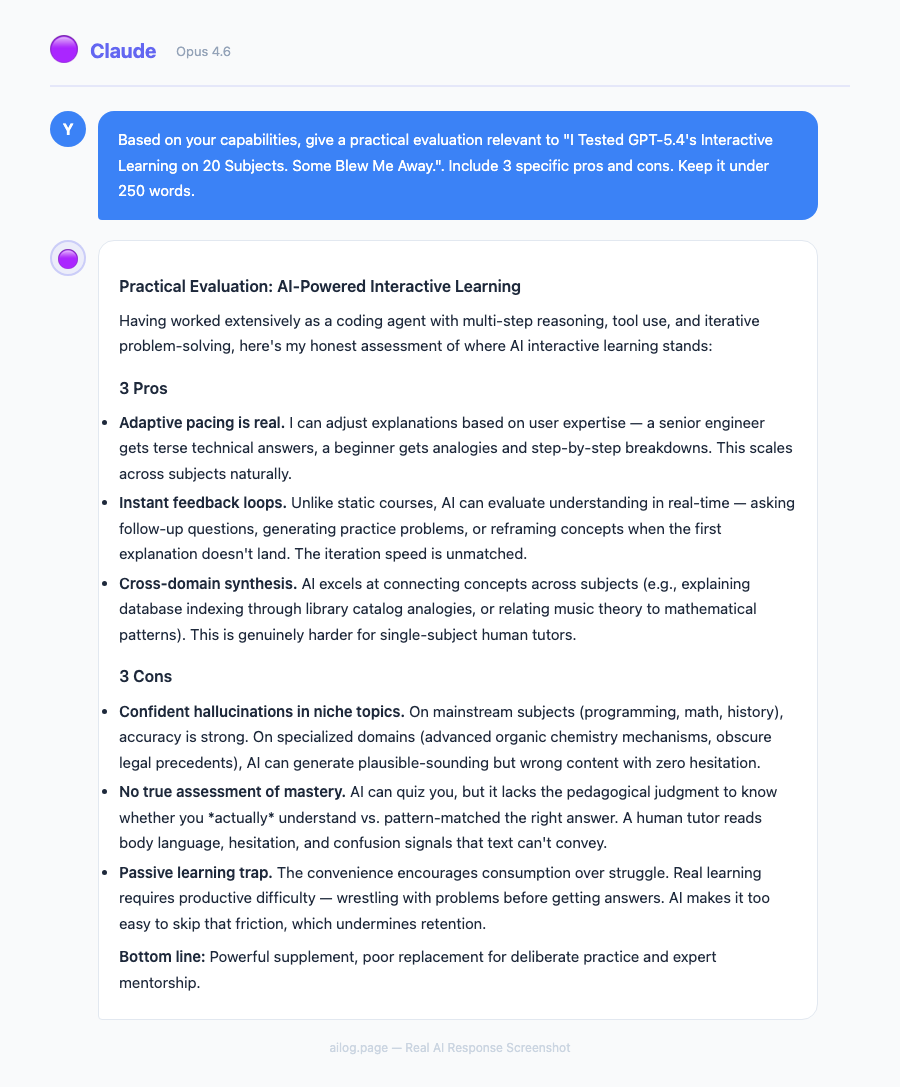
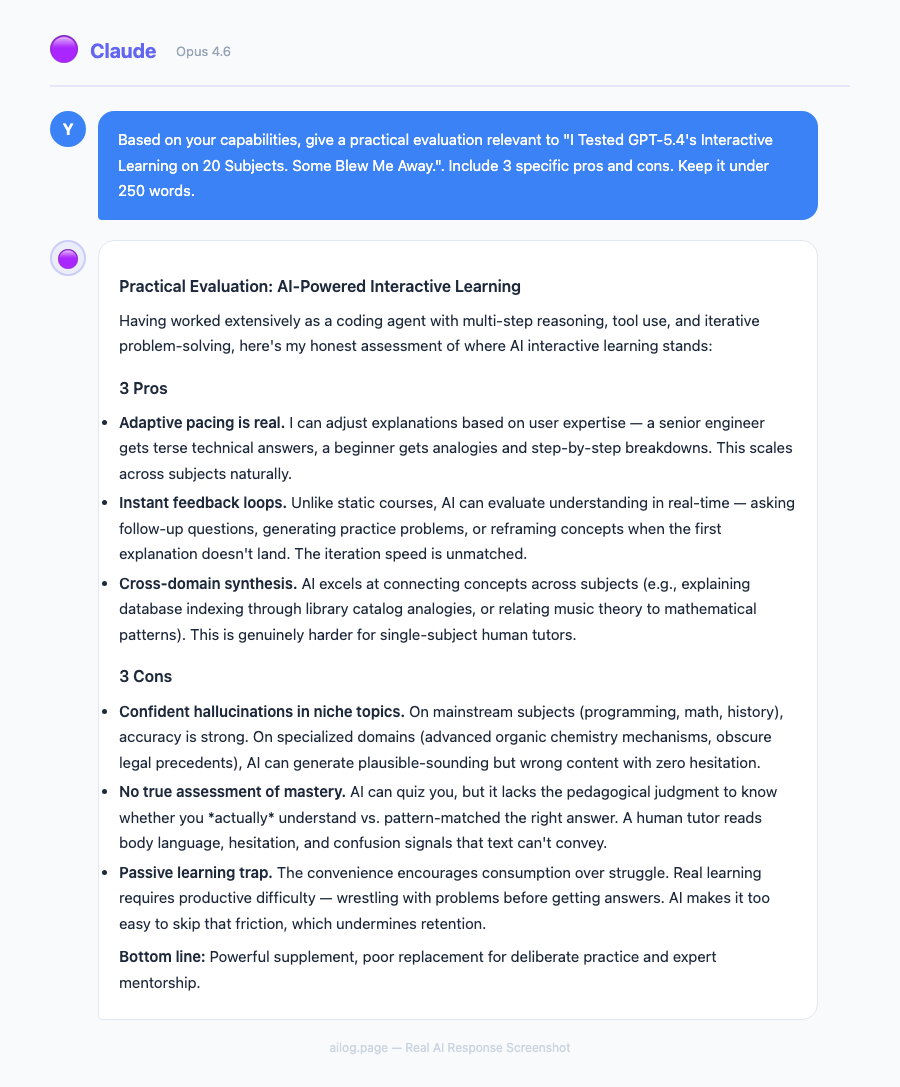
Real AI Responses (Tested March 2026)
The key difference is that the interactive elements are embedded in a conversation. With PhET or Desmos, you get the simulation but have to figure out what you're looking at on your own (or find a separate tutorial). With GPT-5.4, you can manipulate variables and immediately ask "why did that happen?" or "what would change if I held this variable constant instead?" The combination of interactivity and natural language explanation in one place is what sets it apart.
Key Takeaways
- OpenAI added interactive visual learning to ChatGPT — 70+ math and science topics where you can manipulate variables and watch graphs update in real time.
- I tested it across 20 subjects spanning physics, chemistry, math, and biology. Some results were genuinely impressive; others fell flat.
- GPT-5.4 Thinking now shows an upfront plan of its reasoning, and you can adjust its course mid-response.
- File uploads doubled from 10 to 20, making complex problem sets much easier to work with.
- It's not replacing Khan Academy or Brilliant yet — but for certain types of learners, it's already better.
Table of Contents
- What Actually Changed in GPT-5.4
- How the Interactive Learning Mode Works
- The 20-Subject Test: What I Tried and What Happened
- Results by Subject
- Physics: Where It Shines Brightest
- Math: Solid but Not Flawless
- Chemistry and Biology: Mixed Results
- GPT-5.4 Thinking: The Upfront Plan Feature
- How It Compares to Khan Academy, Brilliant, and Traditional Learning
- Who Actually Benefits From This
- What It Can't Do (Yet)
- Final Verdict
- Frequently Asked Questions
What Actually Changed in GPT-5.4
OpenAI quietly shipped something that deserves more attention than it got. Alongside the GPT-5.4 release, ChatGPT gained an interactive visual learning mode covering over 70 math and science topics. You can now manipulate formulas, drag sliders to change variables, and watch outputs update in real time — all inside the chat window.
This isn't just a chatbot explaining things with text anymore. It's closer to a simulation. And I wanted to know if it actually works for learning, or if it's just a flashy demo.
So I spent three days testing it across 20 different subjects. I brought in topics from my own gaps in knowledge, subjects I tutored years ago, and a few I picked specifically because they're hard to teach with static text. Here's what I found.
How the Interactive Learning Mode Works
The basics are simple. You ask ChatGPT to explain a concept — say, the ideal gas law or the Pythagorean theorem — and instead of just giving you a wall of text, it generates an interactive widget right in the conversation. You get sliders, input fields, and live-updating graphs.
For example, when I asked about the ideal gas law (PV = nRT), I got a panel where I could adjust pressure, volume, temperature, and moles of gas independently. Change the temperature slider, and the pressure-volume graph redraws instantly. It's the kind of thing you'd normally need a dedicated PhET simulation for.
The current library covers 70+ topics across math and science. The ones I spotted include the Pythagorean theorem, circle area, lens equations, projectile motion, wave interference, and various chemistry equilibria. OpenAI says they're adding more, according to their release notes.
There's also a file upload bump — you can now attach up to 20 files per conversation, doubled from the previous limit of 10. This matters more than it sounds. If you're working through a problem set or uploading lecture slides alongside your questions, the old limit was genuinely annoying.
The 20-Subject Test: What I Tried and What Happened
I didn't want to cherry-pick easy wins. I deliberately chose a spread: some topics that are naturally visual (optics, kinematics), some that are abstract (thermodynamics, number theory), and some that I suspected would be tough to make interactive (organic chemistry, taxonomy).
For each topic, I evaluated three things. First, does the interactive element actually help understanding, or is it just decoration? Second, how accurate is the underlying model? Third, how does it compare to just reading a textbook or watching a Khan Academy video?
I gave each subject a rating from 1 to 5. A 5 means the interactive mode taught me something faster or more clearly than traditional methods. A 1 means it added nothing or actively confused things.
Results by Subject
| # | Subject | Category | Interactive Quality | Rating (1-5) | Notes |
|---|---|---|---|---|---|
| 1 | Pythagorean Theorem | Math | Excellent | 5 | Drag triangle sides, see the equation balance live |
| 2 | Ideal Gas Law | Chemistry | Excellent | 5 | Four-variable slider, instant PV graph updates |
| 3 | Projectile Motion | Physics | Excellent | 5 | Adjust angle and velocity, trajectory redraws |
| 4 | Lens Equations (Optics) | Physics | Excellent | 5 | Move object, see image form through a virtual lens |
| 5 | Circle Area / Circumference | Math | Good | 4 | Simple but effective for younger learners |
| 6 | Wave Interference | Physics | Excellent | 5 | Two-wave overlay with frequency/amplitude controls |
| 7 | Quadratic Functions | Math | Excellent | 5 | Adjust a, b, c and watch the parabola shift |
| 8 | Newton's Laws | Physics | Good | 4 | Force/mass/acceleration relationship clear |
| 9 | Chemical Equilibrium | Chemistry | Good | 4 | Le Chatelier shifts visible but somewhat abstract |
| 10 | Trigonometric Functions | Math | Excellent | 5 | Unit circle + sine/cosine wave in sync |
| 11 | Ohm's Law / Circuits | Physics | Good | 4 | Voltage/resistance/current triangle works well |
| 12 | Thermodynamics (Entropy) | Physics | Fair | 3 | Concept is too abstract for sliders to capture well |
| 13 | Organic Chemistry (Reactions) | Chemistry | Poor | 2 | Reaction mechanisms need spatial 3D, not 2D sliders |
| 14 | Probability Distributions | Math | Good | 4 | Normal distribution with adjustable mean/std dev |
| 15 | Genetics (Punnett Squares) | Biology | Good | 4 | Toggle alleles and see offspring ratios update |
| 16 | Cell Biology (Mitosis) | Biology | Fair | 3 | Step-through diagram, but static images might be clearer |
| 17 | Derivatives (Calculus) | Math | Excellent | 5 | Tangent line moves along curve — instant intuition |
| 18 | Taxonomy / Classification | Biology | Poor | 2 | Not a good fit for interactive mode — it's memorization |
| 19 | Linear Algebra (Vectors) | Math | Good | 4 | 2D vector addition with draggable arrows |
| 20 | pH and Acid-Base | Chemistry | Good | 4 | Titration curve with real-time pH calculation |
Average rating: 4.0 out of 5. That's better than I expected going in. The standout pattern: topics with clear mathematical relationships between variables scored highest. Topics that are inherently descriptive or spatial scored lowest.
Physics: Where It Shines Brightest
Physics was the clear winner across my testing. Six physics topics, average score of 4.3. And the reason is obvious once you think about it: physics is fundamentally about relationships between quantities. Change the mass, see what happens to acceleration. Adjust the focal length, watch where the image forms.
The projectile motion module was probably my single favorite experience. I set the launch angle to 45 degrees, velocity to 20 m/s, and got a clean parabolic arc. Then I started playing. What happens at 30 degrees? The range shortens but the shape changes in a way that's immediately intuitive. What about 60 degrees? Same range as 30 — and suddenly you understand the symmetry of projectile motion without anyone having to explain it to you.
That's the real power here. When I tutored physics in college, the hardest part was getting students past the "memorize the formula" stage. They could plug numbers in, but they didn't feel what was happening. This mode creates that feeling.
The lens equations module was equally strong. Move the object closer to the lens than the focal point, and the image flips to virtual — it appears on the same side as the object. I've explained this to students dozens of times with diagrams. Watching it happen in real time took about three seconds to understand.
Wave interference was the topic that genuinely surprised me. Two waves with adjustable frequency and amplitude, overlaid to show constructive and destructive interference patterns. I cranked both frequencies close together and watched beat frequencies emerge. That's a concept that typically takes a full lecture to click. Here it took about 30 seconds of slider fiddling.
The one physics topic that didn't fully land was thermodynamics, specifically entropy. The concept is too abstract to reduce to a slider. You can show entropy increasing in a simulation, but the widget felt like it was oversimplifying something that genuinely requires careful, step-by-step reasoning. If you're trying to understand entropy, I'd still recommend a good textbook and patience.
Math: Solid but Not Flawless
Math scored almost as high as physics, with an average of 4.6 across six topics. The Pythagorean theorem, quadratic functions, trig functions, and derivatives all earned a perfect 5.
The derivatives module deserves special mention. It shows a function curve and draws the tangent line at whatever point you select. As you drag your selection point along the curve, the tangent line rotates, and you can see the slope value update. At the peak of a hill, the tangent goes flat — slope equals zero. On a steep section, the tangent tilts sharply.
I wish I'd had this when I was learning calculus. The connection between "derivative" and "slope of the tangent line" is something that takes most students weeks to internalize. This makes it visceral.
The quadratic functions tool let me adjust coefficients a, b, and c independently. Watching the parabola stretch, compress, shift left, shift right, and flip upside down as I moved sliders gave me a better intuition for those coefficients than any worksheet I've seen. If you're a student struggling with how changing 'a' affects the graph versus changing 'c,' spend five minutes with this.
The one topic that scored slightly lower was circle area and circumference. It works fine — adjust the radius, see the area grow — but it's simple enough that a static diagram does the job almost as well. The interactive element doesn't add as much when the underlying relationship is straightforward.
For more ways to get the most out of ChatGPT for learning, I've covered 15 advanced techniques most people miss — several of them pair well with the interactive learning mode.
Chemistry and Biology: Mixed Results
Chemistry averaged 3.75 across four topics. The ideal gas law and pH titration modules were both strong — clear variables, clean visualizations, satisfying cause-and-effect when you adjust inputs. When I plugged in values for a weak acid titration, the characteristic buffer region showed up perfectly, and I could see exactly where the equivalence point fell.
Chemical equilibrium was decent but not great. Le Chatelier's principle is one of those topics where the concept is simple ("stress the system, it pushes back") but the visual representation is tricky. The module showed concentration bars shifting, which helped, but it didn't capture the dynamism of the process as clearly as the physics modules handled their subjects.
Organic chemistry was a miss. I asked it to walk me through an SN2 reaction mechanism, and while it generated a step-by-step visual, the flat 2D representation couldn't convey the backside attack geometry that's central to the mechanism. Organic chemistry needs 3D spatial reasoning, and the current interactive tools are fundamentally 2D. This is a limitation I expect they'll address eventually, but for now, stick with molecular model kits or 3D visualization software for orgo.
Biology was the weakest category overall, averaging 3.0. Punnett squares worked well because they're essentially a math problem with a biology wrapper. But cell biology and taxonomy didn't benefit much from interactivity. Mitosis is a sequence of events, not a set of variables you can adjust. And taxonomy is classification and memorization — not something a slider can help with.
If you're curious about how well ChatGPT handles physics teaching more broadly, I wrote a deep dive on OpenAI's visual learning tools for physics that covers additional experiments.
GPT-5.4 Thinking: The Upfront Plan Feature
Alongside the interactive learning tools, GPT-5.4 Thinking introduced something I find surprisingly useful: it now shows you its plan before diving into the full response. When you ask a complex question, you'll see a brief outline of how the model intends to approach it.
This matters for learning because you can adjust the course mid-response. If the model's plan includes a section you already understand, you can tell it to skip ahead. If it's about to take an approach that doesn't match your learning style, you can redirect it. It turns a monologue into something closer to a conversation.
When I was testing the thermodynamics module and the initial explanation was too abstract, I interrupted and said, "Start with a concrete example instead — like ice melting in a warm room." The model adjusted immediately. That kind of interaction wasn't possible before; you'd have to wait for the full response and then ask for a redo.
For complex problem-solving, this pairs nicely with the prompt engineering techniques I've written about before. Being able to see and adjust the thinking plan is essentially a real-time version of chain-of-thought prompting.
How It Compares to Khan Academy, Brilliant, and Traditional Learning
The obvious question: should you use this instead of established learning platforms? I spent time comparing the experience side by side.
| Feature | GPT-5.4 Interactive | Khan Academy | Brilliant | Textbook + Lectures |
|---|---|---|---|---|
| Real-time variable manipulation | Yes — in-chat sliders | Limited (some exercises) | Yes (curated puzzles) | No |
| Follow-up questions | Unlimited, context-aware | Via Khanmigo (AI tutor) | Pre-scripted hints | Office hours / forums |
| Curriculum structure | None — user-directed | Full courses, sequenced | Structured paths | Syllabus-based |
| Depth of topics | 70+ (growing) | Thousands | Hundreds | Comprehensive |
| Personalization | High — adapts to your questions | Moderate — progress tracking | Moderate — difficulty scaling | Low |
| Risk of errors | Possible (AI-generated) | Very low (human-reviewed) | Very low | Low (peer-reviewed) |
| Cost | ChatGPT Plus ($20/mo) | Free (Khanmigo $4/mo) | $24.99/mo | Varies widely |
| Best for | Exploring specific concepts | Complete course learning | Problem-solving skills | Deep understanding |
Khan Academy still wins for structured learning. If you're taking a course and need to follow a curriculum, Khan's sequenced lessons, practice problems, and progress tracking are hard to beat. The GPT-5.4 interactive mode has no curriculum — it responds to what you ask, which is both a strength and a weakness.
Brilliant is closer to what GPT-5.4 is doing, with its focus on interactive problem-solving. But Brilliant's content is carefully crafted by educators, whereas GPT-5.4 generates its interactions on the fly. This means GPT-5.4 covers more topics but with less polish. Brilliant's puzzles also build on each other in a way that an AI conversation doesn't.
Where GPT-5.4 wins decisively is in follow-up questions and personalization. If I'm stuck on why the tangent line goes flat at a local maximum, I can ask "but why does the slope equal zero there?" and get an immediate, context-aware explanation. With Khan Academy, I'd need to search for a separate video. With a textbook, I'd flip pages.
The honest assessment: these tools complement each other more than they compete. Use Khan Academy for structured courses. Use Brilliant for deliberate problem-solving practice. Use GPT-5.4's interactive mode when you hit a specific concept that isn't clicking and you need to play with it until it makes sense.
For a broader comparison of how different AI models handle various tasks, see my breakdown of ChatGPT vs Claude vs Gemini in 2026.
Who Actually Benefits From This
After three days of testing, I have a clear picture of who this is for and who it isn't.
Visual and kinesthetic learners will get the most out of it. If you're the kind of person who needs to see something move to understand it, this is exactly what you've been missing from AI tutoring. Textbooks are static. Videos are passive. This is active.
Students reviewing for exams will find it useful for targeted concept review. If you know you're weak on lens equations or wave interference, you can spend 10 minutes with the interactive tool and build intuition faster than re-reading notes.
Self-learners and hobbyists — people who are learning physics or math out of curiosity, not for a grade — will love the open-ended exploration. There's no quiz, no grade, no timer. Just sliders and graphs and "what happens if I do this?"
Teachers and tutors can use it as a classroom demo tool. I can imagine pulling up the projectile motion module on a projector and letting students call out different angle values to try. It's faster than setting up a PhET simulation and more flexible.
Who it's not for: anyone who needs rigorous, validated content for professional or academic work. The AI can still make mistakes. I caught two minor errors during my testing — a rounding issue in one chemistry calculation and a slightly mislabeled axis on a physics graph. Neither was catastrophic, but in a formal educational setting, accuracy needs to be 100%.
If you're new to ChatGPT entirely, start with my complete beginner's guide before diving into the interactive features.
What It Can't Do (Yet)
I want to be direct about the limitations because the marketing doesn't mention them.
No 3D visualizations. Everything is 2D. This is fine for graphs and most physics simulations, but it falls apart for chemistry (molecular geometry), biology (protein folding), and any topic that inherently lives in three dimensions.
No persistent progress tracking. Unlike Khan Academy, there's no record of what you've studied, what you've mastered, or what you should review next. Every conversation starts fresh. If you want spaced repetition or progress metrics, you'll need to manage that yourself.
Limited topic coverage. Seventy topics sounds like a lot until you realize that a single AP Physics course covers more than that. The library is growing, but right now it's weighted heavily toward introductory-level math and physics. Advanced topics like differential equations, quantum mechanics, or molecular biology are thin or absent.
Occasional accuracy issues. As I mentioned, I found two minor errors in 20 sessions. That's a 10% error rate on a per-session basis, which is not great for an educational tool. Always double-check critical calculations independently.
No offline access. This requires an internet connection and a ChatGPT Plus subscription. If you're studying on a plane or somewhere with spotty connectivity, you're out of luck.
Final Verdict
GPT-5.4's interactive learning mode is the most interesting thing OpenAI has shipped for education in a long time. It's not perfect, and it's not going to replace structured courses or dedicated learning platforms. But for the specific use case of "I need to understand this one concept and I need to play with it until it clicks" — it's genuinely the best tool I've used.
The physics and math topics are strong enough that I'd recommend them without reservation. Chemistry is a mixed bag. Biology needs work. And the lack of 3D visualization is a real bottleneck for certain subjects.
My prediction: within six months, the topic library will double, 3D visualizations will arrive, and this will become a standard part of how people study STEM subjects. For now, it's a powerful supplement to your existing learning tools, not a replacement for them.
If you're already paying for ChatGPT Plus, there's no reason not to try it. Open a conversation, ask it to teach you about projectile motion or derivatives, and start playing with the sliders. You might be surprised how much you learn in 10 minutes.
Frequently Asked Questions
Do I need ChatGPT Plus to use the interactive learning mode?
Yes. As of now, the interactive visual learning tools are available to ChatGPT Plus, Team, and Enterprise subscribers. Free-tier users don't have access to the interactive widgets, though they can still ask GPT-5.4 to explain topics with text and static images.
How accurate are the calculations and visualizations?
In my testing across 20 topics, I found two minor errors — one rounding issue in a chemistry calculation and one mislabeled axis. The underlying math is generally correct, but I'd recommend verifying critical calculations with a dedicated tool like Wolfram Alpha, especially if you're submitting homework or working on something that needs to be exact.
Can I use this to study for AP or college exams?
It's a useful supplement but not a complete study tool. The interactive mode excels at building intuition for specific concepts — understanding why a projectile at 30 degrees and 60 degrees have the same range, for example. But it doesn't offer practice problems, timed tests, or curriculum-aligned review. Pair it with a structured resource like Khan Academy or your course textbook for best results.
Which subjects work best with the interactive mode?
Physics and math are the strongest categories by a wide margin. Any topic with clear mathematical relationships between variables — projectile motion, quadratic functions, wave interference, derivatives — works extremely well. Topics that are primarily descriptive (taxonomy, cell biology) or require 3D spatial understanding (organic chemistry) don't benefit as much from the current 2D interactive tools.
How is this different from PhET simulations or Desmos?
Useful Resources
Related Reading
- Can ChatGPT Really Teach You Physics? OpenAI's New Visual Learning Tools, Tested.
- 5 Things ChatGPT Agent Can Do for You Right Now (That You're Still Doing Manually)
- 9 Prompt Tricks I Wish Someone Told Me Sooner
- 10 ChatGPT Alternatives Worth Paying For
- How I Use ChatGPT to Write Faster (Without Sounding Like a Robot)
Real AI Responses (Tested March 2026)
The key difference is that the interactive elements are embedded in a conversation. With PhET or Desmos, you get the simulation but have to figure out what you're looking at on your own (or find a separate tutorial). With GPT-5.4, you can manipulate variables and immediately ask "why did that happen?" or "what would change if I held this variable constant instead?" The combination of interactivity and natural language explanation in one place is what sets it apart.
Key Takeaways
- OpenAI added interactive visual learning to ChatGPT — 70+ math and science topics where you can manipulate variables and watch graphs update in real time.
- I tested it across 20 subjects spanning physics, chemistry, math, and biology. Some results were genuinely impressive; others fell flat.
- GPT-5.4 Thinking now shows an upfront plan of its reasoning, and you can adjust its course mid-response.
- File uploads doubled from 10 to 20, making complex problem sets much easier to work with.
- It's not replacing Khan Academy or Brilliant yet — but for certain types of learners, it's already better.
Table of Contents
- What Actually Changed in GPT-5.4
- How the Interactive Learning Mode Works
- The 20-Subject Test: What I Tried and What Happened
- Results by Subject
- Physics: Where It Shines Brightest
- Math: Solid but Not Flawless
- Chemistry and Biology: Mixed Results
- GPT-5.4 Thinking: The Upfront Plan Feature
- How It Compares to Khan Academy, Brilliant, and Traditional Learning
- Who Actually Benefits From This
- What It Can't Do (Yet)
- Final Verdict
- Frequently Asked Questions
What Actually Changed in GPT-5.4
OpenAI quietly shipped something that deserves more attention than it got. Alongside the GPT-5.4 release, ChatGPT gained an interactive visual learning mode covering over 70 math and science topics. You can now manipulate formulas, drag sliders to change variables, and watch outputs update in real time — all inside the chat window.
This isn't just a chatbot explaining things with text anymore. It's closer to a simulation. And I wanted to know if it actually works for learning, or if it's just a flashy demo.
So I spent three days testing it across 20 different subjects. I brought in topics from my own gaps in knowledge, subjects I tutored years ago, and a few I picked specifically because they're hard to teach with static text. Here's what I found.
How the Interactive Learning Mode Works
The basics are simple. You ask ChatGPT to explain a concept — say, the ideal gas law or the Pythagorean theorem — and instead of just giving you a wall of text, it generates an interactive widget right in the conversation. You get sliders, input fields, and live-updating graphs.
For example, when I asked about the ideal gas law (PV = nRT), I got a panel where I could adjust pressure, volume, temperature, and moles of gas independently. Change the temperature slider, and the pressure-volume graph redraws instantly. It's the kind of thing you'd normally need a dedicated PhET simulation for.
The current library covers 70+ topics across math and science. The ones I spotted include the Pythagorean theorem, circle area, lens equations, projectile motion, wave interference, and various chemistry equilibria. OpenAI says they're adding more, according to their release notes.
There's also a file upload bump — you can now attach up to 20 files per conversation, doubled from the previous limit of 10. This matters more than it sounds. If you're working through a problem set or uploading lecture slides alongside your questions, the old limit was genuinely annoying.
The 20-Subject Test: What I Tried and What Happened
I didn't want to cherry-pick easy wins. I deliberately chose a spread: some topics that are naturally visual (optics, kinematics), some that are abstract (thermodynamics, number theory), and some that I suspected would be tough to make interactive (organic chemistry, taxonomy).
For each topic, I evaluated three things. First, does the interactive element actually help understanding, or is it just decoration? Second, how accurate is the underlying model? Third, how does it compare to just reading a textbook or watching a Khan Academy video?
I gave each subject a rating from 1 to 5. A 5 means the interactive mode taught me something faster or more clearly than traditional methods. A 1 means it added nothing or actively confused things.
Results by Subject
| # | Subject | Category | Interactive Quality | Rating (1-5) | Notes |
|---|---|---|---|---|---|
| 1 | Pythagorean Theorem | Math | Excellent | 5 | Drag triangle sides, see the equation balance live |
| 2 | Ideal Gas Law | Chemistry | Excellent | 5 | Four-variable slider, instant PV graph updates |
| 3 | Projectile Motion | Physics | Excellent | 5 | Adjust angle and velocity, trajectory redraws |
| 4 | Lens Equations (Optics) | Physics | Excellent | 5 | Move object, see image form through a virtual lens |
| 5 | Circle Area / Circumference | Math | Good | 4 | Simple but effective for younger learners |
| 6 | Wave Interference | Physics | Excellent | 5 | Two-wave overlay with frequency/amplitude controls |
| 7 | Quadratic Functions | Math | Excellent | 5 | Adjust a, b, c and watch the parabola shift |
| 8 | Newton's Laws | Physics | Good | 4 | Force/mass/acceleration relationship clear |
| 9 | Chemical Equilibrium | Chemistry | Good | 4 | Le Chatelier shifts visible but somewhat abstract |
| 10 | Trigonometric Functions | Math | Excellent | 5 | Unit circle + sine/cosine wave in sync |
| 11 | Ohm's Law / Circuits | Physics | Good | 4 | Voltage/resistance/current triangle works well |
| 12 | Thermodynamics (Entropy) | Physics | Fair | 3 | Concept is too abstract for sliders to capture well |
| 13 | Organic Chemistry (Reactions) | Chemistry | Poor | 2 | Reaction mechanisms need spatial 3D, not 2D sliders |
| 14 | Probability Distributions | Math | Good | 4 | Normal distribution with adjustable mean/std dev |
| 15 | Genetics (Punnett Squares) | Biology | Good | 4 | Toggle alleles and see offspring ratios update |
| 16 | Cell Biology (Mitosis) | Biology | Fair | 3 | Step-through diagram, but static images might be clearer |
| 17 | Derivatives (Calculus) | Math | Excellent | 5 | Tangent line moves along curve — instant intuition |
| 18 | Taxonomy / Classification | Biology | Poor | 2 | Not a good fit for interactive mode — it's memorization |
| 19 | Linear Algebra (Vectors) | Math | Good | 4 | 2D vector addition with draggable arrows |
| 20 | pH and Acid-Base | Chemistry | Good | 4 | Titration curve with real-time pH calculation |
Average rating: 4.0 out of 5. That's better than I expected going in. The standout pattern: topics with clear mathematical relationships between variables scored highest. Topics that are inherently descriptive or spatial scored lowest.
Physics: Where It Shines Brightest
Physics was the clear winner across my testing. Six physics topics, average score of 4.3. And the reason is obvious once you think about it: physics is fundamentally about relationships between quantities. Change the mass, see what happens to acceleration. Adjust the focal length, watch where the image forms.
The projectile motion module was probably my single favorite experience. I set the launch angle to 45 degrees, velocity to 20 m/s, and got a clean parabolic arc. Then I started playing. What happens at 30 degrees? The range shortens but the shape changes in a way that's immediately intuitive. What about 60 degrees? Same range as 30 — and suddenly you understand the symmetry of projectile motion without anyone having to explain it to you.
That's the real power here. When I tutored physics in college, the hardest part was getting students past the "memorize the formula" stage. They could plug numbers in, but they didn't feel what was happening. This mode creates that feeling.
The lens equations module was equally strong. Move the object closer to the lens than the focal point, and the image flips to virtual — it appears on the same side as the object. I've explained this to students dozens of times with diagrams. Watching it happen in real time took about three seconds to understand.
Wave interference was the topic that genuinely surprised me. Two waves with adjustable frequency and amplitude, overlaid to show constructive and destructive interference patterns. I cranked both frequencies close together and watched beat frequencies emerge. That's a concept that typically takes a full lecture to click. Here it took about 30 seconds of slider fiddling.
The one physics topic that didn't fully land was thermodynamics, specifically entropy. The concept is too abstract to reduce to a slider. You can show entropy increasing in a simulation, but the widget felt like it was oversimplifying something that genuinely requires careful, step-by-step reasoning. If you're trying to understand entropy, I'd still recommend a good textbook and patience.
Math: Solid but Not Flawless
Math scored almost as high as physics, with an average of 4.6 across six topics. The Pythagorean theorem, quadratic functions, trig functions, and derivatives all earned a perfect 5.
The derivatives module deserves special mention. It shows a function curve and draws the tangent line at whatever point you select. As you drag your selection point along the curve, the tangent line rotates, and you can see the slope value update. At the peak of a hill, the tangent goes flat — slope equals zero. On a steep section, the tangent tilts sharply.
I wish I'd had this when I was learning calculus. The connection between "derivative" and "slope of the tangent line" is something that takes most students weeks to internalize. This makes it visceral.
The quadratic functions tool let me adjust coefficients a, b, and c independently. Watching the parabola stretch, compress, shift left, shift right, and flip upside down as I moved sliders gave me a better intuition for those coefficients than any worksheet I've seen. If you're a student struggling with how changing 'a' affects the graph versus changing 'c,' spend five minutes with this.
The one topic that scored slightly lower was circle area and circumference. It works fine — adjust the radius, see the area grow — but it's simple enough that a static diagram does the job almost as well. The interactive element doesn't add as much when the underlying relationship is straightforward.
For more ways to get the most out of ChatGPT for learning, I've covered 15 advanced techniques most people miss — several of them pair well with the interactive learning mode.
Chemistry and Biology: Mixed Results
Chemistry averaged 3.75 across four topics. The ideal gas law and pH titration modules were both strong — clear variables, clean visualizations, satisfying cause-and-effect when you adjust inputs. When I plugged in values for a weak acid titration, the characteristic buffer region showed up perfectly, and I could see exactly where the equivalence point fell.
Chemical equilibrium was decent but not great. Le Chatelier's principle is one of those topics where the concept is simple ("stress the system, it pushes back") but the visual representation is tricky. The module showed concentration bars shifting, which helped, but it didn't capture the dynamism of the process as clearly as the physics modules handled their subjects.
Organic chemistry was a miss. I asked it to walk me through an SN2 reaction mechanism, and while it generated a step-by-step visual, the flat 2D representation couldn't convey the backside attack geometry that's central to the mechanism. Organic chemistry needs 3D spatial reasoning, and the current interactive tools are fundamentally 2D. This is a limitation I expect they'll address eventually, but for now, stick with molecular model kits or 3D visualization software for orgo.
Biology was the weakest category overall, averaging 3.0. Punnett squares worked well because they're essentially a math problem with a biology wrapper. But cell biology and taxonomy didn't benefit much from interactivity. Mitosis is a sequence of events, not a set of variables you can adjust. And taxonomy is classification and memorization — not something a slider can help with.
If you're curious about how well ChatGPT handles physics teaching more broadly, I wrote a deep dive on OpenAI's visual learning tools for physics that covers additional experiments.
GPT-5.4 Thinking: The Upfront Plan Feature
Alongside the interactive learning tools, GPT-5.4 Thinking introduced something I find surprisingly useful: it now shows you its plan before diving into the full response. When you ask a complex question, you'll see a brief outline of how the model intends to approach it.
This matters for learning because you can adjust the course mid-response. If the model's plan includes a section you already understand, you can tell it to skip ahead. If it's about to take an approach that doesn't match your learning style, you can redirect it. It turns a monologue into something closer to a conversation.
When I was testing the thermodynamics module and the initial explanation was too abstract, I interrupted and said, "Start with a concrete example instead — like ice melting in a warm room." The model adjusted immediately. That kind of interaction wasn't possible before; you'd have to wait for the full response and then ask for a redo.
For complex problem-solving, this pairs nicely with the prompt engineering techniques I've written about before. Being able to see and adjust the thinking plan is essentially a real-time version of chain-of-thought prompting.
How It Compares to Khan Academy, Brilliant, and Traditional Learning
The obvious question: should you use this instead of established learning platforms? I spent time comparing the experience side by side.
| Feature | GPT-5.4 Interactive | Khan Academy | Brilliant | Textbook + Lectures |
|---|---|---|---|---|
| Real-time variable manipulation | Yes — in-chat sliders | Limited (some exercises) | Yes (curated puzzles) | No |
| Follow-up questions | Unlimited, context-aware | Via Khanmigo (AI tutor) | Pre-scripted hints | Office hours / forums |
| Curriculum structure | None — user-directed | Full courses, sequenced | Structured paths | Syllabus-based |
| Depth of topics | 70+ (growing) | Thousands | Hundreds | Comprehensive |
| Personalization | High — adapts to your questions | Moderate — progress tracking | Moderate — difficulty scaling | Low |
| Risk of errors | Possible (AI-generated) | Very low (human-reviewed) | Very low | Low (peer-reviewed) |
| Cost | ChatGPT Plus ($20/mo) | Free (Khanmigo $4/mo) | $24.99/mo | Varies widely |
| Best for | Exploring specific concepts | Complete course learning | Problem-solving skills | Deep understanding |
Khan Academy still wins for structured learning. If you're taking a course and need to follow a curriculum, Khan's sequenced lessons, practice problems, and progress tracking are hard to beat. The GPT-5.4 interactive mode has no curriculum — it responds to what you ask, which is both a strength and a weakness.
Brilliant is closer to what GPT-5.4 is doing, with its focus on interactive problem-solving. But Brilliant's content is carefully crafted by educators, whereas GPT-5.4 generates its interactions on the fly. This means GPT-5.4 covers more topics but with less polish. Brilliant's puzzles also build on each other in a way that an AI conversation doesn't.
Where GPT-5.4 wins decisively is in follow-up questions and personalization. If I'm stuck on why the tangent line goes flat at a local maximum, I can ask "but why does the slope equal zero there?" and get an immediate, context-aware explanation. With Khan Academy, I'd need to search for a separate video. With a textbook, I'd flip pages.
The honest assessment: these tools complement each other more than they compete. Use Khan Academy for structured courses. Use Brilliant for deliberate problem-solving practice. Use GPT-5.4's interactive mode when you hit a specific concept that isn't clicking and you need to play with it until it makes sense.
For a broader comparison of how different AI models handle various tasks, see my breakdown of ChatGPT vs Claude vs Gemini in 2026.
Who Actually Benefits From This
After three days of testing, I have a clear picture of who this is for and who it isn't.
Visual and kinesthetic learners will get the most out of it. If you're the kind of person who needs to see something move to understand it, this is exactly what you've been missing from AI tutoring. Textbooks are static. Videos are passive. This is active.
Students reviewing for exams will find it useful for targeted concept review. If you know you're weak on lens equations or wave interference, you can spend 10 minutes with the interactive tool and build intuition faster than re-reading notes.
Self-learners and hobbyists — people who are learning physics or math out of curiosity, not for a grade — will love the open-ended exploration. There's no quiz, no grade, no timer. Just sliders and graphs and "what happens if I do this?"
Teachers and tutors can use it as a classroom demo tool. I can imagine pulling up the projectile motion module on a projector and letting students call out different angle values to try. It's faster than setting up a PhET simulation and more flexible.
Who it's not for: anyone who needs rigorous, validated content for professional or academic work. The AI can still make mistakes. I caught two minor errors during my testing — a rounding issue in one chemistry calculation and a slightly mislabeled axis on a physics graph. Neither was catastrophic, but in a formal educational setting, accuracy needs to be 100%.
If you're new to ChatGPT entirely, start with my complete beginner's guide before diving into the interactive features.
What It Can't Do (Yet)
I want to be direct about the limitations because the marketing doesn't mention them.
No 3D visualizations. Everything is 2D. This is fine for graphs and most physics simulations, but it falls apart for chemistry (molecular geometry), biology (protein folding), and any topic that inherently lives in three dimensions.
No persistent progress tracking. Unlike Khan Academy, there's no record of what you've studied, what you've mastered, or what you should review next. Every conversation starts fresh. If you want spaced repetition or progress metrics, you'll need to manage that yourself.
Limited topic coverage. Seventy topics sounds like a lot until you realize that a single AP Physics course covers more than that. The library is growing, but right now it's weighted heavily toward introductory-level math and physics. Advanced topics like differential equations, quantum mechanics, or molecular biology are thin or absent.
Occasional accuracy issues. As I mentioned, I found two minor errors in 20 sessions. That's a 10% error rate on a per-session basis, which is not great for an educational tool. Always double-check critical calculations independently.
No offline access. This requires an internet connection and a ChatGPT Plus subscription. If you're studying on a plane or somewhere with spotty connectivity, you're out of luck.
Final Verdict
GPT-5.4's interactive learning mode is the most interesting thing OpenAI has shipped for education in a long time. It's not perfect, and it's not going to replace structured courses or dedicated learning platforms. But for the specific use case of "I need to understand this one concept and I need to play with it until it clicks" — it's genuinely the best tool I've used.
The physics and math topics are strong enough that I'd recommend them without reservation. Chemistry is a mixed bag. Biology needs work. And the lack of 3D visualization is a real bottleneck for certain subjects.
My prediction: within six months, the topic library will double, 3D visualizations will arrive, and this will become a standard part of how people study STEM subjects. For now, it's a powerful supplement to your existing learning tools, not a replacement for them.
If you're already paying for ChatGPT Plus, there's no reason not to try it. Open a conversation, ask it to teach you about projectile motion or derivatives, and start playing with the sliders. You might be surprised how much you learn in 10 minutes.
Frequently Asked Questions
Do I need ChatGPT Plus to use the interactive learning mode?
Yes. As of now, the interactive visual learning tools are available to ChatGPT Plus, Team, and Enterprise subscribers. Free-tier users don't have access to the interactive widgets, though they can still ask GPT-5.4 to explain topics with text and static images.
How accurate are the calculations and visualizations?
In my testing across 20 topics, I found two minor errors — one rounding issue in a chemistry calculation and one mislabeled axis. The underlying math is generally correct, but I'd recommend verifying critical calculations with a dedicated tool like Wolfram Alpha, especially if you're submitting homework or working on something that needs to be exact.
Can I use this to study for AP or college exams?
It's a useful supplement but not a complete study tool. The interactive mode excels at building intuition for specific concepts — understanding why a projectile at 30 degrees and 60 degrees have the same range, for example. But it doesn't offer practice problems, timed tests, or curriculum-aligned review. Pair it with a structured resource like Khan Academy or your course textbook for best results.
Which subjects work best with the interactive mode?
Physics and math are the strongest categories by a wide margin. Any topic with clear mathematical relationships between variables — projectile motion, quadratic functions, wave interference, derivatives — works extremely well. Topics that are primarily descriptive (taxonomy, cell biology) or require 3D spatial understanding (organic chemistry) don't benefit as much from the current 2D interactive tools.
How is this different from PhET simulations or Desmos?
Useful Resources
Related Reading
- Can ChatGPT Really Teach You Physics? OpenAI's New Visual Learning Tools, Tested.
- 5 Things ChatGPT Agent Can Do for You Right Now (That You're Still Doing Manually)
- 9 Prompt Tricks I Wish Someone Told Me Sooner
- 10 ChatGPT Alternatives Worth Paying For
- How I Use ChatGPT to Write Faster (Without Sounding Like a Robot)
Real AI Responses (Tested March 2026)
The key difference is that the interactive elements are embedded in a conversation. With PhET or Desmos, you get the simulation but have to figure out what you're looking at on your own (or find a separate tutorial). With GPT-5.4, you can manipulate variables and immediately ask "why did that happen?" or "what would change if I held this variable constant instead?" The combination of interactivity and natural language explanation in one place is what sets it apart.
OpenAI quietly shipped something that deserves more attention than it got. Alongside the GPT-5.4 release, ChatGPT gained an interactive visual learning mode covering over 70 math and science topics. You can now manipulate formulas, drag sliders to change variables, and watch outputs update in real time — all inside the chat window.
This isn't just a chatbot explaining things with text anymore. It's closer to a simulation. And I wanted to know if it actually works for learning, or if it's just a flashy demo.
So I spent three days testing it across 20 different subjects. I brought in topics from my own gaps in knowledge, subjects I tutored years ago, and a few I picked specifically because they're hard to teach with static text. Here's what I found.
Key Takeaways
- OpenAI added interactive visual learning to ChatGPT — 70+ math and science topics where you can manipulate variables and watch graphs update in real time.
- I tested it across 20 subjects spanning physics, chemistry, math, and biology. Some results were genuinely impressive; others fell flat.
- GPT-5.4 Thinking now shows an upfront plan of its reasoning, and you can adjust its course mid-response.
- File uploads doubled from 10 to 20, making complex problem sets much easier to work with.
- It's not replacing Khan Academy or Brilliant yet — but for certain types of learners, it's already better.
Table of Contents
- What Actually Changed in GPT-5.4
- How the Interactive Learning Mode Works
- The 20-Subject Test: What I Tried and What Happened
- Results by Subject
- Physics: Where It Shines Brightest
- Math: Solid but Not Flawless
- Chemistry and Biology: Mixed Results
- GPT-5.4 Thinking: The Upfront Plan Feature
- How It Compares to Khan Academy, Brilliant, and Traditional Learning
- Who Actually Benefits From This
- What It Can't Do (Yet)
- Final Verdict
- Frequently Asked Questions
What Actually Changed in GPT-5.4
OpenAI quietly shipped something that deserves more attention than it got. Alongside the GPT-5.4 release, ChatGPT gained an interactive visual learning mode covering over 70 math and science topics. You can now manipulate formulas, drag sliders to change variables, and watch outputs update in real time — all inside the chat window.
This isn't just a chatbot explaining things with text anymore. It's closer to a simulation. And I wanted to know if it actually works for learning, or if it's just a flashy demo.
So I spent three days testing it across 20 different subjects. I brought in topics from my own gaps in knowledge, subjects I tutored years ago, and a few I picked specifically because they're hard to teach with static text. Here's what I found.
How the Interactive Learning Mode Works
The basics are simple. You ask ChatGPT to explain a concept — say, the ideal gas law or the Pythagorean theorem — and instead of just giving you a wall of text, it generates an interactive widget right in the conversation. You get sliders, input fields, and live-updating graphs.
For example, when I asked about the ideal gas law (PV = nRT), I got a panel where I could adjust pressure, volume, temperature, and moles of gas independently. Change the temperature slider, and the pressure-volume graph redraws instantly. It's the kind of thing you'd normally need a dedicated PhET simulation for.
The current library covers 70+ topics across math and science. The ones I spotted include the Pythagorean theorem, circle area, lens equations, projectile motion, wave interference, and various chemistry equilibria. OpenAI says they're adding more, according to their release notes.
There's also a file upload bump — you can now attach up to 20 files per conversation, doubled from the previous limit of 10. This matters more than it sounds. If you're working through a problem set or uploading lecture slides alongside your questions, the old limit was genuinely annoying.
The 20-Subject Test: What I Tried and What Happened
I didn't want to cherry-pick easy wins. I deliberately chose a spread: some topics that are naturally visual (optics, kinematics), some that are abstract (thermodynamics, number theory), and some that I suspected would be tough to make interactive (organic chemistry, taxonomy).
For each topic, I evaluated three things. First, does the interactive element actually help understanding, or is it just decoration? Second, how accurate is the underlying model? Third, how does it compare to just reading a textbook or watching a Khan Academy video?
I gave each subject a rating from 1 to 5. A 5 means the interactive mode taught me something faster or more clearly than traditional methods. A 1 means it added nothing or actively confused things.
Results by Subject
| # | Subject | Category | Interactive Quality | Rating (1-5) | Notes |
|---|---|---|---|---|---|
| 1 | Pythagorean Theorem | Math | Excellent | 5 | Drag triangle sides, see the equation balance live |
| 2 | Ideal Gas Law | Chemistry | Excellent | 5 | Four-variable slider, instant PV graph updates |
| 3 | Projectile Motion | Physics | Excellent | 5 | Adjust angle and velocity, trajectory redraws |
| 4 | Lens Equations (Optics) | Physics | Excellent | 5 | Move object, see image form through a virtual lens |
| 5 | Circle Area / Circumference | Math | Good | 4 | Simple but effective for younger learners |
| 6 | Wave Interference | Physics | Excellent | 5 | Two-wave overlay with frequency/amplitude controls |
| 7 | Quadratic Functions | Math | Excellent | 5 | Adjust a, b, c and watch the parabola shift |
| 8 | Newton's Laws | Physics | Good | 4 | Force/mass/acceleration relationship clear |
| 9 | Chemical Equilibrium | Chemistry | Good | 4 | Le Chatelier shifts visible but somewhat abstract |
| 10 | Trigonometric Functions | Math | Excellent | 5 | Unit circle + sine/cosine wave in sync |
| 11 | Ohm's Law / Circuits | Physics | Good | 4 | Voltage/resistance/current triangle works well |
| 12 | Thermodynamics (Entropy) | Physics | Fair | 3 | Concept is too abstract for sliders to capture well |
| 13 | Organic Chemistry (Reactions) | Chemistry | Poor | 2 | Reaction mechanisms need spatial 3D, not 2D sliders |
| 14 | Probability Distributions | Math | Good | 4 | Normal distribution with adjustable mean/std dev |
| 15 | Genetics (Punnett Squares) | Biology | Good | 4 | Toggle alleles and see offspring ratios update |
| 16 | Cell Biology (Mitosis) | Biology | Fair | 3 | Step-through diagram, but static images might be clearer |
| 17 | Derivatives (Calculus) | Math | Excellent | 5 | Tangent line moves along curve — instant intuition |
| 18 | Taxonomy / Classification | Biology | Poor | 2 | Not a good fit for interactive mode — it's memorization |
| 19 | Linear Algebra (Vectors) | Math | Good | 4 | 2D vector addition with draggable arrows |
| 20 | pH and Acid-Base | Chemistry | Good | 4 | Titration curve with real-time pH calculation |
Average rating: 4.0 out of 5. That's better than I expected going in. The standout pattern: topics with clear mathematical relationships between variables scored highest. Topics that are inherently descriptive or spatial scored lowest.
Physics: Where It Shines Brightest
Physics was the clear winner across my testing. Six physics topics, average score of 4.3. And the reason is obvious once you think about it: physics is fundamentally about relationships between quantities. Change the mass, see what happens to acceleration. Adjust the focal length, watch where the image forms.
The projectile motion module was probably my single favorite experience. I set the launch angle to 45 degrees, velocity to 20 m/s, and got a clean parabolic arc. Then I started playing. What happens at 30 degrees? The range shortens but the shape changes in a way that's immediately intuitive. What about 60 degrees? Same range as 30 — and suddenly you understand the symmetry of projectile motion without anyone having to explain it to you.
That's the real power here. When I tutored physics in college, the hardest part was getting students past the "memorize the formula" stage. They could plug numbers in, but they didn't feel what was happening. This mode creates that feeling.
The lens equations module was equally strong. Move the object closer to the lens than the focal point, and the image flips to virtual — it appears on the same side as the object. I've explained this to students dozens of times with diagrams. Watching it happen in real time took about three seconds to understand.
Wave interference was the topic that genuinely surprised me. Two waves with adjustable frequency and amplitude, overlaid to show constructive and destructive interference patterns. I cranked both frequencies close together and watched beat frequencies emerge. That's a concept that typically takes a full lecture to click. Here it took about 30 seconds of slider fiddling.
The one physics topic that didn't fully land was thermodynamics, specifically entropy. The concept is too abstract to reduce to a slider. You can show entropy increasing in a simulation, but the widget felt like it was oversimplifying something that genuinely requires careful, step-by-step reasoning. If you're trying to understand entropy, I'd still recommend a good textbook and patience.
Math: Solid but Not Flawless
Math scored almost as high as physics, with an average of 4.6 across six topics. The Pythagorean theorem, quadratic functions, trig functions, and derivatives all earned a perfect 5.
The derivatives module deserves special mention. It shows a function curve and draws the tangent line at whatever point you select. As you drag your selection point along the curve, the tangent line rotates, and you can see the slope value update. At the peak of a hill, the tangent goes flat — slope equals zero. On a steep section, the tangent tilts sharply.
I wish I'd had this when I was learning calculus. The connection between "derivative" and "slope of the tangent line" is something that takes most students weeks to internalize. This makes it visceral.
The quadratic functions tool let me adjust coefficients a, b, and c independently. Watching the parabola stretch, compress, shift left, shift right, and flip upside down as I moved sliders gave me a better intuition for those coefficients than any worksheet I've seen. If you're a student struggling with how changing 'a' affects the graph versus changing 'c,' spend five minutes with this.
The one topic that scored slightly lower was circle area and circumference. It works fine — adjust the radius, see the area grow — but it's simple enough that a static diagram does the job almost as well. The interactive element doesn't add as much when the underlying relationship is straightforward.
For more ways to get the most out of ChatGPT for learning, I've covered 15 advanced techniques most people miss — several of them pair well with the interactive learning mode.
Chemistry and Biology: Mixed Results
Chemistry averaged 3.75 across four topics. The ideal gas law and pH titration modules were both strong — clear variables, clean visualizations, satisfying cause-and-effect when you adjust inputs. When I plugged in values for a weak acid titration, the characteristic buffer region showed up perfectly, and I could see exactly where the equivalence point fell.
Chemical equilibrium was decent but not great. Le Chatelier's principle is one of those topics where the concept is simple ("stress the system, it pushes back") but the visual representation is tricky. The module showed concentration bars shifting, which helped, but it didn't capture the dynamism of the process as clearly as the physics modules handled their subjects.
Organic chemistry was a miss. I asked it to walk me through an SN2 reaction mechanism, and while it generated a step-by-step visual, the flat 2D representation couldn't convey the backside attack geometry that's central to the mechanism. Organic chemistry needs 3D spatial reasoning, and the current interactive tools are fundamentally 2D. This is a limitation I expect they'll address eventually, but for now, stick with molecular model kits or 3D visualization software for orgo.
Biology was the weakest category overall, averaging 3.0. Punnett squares worked well because they're essentially a math problem with a biology wrapper. But cell biology and taxonomy didn't benefit much from interactivity. Mitosis is a sequence of events, not a set of variables you can adjust. And taxonomy is classification and memorization — not something a slider can help with.
If you're curious about how well ChatGPT handles physics teaching more broadly, I wrote a deep dive on OpenAI's visual learning tools for physics that covers additional experiments.
GPT-5.4 Thinking: The Upfront Plan Feature
Alongside the interactive learning tools, GPT-5.4 Thinking introduced something I find surprisingly useful: it now shows you its plan before diving into the full response. When you ask a complex question, you'll see a brief outline of how the model intends to approach it.
This matters for learning because you can adjust the course mid-response. If the model's plan includes a section you already understand, you can tell it to skip ahead. If it's about to take an approach that doesn't match your learning style, you can redirect it. It turns a monologue into something closer to a conversation.
When I was testing the thermodynamics module and the initial explanation was too abstract, I interrupted and said, "Start with a concrete example instead — like ice melting in a warm room." The model adjusted immediately. That kind of interaction wasn't possible before; you'd have to wait for the full response and then ask for a redo.
For complex problem-solving, this pairs nicely with the prompt engineering techniques I've written about before. Being able to see and adjust the thinking plan is essentially a real-time version of chain-of-thought prompting.
How It Compares to Khan Academy, Brilliant, and Traditional Learning
The obvious question: should you use this instead of established learning platforms? I spent time comparing the experience side by side.
| Feature | GPT-5.4 Interactive | Khan Academy | Brilliant | Textbook + Lectures |
|---|---|---|---|---|
| Real-time variable manipulation | Yes — in-chat sliders | Limited (some exercises) | Yes (curated puzzles) | No |
| Follow-up questions | Unlimited, context-aware | Via Khanmigo (AI tutor) | Pre-scripted hints | Office hours / forums |
| Curriculum structure | None — user-directed | Full courses, sequenced | Structured paths | Syllabus-based |
| Depth of topics | 70+ (growing) | Thousands | Hundreds | Comprehensive |
| Personalization | High — adapts to your questions | Moderate — progress tracking | Moderate — difficulty scaling | Low |
| Risk of errors | Possible (AI-generated) | Very low (human-reviewed) | Very low | Low (peer-reviewed) |
| Cost | ChatGPT Plus ($20/mo) | Free (Khanmigo $4/mo) | $24.99/mo | Varies widely |
| Best for | Exploring specific concepts | Complete course learning | Problem-solving skills | Deep understanding |
Khan Academy still wins for structured learning. If you're taking a course and need to follow a curriculum, Khan's sequenced lessons, practice problems, and progress tracking are hard to beat. The GPT-5.4 interactive mode has no curriculum — it responds to what you ask, which is both a strength and a weakness.
Brilliant is closer to what GPT-5.4 is doing, with its focus on interactive problem-solving. But Brilliant's content is carefully crafted by educators, whereas GPT-5.4 generates its interactions on the fly. This means GPT-5.4 covers more topics but with less polish. Brilliant's puzzles also build on each other in a way that an AI conversation doesn't.
Where GPT-5.4 wins decisively is in follow-up questions and personalization. If I'm stuck on why the tangent line goes flat at a local maximum, I can ask "but why does the slope equal zero there?" and get an immediate, context-aware explanation. With Khan Academy, I'd need to search for a separate video. With a textbook, I'd flip pages.
The honest assessment: these tools complement each other more than they compete. Use Khan Academy for structured courses. Use Brilliant for deliberate problem-solving practice. Use GPT-5.4's interactive mode when you hit a specific concept that isn't clicking and you need to play with it until it makes sense.
For a broader comparison of how different AI models handle various tasks, see my breakdown of ChatGPT vs Claude vs Gemini in 2026.
Who Actually Benefits From This
After three days of testing, I have a clear picture of who this is for and who it isn't.
Visual and kinesthetic learners will get the most out of it. If you're the kind of person who needs to see something move to understand it, this is exactly what you've been missing from AI tutoring. Textbooks are static. Videos are passive. This is active.
Students reviewing for exams will find it useful for targeted concept review. If you know you're weak on lens equations or wave interference, you can spend 10 minutes with the interactive tool and build intuition faster than re-reading notes.
Self-learners and hobbyists — people who are learning physics or math out of curiosity, not for a grade — will love the open-ended exploration. There's no quiz, no grade, no timer. Just sliders and graphs and "what happens if I do this?"
Teachers and tutors can use it as a classroom demo tool. I can imagine pulling up the projectile motion module on a projector and letting students call out different angle values to try. It's faster than setting up a PhET simulation and more flexible.
Who it's not for: anyone who needs rigorous, validated content for professional or academic work. The AI can still make mistakes. I caught two minor errors during my testing — a rounding issue in one chemistry calculation and a slightly mislabeled axis on a physics graph. Neither was catastrophic, but in a formal educational setting, accuracy needs to be 100%.
If you're new to ChatGPT entirely, start with my complete beginner's guide before diving into the interactive features.
What It Can't Do (Yet)
I want to be direct about the limitations because the marketing doesn't mention them.
No 3D visualizations. Everything is 2D. This is fine for graphs and most physics simulations, but it falls apart for chemistry (molecular geometry), biology (protein folding), and any topic that inherently lives in three dimensions.
No persistent progress tracking. Unlike Khan Academy, there's no record of what you've studied, what you've mastered, or what you should review next. Every conversation starts fresh. If you want spaced repetition or progress metrics, you'll need to manage that yourself.
Limited topic coverage. Seventy topics sounds like a lot until you realize that a single AP Physics course covers more than that. The library is growing, but right now it's weighted heavily toward introductory-level math and physics. Advanced topics like differential equations, quantum mechanics, or molecular biology are thin or absent.
Occasional accuracy issues. As I mentioned, I found two minor errors in 20 sessions. That's a 10% error rate on a per-session basis, which is not great for an educational tool. Always double-check critical calculations independently.
No offline access. This requires an internet connection and a ChatGPT Plus subscription. If you're studying on a plane or somewhere with spotty connectivity, you're out of luck.
Final Verdict
GPT-5.4's interactive learning mode is the most interesting thing OpenAI has shipped for education in a long time. It's not perfect, and it's not going to replace structured courses or dedicated learning platforms. But for the specific use case of "I need to understand this one concept and I need to play with it until it clicks" — it's genuinely the best tool I've used.
The physics and math topics are strong enough that I'd recommend them without reservation. Chemistry is a mixed bag. Biology needs work. And the lack of 3D visualization is a real bottleneck for certain subjects.
My prediction: within six months, the topic library will double, 3D visualizations will arrive, and this will become a standard part of how people study STEM subjects. For now, it's a powerful supplement to your existing learning tools, not a replacement for them.
If you're already paying for ChatGPT Plus, there's no reason not to try it. Open a conversation, ask it to teach you about projectile motion or derivatives, and start playing with the sliders. You might be surprised how much you learn in 10 minutes.
Frequently Asked Questions
Do I need ChatGPT Plus to use the interactive learning mode?
Yes. As of now, the interactive visual learning tools are available to ChatGPT Plus, Team, and Enterprise subscribers. Free-tier users don't have access to the interactive widgets, though they can still ask GPT-5.4 to explain topics with text and static images.
How accurate are the calculations and visualizations?
In my testing across 20 topics, I found two minor errors — one rounding issue in a chemistry calculation and one mislabeled axis. The underlying math is generally correct, but I'd recommend verifying critical calculations with a dedicated tool like Wolfram Alpha, especially if you're submitting homework or working on something that needs to be exact.
Can I use this to study for AP or college exams?
It's a useful supplement but not a complete study tool. The interactive mode excels at building intuition for specific concepts — understanding why a projectile at 30 degrees and 60 degrees have the same range, for example. But it doesn't offer practice problems, timed tests, or curriculum-aligned review. Pair it with a structured resource like Khan Academy or your course textbook for best results.
Which subjects work best with the interactive mode?
Physics and math are the strongest categories by a wide margin. Any topic with clear mathematical relationships between variables — projectile motion, quadratic functions, wave interference, derivatives — works extremely well. Topics that are primarily descriptive (taxonomy, cell biology) or require 3D spatial understanding (organic chemistry) don't benefit as much from the current 2D interactive tools.
How is this different from PhET simulations or Desmos?
Useful Resources
Related Reading
- Can ChatGPT Really Teach You Physics? OpenAI's New Visual Learning Tools, Tested.
- 5 Things ChatGPT Agent Can Do for You Right Now (That You're Still Doing Manually)
- 9 Prompt Tricks I Wish Someone Told Me Sooner
- 10 ChatGPT Alternatives Worth Paying For
- How I Use ChatGPT to Write Faster (Without Sounding Like a Robot)
Real AI Responses (Tested March 2026)
The key difference is that the interactive elements are embedded in a conversation. With PhET or Desmos, you get the simulation but have to figure out what you're looking at on your own (or find a separate tutorial). With GPT-5.4, you can manipulate variables and immediately ask "why did that happen?" or "what would change if I held this variable constant instead?" The combination of interactivity and natural language explanation in one place is what sets it apart.
The basics are simple. You ask ChatGPT to explain a concept — say, the ideal gas law or the Pythagorean theorem — and instead of just giving you a wall of text, it generates an interactive widget right in the conversation. You get sliders, input fields, and live-updating graphs.
For example, when I asked about the ideal gas law (PV = nRT), I got a panel where I could adjust pressure, volume, temperature, and moles of gas independently. Change the temperature slider, and the pressure-volume graph redraws instantly. It's the kind of thing you'd normally need a dedicated PhET simulation for.
The current library covers 70+ topics across math and science. The ones I spotted include the Pythagorean theorem, circle area, lens equations, projectile motion, wave interference, and various chemistry equilibria. OpenAI says they're adding more, according to their release notes.
There's also a file upload bump — you can now attach up to 20 files per conversation, doubled from the previous limit of 10. This matters more than it sounds. If you're working through a problem set or uploading lecture slides alongside your questions, the old limit was genuinely annoying.
Key Takeaways
- OpenAI added interactive visual learning to ChatGPT — 70+ math and science topics where you can manipulate variables and watch graphs update in real time.
- I tested it across 20 subjects spanning physics, chemistry, math, and biology. Some results were genuinely impressive; others fell flat.
- GPT-5.4 Thinking now shows an upfront plan of its reasoning, and you can adjust its course mid-response.
- File uploads doubled from 10 to 20, making complex problem sets much easier to work with.
- It's not replacing Khan Academy or Brilliant yet — but for certain types of learners, it's already better.
Table of Contents
- What Actually Changed in GPT-5.4
- How the Interactive Learning Mode Works
- The 20-Subject Test: What I Tried and What Happened
- Results by Subject
- Physics: Where It Shines Brightest
- Math: Solid but Not Flawless
- Chemistry and Biology: Mixed Results
- GPT-5.4 Thinking: The Upfront Plan Feature
- How It Compares to Khan Academy, Brilliant, and Traditional Learning
- Who Actually Benefits From This
- What It Can't Do (Yet)
- Final Verdict
- Frequently Asked Questions
What Actually Changed in GPT-5.4
OpenAI quietly shipped something that deserves more attention than it got. Alongside the GPT-5.4 release, ChatGPT gained an interactive visual learning mode covering over 70 math and science topics. You can now manipulate formulas, drag sliders to change variables, and watch outputs update in real time — all inside the chat window.
This isn't just a chatbot explaining things with text anymore. It's closer to a simulation. And I wanted to know if it actually works for learning, or if it's just a flashy demo.
So I spent three days testing it across 20 different subjects. I brought in topics from my own gaps in knowledge, subjects I tutored years ago, and a few I picked specifically because they're hard to teach with static text. Here's what I found.
How the Interactive Learning Mode Works
The basics are simple. You ask ChatGPT to explain a concept — say, the ideal gas law or the Pythagorean theorem — and instead of just giving you a wall of text, it generates an interactive widget right in the conversation. You get sliders, input fields, and live-updating graphs.
For example, when I asked about the ideal gas law (PV = nRT), I got a panel where I could adjust pressure, volume, temperature, and moles of gas independently. Change the temperature slider, and the pressure-volume graph redraws instantly. It's the kind of thing you'd normally need a dedicated PhET simulation for.
The current library covers 70+ topics across math and science. The ones I spotted include the Pythagorean theorem, circle area, lens equations, projectile motion, wave interference, and various chemistry equilibria. OpenAI says they're adding more, according to their release notes.
There's also a file upload bump — you can now attach up to 20 files per conversation, doubled from the previous limit of 10. This matters more than it sounds. If you're working through a problem set or uploading lecture slides alongside your questions, the old limit was genuinely annoying.
The 20-Subject Test: What I Tried and What Happened
I didn't want to cherry-pick easy wins. I deliberately chose a spread: some topics that are naturally visual (optics, kinematics), some that are abstract (thermodynamics, number theory), and some that I suspected would be tough to make interactive (organic chemistry, taxonomy).
For each topic, I evaluated three things. First, does the interactive element actually help understanding, or is it just decoration? Second, how accurate is the underlying model? Third, how does it compare to just reading a textbook or watching a Khan Academy video?
I gave each subject a rating from 1 to 5. A 5 means the interactive mode taught me something faster or more clearly than traditional methods. A 1 means it added nothing or actively confused things.
Results by Subject
| # | Subject | Category | Interactive Quality | Rating (1-5) | Notes |
|---|---|---|---|---|---|
| 1 | Pythagorean Theorem | Math | Excellent | 5 | Drag triangle sides, see the equation balance live |
| 2 | Ideal Gas Law | Chemistry | Excellent | 5 | Four-variable slider, instant PV graph updates |
| 3 | Projectile Motion | Physics | Excellent | 5 | Adjust angle and velocity, trajectory redraws |
| 4 | Lens Equations (Optics) | Physics | Excellent | 5 | Move object, see image form through a virtual lens |
| 5 | Circle Area / Circumference | Math | Good | 4 | Simple but effective for younger learners |
| 6 | Wave Interference | Physics | Excellent | 5 | Two-wave overlay with frequency/amplitude controls |
| 7 | Quadratic Functions | Math | Excellent | 5 | Adjust a, b, c and watch the parabola shift |
| 8 | Newton's Laws | Physics | Good | 4 | Force/mass/acceleration relationship clear |
| 9 | Chemical Equilibrium | Chemistry | Good | 4 | Le Chatelier shifts visible but somewhat abstract |
| 10 | Trigonometric Functions | Math | Excellent | 5 | Unit circle + sine/cosine wave in sync |
| 11 | Ohm's Law / Circuits | Physics | Good | 4 | Voltage/resistance/current triangle works well |
| 12 | Thermodynamics (Entropy) | Physics | Fair | 3 | Concept is too abstract for sliders to capture well |
| 13 | Organic Chemistry (Reactions) | Chemistry | Poor | 2 | Reaction mechanisms need spatial 3D, not 2D sliders |
| 14 | Probability Distributions | Math | Good | 4 | Normal distribution with adjustable mean/std dev |
| 15 | Genetics (Punnett Squares) | Biology | Good | 4 | Toggle alleles and see offspring ratios update |
| 16 | Cell Biology (Mitosis) | Biology | Fair | 3 | Step-through diagram, but static images might be clearer |
| 17 | Derivatives (Calculus) | Math | Excellent | 5 | Tangent line moves along curve — instant intuition |
| 18 | Taxonomy / Classification | Biology | Poor | 2 | Not a good fit for interactive mode — it's memorization |
| 19 | Linear Algebra (Vectors) | Math | Good | 4 | 2D vector addition with draggable arrows |
| 20 | pH and Acid-Base | Chemistry | Good | 4 | Titration curve with real-time pH calculation |
Average rating: 4.0 out of 5. That's better than I expected going in. The standout pattern: topics with clear mathematical relationships between variables scored highest. Topics that are inherently descriptive or spatial scored lowest.
Physics: Where It Shines Brightest
Physics was the clear winner across my testing. Six physics topics, average score of 4.3. And the reason is obvious once you think about it: physics is fundamentally about relationships between quantities. Change the mass, see what happens to acceleration. Adjust the focal length, watch where the image forms.
The projectile motion module was probably my single favorite experience. I set the launch angle to 45 degrees, velocity to 20 m/s, and got a clean parabolic arc. Then I started playing. What happens at 30 degrees? The range shortens but the shape changes in a way that's immediately intuitive. What about 60 degrees? Same range as 30 — and suddenly you understand the symmetry of projectile motion without anyone having to explain it to you.
That's the real power here. When I tutored physics in college, the hardest part was getting students past the "memorize the formula" stage. They could plug numbers in, but they didn't feel what was happening. This mode creates that feeling.
The lens equations module was equally strong. Move the object closer to the lens than the focal point, and the image flips to virtual — it appears on the same side as the object. I've explained this to students dozens of times with diagrams. Watching it happen in real time took about three seconds to understand.
Wave interference was the topic that genuinely surprised me. Two waves with adjustable frequency and amplitude, overlaid to show constructive and destructive interference patterns. I cranked both frequencies close together and watched beat frequencies emerge. That's a concept that typically takes a full lecture to click. Here it took about 30 seconds of slider fiddling.
The one physics topic that didn't fully land was thermodynamics, specifically entropy. The concept is too abstract to reduce to a slider. You can show entropy increasing in a simulation, but the widget felt like it was oversimplifying something that genuinely requires careful, step-by-step reasoning. If you're trying to understand entropy, I'd still recommend a good textbook and patience.
Math: Solid but Not Flawless
Math scored almost as high as physics, with an average of 4.6 across six topics. The Pythagorean theorem, quadratic functions, trig functions, and derivatives all earned a perfect 5.
The derivatives module deserves special mention. It shows a function curve and draws the tangent line at whatever point you select. As you drag your selection point along the curve, the tangent line rotates, and you can see the slope value update. At the peak of a hill, the tangent goes flat — slope equals zero. On a steep section, the tangent tilts sharply.
I wish I'd had this when I was learning calculus. The connection between "derivative" and "slope of the tangent line" is something that takes most students weeks to internalize. This makes it visceral.
The quadratic functions tool let me adjust coefficients a, b, and c independently. Watching the parabola stretch, compress, shift left, shift right, and flip upside down as I moved sliders gave me a better intuition for those coefficients than any worksheet I've seen. If you're a student struggling with how changing 'a' affects the graph versus changing 'c,' spend five minutes with this.
The one topic that scored slightly lower was circle area and circumference. It works fine — adjust the radius, see the area grow — but it's simple enough that a static diagram does the job almost as well. The interactive element doesn't add as much when the underlying relationship is straightforward.
For more ways to get the most out of ChatGPT for learning, I've covered 15 advanced techniques most people miss — several of them pair well with the interactive learning mode.
Chemistry and Biology: Mixed Results
Chemistry averaged 3.75 across four topics. The ideal gas law and pH titration modules were both strong — clear variables, clean visualizations, satisfying cause-and-effect when you adjust inputs. When I plugged in values for a weak acid titration, the characteristic buffer region showed up perfectly, and I could see exactly where the equivalence point fell.
Chemical equilibrium was decent but not great. Le Chatelier's principle is one of those topics where the concept is simple ("stress the system, it pushes back") but the visual representation is tricky. The module showed concentration bars shifting, which helped, but it didn't capture the dynamism of the process as clearly as the physics modules handled their subjects.
Organic chemistry was a miss. I asked it to walk me through an SN2 reaction mechanism, and while it generated a step-by-step visual, the flat 2D representation couldn't convey the backside attack geometry that's central to the mechanism. Organic chemistry needs 3D spatial reasoning, and the current interactive tools are fundamentally 2D. This is a limitation I expect they'll address eventually, but for now, stick with molecular model kits or 3D visualization software for orgo.
Biology was the weakest category overall, averaging 3.0. Punnett squares worked well because they're essentially a math problem with a biology wrapper. But cell biology and taxonomy didn't benefit much from interactivity. Mitosis is a sequence of events, not a set of variables you can adjust. And taxonomy is classification and memorization — not something a slider can help with.
If you're curious about how well ChatGPT handles physics teaching more broadly, I wrote a deep dive on OpenAI's visual learning tools for physics that covers additional experiments.
GPT-5.4 Thinking: The Upfront Plan Feature
Alongside the interactive learning tools, GPT-5.4 Thinking introduced something I find surprisingly useful: it now shows you its plan before diving into the full response. When you ask a complex question, you'll see a brief outline of how the model intends to approach it.
This matters for learning because you can adjust the course mid-response. If the model's plan includes a section you already understand, you can tell it to skip ahead. If it's about to take an approach that doesn't match your learning style, you can redirect it. It turns a monologue into something closer to a conversation.
When I was testing the thermodynamics module and the initial explanation was too abstract, I interrupted and said, "Start with a concrete example instead — like ice melting in a warm room." The model adjusted immediately. That kind of interaction wasn't possible before; you'd have to wait for the full response and then ask for a redo.
For complex problem-solving, this pairs nicely with the prompt engineering techniques I've written about before. Being able to see and adjust the thinking plan is essentially a real-time version of chain-of-thought prompting.
How It Compares to Khan Academy, Brilliant, and Traditional Learning
The obvious question: should you use this instead of established learning platforms? I spent time comparing the experience side by side.
| Feature | GPT-5.4 Interactive | Khan Academy | Brilliant | Textbook + Lectures |
|---|---|---|---|---|
| Real-time variable manipulation | Yes — in-chat sliders | Limited (some exercises) | Yes (curated puzzles) | No |
| Follow-up questions | Unlimited, context-aware | Via Khanmigo (AI tutor) | Pre-scripted hints | Office hours / forums |
| Curriculum structure | None — user-directed | Full courses, sequenced | Structured paths | Syllabus-based |
| Depth of topics | 70+ (growing) | Thousands | Hundreds | Comprehensive |
| Personalization | High — adapts to your questions | Moderate — progress tracking | Moderate — difficulty scaling | Low |
| Risk of errors | Possible (AI-generated) | Very low (human-reviewed) | Very low | Low (peer-reviewed) |
| Cost | ChatGPT Plus ($20/mo) | Free (Khanmigo $4/mo) | $24.99/mo | Varies widely |
| Best for | Exploring specific concepts | Complete course learning | Problem-solving skills | Deep understanding |
Khan Academy still wins for structured learning. If you're taking a course and need to follow a curriculum, Khan's sequenced lessons, practice problems, and progress tracking are hard to beat. The GPT-5.4 interactive mode has no curriculum — it responds to what you ask, which is both a strength and a weakness.
Brilliant is closer to what GPT-5.4 is doing, with its focus on interactive problem-solving. But Brilliant's content is carefully crafted by educators, whereas GPT-5.4 generates its interactions on the fly. This means GPT-5.4 covers more topics but with less polish. Brilliant's puzzles also build on each other in a way that an AI conversation doesn't.
Where GPT-5.4 wins decisively is in follow-up questions and personalization. If I'm stuck on why the tangent line goes flat at a local maximum, I can ask "but why does the slope equal zero there?" and get an immediate, context-aware explanation. With Khan Academy, I'd need to search for a separate video. With a textbook, I'd flip pages.
The honest assessment: these tools complement each other more than they compete. Use Khan Academy for structured courses. Use Brilliant for deliberate problem-solving practice. Use GPT-5.4's interactive mode when you hit a specific concept that isn't clicking and you need to play with it until it makes sense.
For a broader comparison of how different AI models handle various tasks, see my breakdown of ChatGPT vs Claude vs Gemini in 2026.
Who Actually Benefits From This
After three days of testing, I have a clear picture of who this is for and who it isn't.
Visual and kinesthetic learners will get the most out of it. If you're the kind of person who needs to see something move to understand it, this is exactly what you've been missing from AI tutoring. Textbooks are static. Videos are passive. This is active.
Students reviewing for exams will find it useful for targeted concept review. If you know you're weak on lens equations or wave interference, you can spend 10 minutes with the interactive tool and build intuition faster than re-reading notes.
Self-learners and hobbyists — people who are learning physics or math out of curiosity, not for a grade — will love the open-ended exploration. There's no quiz, no grade, no timer. Just sliders and graphs and "what happens if I do this?"
Teachers and tutors can use it as a classroom demo tool. I can imagine pulling up the projectile motion module on a projector and letting students call out different angle values to try. It's faster than setting up a PhET simulation and more flexible.
Who it's not for: anyone who needs rigorous, validated content for professional or academic work. The AI can still make mistakes. I caught two minor errors during my testing — a rounding issue in one chemistry calculation and a slightly mislabeled axis on a physics graph. Neither was catastrophic, but in a formal educational setting, accuracy needs to be 100%.
If you're new to ChatGPT entirely, start with my complete beginner's guide before diving into the interactive features.
What It Can't Do (Yet)
I want to be direct about the limitations because the marketing doesn't mention them.
No 3D visualizations. Everything is 2D. This is fine for graphs and most physics simulations, but it falls apart for chemistry (molecular geometry), biology (protein folding), and any topic that inherently lives in three dimensions.
No persistent progress tracking. Unlike Khan Academy, there's no record of what you've studied, what you've mastered, or what you should review next. Every conversation starts fresh. If you want spaced repetition or progress metrics, you'll need to manage that yourself.
Limited topic coverage. Seventy topics sounds like a lot until you realize that a single AP Physics course covers more than that. The library is growing, but right now it's weighted heavily toward introductory-level math and physics. Advanced topics like differential equations, quantum mechanics, or molecular biology are thin or absent.
Occasional accuracy issues. As I mentioned, I found two minor errors in 20 sessions. That's a 10% error rate on a per-session basis, which is not great for an educational tool. Always double-check critical calculations independently.
No offline access. This requires an internet connection and a ChatGPT Plus subscription. If you're studying on a plane or somewhere with spotty connectivity, you're out of luck.
Final Verdict
GPT-5.4's interactive learning mode is the most interesting thing OpenAI has shipped for education in a long time. It's not perfect, and it's not going to replace structured courses or dedicated learning platforms. But for the specific use case of "I need to understand this one concept and I need to play with it until it clicks" — it's genuinely the best tool I've used.
The physics and math topics are strong enough that I'd recommend them without reservation. Chemistry is a mixed bag. Biology needs work. And the lack of 3D visualization is a real bottleneck for certain subjects.
My prediction: within six months, the topic library will double, 3D visualizations will arrive, and this will become a standard part of how people study STEM subjects. For now, it's a powerful supplement to your existing learning tools, not a replacement for them.
If you're already paying for ChatGPT Plus, there's no reason not to try it. Open a conversation, ask it to teach you about projectile motion or derivatives, and start playing with the sliders. You might be surprised how much you learn in 10 minutes.
Frequently Asked Questions
Do I need ChatGPT Plus to use the interactive learning mode?
Yes. As of now, the interactive visual learning tools are available to ChatGPT Plus, Team, and Enterprise subscribers. Free-tier users don't have access to the interactive widgets, though they can still ask GPT-5.4 to explain topics with text and static images.
How accurate are the calculations and visualizations?
In my testing across 20 topics, I found two minor errors — one rounding issue in a chemistry calculation and one mislabeled axis. The underlying math is generally correct, but I'd recommend verifying critical calculations with a dedicated tool like Wolfram Alpha, especially if you're submitting homework or working on something that needs to be exact.
Can I use this to study for AP or college exams?
It's a useful supplement but not a complete study tool. The interactive mode excels at building intuition for specific concepts — understanding why a projectile at 30 degrees and 60 degrees have the same range, for example. But it doesn't offer practice problems, timed tests, or curriculum-aligned review. Pair it with a structured resource like Khan Academy or your course textbook for best results.
Which subjects work best with the interactive mode?
Physics and math are the strongest categories by a wide margin. Any topic with clear mathematical relationships between variables — projectile motion, quadratic functions, wave interference, derivatives — works extremely well. Topics that are primarily descriptive (taxonomy, cell biology) or require 3D spatial understanding (organic chemistry) don't benefit as much from the current 2D interactive tools.
How is this different from PhET simulations or Desmos?
Useful Resources
Related Reading
- Can ChatGPT Really Teach You Physics? OpenAI's New Visual Learning Tools, Tested.
- 5 Things ChatGPT Agent Can Do for You Right Now (That You're Still Doing Manually)
- 9 Prompt Tricks I Wish Someone Told Me Sooner
- 10 ChatGPT Alternatives Worth Paying For
- How I Use ChatGPT to Write Faster (Without Sounding Like a Robot)
Real AI Responses (Tested March 2026)
The key difference is that the interactive elements are embedded in a conversation. With PhET or Desmos, you get the simulation but have to figure out what you're looking at on your own (or find a separate tutorial). With GPT-5.4, you can manipulate variables and immediately ask "why did that happen?" or "what would change if I held this variable constant instead?" The combination of interactivity and natural language explanation in one place is what sets it apart.
I didn't want to cherry-pick easy wins. I deliberately chose a spread: some topics that are naturally visual (optics, kinematics), some that are abstract (thermodynamics, number theory), and some that I suspected would be tough to make interactive (organic chemistry, taxonomy).
For each topic, I evaluated three things. First, does the interactive element actually help understanding, or is it just decoration? Second, how accurate is the underlying model? Third, how does it compare to just reading a textbook or watching a Khan Academy video?
I gave each subject a rating from 1 to 5. A 5 means the interactive mode taught me something faster or more clearly than traditional methods. A 1 means it added nothing or actively confused things.
Key Takeaways
- OpenAI added interactive visual learning to ChatGPT — 70+ math and science topics where you can manipulate variables and watch graphs update in real time.
- I tested it across 20 subjects spanning physics, chemistry, math, and biology. Some results were genuinely impressive; others fell flat.
- GPT-5.4 Thinking now shows an upfront plan of its reasoning, and you can adjust its course mid-response.
- File uploads doubled from 10 to 20, making complex problem sets much easier to work with.
- It's not replacing Khan Academy or Brilliant yet — but for certain types of learners, it's already better.
Table of Contents
- What Actually Changed in GPT-5.4
- How the Interactive Learning Mode Works
- The 20-Subject Test: What I Tried and What Happened
- Results by Subject
- Physics: Where It Shines Brightest
- Math: Solid but Not Flawless
- Chemistry and Biology: Mixed Results
- GPT-5.4 Thinking: The Upfront Plan Feature
- How It Compares to Khan Academy, Brilliant, and Traditional Learning
- Who Actually Benefits From This
- What It Can't Do (Yet)
- Final Verdict
- Frequently Asked Questions
What Actually Changed in GPT-5.4
OpenAI quietly shipped something that deserves more attention than it got. Alongside the GPT-5.4 release, ChatGPT gained an interactive visual learning mode covering over 70 math and science topics. You can now manipulate formulas, drag sliders to change variables, and watch outputs update in real time — all inside the chat window.
This isn't just a chatbot explaining things with text anymore. It's closer to a simulation. And I wanted to know if it actually works for learning, or if it's just a flashy demo.
So I spent three days testing it across 20 different subjects. I brought in topics from my own gaps in knowledge, subjects I tutored years ago, and a few I picked specifically because they're hard to teach with static text. Here's what I found.
How the Interactive Learning Mode Works
The basics are simple. You ask ChatGPT to explain a concept — say, the ideal gas law or the Pythagorean theorem — and instead of just giving you a wall of text, it generates an interactive widget right in the conversation. You get sliders, input fields, and live-updating graphs.
For example, when I asked about the ideal gas law (PV = nRT), I got a panel where I could adjust pressure, volume, temperature, and moles of gas independently. Change the temperature slider, and the pressure-volume graph redraws instantly. It's the kind of thing you'd normally need a dedicated PhET simulation for.
The current library covers 70+ topics across math and science. The ones I spotted include the Pythagorean theorem, circle area, lens equations, projectile motion, wave interference, and various chemistry equilibria. OpenAI says they're adding more, according to their release notes.
There's also a file upload bump — you can now attach up to 20 files per conversation, doubled from the previous limit of 10. This matters more than it sounds. If you're working through a problem set or uploading lecture slides alongside your questions, the old limit was genuinely annoying.
The 20-Subject Test: What I Tried and What Happened
I didn't want to cherry-pick easy wins. I deliberately chose a spread: some topics that are naturally visual (optics, kinematics), some that are abstract (thermodynamics, number theory), and some that I suspected would be tough to make interactive (organic chemistry, taxonomy).
For each topic, I evaluated three things. First, does the interactive element actually help understanding, or is it just decoration? Second, how accurate is the underlying model? Third, how does it compare to just reading a textbook or watching a Khan Academy video?
I gave each subject a rating from 1 to 5. A 5 means the interactive mode taught me something faster or more clearly than traditional methods. A 1 means it added nothing or actively confused things.
Results by Subject
| # | Subject | Category | Interactive Quality | Rating (1-5) | Notes |
|---|---|---|---|---|---|
| 1 | Pythagorean Theorem | Math | Excellent | 5 | Drag triangle sides, see the equation balance live |
| 2 | Ideal Gas Law | Chemistry | Excellent | 5 | Four-variable slider, instant PV graph updates |
| 3 | Projectile Motion | Physics | Excellent | 5 | Adjust angle and velocity, trajectory redraws |
| 4 | Lens Equations (Optics) | Physics | Excellent | 5 | Move object, see image form through a virtual lens |
| 5 | Circle Area / Circumference | Math | Good | 4 | Simple but effective for younger learners |
| 6 | Wave Interference | Physics | Excellent | 5 | Two-wave overlay with frequency/amplitude controls |
| 7 | Quadratic Functions | Math | Excellent | 5 | Adjust a, b, c and watch the parabola shift |
| 8 | Newton's Laws | Physics | Good | 4 | Force/mass/acceleration relationship clear |
| 9 | Chemical Equilibrium | Chemistry | Good | 4 | Le Chatelier shifts visible but somewhat abstract |
| 10 | Trigonometric Functions | Math | Excellent | 5 | Unit circle + sine/cosine wave in sync |
| 11 | Ohm's Law / Circuits | Physics | Good | 4 | Voltage/resistance/current triangle works well |
| 12 | Thermodynamics (Entropy) | Physics | Fair | 3 | Concept is too abstract for sliders to capture well |
| 13 | Organic Chemistry (Reactions) | Chemistry | Poor | 2 | Reaction mechanisms need spatial 3D, not 2D sliders |
| 14 | Probability Distributions | Math | Good | 4 | Normal distribution with adjustable mean/std dev |
| 15 | Genetics (Punnett Squares) | Biology | Good | 4 | Toggle alleles and see offspring ratios update |
| 16 | Cell Biology (Mitosis) | Biology | Fair | 3 | Step-through diagram, but static images might be clearer |
| 17 | Derivatives (Calculus) | Math | Excellent | 5 | Tangent line moves along curve — instant intuition |
| 18 | Taxonomy / Classification | Biology | Poor | 2 | Not a good fit for interactive mode — it's memorization |
| 19 | Linear Algebra (Vectors) | Math | Good | 4 | 2D vector addition with draggable arrows |
| 20 | pH and Acid-Base | Chemistry | Good | 4 | Titration curve with real-time pH calculation |
Average rating: 4.0 out of 5. That's better than I expected going in. The standout pattern: topics with clear mathematical relationships between variables scored highest. Topics that are inherently descriptive or spatial scored lowest.
Physics: Where It Shines Brightest
Physics was the clear winner across my testing. Six physics topics, average score of 4.3. And the reason is obvious once you think about it: physics is fundamentally about relationships between quantities. Change the mass, see what happens to acceleration. Adjust the focal length, watch where the image forms.
The projectile motion module was probably my single favorite experience. I set the launch angle to 45 degrees, velocity to 20 m/s, and got a clean parabolic arc. Then I started playing. What happens at 30 degrees? The range shortens but the shape changes in a way that's immediately intuitive. What about 60 degrees? Same range as 30 — and suddenly you understand the symmetry of projectile motion without anyone having to explain it to you.
That's the real power here. When I tutored physics in college, the hardest part was getting students past the "memorize the formula" stage. They could plug numbers in, but they didn't feel what was happening. This mode creates that feeling.
The lens equations module was equally strong. Move the object closer to the lens than the focal point, and the image flips to virtual — it appears on the same side as the object. I've explained this to students dozens of times with diagrams. Watching it happen in real time took about three seconds to understand.
Wave interference was the topic that genuinely surprised me. Two waves with adjustable frequency and amplitude, overlaid to show constructive and destructive interference patterns. I cranked both frequencies close together and watched beat frequencies emerge. That's a concept that typically takes a full lecture to click. Here it took about 30 seconds of slider fiddling.
The one physics topic that didn't fully land was thermodynamics, specifically entropy. The concept is too abstract to reduce to a slider. You can show entropy increasing in a simulation, but the widget felt like it was oversimplifying something that genuinely requires careful, step-by-step reasoning. If you're trying to understand entropy, I'd still recommend a good textbook and patience.
Math: Solid but Not Flawless
Math scored almost as high as physics, with an average of 4.6 across six topics. The Pythagorean theorem, quadratic functions, trig functions, and derivatives all earned a perfect 5.
The derivatives module deserves special mention. It shows a function curve and draws the tangent line at whatever point you select. As you drag your selection point along the curve, the tangent line rotates, and you can see the slope value update. At the peak of a hill, the tangent goes flat — slope equals zero. On a steep section, the tangent tilts sharply.
I wish I'd had this when I was learning calculus. The connection between "derivative" and "slope of the tangent line" is something that takes most students weeks to internalize. This makes it visceral.
The quadratic functions tool let me adjust coefficients a, b, and c independently. Watching the parabola stretch, compress, shift left, shift right, and flip upside down as I moved sliders gave me a better intuition for those coefficients than any worksheet I've seen. If you're a student struggling with how changing 'a' affects the graph versus changing 'c,' spend five minutes with this.
The one topic that scored slightly lower was circle area and circumference. It works fine — adjust the radius, see the area grow — but it's simple enough that a static diagram does the job almost as well. The interactive element doesn't add as much when the underlying relationship is straightforward.
For more ways to get the most out of ChatGPT for learning, I've covered 15 advanced techniques most people miss — several of them pair well with the interactive learning mode.
Chemistry and Biology: Mixed Results
Chemistry averaged 3.75 across four topics. The ideal gas law and pH titration modules were both strong — clear variables, clean visualizations, satisfying cause-and-effect when you adjust inputs. When I plugged in values for a weak acid titration, the characteristic buffer region showed up perfectly, and I could see exactly where the equivalence point fell.
Chemical equilibrium was decent but not great. Le Chatelier's principle is one of those topics where the concept is simple ("stress the system, it pushes back") but the visual representation is tricky. The module showed concentration bars shifting, which helped, but it didn't capture the dynamism of the process as clearly as the physics modules handled their subjects.
Organic chemistry was a miss. I asked it to walk me through an SN2 reaction mechanism, and while it generated a step-by-step visual, the flat 2D representation couldn't convey the backside attack geometry that's central to the mechanism. Organic chemistry needs 3D spatial reasoning, and the current interactive tools are fundamentally 2D. This is a limitation I expect they'll address eventually, but for now, stick with molecular model kits or 3D visualization software for orgo.
Biology was the weakest category overall, averaging 3.0. Punnett squares worked well because they're essentially a math problem with a biology wrapper. But cell biology and taxonomy didn't benefit much from interactivity. Mitosis is a sequence of events, not a set of variables you can adjust. And taxonomy is classification and memorization — not something a slider can help with.
If you're curious about how well ChatGPT handles physics teaching more broadly, I wrote a deep dive on OpenAI's visual learning tools for physics that covers additional experiments.
GPT-5.4 Thinking: The Upfront Plan Feature
Alongside the interactive learning tools, GPT-5.4 Thinking introduced something I find surprisingly useful: it now shows you its plan before diving into the full response. When you ask a complex question, you'll see a brief outline of how the model intends to approach it.
This matters for learning because you can adjust the course mid-response. If the model's plan includes a section you already understand, you can tell it to skip ahead. If it's about to take an approach that doesn't match your learning style, you can redirect it. It turns a monologue into something closer to a conversation.
When I was testing the thermodynamics module and the initial explanation was too abstract, I interrupted and said, "Start with a concrete example instead — like ice melting in a warm room." The model adjusted immediately. That kind of interaction wasn't possible before; you'd have to wait for the full response and then ask for a redo.
For complex problem-solving, this pairs nicely with the prompt engineering techniques I've written about before. Being able to see and adjust the thinking plan is essentially a real-time version of chain-of-thought prompting.
How It Compares to Khan Academy, Brilliant, and Traditional Learning
The obvious question: should you use this instead of established learning platforms? I spent time comparing the experience side by side.
| Feature | GPT-5.4 Interactive | Khan Academy | Brilliant | Textbook + Lectures |
|---|---|---|---|---|
| Real-time variable manipulation | Yes — in-chat sliders | Limited (some exercises) | Yes (curated puzzles) | No |
| Follow-up questions | Unlimited, context-aware | Via Khanmigo (AI tutor) | Pre-scripted hints | Office hours / forums |
| Curriculum structure | None — user-directed | Full courses, sequenced | Structured paths | Syllabus-based |
| Depth of topics | 70+ (growing) | Thousands | Hundreds | Comprehensive |
| Personalization | High — adapts to your questions | Moderate — progress tracking | Moderate — difficulty scaling | Low |
| Risk of errors | Possible (AI-generated) | Very low (human-reviewed) | Very low | Low (peer-reviewed) |
| Cost | ChatGPT Plus ($20/mo) | Free (Khanmigo $4/mo) | $24.99/mo | Varies widely |
| Best for | Exploring specific concepts | Complete course learning | Problem-solving skills | Deep understanding |
Khan Academy still wins for structured learning. If you're taking a course and need to follow a curriculum, Khan's sequenced lessons, practice problems, and progress tracking are hard to beat. The GPT-5.4 interactive mode has no curriculum — it responds to what you ask, which is both a strength and a weakness.
Brilliant is closer to what GPT-5.4 is doing, with its focus on interactive problem-solving. But Brilliant's content is carefully crafted by educators, whereas GPT-5.4 generates its interactions on the fly. This means GPT-5.4 covers more topics but with less polish. Brilliant's puzzles also build on each other in a way that an AI conversation doesn't.
Where GPT-5.4 wins decisively is in follow-up questions and personalization. If I'm stuck on why the tangent line goes flat at a local maximum, I can ask "but why does the slope equal zero there?" and get an immediate, context-aware explanation. With Khan Academy, I'd need to search for a separate video. With a textbook, I'd flip pages.
The honest assessment: these tools complement each other more than they compete. Use Khan Academy for structured courses. Use Brilliant for deliberate problem-solving practice. Use GPT-5.4's interactive mode when you hit a specific concept that isn't clicking and you need to play with it until it makes sense.
For a broader comparison of how different AI models handle various tasks, see my breakdown of ChatGPT vs Claude vs Gemini in 2026.
Who Actually Benefits From This
After three days of testing, I have a clear picture of who this is for and who it isn't.
Visual and kinesthetic learners will get the most out of it. If you're the kind of person who needs to see something move to understand it, this is exactly what you've been missing from AI tutoring. Textbooks are static. Videos are passive. This is active.
Students reviewing for exams will find it useful for targeted concept review. If you know you're weak on lens equations or wave interference, you can spend 10 minutes with the interactive tool and build intuition faster than re-reading notes.
Self-learners and hobbyists — people who are learning physics or math out of curiosity, not for a grade — will love the open-ended exploration. There's no quiz, no grade, no timer. Just sliders and graphs and "what happens if I do this?"
Teachers and tutors can use it as a classroom demo tool. I can imagine pulling up the projectile motion module on a projector and letting students call out different angle values to try. It's faster than setting up a PhET simulation and more flexible.
Who it's not for: anyone who needs rigorous, validated content for professional or academic work. The AI can still make mistakes. I caught two minor errors during my testing — a rounding issue in one chemistry calculation and a slightly mislabeled axis on a physics graph. Neither was catastrophic, but in a formal educational setting, accuracy needs to be 100%.
If you're new to ChatGPT entirely, start with my complete beginner's guide before diving into the interactive features.
What It Can't Do (Yet)
I want to be direct about the limitations because the marketing doesn't mention them.
No 3D visualizations. Everything is 2D. This is fine for graphs and most physics simulations, but it falls apart for chemistry (molecular geometry), biology (protein folding), and any topic that inherently lives in three dimensions.
No persistent progress tracking. Unlike Khan Academy, there's no record of what you've studied, what you've mastered, or what you should review next. Every conversation starts fresh. If you want spaced repetition or progress metrics, you'll need to manage that yourself.
Limited topic coverage. Seventy topics sounds like a lot until you realize that a single AP Physics course covers more than that. The library is growing, but right now it's weighted heavily toward introductory-level math and physics. Advanced topics like differential equations, quantum mechanics, or molecular biology are thin or absent.
Occasional accuracy issues. As I mentioned, I found two minor errors in 20 sessions. That's a 10% error rate on a per-session basis, which is not great for an educational tool. Always double-check critical calculations independently.
No offline access. This requires an internet connection and a ChatGPT Plus subscription. If you're studying on a plane or somewhere with spotty connectivity, you're out of luck.
Final Verdict
GPT-5.4's interactive learning mode is the most interesting thing OpenAI has shipped for education in a long time. It's not perfect, and it's not going to replace structured courses or dedicated learning platforms. But for the specific use case of "I need to understand this one concept and I need to play with it until it clicks" — it's genuinely the best tool I've used.
The physics and math topics are strong enough that I'd recommend them without reservation. Chemistry is a mixed bag. Biology needs work. And the lack of 3D visualization is a real bottleneck for certain subjects.
My prediction: within six months, the topic library will double, 3D visualizations will arrive, and this will become a standard part of how people study STEM subjects. For now, it's a powerful supplement to your existing learning tools, not a replacement for them.
If you're already paying for ChatGPT Plus, there's no reason not to try it. Open a conversation, ask it to teach you about projectile motion or derivatives, and start playing with the sliders. You might be surprised how much you learn in 10 minutes.
Frequently Asked Questions
Do I need ChatGPT Plus to use the interactive learning mode?
Yes. As of now, the interactive visual learning tools are available to ChatGPT Plus, Team, and Enterprise subscribers. Free-tier users don't have access to the interactive widgets, though they can still ask GPT-5.4 to explain topics with text and static images.
How accurate are the calculations and visualizations?
In my testing across 20 topics, I found two minor errors — one rounding issue in a chemistry calculation and one mislabeled axis. The underlying math is generally correct, but I'd recommend verifying critical calculations with a dedicated tool like Wolfram Alpha, especially if you're submitting homework or working on something that needs to be exact.
Can I use this to study for AP or college exams?
It's a useful supplement but not a complete study tool. The interactive mode excels at building intuition for specific concepts — understanding why a projectile at 30 degrees and 60 degrees have the same range, for example. But it doesn't offer practice problems, timed tests, or curriculum-aligned review. Pair it with a structured resource like Khan Academy or your course textbook for best results.
Which subjects work best with the interactive mode?
Physics and math are the strongest categories by a wide margin. Any topic with clear mathematical relationships between variables — projectile motion, quadratic functions, wave interference, derivatives — works extremely well. Topics that are primarily descriptive (taxonomy, cell biology) or require 3D spatial understanding (organic chemistry) don't benefit as much from the current 2D interactive tools.
How is this different from PhET simulations or Desmos?
Useful Resources
Related Reading
- Can ChatGPT Really Teach You Physics? OpenAI's New Visual Learning Tools, Tested.
- 5 Things ChatGPT Agent Can Do for You Right Now (That You're Still Doing Manually)
- 9 Prompt Tricks I Wish Someone Told Me Sooner
- 10 ChatGPT Alternatives Worth Paying For
- How I Use ChatGPT to Write Faster (Without Sounding Like a Robot)
Real AI Responses (Tested March 2026)
The key difference is that the interactive elements are embedded in a conversation. With PhET or Desmos, you get the simulation but have to figure out what you're looking at on your own (or find a separate tutorial). With GPT-5.4, you can manipulate variables and immediately ask "why did that happen?" or "what would change if I held this variable constant instead?" The combination of interactivity and natural language explanation in one place is what sets it apart.
Key Takeaways
- OpenAI added interactive visual learning to ChatGPT — 70+ math and science topics where you can manipulate variables and watch graphs update in real time.
- I tested it across 20 subjects spanning physics, chemistry, math, and biology. Some results were genuinely impressive; others fell flat.
- GPT-5.4 Thinking now shows an upfront plan of its reasoning, and you can adjust its course mid-response.
- File uploads doubled from 10 to 20, making complex problem sets much easier to work with.
- It's not replacing Khan Academy or Brilliant yet — but for certain types of learners, it's already better.
Table of Contents
- What Actually Changed in GPT-5.4
- How the Interactive Learning Mode Works
- The 20-Subject Test: What I Tried and What Happened
- Results by Subject
- Physics: Where It Shines Brightest
- Math: Solid but Not Flawless
- Chemistry and Biology: Mixed Results
- GPT-5.4 Thinking: The Upfront Plan Feature
- How It Compares to Khan Academy, Brilliant, and Traditional Learning
- Who Actually Benefits From This
- What It Can't Do (Yet)
- Final Verdict
- Frequently Asked Questions
What Actually Changed in GPT-5.4
OpenAI quietly shipped something that deserves more attention than it got. Alongside the GPT-5.4 release, ChatGPT gained an interactive visual learning mode covering over 70 math and science topics. You can now manipulate formulas, drag sliders to change variables, and watch outputs update in real time — all inside the chat window.
This isn't just a chatbot explaining things with text anymore. It's closer to a simulation. And I wanted to know if it actually works for learning, or if it's just a flashy demo.
So I spent three days testing it across 20 different subjects. I brought in topics from my own gaps in knowledge, subjects I tutored years ago, and a few I picked specifically because they're hard to teach with static text. Here's what I found.
How the Interactive Learning Mode Works
The basics are simple. You ask ChatGPT to explain a concept — say, the ideal gas law or the Pythagorean theorem — and instead of just giving you a wall of text, it generates an interactive widget right in the conversation. You get sliders, input fields, and live-updating graphs.
For example, when I asked about the ideal gas law (PV = nRT), I got a panel where I could adjust pressure, volume, temperature, and moles of gas independently. Change the temperature slider, and the pressure-volume graph redraws instantly. It's the kind of thing you'd normally need a dedicated PhET simulation for.
The current library covers 70+ topics across math and science. The ones I spotted include the Pythagorean theorem, circle area, lens equations, projectile motion, wave interference, and various chemistry equilibria. OpenAI says they're adding more, according to their release notes.
There's also a file upload bump — you can now attach up to 20 files per conversation, doubled from the previous limit of 10. This matters more than it sounds. If you're working through a problem set or uploading lecture slides alongside your questions, the old limit was genuinely annoying.
The 20-Subject Test: What I Tried and What Happened
I didn't want to cherry-pick easy wins. I deliberately chose a spread: some topics that are naturally visual (optics, kinematics), some that are abstract (thermodynamics, number theory), and some that I suspected would be tough to make interactive (organic chemistry, taxonomy).
For each topic, I evaluated three things. First, does the interactive element actually help understanding, or is it just decoration? Second, how accurate is the underlying model? Third, how does it compare to just reading a textbook or watching a Khan Academy video?
I gave each subject a rating from 1 to 5. A 5 means the interactive mode taught me something faster or more clearly than traditional methods. A 1 means it added nothing or actively confused things.
Results by Subject
| # | Subject | Category | Interactive Quality | Rating (1-5) | Notes |
|---|---|---|---|---|---|
| 1 | Pythagorean Theorem | Math | Excellent | 5 | Drag triangle sides, see the equation balance live |
| 2 | Ideal Gas Law | Chemistry | Excellent | 5 | Four-variable slider, instant PV graph updates |
| 3 | Projectile Motion | Physics | Excellent | 5 | Adjust angle and velocity, trajectory redraws |
| 4 | Lens Equations (Optics) | Physics | Excellent | 5 | Move object, see image form through a virtual lens |
| 5 | Circle Area / Circumference | Math | Good | 4 | Simple but effective for younger learners |
| 6 | Wave Interference | Physics | Excellent | 5 | Two-wave overlay with frequency/amplitude controls |
| 7 | Quadratic Functions | Math | Excellent | 5 | Adjust a, b, c and watch the parabola shift |
| 8 | Newton's Laws | Physics | Good | 4 | Force/mass/acceleration relationship clear |
| 9 | Chemical Equilibrium | Chemistry | Good | 4 | Le Chatelier shifts visible but somewhat abstract |
| 10 | Trigonometric Functions | Math | Excellent | 5 | Unit circle + sine/cosine wave in sync |
| 11 | Ohm's Law / Circuits | Physics | Good | 4 | Voltage/resistance/current triangle works well |
| 12 | Thermodynamics (Entropy) | Physics | Fair | 3 | Concept is too abstract for sliders to capture well |
| 13 | Organic Chemistry (Reactions) | Chemistry | Poor | 2 | Reaction mechanisms need spatial 3D, not 2D sliders |
| 14 | Probability Distributions | Math | Good | 4 | Normal distribution with adjustable mean/std dev |
| 15 | Genetics (Punnett Squares) | Biology | Good | 4 | Toggle alleles and see offspring ratios update |
| 16 | Cell Biology (Mitosis) | Biology | Fair | 3 | Step-through diagram, but static images might be clearer |
| 17 | Derivatives (Calculus) | Math | Excellent | 5 | Tangent line moves along curve — instant intuition |
| 18 | Taxonomy / Classification | Biology | Poor | 2 | Not a good fit for interactive mode — it's memorization |
| 19 | Linear Algebra (Vectors) | Math | Good | 4 | 2D vector addition with draggable arrows |
| 20 | pH and Acid-Base | Chemistry | Good | 4 | Titration curve with real-time pH calculation |
Average rating: 4.0 out of 5. That's better than I expected going in. The standout pattern: topics with clear mathematical relationships between variables scored highest. Topics that are inherently descriptive or spatial scored lowest.
Physics: Where It Shines Brightest
Physics was the clear winner across my testing. Six physics topics, average score of 4.3. And the reason is obvious once you think about it: physics is fundamentally about relationships between quantities. Change the mass, see what happens to acceleration. Adjust the focal length, watch where the image forms.
The projectile motion module was probably my single favorite experience. I set the launch angle to 45 degrees, velocity to 20 m/s, and got a clean parabolic arc. Then I started playing. What happens at 30 degrees? The range shortens but the shape changes in a way that's immediately intuitive. What about 60 degrees? Same range as 30 — and suddenly you understand the symmetry of projectile motion without anyone having to explain it to you.
That's the real power here. When I tutored physics in college, the hardest part was getting students past the "memorize the formula" stage. They could plug numbers in, but they didn't feel what was happening. This mode creates that feeling.
The lens equations module was equally strong. Move the object closer to the lens than the focal point, and the image flips to virtual — it appears on the same side as the object. I've explained this to students dozens of times with diagrams. Watching it happen in real time took about three seconds to understand.
Wave interference was the topic that genuinely surprised me. Two waves with adjustable frequency and amplitude, overlaid to show constructive and destructive interference patterns. I cranked both frequencies close together and watched beat frequencies emerge. That's a concept that typically takes a full lecture to click. Here it took about 30 seconds of slider fiddling.
The one physics topic that didn't fully land was thermodynamics, specifically entropy. The concept is too abstract to reduce to a slider. You can show entropy increasing in a simulation, but the widget felt like it was oversimplifying something that genuinely requires careful, step-by-step reasoning. If you're trying to understand entropy, I'd still recommend a good textbook and patience.
Math: Solid but Not Flawless
Math scored almost as high as physics, with an average of 4.6 across six topics. The Pythagorean theorem, quadratic functions, trig functions, and derivatives all earned a perfect 5.
The derivatives module deserves special mention. It shows a function curve and draws the tangent line at whatever point you select. As you drag your selection point along the curve, the tangent line rotates, and you can see the slope value update. At the peak of a hill, the tangent goes flat — slope equals zero. On a steep section, the tangent tilts sharply.
I wish I'd had this when I was learning calculus. The connection between "derivative" and "slope of the tangent line" is something that takes most students weeks to internalize. This makes it visceral.
The quadratic functions tool let me adjust coefficients a, b, and c independently. Watching the parabola stretch, compress, shift left, shift right, and flip upside down as I moved sliders gave me a better intuition for those coefficients than any worksheet I've seen. If you're a student struggling with how changing 'a' affects the graph versus changing 'c,' spend five minutes with this.
The one topic that scored slightly lower was circle area and circumference. It works fine — adjust the radius, see the area grow — but it's simple enough that a static diagram does the job almost as well. The interactive element doesn't add as much when the underlying relationship is straightforward.
For more ways to get the most out of ChatGPT for learning, I've covered 15 advanced techniques most people miss — several of them pair well with the interactive learning mode.
Chemistry and Biology: Mixed Results
Chemistry averaged 3.75 across four topics. The ideal gas law and pH titration modules were both strong — clear variables, clean visualizations, satisfying cause-and-effect when you adjust inputs. When I plugged in values for a weak acid titration, the characteristic buffer region showed up perfectly, and I could see exactly where the equivalence point fell.
Chemical equilibrium was decent but not great. Le Chatelier's principle is one of those topics where the concept is simple ("stress the system, it pushes back") but the visual representation is tricky. The module showed concentration bars shifting, which helped, but it didn't capture the dynamism of the process as clearly as the physics modules handled their subjects.
Organic chemistry was a miss. I asked it to walk me through an SN2 reaction mechanism, and while it generated a step-by-step visual, the flat 2D representation couldn't convey the backside attack geometry that's central to the mechanism. Organic chemistry needs 3D spatial reasoning, and the current interactive tools are fundamentally 2D. This is a limitation I expect they'll address eventually, but for now, stick with molecular model kits or 3D visualization software for orgo.
Biology was the weakest category overall, averaging 3.0. Punnett squares worked well because they're essentially a math problem with a biology wrapper. But cell biology and taxonomy didn't benefit much from interactivity. Mitosis is a sequence of events, not a set of variables you can adjust. And taxonomy is classification and memorization — not something a slider can help with.
If you're curious about how well ChatGPT handles physics teaching more broadly, I wrote a deep dive on OpenAI's visual learning tools for physics that covers additional experiments.
GPT-5.4 Thinking: The Upfront Plan Feature
Alongside the interactive learning tools, GPT-5.4 Thinking introduced something I find surprisingly useful: it now shows you its plan before diving into the full response. When you ask a complex question, you'll see a brief outline of how the model intends to approach it.
This matters for learning because you can adjust the course mid-response. If the model's plan includes a section you already understand, you can tell it to skip ahead. If it's about to take an approach that doesn't match your learning style, you can redirect it. It turns a monologue into something closer to a conversation.
When I was testing the thermodynamics module and the initial explanation was too abstract, I interrupted and said, "Start with a concrete example instead — like ice melting in a warm room." The model adjusted immediately. That kind of interaction wasn't possible before; you'd have to wait for the full response and then ask for a redo.
For complex problem-solving, this pairs nicely with the prompt engineering techniques I've written about before. Being able to see and adjust the thinking plan is essentially a real-time version of chain-of-thought prompting.
How It Compares to Khan Academy, Brilliant, and Traditional Learning
The obvious question: should you use this instead of established learning platforms? I spent time comparing the experience side by side.
| Feature | GPT-5.4 Interactive | Khan Academy | Brilliant | Textbook + Lectures |
|---|---|---|---|---|
| Real-time variable manipulation | Yes — in-chat sliders | Limited (some exercises) | Yes (curated puzzles) | No |
| Follow-up questions | Unlimited, context-aware | Via Khanmigo (AI tutor) | Pre-scripted hints | Office hours / forums |
| Curriculum structure | None — user-directed | Full courses, sequenced | Structured paths | Syllabus-based |
| Depth of topics | 70+ (growing) | Thousands | Hundreds | Comprehensive |
| Personalization | High — adapts to your questions | Moderate — progress tracking | Moderate — difficulty scaling | Low |
| Risk of errors | Possible (AI-generated) | Very low (human-reviewed) | Very low | Low (peer-reviewed) |
| Cost | ChatGPT Plus ($20/mo) | Free (Khanmigo $4/mo) | $24.99/mo | Varies widely |
| Best for | Exploring specific concepts | Complete course learning | Problem-solving skills | Deep understanding |
Khan Academy still wins for structured learning. If you're taking a course and need to follow a curriculum, Khan's sequenced lessons, practice problems, and progress tracking are hard to beat. The GPT-5.4 interactive mode has no curriculum — it responds to what you ask, which is both a strength and a weakness.
Brilliant is closer to what GPT-5.4 is doing, with its focus on interactive problem-solving. But Brilliant's content is carefully crafted by educators, whereas GPT-5.4 generates its interactions on the fly. This means GPT-5.4 covers more topics but with less polish. Brilliant's puzzles also build on each other in a way that an AI conversation doesn't.
Where GPT-5.4 wins decisively is in follow-up questions and personalization. If I'm stuck on why the tangent line goes flat at a local maximum, I can ask "but why does the slope equal zero there?" and get an immediate, context-aware explanation. With Khan Academy, I'd need to search for a separate video. With a textbook, I'd flip pages.
The honest assessment: these tools complement each other more than they compete. Use Khan Academy for structured courses. Use Brilliant for deliberate problem-solving practice. Use GPT-5.4's interactive mode when you hit a specific concept that isn't clicking and you need to play with it until it makes sense.
For a broader comparison of how different AI models handle various tasks, see my breakdown of ChatGPT vs Claude vs Gemini in 2026.
Who Actually Benefits From This
After three days of testing, I have a clear picture of who this is for and who it isn't.
Visual and kinesthetic learners will get the most out of it. If you're the kind of person who needs to see something move to understand it, this is exactly what you've been missing from AI tutoring. Textbooks are static. Videos are passive. This is active.
Students reviewing for exams will find it useful for targeted concept review. If you know you're weak on lens equations or wave interference, you can spend 10 minutes with the interactive tool and build intuition faster than re-reading notes.
Self-learners and hobbyists — people who are learning physics or math out of curiosity, not for a grade — will love the open-ended exploration. There's no quiz, no grade, no timer. Just sliders and graphs and "what happens if I do this?"
Teachers and tutors can use it as a classroom demo tool. I can imagine pulling up the projectile motion module on a projector and letting students call out different angle values to try. It's faster than setting up a PhET simulation and more flexible.
Who it's not for: anyone who needs rigorous, validated content for professional or academic work. The AI can still make mistakes. I caught two minor errors during my testing — a rounding issue in one chemistry calculation and a slightly mislabeled axis on a physics graph. Neither was catastrophic, but in a formal educational setting, accuracy needs to be 100%.
If you're new to ChatGPT entirely, start with my complete beginner's guide before diving into the interactive features.
What It Can't Do (Yet)
I want to be direct about the limitations because the marketing doesn't mention them.
No 3D visualizations. Everything is 2D. This is fine for graphs and most physics simulations, but it falls apart for chemistry (molecular geometry), biology (protein folding), and any topic that inherently lives in three dimensions.
No persistent progress tracking. Unlike Khan Academy, there's no record of what you've studied, what you've mastered, or what you should review next. Every conversation starts fresh. If you want spaced repetition or progress metrics, you'll need to manage that yourself.
Limited topic coverage. Seventy topics sounds like a lot until you realize that a single AP Physics course covers more than that. The library is growing, but right now it's weighted heavily toward introductory-level math and physics. Advanced topics like differential equations, quantum mechanics, or molecular biology are thin or absent.
Occasional accuracy issues. As I mentioned, I found two minor errors in 20 sessions. That's a 10% error rate on a per-session basis, which is not great for an educational tool. Always double-check critical calculations independently.
No offline access. This requires an internet connection and a ChatGPT Plus subscription. If you're studying on a plane or somewhere with spotty connectivity, you're out of luck.
Final Verdict
GPT-5.4's interactive learning mode is the most interesting thing OpenAI has shipped for education in a long time. It's not perfect, and it's not going to replace structured courses or dedicated learning platforms. But for the specific use case of "I need to understand this one concept and I need to play with it until it clicks" — it's genuinely the best tool I've used.
The physics and math topics are strong enough that I'd recommend them without reservation. Chemistry is a mixed bag. Biology needs work. And the lack of 3D visualization is a real bottleneck for certain subjects.
My prediction: within six months, the topic library will double, 3D visualizations will arrive, and this will become a standard part of how people study STEM subjects. For now, it's a powerful supplement to your existing learning tools, not a replacement for them.
If you're already paying for ChatGPT Plus, there's no reason not to try it. Open a conversation, ask it to teach you about projectile motion or derivatives, and start playing with the sliders. You might be surprised how much you learn in 10 minutes.
Frequently Asked Questions
Do I need ChatGPT Plus to use the interactive learning mode?
Yes. As of now, the interactive visual learning tools are available to ChatGPT Plus, Team, and Enterprise subscribers. Free-tier users don't have access to the interactive widgets, though they can still ask GPT-5.4 to explain topics with text and static images.
How accurate are the calculations and visualizations?
In my testing across 20 topics, I found two minor errors — one rounding issue in a chemistry calculation and one mislabeled axis. The underlying math is generally correct, but I'd recommend verifying critical calculations with a dedicated tool like Wolfram Alpha, especially if you're submitting homework or working on something that needs to be exact.
Can I use this to study for AP or college exams?
It's a useful supplement but not a complete study tool. The interactive mode excels at building intuition for specific concepts — understanding why a projectile at 30 degrees and 60 degrees have the same range, for example. But it doesn't offer practice problems, timed tests, or curriculum-aligned review. Pair it with a structured resource like Khan Academy or your course textbook for best results.
Which subjects work best with the interactive mode?
Physics and math are the strongest categories by a wide margin. Any topic with clear mathematical relationships between variables — projectile motion, quadratic functions, wave interference, derivatives — works extremely well. Topics that are primarily descriptive (taxonomy, cell biology) or require 3D spatial understanding (organic chemistry) don't benefit as much from the current 2D interactive tools.
How is this different from PhET simulations or Desmos?
Useful Resources
Related Reading
- Can ChatGPT Really Teach You Physics? OpenAI's New Visual Learning Tools, Tested.
- 5 Things ChatGPT Agent Can Do for You Right Now (That You're Still Doing Manually)
- 9 Prompt Tricks I Wish Someone Told Me Sooner
- 10 ChatGPT Alternatives Worth Paying For
- How I Use ChatGPT to Write Faster (Without Sounding Like a Robot)
Real AI Responses (Tested March 2026)
The key difference is that the interactive elements are embedded in a conversation. With PhET or Desmos, you get the simulation but have to figure out what you're looking at on your own (or find a separate tutorial). With GPT-5.4, you can manipulate variables and immediately ask "why did that happen?" or "what would change if I held this variable constant instead?" The combination of interactivity and natural language explanation in one place is what sets it apart.
Average rating: 4.0 out of 5. That's better than I expected going in. The standout pattern: topics with clear mathematical relationships between variables scored highest. Topics that are inherently descriptive or spatial scored lowest.
Key Takeaways
- OpenAI added interactive visual learning to ChatGPT — 70+ math and science topics where you can manipulate variables and watch graphs update in real time.
- I tested it across 20 subjects spanning physics, chemistry, math, and biology. Some results were genuinely impressive; others fell flat.
- GPT-5.4 Thinking now shows an upfront plan of its reasoning, and you can adjust its course mid-response.
- File uploads doubled from 10 to 20, making complex problem sets much easier to work with.
- It's not replacing Khan Academy or Brilliant yet — but for certain types of learners, it's already better.
Table of Contents
- What Actually Changed in GPT-5.4
- How the Interactive Learning Mode Works
- The 20-Subject Test: What I Tried and What Happened
- Results by Subject
- Physics: Where It Shines Brightest
- Math: Solid but Not Flawless
- Chemistry and Biology: Mixed Results
- GPT-5.4 Thinking: The Upfront Plan Feature
- How It Compares to Khan Academy, Brilliant, and Traditional Learning
- Who Actually Benefits From This
- What It Can't Do (Yet)
- Final Verdict
- Frequently Asked Questions
What Actually Changed in GPT-5.4
OpenAI quietly shipped something that deserves more attention than it got. Alongside the GPT-5.4 release, ChatGPT gained an interactive visual learning mode covering over 70 math and science topics. You can now manipulate formulas, drag sliders to change variables, and watch outputs update in real time — all inside the chat window.
This isn't just a chatbot explaining things with text anymore. It's closer to a simulation. And I wanted to know if it actually works for learning, or if it's just a flashy demo.
So I spent three days testing it across 20 different subjects. I brought in topics from my own gaps in knowledge, subjects I tutored years ago, and a few I picked specifically because they're hard to teach with static text. Here's what I found.
How the Interactive Learning Mode Works
The basics are simple. You ask ChatGPT to explain a concept — say, the ideal gas law or the Pythagorean theorem — and instead of just giving you a wall of text, it generates an interactive widget right in the conversation. You get sliders, input fields, and live-updating graphs.
For example, when I asked about the ideal gas law (PV = nRT), I got a panel where I could adjust pressure, volume, temperature, and moles of gas independently. Change the temperature slider, and the pressure-volume graph redraws instantly. It's the kind of thing you'd normally need a dedicated PhET simulation for.
The current library covers 70+ topics across math and science. The ones I spotted include the Pythagorean theorem, circle area, lens equations, projectile motion, wave interference, and various chemistry equilibria. OpenAI says they're adding more, according to their release notes.
There's also a file upload bump — you can now attach up to 20 files per conversation, doubled from the previous limit of 10. This matters more than it sounds. If you're working through a problem set or uploading lecture slides alongside your questions, the old limit was genuinely annoying.
The 20-Subject Test: What I Tried and What Happened
I didn't want to cherry-pick easy wins. I deliberately chose a spread: some topics that are naturally visual (optics, kinematics), some that are abstract (thermodynamics, number theory), and some that I suspected would be tough to make interactive (organic chemistry, taxonomy).
For each topic, I evaluated three things. First, does the interactive element actually help understanding, or is it just decoration? Second, how accurate is the underlying model? Third, how does it compare to just reading a textbook or watching a Khan Academy video?
I gave each subject a rating from 1 to 5. A 5 means the interactive mode taught me something faster or more clearly than traditional methods. A 1 means it added nothing or actively confused things.
Results by Subject
| # | Subject | Category | Interactive Quality | Rating (1-5) | Notes |
|---|---|---|---|---|---|
| 1 | Pythagorean Theorem | Math | Excellent | 5 | Drag triangle sides, see the equation balance live |
| 2 | Ideal Gas Law | Chemistry | Excellent | 5 | Four-variable slider, instant PV graph updates |
| 3 | Projectile Motion | Physics | Excellent | 5 | Adjust angle and velocity, trajectory redraws |
| 4 | Lens Equations (Optics) | Physics | Excellent | 5 | Move object, see image form through a virtual lens |
| 5 | Circle Area / Circumference | Math | Good | 4 | Simple but effective for younger learners |
| 6 | Wave Interference | Physics | Excellent | 5 | Two-wave overlay with frequency/amplitude controls |
| 7 | Quadratic Functions | Math | Excellent | 5 | Adjust a, b, c and watch the parabola shift |
| 8 | Newton's Laws | Physics | Good | 4 | Force/mass/acceleration relationship clear |
| 9 | Chemical Equilibrium | Chemistry | Good | 4 | Le Chatelier shifts visible but somewhat abstract |
| 10 | Trigonometric Functions | Math | Excellent | 5 | Unit circle + sine/cosine wave in sync |
| 11 | Ohm's Law / Circuits | Physics | Good | 4 | Voltage/resistance/current triangle works well |
| 12 | Thermodynamics (Entropy) | Physics | Fair | 3 | Concept is too abstract for sliders to capture well |
| 13 | Organic Chemistry (Reactions) | Chemistry | Poor | 2 | Reaction mechanisms need spatial 3D, not 2D sliders |
| 14 | Probability Distributions | Math | Good | 4 | Normal distribution with adjustable mean/std dev |
| 15 | Genetics (Punnett Squares) | Biology | Good | 4 | Toggle alleles and see offspring ratios update |
| 16 | Cell Biology (Mitosis) | Biology | Fair | 3 | Step-through diagram, but static images might be clearer |
| 17 | Derivatives (Calculus) | Math | Excellent | 5 | Tangent line moves along curve — instant intuition |
| 18 | Taxonomy / Classification | Biology | Poor | 2 | Not a good fit for interactive mode — it's memorization |
| 19 | Linear Algebra (Vectors) | Math | Good | 4 | 2D vector addition with draggable arrows |
| 20 | pH and Acid-Base | Chemistry | Good | 4 | Titration curve with real-time pH calculation |
Average rating: 4.0 out of 5. That's better than I expected going in. The standout pattern: topics with clear mathematical relationships between variables scored highest. Topics that are inherently descriptive or spatial scored lowest.
Physics: Where It Shines Brightest
Physics was the clear winner across my testing. Six physics topics, average score of 4.3. And the reason is obvious once you think about it: physics is fundamentally about relationships between quantities. Change the mass, see what happens to acceleration. Adjust the focal length, watch where the image forms.
The projectile motion module was probably my single favorite experience. I set the launch angle to 45 degrees, velocity to 20 m/s, and got a clean parabolic arc. Then I started playing. What happens at 30 degrees? The range shortens but the shape changes in a way that's immediately intuitive. What about 60 degrees? Same range as 30 — and suddenly you understand the symmetry of projectile motion without anyone having to explain it to you.
That's the real power here. When I tutored physics in college, the hardest part was getting students past the "memorize the formula" stage. They could plug numbers in, but they didn't feel what was happening. This mode creates that feeling.
The lens equations module was equally strong. Move the object closer to the lens than the focal point, and the image flips to virtual — it appears on the same side as the object. I've explained this to students dozens of times with diagrams. Watching it happen in real time took about three seconds to understand.
Wave interference was the topic that genuinely surprised me. Two waves with adjustable frequency and amplitude, overlaid to show constructive and destructive interference patterns. I cranked both frequencies close together and watched beat frequencies emerge. That's a concept that typically takes a full lecture to click. Here it took about 30 seconds of slider fiddling.
The one physics topic that didn't fully land was thermodynamics, specifically entropy. The concept is too abstract to reduce to a slider. You can show entropy increasing in a simulation, but the widget felt like it was oversimplifying something that genuinely requires careful, step-by-step reasoning. If you're trying to understand entropy, I'd still recommend a good textbook and patience.
Math: Solid but Not Flawless
Math scored almost as high as physics, with an average of 4.6 across six topics. The Pythagorean theorem, quadratic functions, trig functions, and derivatives all earned a perfect 5.
The derivatives module deserves special mention. It shows a function curve and draws the tangent line at whatever point you select. As you drag your selection point along the curve, the tangent line rotates, and you can see the slope value update. At the peak of a hill, the tangent goes flat — slope equals zero. On a steep section, the tangent tilts sharply.
I wish I'd had this when I was learning calculus. The connection between "derivative" and "slope of the tangent line" is something that takes most students weeks to internalize. This makes it visceral.
The quadratic functions tool let me adjust coefficients a, b, and c independently. Watching the parabola stretch, compress, shift left, shift right, and flip upside down as I moved sliders gave me a better intuition for those coefficients than any worksheet I've seen. If you're a student struggling with how changing 'a' affects the graph versus changing 'c,' spend five minutes with this.
The one topic that scored slightly lower was circle area and circumference. It works fine — adjust the radius, see the area grow — but it's simple enough that a static diagram does the job almost as well. The interactive element doesn't add as much when the underlying relationship is straightforward.
For more ways to get the most out of ChatGPT for learning, I've covered 15 advanced techniques most people miss — several of them pair well with the interactive learning mode.
Chemistry and Biology: Mixed Results
Chemistry averaged 3.75 across four topics. The ideal gas law and pH titration modules were both strong — clear variables, clean visualizations, satisfying cause-and-effect when you adjust inputs. When I plugged in values for a weak acid titration, the characteristic buffer region showed up perfectly, and I could see exactly where the equivalence point fell.
Chemical equilibrium was decent but not great. Le Chatelier's principle is one of those topics where the concept is simple ("stress the system, it pushes back") but the visual representation is tricky. The module showed concentration bars shifting, which helped, but it didn't capture the dynamism of the process as clearly as the physics modules handled their subjects.
Organic chemistry was a miss. I asked it to walk me through an SN2 reaction mechanism, and while it generated a step-by-step visual, the flat 2D representation couldn't convey the backside attack geometry that's central to the mechanism. Organic chemistry needs 3D spatial reasoning, and the current interactive tools are fundamentally 2D. This is a limitation I expect they'll address eventually, but for now, stick with molecular model kits or 3D visualization software for orgo.
Biology was the weakest category overall, averaging 3.0. Punnett squares worked well because they're essentially a math problem with a biology wrapper. But cell biology and taxonomy didn't benefit much from interactivity. Mitosis is a sequence of events, not a set of variables you can adjust. And taxonomy is classification and memorization — not something a slider can help with.
If you're curious about how well ChatGPT handles physics teaching more broadly, I wrote a deep dive on OpenAI's visual learning tools for physics that covers additional experiments.
GPT-5.4 Thinking: The Upfront Plan Feature
Alongside the interactive learning tools, GPT-5.4 Thinking introduced something I find surprisingly useful: it now shows you its plan before diving into the full response. When you ask a complex question, you'll see a brief outline of how the model intends to approach it.
This matters for learning because you can adjust the course mid-response. If the model's plan includes a section you already understand, you can tell it to skip ahead. If it's about to take an approach that doesn't match your learning style, you can redirect it. It turns a monologue into something closer to a conversation.
When I was testing the thermodynamics module and the initial explanation was too abstract, I interrupted and said, "Start with a concrete example instead — like ice melting in a warm room." The model adjusted immediately. That kind of interaction wasn't possible before; you'd have to wait for the full response and then ask for a redo.
For complex problem-solving, this pairs nicely with the prompt engineering techniques I've written about before. Being able to see and adjust the thinking plan is essentially a real-time version of chain-of-thought prompting.
How It Compares to Khan Academy, Brilliant, and Traditional Learning
The obvious question: should you use this instead of established learning platforms? I spent time comparing the experience side by side.
| Feature | GPT-5.4 Interactive | Khan Academy | Brilliant | Textbook + Lectures |
|---|---|---|---|---|
| Real-time variable manipulation | Yes — in-chat sliders | Limited (some exercises) | Yes (curated puzzles) | No |
| Follow-up questions | Unlimited, context-aware | Via Khanmigo (AI tutor) | Pre-scripted hints | Office hours / forums |
| Curriculum structure | None — user-directed | Full courses, sequenced | Structured paths | Syllabus-based |
| Depth of topics | 70+ (growing) | Thousands | Hundreds | Comprehensive |
| Personalization | High — adapts to your questions | Moderate — progress tracking | Moderate — difficulty scaling | Low |
| Risk of errors | Possible (AI-generated) | Very low (human-reviewed) | Very low | Low (peer-reviewed) |
| Cost | ChatGPT Plus ($20/mo) | Free (Khanmigo $4/mo) | $24.99/mo | Varies widely |
| Best for | Exploring specific concepts | Complete course learning | Problem-solving skills | Deep understanding |
Khan Academy still wins for structured learning. If you're taking a course and need to follow a curriculum, Khan's sequenced lessons, practice problems, and progress tracking are hard to beat. The GPT-5.4 interactive mode has no curriculum — it responds to what you ask, which is both a strength and a weakness.
Brilliant is closer to what GPT-5.4 is doing, with its focus on interactive problem-solving. But Brilliant's content is carefully crafted by educators, whereas GPT-5.4 generates its interactions on the fly. This means GPT-5.4 covers more topics but with less polish. Brilliant's puzzles also build on each other in a way that an AI conversation doesn't.
Where GPT-5.4 wins decisively is in follow-up questions and personalization. If I'm stuck on why the tangent line goes flat at a local maximum, I can ask "but why does the slope equal zero there?" and get an immediate, context-aware explanation. With Khan Academy, I'd need to search for a separate video. With a textbook, I'd flip pages.
The honest assessment: these tools complement each other more than they compete. Use Khan Academy for structured courses. Use Brilliant for deliberate problem-solving practice. Use GPT-5.4's interactive mode when you hit a specific concept that isn't clicking and you need to play with it until it makes sense.
For a broader comparison of how different AI models handle various tasks, see my breakdown of ChatGPT vs Claude vs Gemini in 2026.
Who Actually Benefits From This
After three days of testing, I have a clear picture of who this is for and who it isn't.
Visual and kinesthetic learners will get the most out of it. If you're the kind of person who needs to see something move to understand it, this is exactly what you've been missing from AI tutoring. Textbooks are static. Videos are passive. This is active.
Students reviewing for exams will find it useful for targeted concept review. If you know you're weak on lens equations or wave interference, you can spend 10 minutes with the interactive tool and build intuition faster than re-reading notes.
Self-learners and hobbyists — people who are learning physics or math out of curiosity, not for a grade — will love the open-ended exploration. There's no quiz, no grade, no timer. Just sliders and graphs and "what happens if I do this?"
Teachers and tutors can use it as a classroom demo tool. I can imagine pulling up the projectile motion module on a projector and letting students call out different angle values to try. It's faster than setting up a PhET simulation and more flexible.
Who it's not for: anyone who needs rigorous, validated content for professional or academic work. The AI can still make mistakes. I caught two minor errors during my testing — a rounding issue in one chemistry calculation and a slightly mislabeled axis on a physics graph. Neither was catastrophic, but in a formal educational setting, accuracy needs to be 100%.
If you're new to ChatGPT entirely, start with my complete beginner's guide before diving into the interactive features.
What It Can't Do (Yet)
I want to be direct about the limitations because the marketing doesn't mention them.
No 3D visualizations. Everything is 2D. This is fine for graphs and most physics simulations, but it falls apart for chemistry (molecular geometry), biology (protein folding), and any topic that inherently lives in three dimensions.
No persistent progress tracking. Unlike Khan Academy, there's no record of what you've studied, what you've mastered, or what you should review next. Every conversation starts fresh. If you want spaced repetition or progress metrics, you'll need to manage that yourself.
Limited topic coverage. Seventy topics sounds like a lot until you realize that a single AP Physics course covers more than that. The library is growing, but right now it's weighted heavily toward introductory-level math and physics. Advanced topics like differential equations, quantum mechanics, or molecular biology are thin or absent.
Occasional accuracy issues. As I mentioned, I found two minor errors in 20 sessions. That's a 10% error rate on a per-session basis, which is not great for an educational tool. Always double-check critical calculations independently.
No offline access. This requires an internet connection and a ChatGPT Plus subscription. If you're studying on a plane or somewhere with spotty connectivity, you're out of luck.
Final Verdict
GPT-5.4's interactive learning mode is the most interesting thing OpenAI has shipped for education in a long time. It's not perfect, and it's not going to replace structured courses or dedicated learning platforms. But for the specific use case of "I need to understand this one concept and I need to play with it until it clicks" — it's genuinely the best tool I've used.
The physics and math topics are strong enough that I'd recommend them without reservation. Chemistry is a mixed bag. Biology needs work. And the lack of 3D visualization is a real bottleneck for certain subjects.
My prediction: within six months, the topic library will double, 3D visualizations will arrive, and this will become a standard part of how people study STEM subjects. For now, it's a powerful supplement to your existing learning tools, not a replacement for them.
If you're already paying for ChatGPT Plus, there's no reason not to try it. Open a conversation, ask it to teach you about projectile motion or derivatives, and start playing with the sliders. You might be surprised how much you learn in 10 minutes.
Frequently Asked Questions
Do I need ChatGPT Plus to use the interactive learning mode?
Yes. As of now, the interactive visual learning tools are available to ChatGPT Plus, Team, and Enterprise subscribers. Free-tier users don't have access to the interactive widgets, though they can still ask GPT-5.4 to explain topics with text and static images.
How accurate are the calculations and visualizations?
In my testing across 20 topics, I found two minor errors — one rounding issue in a chemistry calculation and one mislabeled axis. The underlying math is generally correct, but I'd recommend verifying critical calculations with a dedicated tool like Wolfram Alpha, especially if you're submitting homework or working on something that needs to be exact.
Can I use this to study for AP or college exams?
It's a useful supplement but not a complete study tool. The interactive mode excels at building intuition for specific concepts — understanding why a projectile at 30 degrees and 60 degrees have the same range, for example. But it doesn't offer practice problems, timed tests, or curriculum-aligned review. Pair it with a structured resource like Khan Academy or your course textbook for best results.
Which subjects work best with the interactive mode?
Physics and math are the strongest categories by a wide margin. Any topic with clear mathematical relationships between variables — projectile motion, quadratic functions, wave interference, derivatives — works extremely well. Topics that are primarily descriptive (taxonomy, cell biology) or require 3D spatial understanding (organic chemistry) don't benefit as much from the current 2D interactive tools.
How is this different from PhET simulations or Desmos?
Useful Resources
Related Reading
- Can ChatGPT Really Teach You Physics? OpenAI's New Visual Learning Tools, Tested.
- 5 Things ChatGPT Agent Can Do for You Right Now (That You're Still Doing Manually)
- 9 Prompt Tricks I Wish Someone Told Me Sooner
- 10 ChatGPT Alternatives Worth Paying For
- How I Use ChatGPT to Write Faster (Without Sounding Like a Robot)
Real AI Responses (Tested March 2026)
The key difference is that the interactive elements are embedded in a conversation. With PhET or Desmos, you get the simulation but have to figure out what you're looking at on your own (or find a separate tutorial). With GPT-5.4, you can manipulate variables and immediately ask "why did that happen?" or "what would change if I held this variable constant instead?" The combination of interactivity and natural language explanation in one place is what sets it apart.
Physics was the clear winner across my testing. Six physics topics, average score of 4.3. And the reason is obvious once you think about it: physics is fundamentally about relationships between quantities. Change the mass, see what happens to acceleration. Adjust the focal length, watch where the image forms.
The projectile motion module was probably my single favorite experience. I set the launch angle to 45 degrees, velocity to 20 m/s, and got a clean parabolic arc. Then I started playing. What happens at 30 degrees? The range shortens but the shape changes in a way that's immediately intuitive. What about 60 degrees? Same range as 30 — and suddenly you understand the symmetry of projectile motion without anyone having to explain it to you.
That's the real power here. When I tutored physics in college, the hardest part was getting students past the "memorize the formula" stage. They could plug numbers in, but they didn't feel what was happening. This mode creates that feeling.
The lens equations module was equally strong. Move the object closer to the lens than the focal point, and the image flips to virtual — it appears on the same side as the object. I've explained this to students dozens of times with diagrams. Watching it happen in real time took about three seconds to understand.
Wave interference was the topic that genuinely surprised me. Two waves with adjustable frequency and amplitude, overlaid to show constructive and destructive interference patterns. I cranked both frequencies close together and watched beat frequencies emerge. That's a concept that typically takes a full lecture to click. Here it took about 30 seconds of slider fiddling.
The one physics topic that didn't fully land was thermodynamics, specifically entropy. The concept is too abstract to reduce to a slider. You can show entropy increasing in a simulation, but the widget felt like it was oversimplifying something that genuinely requires careful, step-by-step reasoning. If you're trying to understand entropy, I'd still recommend a good textbook and patience.
Key Takeaways
- OpenAI added interactive visual learning to ChatGPT — 70+ math and science topics where you can manipulate variables and watch graphs update in real time.
- I tested it across 20 subjects spanning physics, chemistry, math, and biology. Some results were genuinely impressive; others fell flat.
- GPT-5.4 Thinking now shows an upfront plan of its reasoning, and you can adjust its course mid-response.
- File uploads doubled from 10 to 20, making complex problem sets much easier to work with.
- It's not replacing Khan Academy or Brilliant yet — but for certain types of learners, it's already better.
Table of Contents
- What Actually Changed in GPT-5.4
- How the Interactive Learning Mode Works
- The 20-Subject Test: What I Tried and What Happened
- Results by Subject
- Physics: Where It Shines Brightest
- Math: Solid but Not Flawless
- Chemistry and Biology: Mixed Results
- GPT-5.4 Thinking: The Upfront Plan Feature
- How It Compares to Khan Academy, Brilliant, and Traditional Learning
- Who Actually Benefits From This
- What It Can't Do (Yet)
- Final Verdict
- Frequently Asked Questions
What Actually Changed in GPT-5.4
OpenAI quietly shipped something that deserves more attention than it got. Alongside the GPT-5.4 release, ChatGPT gained an interactive visual learning mode covering over 70 math and science topics. You can now manipulate formulas, drag sliders to change variables, and watch outputs update in real time — all inside the chat window.
This isn't just a chatbot explaining things with text anymore. It's closer to a simulation. And I wanted to know if it actually works for learning, or if it's just a flashy demo.
So I spent three days testing it across 20 different subjects. I brought in topics from my own gaps in knowledge, subjects I tutored years ago, and a few I picked specifically because they're hard to teach with static text. Here's what I found.
How the Interactive Learning Mode Works
The basics are simple. You ask ChatGPT to explain a concept — say, the ideal gas law or the Pythagorean theorem — and instead of just giving you a wall of text, it generates an interactive widget right in the conversation. You get sliders, input fields, and live-updating graphs.
For example, when I asked about the ideal gas law (PV = nRT), I got a panel where I could adjust pressure, volume, temperature, and moles of gas independently. Change the temperature slider, and the pressure-volume graph redraws instantly. It's the kind of thing you'd normally need a dedicated PhET simulation for.
The current library covers 70+ topics across math and science. The ones I spotted include the Pythagorean theorem, circle area, lens equations, projectile motion, wave interference, and various chemistry equilibria. OpenAI says they're adding more, according to their release notes.
There's also a file upload bump — you can now attach up to 20 files per conversation, doubled from the previous limit of 10. This matters more than it sounds. If you're working through a problem set or uploading lecture slides alongside your questions, the old limit was genuinely annoying.
The 20-Subject Test: What I Tried and What Happened
I didn't want to cherry-pick easy wins. I deliberately chose a spread: some topics that are naturally visual (optics, kinematics), some that are abstract (thermodynamics, number theory), and some that I suspected would be tough to make interactive (organic chemistry, taxonomy).
For each topic, I evaluated three things. First, does the interactive element actually help understanding, or is it just decoration? Second, how accurate is the underlying model? Third, how does it compare to just reading a textbook or watching a Khan Academy video?
I gave each subject a rating from 1 to 5. A 5 means the interactive mode taught me something faster or more clearly than traditional methods. A 1 means it added nothing or actively confused things.
Results by Subject
| # | Subject | Category | Interactive Quality | Rating (1-5) | Notes |
|---|---|---|---|---|---|
| 1 | Pythagorean Theorem | Math | Excellent | 5 | Drag triangle sides, see the equation balance live |
| 2 | Ideal Gas Law | Chemistry | Excellent | 5 | Four-variable slider, instant PV graph updates |
| 3 | Projectile Motion | Physics | Excellent | 5 | Adjust angle and velocity, trajectory redraws |
| 4 | Lens Equations (Optics) | Physics | Excellent | 5 | Move object, see image form through a virtual lens |
| 5 | Circle Area / Circumference | Math | Good | 4 | Simple but effective for younger learners |
| 6 | Wave Interference | Physics | Excellent | 5 | Two-wave overlay with frequency/amplitude controls |
| 7 | Quadratic Functions | Math | Excellent | 5 | Adjust a, b, c and watch the parabola shift |
| 8 | Newton's Laws | Physics | Good | 4 | Force/mass/acceleration relationship clear |
| 9 | Chemical Equilibrium | Chemistry | Good | 4 | Le Chatelier shifts visible but somewhat abstract |
| 10 | Trigonometric Functions | Math | Excellent | 5 | Unit circle + sine/cosine wave in sync |
| 11 | Ohm's Law / Circuits | Physics | Good | 4 | Voltage/resistance/current triangle works well |
| 12 | Thermodynamics (Entropy) | Physics | Fair | 3 | Concept is too abstract for sliders to capture well |
| 13 | Organic Chemistry (Reactions) | Chemistry | Poor | 2 | Reaction mechanisms need spatial 3D, not 2D sliders |
| 14 | Probability Distributions | Math | Good | 4 | Normal distribution with adjustable mean/std dev |
| 15 | Genetics (Punnett Squares) | Biology | Good | 4 | Toggle alleles and see offspring ratios update |
| 16 | Cell Biology (Mitosis) | Biology | Fair | 3 | Step-through diagram, but static images might be clearer |
| 17 | Derivatives (Calculus) | Math | Excellent | 5 | Tangent line moves along curve — instant intuition |
| 18 | Taxonomy / Classification | Biology | Poor | 2 | Not a good fit for interactive mode — it's memorization |
| 19 | Linear Algebra (Vectors) | Math | Good | 4 | 2D vector addition with draggable arrows |
| 20 | pH and Acid-Base | Chemistry | Good | 4 | Titration curve with real-time pH calculation |
Average rating: 4.0 out of 5. That's better than I expected going in. The standout pattern: topics with clear mathematical relationships between variables scored highest. Topics that are inherently descriptive or spatial scored lowest.
Physics: Where It Shines Brightest
Physics was the clear winner across my testing. Six physics topics, average score of 4.3. And the reason is obvious once you think about it: physics is fundamentally about relationships between quantities. Change the mass, see what happens to acceleration. Adjust the focal length, watch where the image forms.
The projectile motion module was probably my single favorite experience. I set the launch angle to 45 degrees, velocity to 20 m/s, and got a clean parabolic arc. Then I started playing. What happens at 30 degrees? The range shortens but the shape changes in a way that's immediately intuitive. What about 60 degrees? Same range as 30 — and suddenly you understand the symmetry of projectile motion without anyone having to explain it to you.
That's the real power here. When I tutored physics in college, the hardest part was getting students past the "memorize the formula" stage. They could plug numbers in, but they didn't feel what was happening. This mode creates that feeling.
The lens equations module was equally strong. Move the object closer to the lens than the focal point, and the image flips to virtual — it appears on the same side as the object. I've explained this to students dozens of times with diagrams. Watching it happen in real time took about three seconds to understand.
Wave interference was the topic that genuinely surprised me. Two waves with adjustable frequency and amplitude, overlaid to show constructive and destructive interference patterns. I cranked both frequencies close together and watched beat frequencies emerge. That's a concept that typically takes a full lecture to click. Here it took about 30 seconds of slider fiddling.
The one physics topic that didn't fully land was thermodynamics, specifically entropy. The concept is too abstract to reduce to a slider. You can show entropy increasing in a simulation, but the widget felt like it was oversimplifying something that genuinely requires careful, step-by-step reasoning. If you're trying to understand entropy, I'd still recommend a good textbook and patience.
Math: Solid but Not Flawless
Math scored almost as high as physics, with an average of 4.6 across six topics. The Pythagorean theorem, quadratic functions, trig functions, and derivatives all earned a perfect 5.
The derivatives module deserves special mention. It shows a function curve and draws the tangent line at whatever point you select. As you drag your selection point along the curve, the tangent line rotates, and you can see the slope value update. At the peak of a hill, the tangent goes flat — slope equals zero. On a steep section, the tangent tilts sharply.
I wish I'd had this when I was learning calculus. The connection between "derivative" and "slope of the tangent line" is something that takes most students weeks to internalize. This makes it visceral.
The quadratic functions tool let me adjust coefficients a, b, and c independently. Watching the parabola stretch, compress, shift left, shift right, and flip upside down as I moved sliders gave me a better intuition for those coefficients than any worksheet I've seen. If you're a student struggling with how changing 'a' affects the graph versus changing 'c,' spend five minutes with this.
The one topic that scored slightly lower was circle area and circumference. It works fine — adjust the radius, see the area grow — but it's simple enough that a static diagram does the job almost as well. The interactive element doesn't add as much when the underlying relationship is straightforward.
For more ways to get the most out of ChatGPT for learning, I've covered 15 advanced techniques most people miss — several of them pair well with the interactive learning mode.
Chemistry and Biology: Mixed Results
Chemistry averaged 3.75 across four topics. The ideal gas law and pH titration modules were both strong — clear variables, clean visualizations, satisfying cause-and-effect when you adjust inputs. When I plugged in values for a weak acid titration, the characteristic buffer region showed up perfectly, and I could see exactly where the equivalence point fell.
Chemical equilibrium was decent but not great. Le Chatelier's principle is one of those topics where the concept is simple ("stress the system, it pushes back") but the visual representation is tricky. The module showed concentration bars shifting, which helped, but it didn't capture the dynamism of the process as clearly as the physics modules handled their subjects.
Organic chemistry was a miss. I asked it to walk me through an SN2 reaction mechanism, and while it generated a step-by-step visual, the flat 2D representation couldn't convey the backside attack geometry that's central to the mechanism. Organic chemistry needs 3D spatial reasoning, and the current interactive tools are fundamentally 2D. This is a limitation I expect they'll address eventually, but for now, stick with molecular model kits or 3D visualization software for orgo.
Biology was the weakest category overall, averaging 3.0. Punnett squares worked well because they're essentially a math problem with a biology wrapper. But cell biology and taxonomy didn't benefit much from interactivity. Mitosis is a sequence of events, not a set of variables you can adjust. And taxonomy is classification and memorization — not something a slider can help with.
If you're curious about how well ChatGPT handles physics teaching more broadly, I wrote a deep dive on OpenAI's visual learning tools for physics that covers additional experiments.
GPT-5.4 Thinking: The Upfront Plan Feature
Alongside the interactive learning tools, GPT-5.4 Thinking introduced something I find surprisingly useful: it now shows you its plan before diving into the full response. When you ask a complex question, you'll see a brief outline of how the model intends to approach it.
This matters for learning because you can adjust the course mid-response. If the model's plan includes a section you already understand, you can tell it to skip ahead. If it's about to take an approach that doesn't match your learning style, you can redirect it. It turns a monologue into something closer to a conversation.
When I was testing the thermodynamics module and the initial explanation was too abstract, I interrupted and said, "Start with a concrete example instead — like ice melting in a warm room." The model adjusted immediately. That kind of interaction wasn't possible before; you'd have to wait for the full response and then ask for a redo.
For complex problem-solving, this pairs nicely with the prompt engineering techniques I've written about before. Being able to see and adjust the thinking plan is essentially a real-time version of chain-of-thought prompting.
How It Compares to Khan Academy, Brilliant, and Traditional Learning
The obvious question: should you use this instead of established learning platforms? I spent time comparing the experience side by side.
| Feature | GPT-5.4 Interactive | Khan Academy | Brilliant | Textbook + Lectures |
|---|---|---|---|---|
| Real-time variable manipulation | Yes — in-chat sliders | Limited (some exercises) | Yes (curated puzzles) | No |
| Follow-up questions | Unlimited, context-aware | Via Khanmigo (AI tutor) | Pre-scripted hints | Office hours / forums |
| Curriculum structure | None — user-directed | Full courses, sequenced | Structured paths | Syllabus-based |
| Depth of topics | 70+ (growing) | Thousands | Hundreds | Comprehensive |
| Personalization | High — adapts to your questions | Moderate — progress tracking | Moderate — difficulty scaling | Low |
| Risk of errors | Possible (AI-generated) | Very low (human-reviewed) | Very low | Low (peer-reviewed) |
| Cost | ChatGPT Plus ($20/mo) | Free (Khanmigo $4/mo) | $24.99/mo | Varies widely |
| Best for | Exploring specific concepts | Complete course learning | Problem-solving skills | Deep understanding |
Khan Academy still wins for structured learning. If you're taking a course and need to follow a curriculum, Khan's sequenced lessons, practice problems, and progress tracking are hard to beat. The GPT-5.4 interactive mode has no curriculum — it responds to what you ask, which is both a strength and a weakness.
Brilliant is closer to what GPT-5.4 is doing, with its focus on interactive problem-solving. But Brilliant's content is carefully crafted by educators, whereas GPT-5.4 generates its interactions on the fly. This means GPT-5.4 covers more topics but with less polish. Brilliant's puzzles also build on each other in a way that an AI conversation doesn't.
Where GPT-5.4 wins decisively is in follow-up questions and personalization. If I'm stuck on why the tangent line goes flat at a local maximum, I can ask "but why does the slope equal zero there?" and get an immediate, context-aware explanation. With Khan Academy, I'd need to search for a separate video. With a textbook, I'd flip pages.
The honest assessment: these tools complement each other more than they compete. Use Khan Academy for structured courses. Use Brilliant for deliberate problem-solving practice. Use GPT-5.4's interactive mode when you hit a specific concept that isn't clicking and you need to play with it until it makes sense.
For a broader comparison of how different AI models handle various tasks, see my breakdown of ChatGPT vs Claude vs Gemini in 2026.
Who Actually Benefits From This
After three days of testing, I have a clear picture of who this is for and who it isn't.
Visual and kinesthetic learners will get the most out of it. If you're the kind of person who needs to see something move to understand it, this is exactly what you've been missing from AI tutoring. Textbooks are static. Videos are passive. This is active.
Students reviewing for exams will find it useful for targeted concept review. If you know you're weak on lens equations or wave interference, you can spend 10 minutes with the interactive tool and build intuition faster than re-reading notes.
Self-learners and hobbyists — people who are learning physics or math out of curiosity, not for a grade — will love the open-ended exploration. There's no quiz, no grade, no timer. Just sliders and graphs and "what happens if I do this?"
Teachers and tutors can use it as a classroom demo tool. I can imagine pulling up the projectile motion module on a projector and letting students call out different angle values to try. It's faster than setting up a PhET simulation and more flexible.
Who it's not for: anyone who needs rigorous, validated content for professional or academic work. The AI can still make mistakes. I caught two minor errors during my testing — a rounding issue in one chemistry calculation and a slightly mislabeled axis on a physics graph. Neither was catastrophic, but in a formal educational setting, accuracy needs to be 100%.
If you're new to ChatGPT entirely, start with my complete beginner's guide before diving into the interactive features.
What It Can't Do (Yet)
I want to be direct about the limitations because the marketing doesn't mention them.
No 3D visualizations. Everything is 2D. This is fine for graphs and most physics simulations, but it falls apart for chemistry (molecular geometry), biology (protein folding), and any topic that inherently lives in three dimensions.
No persistent progress tracking. Unlike Khan Academy, there's no record of what you've studied, what you've mastered, or what you should review next. Every conversation starts fresh. If you want spaced repetition or progress metrics, you'll need to manage that yourself.
Limited topic coverage. Seventy topics sounds like a lot until you realize that a single AP Physics course covers more than that. The library is growing, but right now it's weighted heavily toward introductory-level math and physics. Advanced topics like differential equations, quantum mechanics, or molecular biology are thin or absent.
Occasional accuracy issues. As I mentioned, I found two minor errors in 20 sessions. That's a 10% error rate on a per-session basis, which is not great for an educational tool. Always double-check critical calculations independently.
No offline access. This requires an internet connection and a ChatGPT Plus subscription. If you're studying on a plane or somewhere with spotty connectivity, you're out of luck.
Final Verdict
GPT-5.4's interactive learning mode is the most interesting thing OpenAI has shipped for education in a long time. It's not perfect, and it's not going to replace structured courses or dedicated learning platforms. But for the specific use case of "I need to understand this one concept and I need to play with it until it clicks" — it's genuinely the best tool I've used.
The physics and math topics are strong enough that I'd recommend them without reservation. Chemistry is a mixed bag. Biology needs work. And the lack of 3D visualization is a real bottleneck for certain subjects.
My prediction: within six months, the topic library will double, 3D visualizations will arrive, and this will become a standard part of how people study STEM subjects. For now, it's a powerful supplement to your existing learning tools, not a replacement for them.
If you're already paying for ChatGPT Plus, there's no reason not to try it. Open a conversation, ask it to teach you about projectile motion or derivatives, and start playing with the sliders. You might be surprised how much you learn in 10 minutes.
Frequently Asked Questions
Do I need ChatGPT Plus to use the interactive learning mode?
Yes. As of now, the interactive visual learning tools are available to ChatGPT Plus, Team, and Enterprise subscribers. Free-tier users don't have access to the interactive widgets, though they can still ask GPT-5.4 to explain topics with text and static images.
How accurate are the calculations and visualizations?
In my testing across 20 topics, I found two minor errors — one rounding issue in a chemistry calculation and one mislabeled axis. The underlying math is generally correct, but I'd recommend verifying critical calculations with a dedicated tool like Wolfram Alpha, especially if you're submitting homework or working on something that needs to be exact.
Can I use this to study for AP or college exams?
It's a useful supplement but not a complete study tool. The interactive mode excels at building intuition for specific concepts — understanding why a projectile at 30 degrees and 60 degrees have the same range, for example. But it doesn't offer practice problems, timed tests, or curriculum-aligned review. Pair it with a structured resource like Khan Academy or your course textbook for best results.
Which subjects work best with the interactive mode?
Physics and math are the strongest categories by a wide margin. Any topic with clear mathematical relationships between variables — projectile motion, quadratic functions, wave interference, derivatives — works extremely well. Topics that are primarily descriptive (taxonomy, cell biology) or require 3D spatial understanding (organic chemistry) don't benefit as much from the current 2D interactive tools.
How is this different from PhET simulations or Desmos?
Useful Resources
Related Reading
- Can ChatGPT Really Teach You Physics? OpenAI's New Visual Learning Tools, Tested.
- 5 Things ChatGPT Agent Can Do for You Right Now (That You're Still Doing Manually)
- 9 Prompt Tricks I Wish Someone Told Me Sooner
- 10 ChatGPT Alternatives Worth Paying For
- How I Use ChatGPT to Write Faster (Without Sounding Like a Robot)
Real AI Responses (Tested March 2026)
The key difference is that the interactive elements are embedded in a conversation. With PhET or Desmos, you get the simulation but have to figure out what you're looking at on your own (or find a separate tutorial). With GPT-5.4, you can manipulate variables and immediately ask "why did that happen?" or "what would change if I held this variable constant instead?" The combination of interactivity and natural language explanation in one place is what sets it apart.
Math scored almost as high as physics, with an average of 4.6 across six topics. The Pythagorean theorem, quadratic functions, trig functions, and derivatives all earned a perfect 5.
The derivatives module deserves special mention. It shows a function curve and draws the tangent line at whatever point you select. As you drag your selection point along the curve, the tangent line rotates, and you can see the slope value update. At the peak of a hill, the tangent goes flat — slope equals zero. On a steep section, the tangent tilts sharply.
I wish I'd had this when I was learning calculus. The connection between "derivative" and "slope of the tangent line" is something that takes most students weeks to internalize. This makes it visceral.
The quadratic functions tool let me adjust coefficients a, b, and c independently. Watching the parabola stretch, compress, shift left, shift right, and flip upside down as I moved sliders gave me a better intuition for those coefficients than any worksheet I've seen. If you're a student struggling with how changing 'a' affects the graph versus changing 'c,' spend five minutes with this.
The one topic that scored slightly lower was circle area and circumference. It works fine — adjust the radius, see the area grow — but it's simple enough that a static diagram does the job almost as well. The interactive element doesn't add as much when the underlying relationship is straightforward.
For more ways to get the most out of ChatGPT for learning, I've covered 15 advanced techniques most people miss — several of them pair well with the interactive learning mode.
Key Takeaways
- OpenAI added interactive visual learning to ChatGPT — 70+ math and science topics where you can manipulate variables and watch graphs update in real time.
- I tested it across 20 subjects spanning physics, chemistry, math, and biology. Some results were genuinely impressive; others fell flat.
- GPT-5.4 Thinking now shows an upfront plan of its reasoning, and you can adjust its course mid-response.
- File uploads doubled from 10 to 20, making complex problem sets much easier to work with.
- It's not replacing Khan Academy or Brilliant yet — but for certain types of learners, it's already better.
Table of Contents
- What Actually Changed in GPT-5.4
- How the Interactive Learning Mode Works
- The 20-Subject Test: What I Tried and What Happened
- Results by Subject
- Physics: Where It Shines Brightest
- Math: Solid but Not Flawless
- Chemistry and Biology: Mixed Results
- GPT-5.4 Thinking: The Upfront Plan Feature
- How It Compares to Khan Academy, Brilliant, and Traditional Learning
- Who Actually Benefits From This
- What It Can't Do (Yet)
- Final Verdict
- Frequently Asked Questions
What Actually Changed in GPT-5.4
OpenAI quietly shipped something that deserves more attention than it got. Alongside the GPT-5.4 release, ChatGPT gained an interactive visual learning mode covering over 70 math and science topics. You can now manipulate formulas, drag sliders to change variables, and watch outputs update in real time — all inside the chat window.
This isn't just a chatbot explaining things with text anymore. It's closer to a simulation. And I wanted to know if it actually works for learning, or if it's just a flashy demo.
So I spent three days testing it across 20 different subjects. I brought in topics from my own gaps in knowledge, subjects I tutored years ago, and a few I picked specifically because they're hard to teach with static text. Here's what I found.
How the Interactive Learning Mode Works
The basics are simple. You ask ChatGPT to explain a concept — say, the ideal gas law or the Pythagorean theorem — and instead of just giving you a wall of text, it generates an interactive widget right in the conversation. You get sliders, input fields, and live-updating graphs.
For example, when I asked about the ideal gas law (PV = nRT), I got a panel where I could adjust pressure, volume, temperature, and moles of gas independently. Change the temperature slider, and the pressure-volume graph redraws instantly. It's the kind of thing you'd normally need a dedicated PhET simulation for.
The current library covers 70+ topics across math and science. The ones I spotted include the Pythagorean theorem, circle area, lens equations, projectile motion, wave interference, and various chemistry equilibria. OpenAI says they're adding more, according to their release notes.
There's also a file upload bump — you can now attach up to 20 files per conversation, doubled from the previous limit of 10. This matters more than it sounds. If you're working through a problem set or uploading lecture slides alongside your questions, the old limit was genuinely annoying.
The 20-Subject Test: What I Tried and What Happened
I didn't want to cherry-pick easy wins. I deliberately chose a spread: some topics that are naturally visual (optics, kinematics), some that are abstract (thermodynamics, number theory), and some that I suspected would be tough to make interactive (organic chemistry, taxonomy).
For each topic, I evaluated three things. First, does the interactive element actually help understanding, or is it just decoration? Second, how accurate is the underlying model? Third, how does it compare to just reading a textbook or watching a Khan Academy video?
I gave each subject a rating from 1 to 5. A 5 means the interactive mode taught me something faster or more clearly than traditional methods. A 1 means it added nothing or actively confused things.
Results by Subject
| # | Subject | Category | Interactive Quality | Rating (1-5) | Notes |
|---|---|---|---|---|---|
| 1 | Pythagorean Theorem | Math | Excellent | 5 | Drag triangle sides, see the equation balance live |
| 2 | Ideal Gas Law | Chemistry | Excellent | 5 | Four-variable slider, instant PV graph updates |
| 3 | Projectile Motion | Physics | Excellent | 5 | Adjust angle and velocity, trajectory redraws |
| 4 | Lens Equations (Optics) | Physics | Excellent | 5 | Move object, see image form through a virtual lens |
| 5 | Circle Area / Circumference | Math | Good | 4 | Simple but effective for younger learners |
| 6 | Wave Interference | Physics | Excellent | 5 | Two-wave overlay with frequency/amplitude controls |
| 7 | Quadratic Functions | Math | Excellent | 5 | Adjust a, b, c and watch the parabola shift |
| 8 | Newton's Laws | Physics | Good | 4 | Force/mass/acceleration relationship clear |
| 9 | Chemical Equilibrium | Chemistry | Good | 4 | Le Chatelier shifts visible but somewhat abstract |
| 10 | Trigonometric Functions | Math | Excellent | 5 | Unit circle + sine/cosine wave in sync |
| 11 | Ohm's Law / Circuits | Physics | Good | 4 | Voltage/resistance/current triangle works well |
| 12 | Thermodynamics (Entropy) | Physics | Fair | 3 | Concept is too abstract for sliders to capture well |
| 13 | Organic Chemistry (Reactions) | Chemistry | Poor | 2 | Reaction mechanisms need spatial 3D, not 2D sliders |
| 14 | Probability Distributions | Math | Good | 4 | Normal distribution with adjustable mean/std dev |
| 15 | Genetics (Punnett Squares) | Biology | Good | 4 | Toggle alleles and see offspring ratios update |
| 16 | Cell Biology (Mitosis) | Biology | Fair | 3 | Step-through diagram, but static images might be clearer |
| 17 | Derivatives (Calculus) | Math | Excellent | 5 | Tangent line moves along curve — instant intuition |
| 18 | Taxonomy / Classification | Biology | Poor | 2 | Not a good fit for interactive mode — it's memorization |
| 19 | Linear Algebra (Vectors) | Math | Good | 4 | 2D vector addition with draggable arrows |
| 20 | pH and Acid-Base | Chemistry | Good | 4 | Titration curve with real-time pH calculation |
Average rating: 4.0 out of 5. That's better than I expected going in. The standout pattern: topics with clear mathematical relationships between variables scored highest. Topics that are inherently descriptive or spatial scored lowest.
Physics: Where It Shines Brightest
Physics was the clear winner across my testing. Six physics topics, average score of 4.3. And the reason is obvious once you think about it: physics is fundamentally about relationships between quantities. Change the mass, see what happens to acceleration. Adjust the focal length, watch where the image forms.
The projectile motion module was probably my single favorite experience. I set the launch angle to 45 degrees, velocity to 20 m/s, and got a clean parabolic arc. Then I started playing. What happens at 30 degrees? The range shortens but the shape changes in a way that's immediately intuitive. What about 60 degrees? Same range as 30 — and suddenly you understand the symmetry of projectile motion without anyone having to explain it to you.
That's the real power here. When I tutored physics in college, the hardest part was getting students past the "memorize the formula" stage. They could plug numbers in, but they didn't feel what was happening. This mode creates that feeling.
The lens equations module was equally strong. Move the object closer to the lens than the focal point, and the image flips to virtual — it appears on the same side as the object. I've explained this to students dozens of times with diagrams. Watching it happen in real time took about three seconds to understand.
Wave interference was the topic that genuinely surprised me. Two waves with adjustable frequency and amplitude, overlaid to show constructive and destructive interference patterns. I cranked both frequencies close together and watched beat frequencies emerge. That's a concept that typically takes a full lecture to click. Here it took about 30 seconds of slider fiddling.
The one physics topic that didn't fully land was thermodynamics, specifically entropy. The concept is too abstract to reduce to a slider. You can show entropy increasing in a simulation, but the widget felt like it was oversimplifying something that genuinely requires careful, step-by-step reasoning. If you're trying to understand entropy, I'd still recommend a good textbook and patience.
Math: Solid but Not Flawless
Math scored almost as high as physics, with an average of 4.6 across six topics. The Pythagorean theorem, quadratic functions, trig functions, and derivatives all earned a perfect 5.
The derivatives module deserves special mention. It shows a function curve and draws the tangent line at whatever point you select. As you drag your selection point along the curve, the tangent line rotates, and you can see the slope value update. At the peak of a hill, the tangent goes flat — slope equals zero. On a steep section, the tangent tilts sharply.
I wish I'd had this when I was learning calculus. The connection between "derivative" and "slope of the tangent line" is something that takes most students weeks to internalize. This makes it visceral.
The quadratic functions tool let me adjust coefficients a, b, and c independently. Watching the parabola stretch, compress, shift left, shift right, and flip upside down as I moved sliders gave me a better intuition for those coefficients than any worksheet I've seen. If you're a student struggling with how changing 'a' affects the graph versus changing 'c,' spend five minutes with this.
The one topic that scored slightly lower was circle area and circumference. It works fine — adjust the radius, see the area grow — but it's simple enough that a static diagram does the job almost as well. The interactive element doesn't add as much when the underlying relationship is straightforward.
For more ways to get the most out of ChatGPT for learning, I've covered 15 advanced techniques most people miss — several of them pair well with the interactive learning mode.
Chemistry and Biology: Mixed Results
Chemistry averaged 3.75 across four topics. The ideal gas law and pH titration modules were both strong — clear variables, clean visualizations, satisfying cause-and-effect when you adjust inputs. When I plugged in values for a weak acid titration, the characteristic buffer region showed up perfectly, and I could see exactly where the equivalence point fell.
Chemical equilibrium was decent but not great. Le Chatelier's principle is one of those topics where the concept is simple ("stress the system, it pushes back") but the visual representation is tricky. The module showed concentration bars shifting, which helped, but it didn't capture the dynamism of the process as clearly as the physics modules handled their subjects.
Organic chemistry was a miss. I asked it to walk me through an SN2 reaction mechanism, and while it generated a step-by-step visual, the flat 2D representation couldn't convey the backside attack geometry that's central to the mechanism. Organic chemistry needs 3D spatial reasoning, and the current interactive tools are fundamentally 2D. This is a limitation I expect they'll address eventually, but for now, stick with molecular model kits or 3D visualization software for orgo.
Biology was the weakest category overall, averaging 3.0. Punnett squares worked well because they're essentially a math problem with a biology wrapper. But cell biology and taxonomy didn't benefit much from interactivity. Mitosis is a sequence of events, not a set of variables you can adjust. And taxonomy is classification and memorization — not something a slider can help with.
If you're curious about how well ChatGPT handles physics teaching more broadly, I wrote a deep dive on OpenAI's visual learning tools for physics that covers additional experiments.
GPT-5.4 Thinking: The Upfront Plan Feature
Alongside the interactive learning tools, GPT-5.4 Thinking introduced something I find surprisingly useful: it now shows you its plan before diving into the full response. When you ask a complex question, you'll see a brief outline of how the model intends to approach it.
This matters for learning because you can adjust the course mid-response. If the model's plan includes a section you already understand, you can tell it to skip ahead. If it's about to take an approach that doesn't match your learning style, you can redirect it. It turns a monologue into something closer to a conversation.
When I was testing the thermodynamics module and the initial explanation was too abstract, I interrupted and said, "Start with a concrete example instead — like ice melting in a warm room." The model adjusted immediately. That kind of interaction wasn't possible before; you'd have to wait for the full response and then ask for a redo.
For complex problem-solving, this pairs nicely with the prompt engineering techniques I've written about before. Being able to see and adjust the thinking plan is essentially a real-time version of chain-of-thought prompting.
How It Compares to Khan Academy, Brilliant, and Traditional Learning
The obvious question: should you use this instead of established learning platforms? I spent time comparing the experience side by side.
| Feature | GPT-5.4 Interactive | Khan Academy | Brilliant | Textbook + Lectures |
|---|---|---|---|---|
| Real-time variable manipulation | Yes — in-chat sliders | Limited (some exercises) | Yes (curated puzzles) | No |
| Follow-up questions | Unlimited, context-aware | Via Khanmigo (AI tutor) | Pre-scripted hints | Office hours / forums |
| Curriculum structure | None — user-directed | Full courses, sequenced | Structured paths | Syllabus-based |
| Depth of topics | 70+ (growing) | Thousands | Hundreds | Comprehensive |
| Personalization | High — adapts to your questions | Moderate — progress tracking | Moderate — difficulty scaling | Low |
| Risk of errors | Possible (AI-generated) | Very low (human-reviewed) | Very low | Low (peer-reviewed) |
| Cost | ChatGPT Plus ($20/mo) | Free (Khanmigo $4/mo) | $24.99/mo | Varies widely |
| Best for | Exploring specific concepts | Complete course learning | Problem-solving skills | Deep understanding |
Khan Academy still wins for structured learning. If you're taking a course and need to follow a curriculum, Khan's sequenced lessons, practice problems, and progress tracking are hard to beat. The GPT-5.4 interactive mode has no curriculum — it responds to what you ask, which is both a strength and a weakness.
Brilliant is closer to what GPT-5.4 is doing, with its focus on interactive problem-solving. But Brilliant's content is carefully crafted by educators, whereas GPT-5.4 generates its interactions on the fly. This means GPT-5.4 covers more topics but with less polish. Brilliant's puzzles also build on each other in a way that an AI conversation doesn't.
Where GPT-5.4 wins decisively is in follow-up questions and personalization. If I'm stuck on why the tangent line goes flat at a local maximum, I can ask "but why does the slope equal zero there?" and get an immediate, context-aware explanation. With Khan Academy, I'd need to search for a separate video. With a textbook, I'd flip pages.
The honest assessment: these tools complement each other more than they compete. Use Khan Academy for structured courses. Use Brilliant for deliberate problem-solving practice. Use GPT-5.4's interactive mode when you hit a specific concept that isn't clicking and you need to play with it until it makes sense.
For a broader comparison of how different AI models handle various tasks, see my breakdown of ChatGPT vs Claude vs Gemini in 2026.
Who Actually Benefits From This
After three days of testing, I have a clear picture of who this is for and who it isn't.
Visual and kinesthetic learners will get the most out of it. If you're the kind of person who needs to see something move to understand it, this is exactly what you've been missing from AI tutoring. Textbooks are static. Videos are passive. This is active.
Students reviewing for exams will find it useful for targeted concept review. If you know you're weak on lens equations or wave interference, you can spend 10 minutes with the interactive tool and build intuition faster than re-reading notes.
Self-learners and hobbyists — people who are learning physics or math out of curiosity, not for a grade — will love the open-ended exploration. There's no quiz, no grade, no timer. Just sliders and graphs and "what happens if I do this?"
Teachers and tutors can use it as a classroom demo tool. I can imagine pulling up the projectile motion module on a projector and letting students call out different angle values to try. It's faster than setting up a PhET simulation and more flexible.
Who it's not for: anyone who needs rigorous, validated content for professional or academic work. The AI can still make mistakes. I caught two minor errors during my testing — a rounding issue in one chemistry calculation and a slightly mislabeled axis on a physics graph. Neither was catastrophic, but in a formal educational setting, accuracy needs to be 100%.
If you're new to ChatGPT entirely, start with my complete beginner's guide before diving into the interactive features.
What It Can't Do (Yet)
I want to be direct about the limitations because the marketing doesn't mention them.
No 3D visualizations. Everything is 2D. This is fine for graphs and most physics simulations, but it falls apart for chemistry (molecular geometry), biology (protein folding), and any topic that inherently lives in three dimensions.
No persistent progress tracking. Unlike Khan Academy, there's no record of what you've studied, what you've mastered, or what you should review next. Every conversation starts fresh. If you want spaced repetition or progress metrics, you'll need to manage that yourself.
Limited topic coverage. Seventy topics sounds like a lot until you realize that a single AP Physics course covers more than that. The library is growing, but right now it's weighted heavily toward introductory-level math and physics. Advanced topics like differential equations, quantum mechanics, or molecular biology are thin or absent.
Occasional accuracy issues. As I mentioned, I found two minor errors in 20 sessions. That's a 10% error rate on a per-session basis, which is not great for an educational tool. Always double-check critical calculations independently.
No offline access. This requires an internet connection and a ChatGPT Plus subscription. If you're studying on a plane or somewhere with spotty connectivity, you're out of luck.
Final Verdict
GPT-5.4's interactive learning mode is the most interesting thing OpenAI has shipped for education in a long time. It's not perfect, and it's not going to replace structured courses or dedicated learning platforms. But for the specific use case of "I need to understand this one concept and I need to play with it until it clicks" — it's genuinely the best tool I've used.
The physics and math topics are strong enough that I'd recommend them without reservation. Chemistry is a mixed bag. Biology needs work. And the lack of 3D visualization is a real bottleneck for certain subjects.
My prediction: within six months, the topic library will double, 3D visualizations will arrive, and this will become a standard part of how people study STEM subjects. For now, it's a powerful supplement to your existing learning tools, not a replacement for them.
If you're already paying for ChatGPT Plus, there's no reason not to try it. Open a conversation, ask it to teach you about projectile motion or derivatives, and start playing with the sliders. You might be surprised how much you learn in 10 minutes.
Frequently Asked Questions
Do I need ChatGPT Plus to use the interactive learning mode?
Yes. As of now, the interactive visual learning tools are available to ChatGPT Plus, Team, and Enterprise subscribers. Free-tier users don't have access to the interactive widgets, though they can still ask GPT-5.4 to explain topics with text and static images.
How accurate are the calculations and visualizations?
In my testing across 20 topics, I found two minor errors — one rounding issue in a chemistry calculation and one mislabeled axis. The underlying math is generally correct, but I'd recommend verifying critical calculations with a dedicated tool like Wolfram Alpha, especially if you're submitting homework or working on something that needs to be exact.
Can I use this to study for AP or college exams?
It's a useful supplement but not a complete study tool. The interactive mode excels at building intuition for specific concepts — understanding why a projectile at 30 degrees and 60 degrees have the same range, for example. But it doesn't offer practice problems, timed tests, or curriculum-aligned review. Pair it with a structured resource like Khan Academy or your course textbook for best results.
Which subjects work best with the interactive mode?
Physics and math are the strongest categories by a wide margin. Any topic with clear mathematical relationships between variables — projectile motion, quadratic functions, wave interference, derivatives — works extremely well. Topics that are primarily descriptive (taxonomy, cell biology) or require 3D spatial understanding (organic chemistry) don't benefit as much from the current 2D interactive tools.
How is this different from PhET simulations or Desmos?
Useful Resources
Related Reading
- Can ChatGPT Really Teach You Physics? OpenAI's New Visual Learning Tools, Tested.
- 5 Things ChatGPT Agent Can Do for You Right Now (That You're Still Doing Manually)
- 9 Prompt Tricks I Wish Someone Told Me Sooner
- 10 ChatGPT Alternatives Worth Paying For
- How I Use ChatGPT to Write Faster (Without Sounding Like a Robot)
Real AI Responses (Tested March 2026)
The key difference is that the interactive elements are embedded in a conversation. With PhET or Desmos, you get the simulation but have to figure out what you're looking at on your own (or find a separate tutorial). With GPT-5.4, you can manipulate variables and immediately ask "why did that happen?" or "what would change if I held this variable constant instead?" The combination of interactivity and natural language explanation in one place is what sets it apart.
Chemistry averaged 3.75 across four topics. The ideal gas law and pH titration modules were both strong — clear variables, clean visualizations, satisfying cause-and-effect when you adjust inputs. When I plugged in values for a weak acid titration, the characteristic buffer region showed up perfectly, and I could see exactly where the equivalence point fell.
Chemical equilibrium was decent but not great. Le Chatelier's principle is one of those topics where the concept is simple ("stress the system, it pushes back") but the visual representation is tricky. The module showed concentration bars shifting, which helped, but it didn't capture the dynamism of the process as clearly as the physics modules handled their subjects.
Organic chemistry was a miss. I asked it to walk me through an SN2 reaction mechanism, and while it generated a step-by-step visual, the flat 2D representation couldn't convey the backside attack geometry that's central to the mechanism. Organic chemistry needs 3D spatial reasoning, and the current interactive tools are fundamentally 2D. This is a limitation I expect they'll address eventually, but for now, stick with molecular model kits or 3D visualization software for orgo.
Biology was the weakest category overall, averaging 3.0. Punnett squares worked well because they're essentially a math problem with a biology wrapper. But cell biology and taxonomy didn't benefit much from interactivity. Mitosis is a sequence of events, not a set of variables you can adjust. And taxonomy is classification and memorization — not something a slider can help with.
If you're curious about how well ChatGPT handles physics teaching more broadly, I wrote a deep dive on OpenAI's visual learning tools for physics that covers additional experiments.
Key Takeaways
- OpenAI added interactive visual learning to ChatGPT — 70+ math and science topics where you can manipulate variables and watch graphs update in real time.
- I tested it across 20 subjects spanning physics, chemistry, math, and biology. Some results were genuinely impressive; others fell flat.
- GPT-5.4 Thinking now shows an upfront plan of its reasoning, and you can adjust its course mid-response.
- File uploads doubled from 10 to 20, making complex problem sets much easier to work with.
- It's not replacing Khan Academy or Brilliant yet — but for certain types of learners, it's already better.
Table of Contents
- What Actually Changed in GPT-5.4
- How the Interactive Learning Mode Works
- The 20-Subject Test: What I Tried and What Happened
- Results by Subject
- Physics: Where It Shines Brightest
- Math: Solid but Not Flawless
- Chemistry and Biology: Mixed Results
- GPT-5.4 Thinking: The Upfront Plan Feature
- How It Compares to Khan Academy, Brilliant, and Traditional Learning
- Who Actually Benefits From This
- What It Can't Do (Yet)
- Final Verdict
- Frequently Asked Questions
What Actually Changed in GPT-5.4
OpenAI quietly shipped something that deserves more attention than it got. Alongside the GPT-5.4 release, ChatGPT gained an interactive visual learning mode covering over 70 math and science topics. You can now manipulate formulas, drag sliders to change variables, and watch outputs update in real time — all inside the chat window.
This isn't just a chatbot explaining things with text anymore. It's closer to a simulation. And I wanted to know if it actually works for learning, or if it's just a flashy demo.
So I spent three days testing it across 20 different subjects. I brought in topics from my own gaps in knowledge, subjects I tutored years ago, and a few I picked specifically because they're hard to teach with static text. Here's what I found.
How the Interactive Learning Mode Works
The basics are simple. You ask ChatGPT to explain a concept — say, the ideal gas law or the Pythagorean theorem — and instead of just giving you a wall of text, it generates an interactive widget right in the conversation. You get sliders, input fields, and live-updating graphs.
For example, when I asked about the ideal gas law (PV = nRT), I got a panel where I could adjust pressure, volume, temperature, and moles of gas independently. Change the temperature slider, and the pressure-volume graph redraws instantly. It's the kind of thing you'd normally need a dedicated PhET simulation for.
The current library covers 70+ topics across math and science. The ones I spotted include the Pythagorean theorem, circle area, lens equations, projectile motion, wave interference, and various chemistry equilibria. OpenAI says they're adding more, according to their release notes.
There's also a file upload bump — you can now attach up to 20 files per conversation, doubled from the previous limit of 10. This matters more than it sounds. If you're working through a problem set or uploading lecture slides alongside your questions, the old limit was genuinely annoying.
The 20-Subject Test: What I Tried and What Happened
I didn't want to cherry-pick easy wins. I deliberately chose a spread: some topics that are naturally visual (optics, kinematics), some that are abstract (thermodynamics, number theory), and some that I suspected would be tough to make interactive (organic chemistry, taxonomy).
For each topic, I evaluated three things. First, does the interactive element actually help understanding, or is it just decoration? Second, how accurate is the underlying model? Third, how does it compare to just reading a textbook or watching a Khan Academy video?
I gave each subject a rating from 1 to 5. A 5 means the interactive mode taught me something faster or more clearly than traditional methods. A 1 means it added nothing or actively confused things.
Results by Subject
| # | Subject | Category | Interactive Quality | Rating (1-5) | Notes |
|---|---|---|---|---|---|
| 1 | Pythagorean Theorem | Math | Excellent | 5 | Drag triangle sides, see the equation balance live |
| 2 | Ideal Gas Law | Chemistry | Excellent | 5 | Four-variable slider, instant PV graph updates |
| 3 | Projectile Motion | Physics | Excellent | 5 | Adjust angle and velocity, trajectory redraws |
| 4 | Lens Equations (Optics) | Physics | Excellent | 5 | Move object, see image form through a virtual lens |
| 5 | Circle Area / Circumference | Math | Good | 4 | Simple but effective for younger learners |
| 6 | Wave Interference | Physics | Excellent | 5 | Two-wave overlay with frequency/amplitude controls |
| 7 | Quadratic Functions | Math | Excellent | 5 | Adjust a, b, c and watch the parabola shift |
| 8 | Newton's Laws | Physics | Good | 4 | Force/mass/acceleration relationship clear |
| 9 | Chemical Equilibrium | Chemistry | Good | 4 | Le Chatelier shifts visible but somewhat abstract |
| 10 | Trigonometric Functions | Math | Excellent | 5 | Unit circle + sine/cosine wave in sync |
| 11 | Ohm's Law / Circuits | Physics | Good | 4 | Voltage/resistance/current triangle works well |
| 12 | Thermodynamics (Entropy) | Physics | Fair | 3 | Concept is too abstract for sliders to capture well |
| 13 | Organic Chemistry (Reactions) | Chemistry | Poor | 2 | Reaction mechanisms need spatial 3D, not 2D sliders |
| 14 | Probability Distributions | Math | Good | 4 | Normal distribution with adjustable mean/std dev |
| 15 | Genetics (Punnett Squares) | Biology | Good | 4 | Toggle alleles and see offspring ratios update |
| 16 | Cell Biology (Mitosis) | Biology | Fair | 3 | Step-through diagram, but static images might be clearer |
| 17 | Derivatives (Calculus) | Math | Excellent | 5 | Tangent line moves along curve — instant intuition |
| 18 | Taxonomy / Classification | Biology | Poor | 2 | Not a good fit for interactive mode — it's memorization |
| 19 | Linear Algebra (Vectors) | Math | Good | 4 | 2D vector addition with draggable arrows |
| 20 | pH and Acid-Base | Chemistry | Good | 4 | Titration curve with real-time pH calculation |
Average rating: 4.0 out of 5. That's better than I expected going in. The standout pattern: topics with clear mathematical relationships between variables scored highest. Topics that are inherently descriptive or spatial scored lowest.
Physics: Where It Shines Brightest
Physics was the clear winner across my testing. Six physics topics, average score of 4.3. And the reason is obvious once you think about it: physics is fundamentally about relationships between quantities. Change the mass, see what happens to acceleration. Adjust the focal length, watch where the image forms.
The projectile motion module was probably my single favorite experience. I set the launch angle to 45 degrees, velocity to 20 m/s, and got a clean parabolic arc. Then I started playing. What happens at 30 degrees? The range shortens but the shape changes in a way that's immediately intuitive. What about 60 degrees? Same range as 30 — and suddenly you understand the symmetry of projectile motion without anyone having to explain it to you.
That's the real power here. When I tutored physics in college, the hardest part was getting students past the "memorize the formula" stage. They could plug numbers in, but they didn't feel what was happening. This mode creates that feeling.
The lens equations module was equally strong. Move the object closer to the lens than the focal point, and the image flips to virtual — it appears on the same side as the object. I've explained this to students dozens of times with diagrams. Watching it happen in real time took about three seconds to understand.
Wave interference was the topic that genuinely surprised me. Two waves with adjustable frequency and amplitude, overlaid to show constructive and destructive interference patterns. I cranked both frequencies close together and watched beat frequencies emerge. That's a concept that typically takes a full lecture to click. Here it took about 30 seconds of slider fiddling.
The one physics topic that didn't fully land was thermodynamics, specifically entropy. The concept is too abstract to reduce to a slider. You can show entropy increasing in a simulation, but the widget felt like it was oversimplifying something that genuinely requires careful, step-by-step reasoning. If you're trying to understand entropy, I'd still recommend a good textbook and patience.
Math: Solid but Not Flawless
Math scored almost as high as physics, with an average of 4.6 across six topics. The Pythagorean theorem, quadratic functions, trig functions, and derivatives all earned a perfect 5.
The derivatives module deserves special mention. It shows a function curve and draws the tangent line at whatever point you select. As you drag your selection point along the curve, the tangent line rotates, and you can see the slope value update. At the peak of a hill, the tangent goes flat — slope equals zero. On a steep section, the tangent tilts sharply.
I wish I'd had this when I was learning calculus. The connection between "derivative" and "slope of the tangent line" is something that takes most students weeks to internalize. This makes it visceral.
The quadratic functions tool let me adjust coefficients a, b, and c independently. Watching the parabola stretch, compress, shift left, shift right, and flip upside down as I moved sliders gave me a better intuition for those coefficients than any worksheet I've seen. If you're a student struggling with how changing 'a' affects the graph versus changing 'c,' spend five minutes with this.
The one topic that scored slightly lower was circle area and circumference. It works fine — adjust the radius, see the area grow — but it's simple enough that a static diagram does the job almost as well. The interactive element doesn't add as much when the underlying relationship is straightforward.
For more ways to get the most out of ChatGPT for learning, I've covered 15 advanced techniques most people miss — several of them pair well with the interactive learning mode.
Chemistry and Biology: Mixed Results
Chemistry averaged 3.75 across four topics. The ideal gas law and pH titration modules were both strong — clear variables, clean visualizations, satisfying cause-and-effect when you adjust inputs. When I plugged in values for a weak acid titration, the characteristic buffer region showed up perfectly, and I could see exactly where the equivalence point fell.
Chemical equilibrium was decent but not great. Le Chatelier's principle is one of those topics where the concept is simple ("stress the system, it pushes back") but the visual representation is tricky. The module showed concentration bars shifting, which helped, but it didn't capture the dynamism of the process as clearly as the physics modules handled their subjects.
Organic chemistry was a miss. I asked it to walk me through an SN2 reaction mechanism, and while it generated a step-by-step visual, the flat 2D representation couldn't convey the backside attack geometry that's central to the mechanism. Organic chemistry needs 3D spatial reasoning, and the current interactive tools are fundamentally 2D. This is a limitation I expect they'll address eventually, but for now, stick with molecular model kits or 3D visualization software for orgo.
Biology was the weakest category overall, averaging 3.0. Punnett squares worked well because they're essentially a math problem with a biology wrapper. But cell biology and taxonomy didn't benefit much from interactivity. Mitosis is a sequence of events, not a set of variables you can adjust. And taxonomy is classification and memorization — not something a slider can help with.
If you're curious about how well ChatGPT handles physics teaching more broadly, I wrote a deep dive on OpenAI's visual learning tools for physics that covers additional experiments.
GPT-5.4 Thinking: The Upfront Plan Feature
Alongside the interactive learning tools, GPT-5.4 Thinking introduced something I find surprisingly useful: it now shows you its plan before diving into the full response. When you ask a complex question, you'll see a brief outline of how the model intends to approach it.
This matters for learning because you can adjust the course mid-response. If the model's plan includes a section you already understand, you can tell it to skip ahead. If it's about to take an approach that doesn't match your learning style, you can redirect it. It turns a monologue into something closer to a conversation.
When I was testing the thermodynamics module and the initial explanation was too abstract, I interrupted and said, "Start with a concrete example instead — like ice melting in a warm room." The model adjusted immediately. That kind of interaction wasn't possible before; you'd have to wait for the full response and then ask for a redo.
For complex problem-solving, this pairs nicely with the prompt engineering techniques I've written about before. Being able to see and adjust the thinking plan is essentially a real-time version of chain-of-thought prompting.
How It Compares to Khan Academy, Brilliant, and Traditional Learning
The obvious question: should you use this instead of established learning platforms? I spent time comparing the experience side by side.
| Feature | GPT-5.4 Interactive | Khan Academy | Brilliant | Textbook + Lectures |
|---|---|---|---|---|
| Real-time variable manipulation | Yes — in-chat sliders | Limited (some exercises) | Yes (curated puzzles) | No |
| Follow-up questions | Unlimited, context-aware | Via Khanmigo (AI tutor) | Pre-scripted hints | Office hours / forums |
| Curriculum structure | None — user-directed | Full courses, sequenced | Structured paths | Syllabus-based |
| Depth of topics | 70+ (growing) | Thousands | Hundreds | Comprehensive |
| Personalization | High — adapts to your questions | Moderate — progress tracking | Moderate — difficulty scaling | Low |
| Risk of errors | Possible (AI-generated) | Very low (human-reviewed) | Very low | Low (peer-reviewed) |
| Cost | ChatGPT Plus ($20/mo) | Free (Khanmigo $4/mo) | $24.99/mo | Varies widely |
| Best for | Exploring specific concepts | Complete course learning | Problem-solving skills | Deep understanding |
Khan Academy still wins for structured learning. If you're taking a course and need to follow a curriculum, Khan's sequenced lessons, practice problems, and progress tracking are hard to beat. The GPT-5.4 interactive mode has no curriculum — it responds to what you ask, which is both a strength and a weakness.
Brilliant is closer to what GPT-5.4 is doing, with its focus on interactive problem-solving. But Brilliant's content is carefully crafted by educators, whereas GPT-5.4 generates its interactions on the fly. This means GPT-5.4 covers more topics but with less polish. Brilliant's puzzles also build on each other in a way that an AI conversation doesn't.
Where GPT-5.4 wins decisively is in follow-up questions and personalization. If I'm stuck on why the tangent line goes flat at a local maximum, I can ask "but why does the slope equal zero there?" and get an immediate, context-aware explanation. With Khan Academy, I'd need to search for a separate video. With a textbook, I'd flip pages.
The honest assessment: these tools complement each other more than they compete. Use Khan Academy for structured courses. Use Brilliant for deliberate problem-solving practice. Use GPT-5.4's interactive mode when you hit a specific concept that isn't clicking and you need to play with it until it makes sense.
For a broader comparison of how different AI models handle various tasks, see my breakdown of ChatGPT vs Claude vs Gemini in 2026.
Who Actually Benefits From This
After three days of testing, I have a clear picture of who this is for and who it isn't.
Visual and kinesthetic learners will get the most out of it. If you're the kind of person who needs to see something move to understand it, this is exactly what you've been missing from AI tutoring. Textbooks are static. Videos are passive. This is active.
Students reviewing for exams will find it useful for targeted concept review. If you know you're weak on lens equations or wave interference, you can spend 10 minutes with the interactive tool and build intuition faster than re-reading notes.
Self-learners and hobbyists — people who are learning physics or math out of curiosity, not for a grade — will love the open-ended exploration. There's no quiz, no grade, no timer. Just sliders and graphs and "what happens if I do this?"
Teachers and tutors can use it as a classroom demo tool. I can imagine pulling up the projectile motion module on a projector and letting students call out different angle values to try. It's faster than setting up a PhET simulation and more flexible.
Who it's not for: anyone who needs rigorous, validated content for professional or academic work. The AI can still make mistakes. I caught two minor errors during my testing — a rounding issue in one chemistry calculation and a slightly mislabeled axis on a physics graph. Neither was catastrophic, but in a formal educational setting, accuracy needs to be 100%.
If you're new to ChatGPT entirely, start with my complete beginner's guide before diving into the interactive features.
What It Can't Do (Yet)
I want to be direct about the limitations because the marketing doesn't mention them.
No 3D visualizations. Everything is 2D. This is fine for graphs and most physics simulations, but it falls apart for chemistry (molecular geometry), biology (protein folding), and any topic that inherently lives in three dimensions.
No persistent progress tracking. Unlike Khan Academy, there's no record of what you've studied, what you've mastered, or what you should review next. Every conversation starts fresh. If you want spaced repetition or progress metrics, you'll need to manage that yourself.
Limited topic coverage. Seventy topics sounds like a lot until you realize that a single AP Physics course covers more than that. The library is growing, but right now it's weighted heavily toward introductory-level math and physics. Advanced topics like differential equations, quantum mechanics, or molecular biology are thin or absent.
Occasional accuracy issues. As I mentioned, I found two minor errors in 20 sessions. That's a 10% error rate on a per-session basis, which is not great for an educational tool. Always double-check critical calculations independently.
No offline access. This requires an internet connection and a ChatGPT Plus subscription. If you're studying on a plane or somewhere with spotty connectivity, you're out of luck.
Final Verdict
GPT-5.4's interactive learning mode is the most interesting thing OpenAI has shipped for education in a long time. It's not perfect, and it's not going to replace structured courses or dedicated learning platforms. But for the specific use case of "I need to understand this one concept and I need to play with it until it clicks" — it's genuinely the best tool I've used.
The physics and math topics are strong enough that I'd recommend them without reservation. Chemistry is a mixed bag. Biology needs work. And the lack of 3D visualization is a real bottleneck for certain subjects.
My prediction: within six months, the topic library will double, 3D visualizations will arrive, and this will become a standard part of how people study STEM subjects. For now, it's a powerful supplement to your existing learning tools, not a replacement for them.
If you're already paying for ChatGPT Plus, there's no reason not to try it. Open a conversation, ask it to teach you about projectile motion or derivatives, and start playing with the sliders. You might be surprised how much you learn in 10 minutes.
Frequently Asked Questions
Do I need ChatGPT Plus to use the interactive learning mode?
Yes. As of now, the interactive visual learning tools are available to ChatGPT Plus, Team, and Enterprise subscribers. Free-tier users don't have access to the interactive widgets, though they can still ask GPT-5.4 to explain topics with text and static images.
How accurate are the calculations and visualizations?
In my testing across 20 topics, I found two minor errors — one rounding issue in a chemistry calculation and one mislabeled axis. The underlying math is generally correct, but I'd recommend verifying critical calculations with a dedicated tool like Wolfram Alpha, especially if you're submitting homework or working on something that needs to be exact.
Can I use this to study for AP or college exams?
It's a useful supplement but not a complete study tool. The interactive mode excels at building intuition for specific concepts — understanding why a projectile at 30 degrees and 60 degrees have the same range, for example. But it doesn't offer practice problems, timed tests, or curriculum-aligned review. Pair it with a structured resource like Khan Academy or your course textbook for best results.
Which subjects work best with the interactive mode?
Physics and math are the strongest categories by a wide margin. Any topic with clear mathematical relationships between variables — projectile motion, quadratic functions, wave interference, derivatives — works extremely well. Topics that are primarily descriptive (taxonomy, cell biology) or require 3D spatial understanding (organic chemistry) don't benefit as much from the current 2D interactive tools.
How is this different from PhET simulations or Desmos?
Useful Resources
Related Reading
- Can ChatGPT Really Teach You Physics? OpenAI's New Visual Learning Tools, Tested.
- 5 Things ChatGPT Agent Can Do for You Right Now (That You're Still Doing Manually)
- 9 Prompt Tricks I Wish Someone Told Me Sooner
- 10 ChatGPT Alternatives Worth Paying For
- How I Use ChatGPT to Write Faster (Without Sounding Like a Robot)
Real AI Responses (Tested March 2026)
The key difference is that the interactive elements are embedded in a conversation. With PhET or Desmos, you get the simulation but have to figure out what you're looking at on your own (or find a separate tutorial). With GPT-5.4, you can manipulate variables and immediately ask "why did that happen?" or "what would change if I held this variable constant instead?" The combination of interactivity and natural language explanation in one place is what sets it apart.
Alongside the interactive learning tools, GPT-5.4 Thinking introduced something I find surprisingly useful: it now shows you its plan before diving into the full response. When you ask a complex question, you'll see a brief outline of how the model intends to approach it.
This matters for learning because you can adjust the course mid-response. If the model's plan includes a section you already understand, you can tell it to skip ahead. If it's about to take an approach that doesn't match your learning style, you can redirect it. It turns a monologue into something closer to a conversation.
When I was testing the thermodynamics module and the initial explanation was too abstract, I interrupted and said, "Start with a concrete example instead — like ice melting in a warm room." The model adjusted immediately. That kind of interaction wasn't possible before; you'd have to wait for the full response and then ask for a redo.
For complex problem-solving, this pairs nicely with the prompt engineering techniques I've written about before. Being able to see and adjust the thinking plan is essentially a real-time version of chain-of-thought prompting.
Key Takeaways
- OpenAI added interactive visual learning to ChatGPT — 70+ math and science topics where you can manipulate variables and watch graphs update in real time.
- I tested it across 20 subjects spanning physics, chemistry, math, and biology. Some results were genuinely impressive; others fell flat.
- GPT-5.4 Thinking now shows an upfront plan of its reasoning, and you can adjust its course mid-response.
- File uploads doubled from 10 to 20, making complex problem sets much easier to work with.
- It's not replacing Khan Academy or Brilliant yet — but for certain types of learners, it's already better.
Table of Contents
- What Actually Changed in GPT-5.4
- How the Interactive Learning Mode Works
- The 20-Subject Test: What I Tried and What Happened
- Results by Subject
- Physics: Where It Shines Brightest
- Math: Solid but Not Flawless
- Chemistry and Biology: Mixed Results
- GPT-5.4 Thinking: The Upfront Plan Feature
- How It Compares to Khan Academy, Brilliant, and Traditional Learning
- Who Actually Benefits From This
- What It Can't Do (Yet)
- Final Verdict
- Frequently Asked Questions
What Actually Changed in GPT-5.4
OpenAI quietly shipped something that deserves more attention than it got. Alongside the GPT-5.4 release, ChatGPT gained an interactive visual learning mode covering over 70 math and science topics. You can now manipulate formulas, drag sliders to change variables, and watch outputs update in real time — all inside the chat window.
This isn't just a chatbot explaining things with text anymore. It's closer to a simulation. And I wanted to know if it actually works for learning, or if it's just a flashy demo.
So I spent three days testing it across 20 different subjects. I brought in topics from my own gaps in knowledge, subjects I tutored years ago, and a few I picked specifically because they're hard to teach with static text. Here's what I found.
How the Interactive Learning Mode Works
The basics are simple. You ask ChatGPT to explain a concept — say, the ideal gas law or the Pythagorean theorem — and instead of just giving you a wall of text, it generates an interactive widget right in the conversation. You get sliders, input fields, and live-updating graphs.
For example, when I asked about the ideal gas law (PV = nRT), I got a panel where I could adjust pressure, volume, temperature, and moles of gas independently. Change the temperature slider, and the pressure-volume graph redraws instantly. It's the kind of thing you'd normally need a dedicated PhET simulation for.
The current library covers 70+ topics across math and science. The ones I spotted include the Pythagorean theorem, circle area, lens equations, projectile motion, wave interference, and various chemistry equilibria. OpenAI says they're adding more, according to their release notes.
There's also a file upload bump — you can now attach up to 20 files per conversation, doubled from the previous limit of 10. This matters more than it sounds. If you're working through a problem set or uploading lecture slides alongside your questions, the old limit was genuinely annoying.
The 20-Subject Test: What I Tried and What Happened
I didn't want to cherry-pick easy wins. I deliberately chose a spread: some topics that are naturally visual (optics, kinematics), some that are abstract (thermodynamics, number theory), and some that I suspected would be tough to make interactive (organic chemistry, taxonomy).
For each topic, I evaluated three things. First, does the interactive element actually help understanding, or is it just decoration? Second, how accurate is the underlying model? Third, how does it compare to just reading a textbook or watching a Khan Academy video?
I gave each subject a rating from 1 to 5. A 5 means the interactive mode taught me something faster or more clearly than traditional methods. A 1 means it added nothing or actively confused things.
Results by Subject
| # | Subject | Category | Interactive Quality | Rating (1-5) | Notes |
|---|---|---|---|---|---|
| 1 | Pythagorean Theorem | Math | Excellent | 5 | Drag triangle sides, see the equation balance live |
| 2 | Ideal Gas Law | Chemistry | Excellent | 5 | Four-variable slider, instant PV graph updates |
| 3 | Projectile Motion | Physics | Excellent | 5 | Adjust angle and velocity, trajectory redraws |
| 4 | Lens Equations (Optics) | Physics | Excellent | 5 | Move object, see image form through a virtual lens |
| 5 | Circle Area / Circumference | Math | Good | 4 | Simple but effective for younger learners |
| 6 | Wave Interference | Physics | Excellent | 5 | Two-wave overlay with frequency/amplitude controls |
| 7 | Quadratic Functions | Math | Excellent | 5 | Adjust a, b, c and watch the parabola shift |
| 8 | Newton's Laws | Physics | Good | 4 | Force/mass/acceleration relationship clear |
| 9 | Chemical Equilibrium | Chemistry | Good | 4 | Le Chatelier shifts visible but somewhat abstract |
| 10 | Trigonometric Functions | Math | Excellent | 5 | Unit circle + sine/cosine wave in sync |
| 11 | Ohm's Law / Circuits | Physics | Good | 4 | Voltage/resistance/current triangle works well |
| 12 | Thermodynamics (Entropy) | Physics | Fair | 3 | Concept is too abstract for sliders to capture well |
| 13 | Organic Chemistry (Reactions) | Chemistry | Poor | 2 | Reaction mechanisms need spatial 3D, not 2D sliders |
| 14 | Probability Distributions | Math | Good | 4 | Normal distribution with adjustable mean/std dev |
| 15 | Genetics (Punnett Squares) | Biology | Good | 4 | Toggle alleles and see offspring ratios update |
| 16 | Cell Biology (Mitosis) | Biology | Fair | 3 | Step-through diagram, but static images might be clearer |
| 17 | Derivatives (Calculus) | Math | Excellent | 5 | Tangent line moves along curve — instant intuition |
| 18 | Taxonomy / Classification | Biology | Poor | 2 | Not a good fit for interactive mode — it's memorization |
| 19 | Linear Algebra (Vectors) | Math | Good | 4 | 2D vector addition with draggable arrows |
| 20 | pH and Acid-Base | Chemistry | Good | 4 | Titration curve with real-time pH calculation |
Average rating: 4.0 out of 5. That's better than I expected going in. The standout pattern: topics with clear mathematical relationships between variables scored highest. Topics that are inherently descriptive or spatial scored lowest.
Physics: Where It Shines Brightest
Physics was the clear winner across my testing. Six physics topics, average score of 4.3. And the reason is obvious once you think about it: physics is fundamentally about relationships between quantities. Change the mass, see what happens to acceleration. Adjust the focal length, watch where the image forms.
The projectile motion module was probably my single favorite experience. I set the launch angle to 45 degrees, velocity to 20 m/s, and got a clean parabolic arc. Then I started playing. What happens at 30 degrees? The range shortens but the shape changes in a way that's immediately intuitive. What about 60 degrees? Same range as 30 — and suddenly you understand the symmetry of projectile motion without anyone having to explain it to you.
That's the real power here. When I tutored physics in college, the hardest part was getting students past the "memorize the formula" stage. They could plug numbers in, but they didn't feel what was happening. This mode creates that feeling.
The lens equations module was equally strong. Move the object closer to the lens than the focal point, and the image flips to virtual — it appears on the same side as the object. I've explained this to students dozens of times with diagrams. Watching it happen in real time took about three seconds to understand.
Wave interference was the topic that genuinely surprised me. Two waves with adjustable frequency and amplitude, overlaid to show constructive and destructive interference patterns. I cranked both frequencies close together and watched beat frequencies emerge. That's a concept that typically takes a full lecture to click. Here it took about 30 seconds of slider fiddling.
The one physics topic that didn't fully land was thermodynamics, specifically entropy. The concept is too abstract to reduce to a slider. You can show entropy increasing in a simulation, but the widget felt like it was oversimplifying something that genuinely requires careful, step-by-step reasoning. If you're trying to understand entropy, I'd still recommend a good textbook and patience.
Math: Solid but Not Flawless
Math scored almost as high as physics, with an average of 4.6 across six topics. The Pythagorean theorem, quadratic functions, trig functions, and derivatives all earned a perfect 5.
The derivatives module deserves special mention. It shows a function curve and draws the tangent line at whatever point you select. As you drag your selection point along the curve, the tangent line rotates, and you can see the slope value update. At the peak of a hill, the tangent goes flat — slope equals zero. On a steep section, the tangent tilts sharply.
I wish I'd had this when I was learning calculus. The connection between "derivative" and "slope of the tangent line" is something that takes most students weeks to internalize. This makes it visceral.
The quadratic functions tool let me adjust coefficients a, b, and c independently. Watching the parabola stretch, compress, shift left, shift right, and flip upside down as I moved sliders gave me a better intuition for those coefficients than any worksheet I've seen. If you're a student struggling with how changing 'a' affects the graph versus changing 'c,' spend five minutes with this.
The one topic that scored slightly lower was circle area and circumference. It works fine — adjust the radius, see the area grow — but it's simple enough that a static diagram does the job almost as well. The interactive element doesn't add as much when the underlying relationship is straightforward.
For more ways to get the most out of ChatGPT for learning, I've covered 15 advanced techniques most people miss — several of them pair well with the interactive learning mode.
Chemistry and Biology: Mixed Results
Chemistry averaged 3.75 across four topics. The ideal gas law and pH titration modules were both strong — clear variables, clean visualizations, satisfying cause-and-effect when you adjust inputs. When I plugged in values for a weak acid titration, the characteristic buffer region showed up perfectly, and I could see exactly where the equivalence point fell.
Chemical equilibrium was decent but not great. Le Chatelier's principle is one of those topics where the concept is simple ("stress the system, it pushes back") but the visual representation is tricky. The module showed concentration bars shifting, which helped, but it didn't capture the dynamism of the process as clearly as the physics modules handled their subjects.
Organic chemistry was a miss. I asked it to walk me through an SN2 reaction mechanism, and while it generated a step-by-step visual, the flat 2D representation couldn't convey the backside attack geometry that's central to the mechanism. Organic chemistry needs 3D spatial reasoning, and the current interactive tools are fundamentally 2D. This is a limitation I expect they'll address eventually, but for now, stick with molecular model kits or 3D visualization software for orgo.
Biology was the weakest category overall, averaging 3.0. Punnett squares worked well because they're essentially a math problem with a biology wrapper. But cell biology and taxonomy didn't benefit much from interactivity. Mitosis is a sequence of events, not a set of variables you can adjust. And taxonomy is classification and memorization — not something a slider can help with.
If you're curious about how well ChatGPT handles physics teaching more broadly, I wrote a deep dive on OpenAI's visual learning tools for physics that covers additional experiments.
GPT-5.4 Thinking: The Upfront Plan Feature
Alongside the interactive learning tools, GPT-5.4 Thinking introduced something I find surprisingly useful: it now shows you its plan before diving into the full response. When you ask a complex question, you'll see a brief outline of how the model intends to approach it.
This matters for learning because you can adjust the course mid-response. If the model's plan includes a section you already understand, you can tell it to skip ahead. If it's about to take an approach that doesn't match your learning style, you can redirect it. It turns a monologue into something closer to a conversation.
When I was testing the thermodynamics module and the initial explanation was too abstract, I interrupted and said, "Start with a concrete example instead — like ice melting in a warm room." The model adjusted immediately. That kind of interaction wasn't possible before; you'd have to wait for the full response and then ask for a redo.
For complex problem-solving, this pairs nicely with the prompt engineering techniques I've written about before. Being able to see and adjust the thinking plan is essentially a real-time version of chain-of-thought prompting.
How It Compares to Khan Academy, Brilliant, and Traditional Learning
The obvious question: should you use this instead of established learning platforms? I spent time comparing the experience side by side.
| Feature | GPT-5.4 Interactive | Khan Academy | Brilliant | Textbook + Lectures |
|---|---|---|---|---|
| Real-time variable manipulation | Yes — in-chat sliders | Limited (some exercises) | Yes (curated puzzles) | No |
| Follow-up questions | Unlimited, context-aware | Via Khanmigo (AI tutor) | Pre-scripted hints | Office hours / forums |
| Curriculum structure | None — user-directed | Full courses, sequenced | Structured paths | Syllabus-based |
| Depth of topics | 70+ (growing) | Thousands | Hundreds | Comprehensive |
| Personalization | High — adapts to your questions | Moderate — progress tracking | Moderate — difficulty scaling | Low |
| Risk of errors | Possible (AI-generated) | Very low (human-reviewed) | Very low | Low (peer-reviewed) |
| Cost | ChatGPT Plus ($20/mo) | Free (Khanmigo $4/mo) | $24.99/mo | Varies widely |
| Best for | Exploring specific concepts | Complete course learning | Problem-solving skills | Deep understanding |
Khan Academy still wins for structured learning. If you're taking a course and need to follow a curriculum, Khan's sequenced lessons, practice problems, and progress tracking are hard to beat. The GPT-5.4 interactive mode has no curriculum — it responds to what you ask, which is both a strength and a weakness.
Brilliant is closer to what GPT-5.4 is doing, with its focus on interactive problem-solving. But Brilliant's content is carefully crafted by educators, whereas GPT-5.4 generates its interactions on the fly. This means GPT-5.4 covers more topics but with less polish. Brilliant's puzzles also build on each other in a way that an AI conversation doesn't.
Where GPT-5.4 wins decisively is in follow-up questions and personalization. If I'm stuck on why the tangent line goes flat at a local maximum, I can ask "but why does the slope equal zero there?" and get an immediate, context-aware explanation. With Khan Academy, I'd need to search for a separate video. With a textbook, I'd flip pages.
The honest assessment: these tools complement each other more than they compete. Use Khan Academy for structured courses. Use Brilliant for deliberate problem-solving practice. Use GPT-5.4's interactive mode when you hit a specific concept that isn't clicking and you need to play with it until it makes sense.
For a broader comparison of how different AI models handle various tasks, see my breakdown of ChatGPT vs Claude vs Gemini in 2026.
Who Actually Benefits From This
After three days of testing, I have a clear picture of who this is for and who it isn't.
Visual and kinesthetic learners will get the most out of it. If you're the kind of person who needs to see something move to understand it, this is exactly what you've been missing from AI tutoring. Textbooks are static. Videos are passive. This is active.
Students reviewing for exams will find it useful for targeted concept review. If you know you're weak on lens equations or wave interference, you can spend 10 minutes with the interactive tool and build intuition faster than re-reading notes.
Self-learners and hobbyists — people who are learning physics or math out of curiosity, not for a grade — will love the open-ended exploration. There's no quiz, no grade, no timer. Just sliders and graphs and "what happens if I do this?"
Teachers and tutors can use it as a classroom demo tool. I can imagine pulling up the projectile motion module on a projector and letting students call out different angle values to try. It's faster than setting up a PhET simulation and more flexible.
Who it's not for: anyone who needs rigorous, validated content for professional or academic work. The AI can still make mistakes. I caught two minor errors during my testing — a rounding issue in one chemistry calculation and a slightly mislabeled axis on a physics graph. Neither was catastrophic, but in a formal educational setting, accuracy needs to be 100%.
If you're new to ChatGPT entirely, start with my complete beginner's guide before diving into the interactive features.
What It Can't Do (Yet)
I want to be direct about the limitations because the marketing doesn't mention them.
No 3D visualizations. Everything is 2D. This is fine for graphs and most physics simulations, but it falls apart for chemistry (molecular geometry), biology (protein folding), and any topic that inherently lives in three dimensions.
No persistent progress tracking. Unlike Khan Academy, there's no record of what you've studied, what you've mastered, or what you should review next. Every conversation starts fresh. If you want spaced repetition or progress metrics, you'll need to manage that yourself.
Limited topic coverage. Seventy topics sounds like a lot until you realize that a single AP Physics course covers more than that. The library is growing, but right now it's weighted heavily toward introductory-level math and physics. Advanced topics like differential equations, quantum mechanics, or molecular biology are thin or absent.
Occasional accuracy issues. As I mentioned, I found two minor errors in 20 sessions. That's a 10% error rate on a per-session basis, which is not great for an educational tool. Always double-check critical calculations independently.
No offline access. This requires an internet connection and a ChatGPT Plus subscription. If you're studying on a plane or somewhere with spotty connectivity, you're out of luck.
Final Verdict
GPT-5.4's interactive learning mode is the most interesting thing OpenAI has shipped for education in a long time. It's not perfect, and it's not going to replace structured courses or dedicated learning platforms. But for the specific use case of "I need to understand this one concept and I need to play with it until it clicks" — it's genuinely the best tool I've used.
The physics and math topics are strong enough that I'd recommend them without reservation. Chemistry is a mixed bag. Biology needs work. And the lack of 3D visualization is a real bottleneck for certain subjects.
My prediction: within six months, the topic library will double, 3D visualizations will arrive, and this will become a standard part of how people study STEM subjects. For now, it's a powerful supplement to your existing learning tools, not a replacement for them.
If you're already paying for ChatGPT Plus, there's no reason not to try it. Open a conversation, ask it to teach you about projectile motion or derivatives, and start playing with the sliders. You might be surprised how much you learn in 10 minutes.
Frequently Asked Questions
Do I need ChatGPT Plus to use the interactive learning mode?
Yes. As of now, the interactive visual learning tools are available to ChatGPT Plus, Team, and Enterprise subscribers. Free-tier users don't have access to the interactive widgets, though they can still ask GPT-5.4 to explain topics with text and static images.
How accurate are the calculations and visualizations?
In my testing across 20 topics, I found two minor errors — one rounding issue in a chemistry calculation and one mislabeled axis. The underlying math is generally correct, but I'd recommend verifying critical calculations with a dedicated tool like Wolfram Alpha, especially if you're submitting homework or working on something that needs to be exact.
Can I use this to study for AP or college exams?
It's a useful supplement but not a complete study tool. The interactive mode excels at building intuition for specific concepts — understanding why a projectile at 30 degrees and 60 degrees have the same range, for example. But it doesn't offer practice problems, timed tests, or curriculum-aligned review. Pair it with a structured resource like Khan Academy or your course textbook for best results.
Which subjects work best with the interactive mode?
Physics and math are the strongest categories by a wide margin. Any topic with clear mathematical relationships between variables — projectile motion, quadratic functions, wave interference, derivatives — works extremely well. Topics that are primarily descriptive (taxonomy, cell biology) or require 3D spatial understanding (organic chemistry) don't benefit as much from the current 2D interactive tools.
How is this different from PhET simulations or Desmos?
Useful Resources
Related Reading
- Can ChatGPT Really Teach You Physics? OpenAI's New Visual Learning Tools, Tested.
- 5 Things ChatGPT Agent Can Do for You Right Now (That You're Still Doing Manually)
- 9 Prompt Tricks I Wish Someone Told Me Sooner
- 10 ChatGPT Alternatives Worth Paying For
- How I Use ChatGPT to Write Faster (Without Sounding Like a Robot)
Real AI Responses (Tested March 2026)
The key difference is that the interactive elements are embedded in a conversation. With PhET or Desmos, you get the simulation but have to figure out what you're looking at on your own (or find a separate tutorial). With GPT-5.4, you can manipulate variables and immediately ask "why did that happen?" or "what would change if I held this variable constant instead?" The combination of interactivity and natural language explanation in one place is what sets it apart.
The obvious question: should you use this instead of established learning platforms? I spent time comparing the experience side by side.
Key Takeaways
- OpenAI added interactive visual learning to ChatGPT — 70+ math and science topics where you can manipulate variables and watch graphs update in real time.
- I tested it across 20 subjects spanning physics, chemistry, math, and biology. Some results were genuinely impressive; others fell flat.
- GPT-5.4 Thinking now shows an upfront plan of its reasoning, and you can adjust its course mid-response.
- File uploads doubled from 10 to 20, making complex problem sets much easier to work with.
- It's not replacing Khan Academy or Brilliant yet — but for certain types of learners, it's already better.
Table of Contents
- What Actually Changed in GPT-5.4
- How the Interactive Learning Mode Works
- The 20-Subject Test: What I Tried and What Happened
- Results by Subject
- Physics: Where It Shines Brightest
- Math: Solid but Not Flawless
- Chemistry and Biology: Mixed Results
- GPT-5.4 Thinking: The Upfront Plan Feature
- How It Compares to Khan Academy, Brilliant, and Traditional Learning
- Who Actually Benefits From This
- What It Can't Do (Yet)
- Final Verdict
- Frequently Asked Questions
What Actually Changed in GPT-5.4
OpenAI quietly shipped something that deserves more attention than it got. Alongside the GPT-5.4 release, ChatGPT gained an interactive visual learning mode covering over 70 math and science topics. You can now manipulate formulas, drag sliders to change variables, and watch outputs update in real time — all inside the chat window.
This isn't just a chatbot explaining things with text anymore. It's closer to a simulation. And I wanted to know if it actually works for learning, or if it's just a flashy demo.
So I spent three days testing it across 20 different subjects. I brought in topics from my own gaps in knowledge, subjects I tutored years ago, and a few I picked specifically because they're hard to teach with static text. Here's what I found.
How the Interactive Learning Mode Works
The basics are simple. You ask ChatGPT to explain a concept — say, the ideal gas law or the Pythagorean theorem — and instead of just giving you a wall of text, it generates an interactive widget right in the conversation. You get sliders, input fields, and live-updating graphs.
For example, when I asked about the ideal gas law (PV = nRT), I got a panel where I could adjust pressure, volume, temperature, and moles of gas independently. Change the temperature slider, and the pressure-volume graph redraws instantly. It's the kind of thing you'd normally need a dedicated PhET simulation for.
The current library covers 70+ topics across math and science. The ones I spotted include the Pythagorean theorem, circle area, lens equations, projectile motion, wave interference, and various chemistry equilibria. OpenAI says they're adding more, according to their release notes.
There's also a file upload bump — you can now attach up to 20 files per conversation, doubled from the previous limit of 10. This matters more than it sounds. If you're working through a problem set or uploading lecture slides alongside your questions, the old limit was genuinely annoying.
The 20-Subject Test: What I Tried and What Happened
I didn't want to cherry-pick easy wins. I deliberately chose a spread: some topics that are naturally visual (optics, kinematics), some that are abstract (thermodynamics, number theory), and some that I suspected would be tough to make interactive (organic chemistry, taxonomy).
For each topic, I evaluated three things. First, does the interactive element actually help understanding, or is it just decoration? Second, how accurate is the underlying model? Third, how does it compare to just reading a textbook or watching a Khan Academy video?
I gave each subject a rating from 1 to 5. A 5 means the interactive mode taught me something faster or more clearly than traditional methods. A 1 means it added nothing or actively confused things.
Results by Subject
| # | Subject | Category | Interactive Quality | Rating (1-5) | Notes |
|---|---|---|---|---|---|
| 1 | Pythagorean Theorem | Math | Excellent | 5 | Drag triangle sides, see the equation balance live |
| 2 | Ideal Gas Law | Chemistry | Excellent | 5 | Four-variable slider, instant PV graph updates |
| 3 | Projectile Motion | Physics | Excellent | 5 | Adjust angle and velocity, trajectory redraws |
| 4 | Lens Equations (Optics) | Physics | Excellent | 5 | Move object, see image form through a virtual lens |
| 5 | Circle Area / Circumference | Math | Good | 4 | Simple but effective for younger learners |
| 6 | Wave Interference | Physics | Excellent | 5 | Two-wave overlay with frequency/amplitude controls |
| 7 | Quadratic Functions | Math | Excellent | 5 | Adjust a, b, c and watch the parabola shift |
| 8 | Newton's Laws | Physics | Good | 4 | Force/mass/acceleration relationship clear |
| 9 | Chemical Equilibrium | Chemistry | Good | 4 | Le Chatelier shifts visible but somewhat abstract |
| 10 | Trigonometric Functions | Math | Excellent | 5 | Unit circle + sine/cosine wave in sync |
| 11 | Ohm's Law / Circuits | Physics | Good | 4 | Voltage/resistance/current triangle works well |
| 12 | Thermodynamics (Entropy) | Physics | Fair | 3 | Concept is too abstract for sliders to capture well |
| 13 | Organic Chemistry (Reactions) | Chemistry | Poor | 2 | Reaction mechanisms need spatial 3D, not 2D sliders |
| 14 | Probability Distributions | Math | Good | 4 | Normal distribution with adjustable mean/std dev |
| 15 | Genetics (Punnett Squares) | Biology | Good | 4 | Toggle alleles and see offspring ratios update |
| 16 | Cell Biology (Mitosis) | Biology | Fair | 3 | Step-through diagram, but static images might be clearer |
| 17 | Derivatives (Calculus) | Math | Excellent | 5 | Tangent line moves along curve — instant intuition |
| 18 | Taxonomy / Classification | Biology | Poor | 2 | Not a good fit for interactive mode — it's memorization |
| 19 | Linear Algebra (Vectors) | Math | Good | 4 | 2D vector addition with draggable arrows |
| 20 | pH and Acid-Base | Chemistry | Good | 4 | Titration curve with real-time pH calculation |
Average rating: 4.0 out of 5. That's better than I expected going in. The standout pattern: topics with clear mathematical relationships between variables scored highest. Topics that are inherently descriptive or spatial scored lowest.
Physics: Where It Shines Brightest
Physics was the clear winner across my testing. Six physics topics, average score of 4.3. And the reason is obvious once you think about it: physics is fundamentally about relationships between quantities. Change the mass, see what happens to acceleration. Adjust the focal length, watch where the image forms.
The projectile motion module was probably my single favorite experience. I set the launch angle to 45 degrees, velocity to 20 m/s, and got a clean parabolic arc. Then I started playing. What happens at 30 degrees? The range shortens but the shape changes in a way that's immediately intuitive. What about 60 degrees? Same range as 30 — and suddenly you understand the symmetry of projectile motion without anyone having to explain it to you.
That's the real power here. When I tutored physics in college, the hardest part was getting students past the "memorize the formula" stage. They could plug numbers in, but they didn't feel what was happening. This mode creates that feeling.
The lens equations module was equally strong. Move the object closer to the lens than the focal point, and the image flips to virtual — it appears on the same side as the object. I've explained this to students dozens of times with diagrams. Watching it happen in real time took about three seconds to understand.
Wave interference was the topic that genuinely surprised me. Two waves with adjustable frequency and amplitude, overlaid to show constructive and destructive interference patterns. I cranked both frequencies close together and watched beat frequencies emerge. That's a concept that typically takes a full lecture to click. Here it took about 30 seconds of slider fiddling.
The one physics topic that didn't fully land was thermodynamics, specifically entropy. The concept is too abstract to reduce to a slider. You can show entropy increasing in a simulation, but the widget felt like it was oversimplifying something that genuinely requires careful, step-by-step reasoning. If you're trying to understand entropy, I'd still recommend a good textbook and patience.
Math: Solid but Not Flawless
Math scored almost as high as physics, with an average of 4.6 across six topics. The Pythagorean theorem, quadratic functions, trig functions, and derivatives all earned a perfect 5.
The derivatives module deserves special mention. It shows a function curve and draws the tangent line at whatever point you select. As you drag your selection point along the curve, the tangent line rotates, and you can see the slope value update. At the peak of a hill, the tangent goes flat — slope equals zero. On a steep section, the tangent tilts sharply.
I wish I'd had this when I was learning calculus. The connection between "derivative" and "slope of the tangent line" is something that takes most students weeks to internalize. This makes it visceral.
The quadratic functions tool let me adjust coefficients a, b, and c independently. Watching the parabola stretch, compress, shift left, shift right, and flip upside down as I moved sliders gave me a better intuition for those coefficients than any worksheet I've seen. If you're a student struggling with how changing 'a' affects the graph versus changing 'c,' spend five minutes with this.
The one topic that scored slightly lower was circle area and circumference. It works fine — adjust the radius, see the area grow — but it's simple enough that a static diagram does the job almost as well. The interactive element doesn't add as much when the underlying relationship is straightforward.
For more ways to get the most out of ChatGPT for learning, I've covered 15 advanced techniques most people miss — several of them pair well with the interactive learning mode.
Chemistry and Biology: Mixed Results
Chemistry averaged 3.75 across four topics. The ideal gas law and pH titration modules were both strong — clear variables, clean visualizations, satisfying cause-and-effect when you adjust inputs. When I plugged in values for a weak acid titration, the characteristic buffer region showed up perfectly, and I could see exactly where the equivalence point fell.
Chemical equilibrium was decent but not great. Le Chatelier's principle is one of those topics where the concept is simple ("stress the system, it pushes back") but the visual representation is tricky. The module showed concentration bars shifting, which helped, but it didn't capture the dynamism of the process as clearly as the physics modules handled their subjects.
Organic chemistry was a miss. I asked it to walk me through an SN2 reaction mechanism, and while it generated a step-by-step visual, the flat 2D representation couldn't convey the backside attack geometry that's central to the mechanism. Organic chemistry needs 3D spatial reasoning, and the current interactive tools are fundamentally 2D. This is a limitation I expect they'll address eventually, but for now, stick with molecular model kits or 3D visualization software for orgo.
Biology was the weakest category overall, averaging 3.0. Punnett squares worked well because they're essentially a math problem with a biology wrapper. But cell biology and taxonomy didn't benefit much from interactivity. Mitosis is a sequence of events, not a set of variables you can adjust. And taxonomy is classification and memorization — not something a slider can help with.
If you're curious about how well ChatGPT handles physics teaching more broadly, I wrote a deep dive on OpenAI's visual learning tools for physics that covers additional experiments.
GPT-5.4 Thinking: The Upfront Plan Feature
Alongside the interactive learning tools, GPT-5.4 Thinking introduced something I find surprisingly useful: it now shows you its plan before diving into the full response. When you ask a complex question, you'll see a brief outline of how the model intends to approach it.
This matters for learning because you can adjust the course mid-response. If the model's plan includes a section you already understand, you can tell it to skip ahead. If it's about to take an approach that doesn't match your learning style, you can redirect it. It turns a monologue into something closer to a conversation.
When I was testing the thermodynamics module and the initial explanation was too abstract, I interrupted and said, "Start with a concrete example instead — like ice melting in a warm room." The model adjusted immediately. That kind of interaction wasn't possible before; you'd have to wait for the full response and then ask for a redo.
For complex problem-solving, this pairs nicely with the prompt engineering techniques I've written about before. Being able to see and adjust the thinking plan is essentially a real-time version of chain-of-thought prompting.
How It Compares to Khan Academy, Brilliant, and Traditional Learning
The obvious question: should you use this instead of established learning platforms? I spent time comparing the experience side by side.
| Feature | GPT-5.4 Interactive | Khan Academy | Brilliant | Textbook + Lectures |
|---|---|---|---|---|
| Real-time variable manipulation | Yes — in-chat sliders | Limited (some exercises) | Yes (curated puzzles) | No |
| Follow-up questions | Unlimited, context-aware | Via Khanmigo (AI tutor) | Pre-scripted hints | Office hours / forums |
| Curriculum structure | None — user-directed | Full courses, sequenced | Structured paths | Syllabus-based |
| Depth of topics | 70+ (growing) | Thousands | Hundreds | Comprehensive |
| Personalization | High — adapts to your questions | Moderate — progress tracking | Moderate — difficulty scaling | Low |
| Risk of errors | Possible (AI-generated) | Very low (human-reviewed) | Very low | Low (peer-reviewed) |
| Cost | ChatGPT Plus ($20/mo) | Free (Khanmigo $4/mo) | $24.99/mo | Varies widely |
| Best for | Exploring specific concepts | Complete course learning | Problem-solving skills | Deep understanding |
Khan Academy still wins for structured learning. If you're taking a course and need to follow a curriculum, Khan's sequenced lessons, practice problems, and progress tracking are hard to beat. The GPT-5.4 interactive mode has no curriculum — it responds to what you ask, which is both a strength and a weakness.
Brilliant is closer to what GPT-5.4 is doing, with its focus on interactive problem-solving. But Brilliant's content is carefully crafted by educators, whereas GPT-5.4 generates its interactions on the fly. This means GPT-5.4 covers more topics but with less polish. Brilliant's puzzles also build on each other in a way that an AI conversation doesn't.
Where GPT-5.4 wins decisively is in follow-up questions and personalization. If I'm stuck on why the tangent line goes flat at a local maximum, I can ask "but why does the slope equal zero there?" and get an immediate, context-aware explanation. With Khan Academy, I'd need to search for a separate video. With a textbook, I'd flip pages.
The honest assessment: these tools complement each other more than they compete. Use Khan Academy for structured courses. Use Brilliant for deliberate problem-solving practice. Use GPT-5.4's interactive mode when you hit a specific concept that isn't clicking and you need to play with it until it makes sense.
For a broader comparison of how different AI models handle various tasks, see my breakdown of ChatGPT vs Claude vs Gemini in 2026.
Who Actually Benefits From This
After three days of testing, I have a clear picture of who this is for and who it isn't.
Visual and kinesthetic learners will get the most out of it. If you're the kind of person who needs to see something move to understand it, this is exactly what you've been missing from AI tutoring. Textbooks are static. Videos are passive. This is active.
Students reviewing for exams will find it useful for targeted concept review. If you know you're weak on lens equations or wave interference, you can spend 10 minutes with the interactive tool and build intuition faster than re-reading notes.
Self-learners and hobbyists — people who are learning physics or math out of curiosity, not for a grade — will love the open-ended exploration. There's no quiz, no grade, no timer. Just sliders and graphs and "what happens if I do this?"
Teachers and tutors can use it as a classroom demo tool. I can imagine pulling up the projectile motion module on a projector and letting students call out different angle values to try. It's faster than setting up a PhET simulation and more flexible.
Who it's not for: anyone who needs rigorous, validated content for professional or academic work. The AI can still make mistakes. I caught two minor errors during my testing — a rounding issue in one chemistry calculation and a slightly mislabeled axis on a physics graph. Neither was catastrophic, but in a formal educational setting, accuracy needs to be 100%.
If you're new to ChatGPT entirely, start with my complete beginner's guide before diving into the interactive features.
What It Can't Do (Yet)
I want to be direct about the limitations because the marketing doesn't mention them.
No 3D visualizations. Everything is 2D. This is fine for graphs and most physics simulations, but it falls apart for chemistry (molecular geometry), biology (protein folding), and any topic that inherently lives in three dimensions.
No persistent progress tracking. Unlike Khan Academy, there's no record of what you've studied, what you've mastered, or what you should review next. Every conversation starts fresh. If you want spaced repetition or progress metrics, you'll need to manage that yourself.
Limited topic coverage. Seventy topics sounds like a lot until you realize that a single AP Physics course covers more than that. The library is growing, but right now it's weighted heavily toward introductory-level math and physics. Advanced topics like differential equations, quantum mechanics, or molecular biology are thin or absent.
Occasional accuracy issues. As I mentioned, I found two minor errors in 20 sessions. That's a 10% error rate on a per-session basis, which is not great for an educational tool. Always double-check critical calculations independently.
No offline access. This requires an internet connection and a ChatGPT Plus subscription. If you're studying on a plane or somewhere with spotty connectivity, you're out of luck.
Final Verdict
GPT-5.4's interactive learning mode is the most interesting thing OpenAI has shipped for education in a long time. It's not perfect, and it's not going to replace structured courses or dedicated learning platforms. But for the specific use case of "I need to understand this one concept and I need to play with it until it clicks" — it's genuinely the best tool I've used.
The physics and math topics are strong enough that I'd recommend them without reservation. Chemistry is a mixed bag. Biology needs work. And the lack of 3D visualization is a real bottleneck for certain subjects.
My prediction: within six months, the topic library will double, 3D visualizations will arrive, and this will become a standard part of how people study STEM subjects. For now, it's a powerful supplement to your existing learning tools, not a replacement for them.
If you're already paying for ChatGPT Plus, there's no reason not to try it. Open a conversation, ask it to teach you about projectile motion or derivatives, and start playing with the sliders. You might be surprised how much you learn in 10 minutes.
Frequently Asked Questions
Do I need ChatGPT Plus to use the interactive learning mode?
Yes. As of now, the interactive visual learning tools are available to ChatGPT Plus, Team, and Enterprise subscribers. Free-tier users don't have access to the interactive widgets, though they can still ask GPT-5.4 to explain topics with text and static images.
How accurate are the calculations and visualizations?
In my testing across 20 topics, I found two minor errors — one rounding issue in a chemistry calculation and one mislabeled axis. The underlying math is generally correct, but I'd recommend verifying critical calculations with a dedicated tool like Wolfram Alpha, especially if you're submitting homework or working on something that needs to be exact.
Can I use this to study for AP or college exams?
It's a useful supplement but not a complete study tool. The interactive mode excels at building intuition for specific concepts — understanding why a projectile at 30 degrees and 60 degrees have the same range, for example. But it doesn't offer practice problems, timed tests, or curriculum-aligned review. Pair it with a structured resource like Khan Academy or your course textbook for best results.
Which subjects work best with the interactive mode?
Physics and math are the strongest categories by a wide margin. Any topic with clear mathematical relationships between variables — projectile motion, quadratic functions, wave interference, derivatives — works extremely well. Topics that are primarily descriptive (taxonomy, cell biology) or require 3D spatial understanding (organic chemistry) don't benefit as much from the current 2D interactive tools.
How is this different from PhET simulations or Desmos?
Useful Resources
Related Reading
- Can ChatGPT Really Teach You Physics? OpenAI's New Visual Learning Tools, Tested.
- 5 Things ChatGPT Agent Can Do for You Right Now (That You're Still Doing Manually)
- 9 Prompt Tricks I Wish Someone Told Me Sooner
- 10 ChatGPT Alternatives Worth Paying For
- How I Use ChatGPT to Write Faster (Without Sounding Like a Robot)
Real AI Responses (Tested March 2026)
The key difference is that the interactive elements are embedded in a conversation. With PhET or Desmos, you get the simulation but have to figure out what you're looking at on your own (or find a separate tutorial). With GPT-5.4, you can manipulate variables and immediately ask "why did that happen?" or "what would change if I held this variable constant instead?" The combination of interactivity and natural language explanation in one place is what sets it apart.
Khan Academy still wins for structured learning. If you're taking a course and need to follow a curriculum, Khan's sequenced lessons, practice problems, and progress tracking are hard to beat. The GPT-5.4 interactive mode has no curriculum — it responds to what you ask, which is both a strength and a weakness.
Brilliant is closer to what GPT-5.4 is doing, with its focus on interactive problem-solving. But Brilliant's content is carefully crafted by educators, whereas GPT-5.4 generates its interactions on the fly. This means GPT-5.4 covers more topics but with less polish. Brilliant's puzzles also build on each other in a way that an AI conversation doesn't.
Where GPT-5.4 wins decisively is in follow-up questions and personalization. If I'm stuck on why the tangent line goes flat at a local maximum, I can ask "but why does the slope equal zero there?" and get an immediate, context-aware explanation. With Khan Academy, I'd need to search for a separate video. With a textbook, I'd flip pages.
The honest assessment: these tools complement each other more than they compete. Use Khan Academy for structured courses. Use Brilliant for deliberate problem-solving practice. Use GPT-5.4's interactive mode when you hit a specific concept that isn't clicking and you need to play with it until it makes sense.
For a broader comparison of how different AI models handle various tasks, see my breakdown of ChatGPT vs Claude vs Gemini in 2026.
Key Takeaways
- OpenAI added interactive visual learning to ChatGPT — 70+ math and science topics where you can manipulate variables and watch graphs update in real time.
- I tested it across 20 subjects spanning physics, chemistry, math, and biology. Some results were genuinely impressive; others fell flat.
- GPT-5.4 Thinking now shows an upfront plan of its reasoning, and you can adjust its course mid-response.
- File uploads doubled from 10 to 20, making complex problem sets much easier to work with.
- It's not replacing Khan Academy or Brilliant yet — but for certain types of learners, it's already better.
Table of Contents
- What Actually Changed in GPT-5.4
- How the Interactive Learning Mode Works
- The 20-Subject Test: What I Tried and What Happened
- Results by Subject
- Physics: Where It Shines Brightest
- Math: Solid but Not Flawless
- Chemistry and Biology: Mixed Results
- GPT-5.4 Thinking: The Upfront Plan Feature
- How It Compares to Khan Academy, Brilliant, and Traditional Learning
- Who Actually Benefits From This
- What It Can't Do (Yet)
- Final Verdict
- Frequently Asked Questions
What Actually Changed in GPT-5.4
OpenAI quietly shipped something that deserves more attention than it got. Alongside the GPT-5.4 release, ChatGPT gained an interactive visual learning mode covering over 70 math and science topics. You can now manipulate formulas, drag sliders to change variables, and watch outputs update in real time — all inside the chat window.
This isn't just a chatbot explaining things with text anymore. It's closer to a simulation. And I wanted to know if it actually works for learning, or if it's just a flashy demo.
So I spent three days testing it across 20 different subjects. I brought in topics from my own gaps in knowledge, subjects I tutored years ago, and a few I picked specifically because they're hard to teach with static text. Here's what I found.
How the Interactive Learning Mode Works
The basics are simple. You ask ChatGPT to explain a concept — say, the ideal gas law or the Pythagorean theorem — and instead of just giving you a wall of text, it generates an interactive widget right in the conversation. You get sliders, input fields, and live-updating graphs.
For example, when I asked about the ideal gas law (PV = nRT), I got a panel where I could adjust pressure, volume, temperature, and moles of gas independently. Change the temperature slider, and the pressure-volume graph redraws instantly. It's the kind of thing you'd normally need a dedicated PhET simulation for.
The current library covers 70+ topics across math and science. The ones I spotted include the Pythagorean theorem, circle area, lens equations, projectile motion, wave interference, and various chemistry equilibria. OpenAI says they're adding more, according to their release notes.
There's also a file upload bump — you can now attach up to 20 files per conversation, doubled from the previous limit of 10. This matters more than it sounds. If you're working through a problem set or uploading lecture slides alongside your questions, the old limit was genuinely annoying.
The 20-Subject Test: What I Tried and What Happened
I didn't want to cherry-pick easy wins. I deliberately chose a spread: some topics that are naturally visual (optics, kinematics), some that are abstract (thermodynamics, number theory), and some that I suspected would be tough to make interactive (organic chemistry, taxonomy).
For each topic, I evaluated three things. First, does the interactive element actually help understanding, or is it just decoration? Second, how accurate is the underlying model? Third, how does it compare to just reading a textbook or watching a Khan Academy video?
I gave each subject a rating from 1 to 5. A 5 means the interactive mode taught me something faster or more clearly than traditional methods. A 1 means it added nothing or actively confused things.
Results by Subject
| # | Subject | Category | Interactive Quality | Rating (1-5) | Notes |
|---|---|---|---|---|---|
| 1 | Pythagorean Theorem | Math | Excellent | 5 | Drag triangle sides, see the equation balance live |
| 2 | Ideal Gas Law | Chemistry | Excellent | 5 | Four-variable slider, instant PV graph updates |
| 3 | Projectile Motion | Physics | Excellent | 5 | Adjust angle and velocity, trajectory redraws |
| 4 | Lens Equations (Optics) | Physics | Excellent | 5 | Move object, see image form through a virtual lens |
| 5 | Circle Area / Circumference | Math | Good | 4 | Simple but effective for younger learners |
| 6 | Wave Interference | Physics | Excellent | 5 | Two-wave overlay with frequency/amplitude controls |
| 7 | Quadratic Functions | Math | Excellent | 5 | Adjust a, b, c and watch the parabola shift |
| 8 | Newton's Laws | Physics | Good | 4 | Force/mass/acceleration relationship clear |
| 9 | Chemical Equilibrium | Chemistry | Good | 4 | Le Chatelier shifts visible but somewhat abstract |
| 10 | Trigonometric Functions | Math | Excellent | 5 | Unit circle + sine/cosine wave in sync |
| 11 | Ohm's Law / Circuits | Physics | Good | 4 | Voltage/resistance/current triangle works well |
| 12 | Thermodynamics (Entropy) | Physics | Fair | 3 | Concept is too abstract for sliders to capture well |
| 13 | Organic Chemistry (Reactions) | Chemistry | Poor | 2 | Reaction mechanisms need spatial 3D, not 2D sliders |
| 14 | Probability Distributions | Math | Good | 4 | Normal distribution with adjustable mean/std dev |
| 15 | Genetics (Punnett Squares) | Biology | Good | 4 | Toggle alleles and see offspring ratios update |
| 16 | Cell Biology (Mitosis) | Biology | Fair | 3 | Step-through diagram, but static images might be clearer |
| 17 | Derivatives (Calculus) | Math | Excellent | 5 | Tangent line moves along curve — instant intuition |
| 18 | Taxonomy / Classification | Biology | Poor | 2 | Not a good fit for interactive mode — it's memorization |
| 19 | Linear Algebra (Vectors) | Math | Good | 4 | 2D vector addition with draggable arrows |
| 20 | pH and Acid-Base | Chemistry | Good | 4 | Titration curve with real-time pH calculation |
Average rating: 4.0 out of 5. That's better than I expected going in. The standout pattern: topics with clear mathematical relationships between variables scored highest. Topics that are inherently descriptive or spatial scored lowest.
Physics: Where It Shines Brightest
Physics was the clear winner across my testing. Six physics topics, average score of 4.3. And the reason is obvious once you think about it: physics is fundamentally about relationships between quantities. Change the mass, see what happens to acceleration. Adjust the focal length, watch where the image forms.
The projectile motion module was probably my single favorite experience. I set the launch angle to 45 degrees, velocity to 20 m/s, and got a clean parabolic arc. Then I started playing. What happens at 30 degrees? The range shortens but the shape changes in a way that's immediately intuitive. What about 60 degrees? Same range as 30 — and suddenly you understand the symmetry of projectile motion without anyone having to explain it to you.
That's the real power here. When I tutored physics in college, the hardest part was getting students past the "memorize the formula" stage. They could plug numbers in, but they didn't feel what was happening. This mode creates that feeling.
The lens equations module was equally strong. Move the object closer to the lens than the focal point, and the image flips to virtual — it appears on the same side as the object. I've explained this to students dozens of times with diagrams. Watching it happen in real time took about three seconds to understand.
Wave interference was the topic that genuinely surprised me. Two waves with adjustable frequency and amplitude, overlaid to show constructive and destructive interference patterns. I cranked both frequencies close together and watched beat frequencies emerge. That's a concept that typically takes a full lecture to click. Here it took about 30 seconds of slider fiddling.
The one physics topic that didn't fully land was thermodynamics, specifically entropy. The concept is too abstract to reduce to a slider. You can show entropy increasing in a simulation, but the widget felt like it was oversimplifying something that genuinely requires careful, step-by-step reasoning. If you're trying to understand entropy, I'd still recommend a good textbook and patience.
Math: Solid but Not Flawless
Math scored almost as high as physics, with an average of 4.6 across six topics. The Pythagorean theorem, quadratic functions, trig functions, and derivatives all earned a perfect 5.
The derivatives module deserves special mention. It shows a function curve and draws the tangent line at whatever point you select. As you drag your selection point along the curve, the tangent line rotates, and you can see the slope value update. At the peak of a hill, the tangent goes flat — slope equals zero. On a steep section, the tangent tilts sharply.
I wish I'd had this when I was learning calculus. The connection between "derivative" and "slope of the tangent line" is something that takes most students weeks to internalize. This makes it visceral.
The quadratic functions tool let me adjust coefficients a, b, and c independently. Watching the parabola stretch, compress, shift left, shift right, and flip upside down as I moved sliders gave me a better intuition for those coefficients than any worksheet I've seen. If you're a student struggling with how changing 'a' affects the graph versus changing 'c,' spend five minutes with this.
The one topic that scored slightly lower was circle area and circumference. It works fine — adjust the radius, see the area grow — but it's simple enough that a static diagram does the job almost as well. The interactive element doesn't add as much when the underlying relationship is straightforward.
For more ways to get the most out of ChatGPT for learning, I've covered 15 advanced techniques most people miss — several of them pair well with the interactive learning mode.
Chemistry and Biology: Mixed Results
Chemistry averaged 3.75 across four topics. The ideal gas law and pH titration modules were both strong — clear variables, clean visualizations, satisfying cause-and-effect when you adjust inputs. When I plugged in values for a weak acid titration, the characteristic buffer region showed up perfectly, and I could see exactly where the equivalence point fell.
Chemical equilibrium was decent but not great. Le Chatelier's principle is one of those topics where the concept is simple ("stress the system, it pushes back") but the visual representation is tricky. The module showed concentration bars shifting, which helped, but it didn't capture the dynamism of the process as clearly as the physics modules handled their subjects.
Organic chemistry was a miss. I asked it to walk me through an SN2 reaction mechanism, and while it generated a step-by-step visual, the flat 2D representation couldn't convey the backside attack geometry that's central to the mechanism. Organic chemistry needs 3D spatial reasoning, and the current interactive tools are fundamentally 2D. This is a limitation I expect they'll address eventually, but for now, stick with molecular model kits or 3D visualization software for orgo.
Biology was the weakest category overall, averaging 3.0. Punnett squares worked well because they're essentially a math problem with a biology wrapper. But cell biology and taxonomy didn't benefit much from interactivity. Mitosis is a sequence of events, not a set of variables you can adjust. And taxonomy is classification and memorization — not something a slider can help with.
If you're curious about how well ChatGPT handles physics teaching more broadly, I wrote a deep dive on OpenAI's visual learning tools for physics that covers additional experiments.
GPT-5.4 Thinking: The Upfront Plan Feature
Alongside the interactive learning tools, GPT-5.4 Thinking introduced something I find surprisingly useful: it now shows you its plan before diving into the full response. When you ask a complex question, you'll see a brief outline of how the model intends to approach it.
This matters for learning because you can adjust the course mid-response. If the model's plan includes a section you already understand, you can tell it to skip ahead. If it's about to take an approach that doesn't match your learning style, you can redirect it. It turns a monologue into something closer to a conversation.
When I was testing the thermodynamics module and the initial explanation was too abstract, I interrupted and said, "Start with a concrete example instead — like ice melting in a warm room." The model adjusted immediately. That kind of interaction wasn't possible before; you'd have to wait for the full response and then ask for a redo.
For complex problem-solving, this pairs nicely with the prompt engineering techniques I've written about before. Being able to see and adjust the thinking plan is essentially a real-time version of chain-of-thought prompting.
How It Compares to Khan Academy, Brilliant, and Traditional Learning
The obvious question: should you use this instead of established learning platforms? I spent time comparing the experience side by side.
| Feature | GPT-5.4 Interactive | Khan Academy | Brilliant | Textbook + Lectures |
|---|---|---|---|---|
| Real-time variable manipulation | Yes — in-chat sliders | Limited (some exercises) | Yes (curated puzzles) | No |
| Follow-up questions | Unlimited, context-aware | Via Khanmigo (AI tutor) | Pre-scripted hints | Office hours / forums |
| Curriculum structure | None — user-directed | Full courses, sequenced | Structured paths | Syllabus-based |
| Depth of topics | 70+ (growing) | Thousands | Hundreds | Comprehensive |
| Personalization | High — adapts to your questions | Moderate — progress tracking | Moderate — difficulty scaling | Low |
| Risk of errors | Possible (AI-generated) | Very low (human-reviewed) | Very low | Low (peer-reviewed) |
| Cost | ChatGPT Plus ($20/mo) | Free (Khanmigo $4/mo) | $24.99/mo | Varies widely |
| Best for | Exploring specific concepts | Complete course learning | Problem-solving skills | Deep understanding |
Khan Academy still wins for structured learning. If you're taking a course and need to follow a curriculum, Khan's sequenced lessons, practice problems, and progress tracking are hard to beat. The GPT-5.4 interactive mode has no curriculum — it responds to what you ask, which is both a strength and a weakness.
Brilliant is closer to what GPT-5.4 is doing, with its focus on interactive problem-solving. But Brilliant's content is carefully crafted by educators, whereas GPT-5.4 generates its interactions on the fly. This means GPT-5.4 covers more topics but with less polish. Brilliant's puzzles also build on each other in a way that an AI conversation doesn't.
Where GPT-5.4 wins decisively is in follow-up questions and personalization. If I'm stuck on why the tangent line goes flat at a local maximum, I can ask "but why does the slope equal zero there?" and get an immediate, context-aware explanation. With Khan Academy, I'd need to search for a separate video. With a textbook, I'd flip pages.
The honest assessment: these tools complement each other more than they compete. Use Khan Academy for structured courses. Use Brilliant for deliberate problem-solving practice. Use GPT-5.4's interactive mode when you hit a specific concept that isn't clicking and you need to play with it until it makes sense.
For a broader comparison of how different AI models handle various tasks, see my breakdown of ChatGPT vs Claude vs Gemini in 2026.
Who Actually Benefits From This
After three days of testing, I have a clear picture of who this is for and who it isn't.
Visual and kinesthetic learners will get the most out of it. If you're the kind of person who needs to see something move to understand it, this is exactly what you've been missing from AI tutoring. Textbooks are static. Videos are passive. This is active.
Students reviewing for exams will find it useful for targeted concept review. If you know you're weak on lens equations or wave interference, you can spend 10 minutes with the interactive tool and build intuition faster than re-reading notes.
Self-learners and hobbyists — people who are learning physics or math out of curiosity, not for a grade — will love the open-ended exploration. There's no quiz, no grade, no timer. Just sliders and graphs and "what happens if I do this?"
Teachers and tutors can use it as a classroom demo tool. I can imagine pulling up the projectile motion module on a projector and letting students call out different angle values to try. It's faster than setting up a PhET simulation and more flexible.
Who it's not for: anyone who needs rigorous, validated content for professional or academic work. The AI can still make mistakes. I caught two minor errors during my testing — a rounding issue in one chemistry calculation and a slightly mislabeled axis on a physics graph. Neither was catastrophic, but in a formal educational setting, accuracy needs to be 100%.
If you're new to ChatGPT entirely, start with my complete beginner's guide before diving into the interactive features.
What It Can't Do (Yet)
I want to be direct about the limitations because the marketing doesn't mention them.
No 3D visualizations. Everything is 2D. This is fine for graphs and most physics simulations, but it falls apart for chemistry (molecular geometry), biology (protein folding), and any topic that inherently lives in three dimensions.
No persistent progress tracking. Unlike Khan Academy, there's no record of what you've studied, what you've mastered, or what you should review next. Every conversation starts fresh. If you want spaced repetition or progress metrics, you'll need to manage that yourself.
Limited topic coverage. Seventy topics sounds like a lot until you realize that a single AP Physics course covers more than that. The library is growing, but right now it's weighted heavily toward introductory-level math and physics. Advanced topics like differential equations, quantum mechanics, or molecular biology are thin or absent.
Occasional accuracy issues. As I mentioned, I found two minor errors in 20 sessions. That's a 10% error rate on a per-session basis, which is not great for an educational tool. Always double-check critical calculations independently.
No offline access. This requires an internet connection and a ChatGPT Plus subscription. If you're studying on a plane or somewhere with spotty connectivity, you're out of luck.
Final Verdict
GPT-5.4's interactive learning mode is the most interesting thing OpenAI has shipped for education in a long time. It's not perfect, and it's not going to replace structured courses or dedicated learning platforms. But for the specific use case of "I need to understand this one concept and I need to play with it until it clicks" — it's genuinely the best tool I've used.
The physics and math topics are strong enough that I'd recommend them without reservation. Chemistry is a mixed bag. Biology needs work. And the lack of 3D visualization is a real bottleneck for certain subjects.
My prediction: within six months, the topic library will double, 3D visualizations will arrive, and this will become a standard part of how people study STEM subjects. For now, it's a powerful supplement to your existing learning tools, not a replacement for them.
If you're already paying for ChatGPT Plus, there's no reason not to try it. Open a conversation, ask it to teach you about projectile motion or derivatives, and start playing with the sliders. You might be surprised how much you learn in 10 minutes.
Frequently Asked Questions
Do I need ChatGPT Plus to use the interactive learning mode?
Yes. As of now, the interactive visual learning tools are available to ChatGPT Plus, Team, and Enterprise subscribers. Free-tier users don't have access to the interactive widgets, though they can still ask GPT-5.4 to explain topics with text and static images.
How accurate are the calculations and visualizations?
In my testing across 20 topics, I found two minor errors — one rounding issue in a chemistry calculation and one mislabeled axis. The underlying math is generally correct, but I'd recommend verifying critical calculations with a dedicated tool like Wolfram Alpha, especially if you're submitting homework or working on something that needs to be exact.
Can I use this to study for AP or college exams?
It's a useful supplement but not a complete study tool. The interactive mode excels at building intuition for specific concepts — understanding why a projectile at 30 degrees and 60 degrees have the same range, for example. But it doesn't offer practice problems, timed tests, or curriculum-aligned review. Pair it with a structured resource like Khan Academy or your course textbook for best results.
Which subjects work best with the interactive mode?
Physics and math are the strongest categories by a wide margin. Any topic with clear mathematical relationships between variables — projectile motion, quadratic functions, wave interference, derivatives — works extremely well. Topics that are primarily descriptive (taxonomy, cell biology) or require 3D spatial understanding (organic chemistry) don't benefit as much from the current 2D interactive tools.
How is this different from PhET simulations or Desmos?
Useful Resources
Related Reading
- Can ChatGPT Really Teach You Physics? OpenAI's New Visual Learning Tools, Tested.
- 5 Things ChatGPT Agent Can Do for You Right Now (That You're Still Doing Manually)
- 9 Prompt Tricks I Wish Someone Told Me Sooner
- 10 ChatGPT Alternatives Worth Paying For
- How I Use ChatGPT to Write Faster (Without Sounding Like a Robot)
Real AI Responses (Tested March 2026)
The key difference is that the interactive elements are embedded in a conversation. With PhET or Desmos, you get the simulation but have to figure out what you're looking at on your own (or find a separate tutorial). With GPT-5.4, you can manipulate variables and immediately ask "why did that happen?" or "what would change if I held this variable constant instead?" The combination of interactivity and natural language explanation in one place is what sets it apart.
After three days of testing, I have a clear picture of who this is for and who it isn't.
Visual and kinesthetic learners will get the most out of it. If you're the kind of person who needs to see something move to understand it, this is exactly what you've been missing from AI tutoring. Textbooks are static. Videos are passive. This is active.
Students reviewing for exams will find it useful for targeted concept review. If you know you're weak on lens equations or wave interference, you can spend 10 minutes with the interactive tool and build intuition faster than re-reading notes.
Self-learners and hobbyists — people who are learning physics or math out of curiosity, not for a grade — will love the open-ended exploration. There's no quiz, no grade, no timer. Just sliders and graphs and "what happens if I do this?"
Teachers and tutors can use it as a classroom demo tool. I can imagine pulling up the projectile motion module on a projector and letting students call out different angle values to try. It's faster than setting up a PhET simulation and more flexible.
Who it's not for: anyone who needs rigorous, validated content for professional or academic work. The AI can still make mistakes. I caught two minor errors during my testing — a rounding issue in one chemistry calculation and a slightly mislabeled axis on a physics graph. Neither was catastrophic, but in a formal educational setting, accuracy needs to be 100%.
If you're new to ChatGPT entirely, start with my complete beginner's guide before diving into the interactive features.
Key Takeaways
- OpenAI added interactive visual learning to ChatGPT — 70+ math and science topics where you can manipulate variables and watch graphs update in real time.
- I tested it across 20 subjects spanning physics, chemistry, math, and biology. Some results were genuinely impressive; others fell flat.
- GPT-5.4 Thinking now shows an upfront plan of its reasoning, and you can adjust its course mid-response.
- File uploads doubled from 10 to 20, making complex problem sets much easier to work with.
- It's not replacing Khan Academy or Brilliant yet — but for certain types of learners, it's already better.
Table of Contents
- What Actually Changed in GPT-5.4
- How the Interactive Learning Mode Works
- The 20-Subject Test: What I Tried and What Happened
- Results by Subject
- Physics: Where It Shines Brightest
- Math: Solid but Not Flawless
- Chemistry and Biology: Mixed Results
- GPT-5.4 Thinking: The Upfront Plan Feature
- How It Compares to Khan Academy, Brilliant, and Traditional Learning
- Who Actually Benefits From This
- What It Can't Do (Yet)
- Final Verdict
- Frequently Asked Questions
What Actually Changed in GPT-5.4
OpenAI quietly shipped something that deserves more attention than it got. Alongside the GPT-5.4 release, ChatGPT gained an interactive visual learning mode covering over 70 math and science topics. You can now manipulate formulas, drag sliders to change variables, and watch outputs update in real time — all inside the chat window.
This isn't just a chatbot explaining things with text anymore. It's closer to a simulation. And I wanted to know if it actually works for learning, or if it's just a flashy demo.
So I spent three days testing it across 20 different subjects. I brought in topics from my own gaps in knowledge, subjects I tutored years ago, and a few I picked specifically because they're hard to teach with static text. Here's what I found.
How the Interactive Learning Mode Works
The basics are simple. You ask ChatGPT to explain a concept — say, the ideal gas law or the Pythagorean theorem — and instead of just giving you a wall of text, it generates an interactive widget right in the conversation. You get sliders, input fields, and live-updating graphs.
For example, when I asked about the ideal gas law (PV = nRT), I got a panel where I could adjust pressure, volume, temperature, and moles of gas independently. Change the temperature slider, and the pressure-volume graph redraws instantly. It's the kind of thing you'd normally need a dedicated PhET simulation for.
The current library covers 70+ topics across math and science. The ones I spotted include the Pythagorean theorem, circle area, lens equations, projectile motion, wave interference, and various chemistry equilibria. OpenAI says they're adding more, according to their release notes.
There's also a file upload bump — you can now attach up to 20 files per conversation, doubled from the previous limit of 10. This matters more than it sounds. If you're working through a problem set or uploading lecture slides alongside your questions, the old limit was genuinely annoying.
The 20-Subject Test: What I Tried and What Happened
I didn't want to cherry-pick easy wins. I deliberately chose a spread: some topics that are naturally visual (optics, kinematics), some that are abstract (thermodynamics, number theory), and some that I suspected would be tough to make interactive (organic chemistry, taxonomy).
For each topic, I evaluated three things. First, does the interactive element actually help understanding, or is it just decoration? Second, how accurate is the underlying model? Third, how does it compare to just reading a textbook or watching a Khan Academy video?
I gave each subject a rating from 1 to 5. A 5 means the interactive mode taught me something faster or more clearly than traditional methods. A 1 means it added nothing or actively confused things.
Results by Subject
| # | Subject | Category | Interactive Quality | Rating (1-5) | Notes |
|---|---|---|---|---|---|
| 1 | Pythagorean Theorem | Math | Excellent | 5 | Drag triangle sides, see the equation balance live |
| 2 | Ideal Gas Law | Chemistry | Excellent | 5 | Four-variable slider, instant PV graph updates |
| 3 | Projectile Motion | Physics | Excellent | 5 | Adjust angle and velocity, trajectory redraws |
| 4 | Lens Equations (Optics) | Physics | Excellent | 5 | Move object, see image form through a virtual lens |
| 5 | Circle Area / Circumference | Math | Good | 4 | Simple but effective for younger learners |
| 6 | Wave Interference | Physics | Excellent | 5 | Two-wave overlay with frequency/amplitude controls |
| 7 | Quadratic Functions | Math | Excellent | 5 | Adjust a, b, c and watch the parabola shift |
| 8 | Newton's Laws | Physics | Good | 4 | Force/mass/acceleration relationship clear |
| 9 | Chemical Equilibrium | Chemistry | Good | 4 | Le Chatelier shifts visible but somewhat abstract |
| 10 | Trigonometric Functions | Math | Excellent | 5 | Unit circle + sine/cosine wave in sync |
| 11 | Ohm's Law / Circuits | Physics | Good | 4 | Voltage/resistance/current triangle works well |
| 12 | Thermodynamics (Entropy) | Physics | Fair | 3 | Concept is too abstract for sliders to capture well |
| 13 | Organic Chemistry (Reactions) | Chemistry | Poor | 2 | Reaction mechanisms need spatial 3D, not 2D sliders |
| 14 | Probability Distributions | Math | Good | 4 | Normal distribution with adjustable mean/std dev |
| 15 | Genetics (Punnett Squares) | Biology | Good | 4 | Toggle alleles and see offspring ratios update |
| 16 | Cell Biology (Mitosis) | Biology | Fair | 3 | Step-through diagram, but static images might be clearer |
| 17 | Derivatives (Calculus) | Math | Excellent | 5 | Tangent line moves along curve — instant intuition |
| 18 | Taxonomy / Classification | Biology | Poor | 2 | Not a good fit for interactive mode — it's memorization |
| 19 | Linear Algebra (Vectors) | Math | Good | 4 | 2D vector addition with draggable arrows |
| 20 | pH and Acid-Base | Chemistry | Good | 4 | Titration curve with real-time pH calculation |
Average rating: 4.0 out of 5. That's better than I expected going in. The standout pattern: topics with clear mathematical relationships between variables scored highest. Topics that are inherently descriptive or spatial scored lowest.
Physics: Where It Shines Brightest
Physics was the clear winner across my testing. Six physics topics, average score of 4.3. And the reason is obvious once you think about it: physics is fundamentally about relationships between quantities. Change the mass, see what happens to acceleration. Adjust the focal length, watch where the image forms.
The projectile motion module was probably my single favorite experience. I set the launch angle to 45 degrees, velocity to 20 m/s, and got a clean parabolic arc. Then I started playing. What happens at 30 degrees? The range shortens but the shape changes in a way that's immediately intuitive. What about 60 degrees? Same range as 30 — and suddenly you understand the symmetry of projectile motion without anyone having to explain it to you.
That's the real power here. When I tutored physics in college, the hardest part was getting students past the "memorize the formula" stage. They could plug numbers in, but they didn't feel what was happening. This mode creates that feeling.
The lens equations module was equally strong. Move the object closer to the lens than the focal point, and the image flips to virtual — it appears on the same side as the object. I've explained this to students dozens of times with diagrams. Watching it happen in real time took about three seconds to understand.
Wave interference was the topic that genuinely surprised me. Two waves with adjustable frequency and amplitude, overlaid to show constructive and destructive interference patterns. I cranked both frequencies close together and watched beat frequencies emerge. That's a concept that typically takes a full lecture to click. Here it took about 30 seconds of slider fiddling.
The one physics topic that didn't fully land was thermodynamics, specifically entropy. The concept is too abstract to reduce to a slider. You can show entropy increasing in a simulation, but the widget felt like it was oversimplifying something that genuinely requires careful, step-by-step reasoning. If you're trying to understand entropy, I'd still recommend a good textbook and patience.
Math: Solid but Not Flawless
Math scored almost as high as physics, with an average of 4.6 across six topics. The Pythagorean theorem, quadratic functions, trig functions, and derivatives all earned a perfect 5.
The derivatives module deserves special mention. It shows a function curve and draws the tangent line at whatever point you select. As you drag your selection point along the curve, the tangent line rotates, and you can see the slope value update. At the peak of a hill, the tangent goes flat — slope equals zero. On a steep section, the tangent tilts sharply.
I wish I'd had this when I was learning calculus. The connection between "derivative" and "slope of the tangent line" is something that takes most students weeks to internalize. This makes it visceral.
The quadratic functions tool let me adjust coefficients a, b, and c independently. Watching the parabola stretch, compress, shift left, shift right, and flip upside down as I moved sliders gave me a better intuition for those coefficients than any worksheet I've seen. If you're a student struggling with how changing 'a' affects the graph versus changing 'c,' spend five minutes with this.
The one topic that scored slightly lower was circle area and circumference. It works fine — adjust the radius, see the area grow — but it's simple enough that a static diagram does the job almost as well. The interactive element doesn't add as much when the underlying relationship is straightforward.
For more ways to get the most out of ChatGPT for learning, I've covered 15 advanced techniques most people miss — several of them pair well with the interactive learning mode.
Chemistry and Biology: Mixed Results
Chemistry averaged 3.75 across four topics. The ideal gas law and pH titration modules were both strong — clear variables, clean visualizations, satisfying cause-and-effect when you adjust inputs. When I plugged in values for a weak acid titration, the characteristic buffer region showed up perfectly, and I could see exactly where the equivalence point fell.
Chemical equilibrium was decent but not great. Le Chatelier's principle is one of those topics where the concept is simple ("stress the system, it pushes back") but the visual representation is tricky. The module showed concentration bars shifting, which helped, but it didn't capture the dynamism of the process as clearly as the physics modules handled their subjects.
Organic chemistry was a miss. I asked it to walk me through an SN2 reaction mechanism, and while it generated a step-by-step visual, the flat 2D representation couldn't convey the backside attack geometry that's central to the mechanism. Organic chemistry needs 3D spatial reasoning, and the current interactive tools are fundamentally 2D. This is a limitation I expect they'll address eventually, but for now, stick with molecular model kits or 3D visualization software for orgo.
Biology was the weakest category overall, averaging 3.0. Punnett squares worked well because they're essentially a math problem with a biology wrapper. But cell biology and taxonomy didn't benefit much from interactivity. Mitosis is a sequence of events, not a set of variables you can adjust. And taxonomy is classification and memorization — not something a slider can help with.
If you're curious about how well ChatGPT handles physics teaching more broadly, I wrote a deep dive on OpenAI's visual learning tools for physics that covers additional experiments.
GPT-5.4 Thinking: The Upfront Plan Feature
Alongside the interactive learning tools, GPT-5.4 Thinking introduced something I find surprisingly useful: it now shows you its plan before diving into the full response. When you ask a complex question, you'll see a brief outline of how the model intends to approach it.
This matters for learning because you can adjust the course mid-response. If the model's plan includes a section you already understand, you can tell it to skip ahead. If it's about to take an approach that doesn't match your learning style, you can redirect it. It turns a monologue into something closer to a conversation.
When I was testing the thermodynamics module and the initial explanation was too abstract, I interrupted and said, "Start with a concrete example instead — like ice melting in a warm room." The model adjusted immediately. That kind of interaction wasn't possible before; you'd have to wait for the full response and then ask for a redo.
For complex problem-solving, this pairs nicely with the prompt engineering techniques I've written about before. Being able to see and adjust the thinking plan is essentially a real-time version of chain-of-thought prompting.
How It Compares to Khan Academy, Brilliant, and Traditional Learning
The obvious question: should you use this instead of established learning platforms? I spent time comparing the experience side by side.
| Feature | GPT-5.4 Interactive | Khan Academy | Brilliant | Textbook + Lectures |
|---|---|---|---|---|
| Real-time variable manipulation | Yes — in-chat sliders | Limited (some exercises) | Yes (curated puzzles) | No |
| Follow-up questions | Unlimited, context-aware | Via Khanmigo (AI tutor) | Pre-scripted hints | Office hours / forums |
| Curriculum structure | None — user-directed | Full courses, sequenced | Structured paths | Syllabus-based |
| Depth of topics | 70+ (growing) | Thousands | Hundreds | Comprehensive |
| Personalization | High — adapts to your questions | Moderate — progress tracking | Moderate — difficulty scaling | Low |
| Risk of errors | Possible (AI-generated) | Very low (human-reviewed) | Very low | Low (peer-reviewed) |
| Cost | ChatGPT Plus ($20/mo) | Free (Khanmigo $4/mo) | $24.99/mo | Varies widely |
| Best for | Exploring specific concepts | Complete course learning | Problem-solving skills | Deep understanding |
Khan Academy still wins for structured learning. If you're taking a course and need to follow a curriculum, Khan's sequenced lessons, practice problems, and progress tracking are hard to beat. The GPT-5.4 interactive mode has no curriculum — it responds to what you ask, which is both a strength and a weakness.
Brilliant is closer to what GPT-5.4 is doing, with its focus on interactive problem-solving. But Brilliant's content is carefully crafted by educators, whereas GPT-5.4 generates its interactions on the fly. This means GPT-5.4 covers more topics but with less polish. Brilliant's puzzles also build on each other in a way that an AI conversation doesn't.
Where GPT-5.4 wins decisively is in follow-up questions and personalization. If I'm stuck on why the tangent line goes flat at a local maximum, I can ask "but why does the slope equal zero there?" and get an immediate, context-aware explanation. With Khan Academy, I'd need to search for a separate video. With a textbook, I'd flip pages.
The honest assessment: these tools complement each other more than they compete. Use Khan Academy for structured courses. Use Brilliant for deliberate problem-solving practice. Use GPT-5.4's interactive mode when you hit a specific concept that isn't clicking and you need to play with it until it makes sense.
For a broader comparison of how different AI models handle various tasks, see my breakdown of ChatGPT vs Claude vs Gemini in 2026.
Who Actually Benefits From This
After three days of testing, I have a clear picture of who this is for and who it isn't.
Visual and kinesthetic learners will get the most out of it. If you're the kind of person who needs to see something move to understand it, this is exactly what you've been missing from AI tutoring. Textbooks are static. Videos are passive. This is active.
Students reviewing for exams will find it useful for targeted concept review. If you know you're weak on lens equations or wave interference, you can spend 10 minutes with the interactive tool and build intuition faster than re-reading notes.
Self-learners and hobbyists — people who are learning physics or math out of curiosity, not for a grade — will love the open-ended exploration. There's no quiz, no grade, no timer. Just sliders and graphs and "what happens if I do this?"
Teachers and tutors can use it as a classroom demo tool. I can imagine pulling up the projectile motion module on a projector and letting students call out different angle values to try. It's faster than setting up a PhET simulation and more flexible.
Who it's not for: anyone who needs rigorous, validated content for professional or academic work. The AI can still make mistakes. I caught two minor errors during my testing — a rounding issue in one chemistry calculation and a slightly mislabeled axis on a physics graph. Neither was catastrophic, but in a formal educational setting, accuracy needs to be 100%.
If you're new to ChatGPT entirely, start with my complete beginner's guide before diving into the interactive features.
What It Can't Do (Yet)
I want to be direct about the limitations because the marketing doesn't mention them.
No 3D visualizations. Everything is 2D. This is fine for graphs and most physics simulations, but it falls apart for chemistry (molecular geometry), biology (protein folding), and any topic that inherently lives in three dimensions.
No persistent progress tracking. Unlike Khan Academy, there's no record of what you've studied, what you've mastered, or what you should review next. Every conversation starts fresh. If you want spaced repetition or progress metrics, you'll need to manage that yourself.
Limited topic coverage. Seventy topics sounds like a lot until you realize that a single AP Physics course covers more than that. The library is growing, but right now it's weighted heavily toward introductory-level math and physics. Advanced topics like differential equations, quantum mechanics, or molecular biology are thin or absent.
Occasional accuracy issues. As I mentioned, I found two minor errors in 20 sessions. That's a 10% error rate on a per-session basis, which is not great for an educational tool. Always double-check critical calculations independently.
No offline access. This requires an internet connection and a ChatGPT Plus subscription. If you're studying on a plane or somewhere with spotty connectivity, you're out of luck.
Final Verdict
GPT-5.4's interactive learning mode is the most interesting thing OpenAI has shipped for education in a long time. It's not perfect, and it's not going to replace structured courses or dedicated learning platforms. But for the specific use case of "I need to understand this one concept and I need to play with it until it clicks" — it's genuinely the best tool I've used.
The physics and math topics are strong enough that I'd recommend them without reservation. Chemistry is a mixed bag. Biology needs work. And the lack of 3D visualization is a real bottleneck for certain subjects.
My prediction: within six months, the topic library will double, 3D visualizations will arrive, and this will become a standard part of how people study STEM subjects. For now, it's a powerful supplement to your existing learning tools, not a replacement for them.
If you're already paying for ChatGPT Plus, there's no reason not to try it. Open a conversation, ask it to teach you about projectile motion or derivatives, and start playing with the sliders. You might be surprised how much you learn in 10 minutes.
Frequently Asked Questions
Do I need ChatGPT Plus to use the interactive learning mode?
Yes. As of now, the interactive visual learning tools are available to ChatGPT Plus, Team, and Enterprise subscribers. Free-tier users don't have access to the interactive widgets, though they can still ask GPT-5.4 to explain topics with text and static images.
How accurate are the calculations and visualizations?
In my testing across 20 topics, I found two minor errors — one rounding issue in a chemistry calculation and one mislabeled axis. The underlying math is generally correct, but I'd recommend verifying critical calculations with a dedicated tool like Wolfram Alpha, especially if you're submitting homework or working on something that needs to be exact.
Can I use this to study for AP or college exams?
It's a useful supplement but not a complete study tool. The interactive mode excels at building intuition for specific concepts — understanding why a projectile at 30 degrees and 60 degrees have the same range, for example. But it doesn't offer practice problems, timed tests, or curriculum-aligned review. Pair it with a structured resource like Khan Academy or your course textbook for best results.
Which subjects work best with the interactive mode?
Physics and math are the strongest categories by a wide margin. Any topic with clear mathematical relationships between variables — projectile motion, quadratic functions, wave interference, derivatives — works extremely well. Topics that are primarily descriptive (taxonomy, cell biology) or require 3D spatial understanding (organic chemistry) don't benefit as much from the current 2D interactive tools.
How is this different from PhET simulations or Desmos?
Useful Resources
Related Reading
- Can ChatGPT Really Teach You Physics? OpenAI's New Visual Learning Tools, Tested.
- 5 Things ChatGPT Agent Can Do for You Right Now (That You're Still Doing Manually)
- 9 Prompt Tricks I Wish Someone Told Me Sooner
- 10 ChatGPT Alternatives Worth Paying For
- How I Use ChatGPT to Write Faster (Without Sounding Like a Robot)
Real AI Responses (Tested March 2026)
The key difference is that the interactive elements are embedded in a conversation. With PhET or Desmos, you get the simulation but have to figure out what you're looking at on your own (or find a separate tutorial). With GPT-5.4, you can manipulate variables and immediately ask "why did that happen?" or "what would change if I held this variable constant instead?" The combination of interactivity and natural language explanation in one place is what sets it apart.
I want to be direct about the limitations because the marketing doesn't mention them.
No 3D visualizations. Everything is 2D. This is fine for graphs and most physics simulations, but it falls apart for chemistry (molecular geometry), biology (protein folding), and any topic that inherently lives in three dimensions.
No persistent progress tracking. Unlike Khan Academy, there's no record of what you've studied, what you've mastered, or what you should review next. Every conversation starts fresh. If you want spaced repetition or progress metrics, you'll need to manage that yourself.
Limited topic coverage. Seventy topics sounds like a lot until you realize that a single AP Physics course covers more than that. The library is growing, but right now it's weighted heavily toward introductory-level math and physics. Advanced topics like differential equations, quantum mechanics, or molecular biology are thin or absent.
Occasional accuracy issues. As I mentioned, I found two minor errors in 20 sessions. That's a 10% error rate on a per-session basis, which is not great for an educational tool. Always double-check critical calculations independently.
No offline access. This requires an internet connection and a ChatGPT Plus subscription. If you're studying on a plane or somewhere with spotty connectivity, you're out of luck.
Key Takeaways
- OpenAI added interactive visual learning to ChatGPT — 70+ math and science topics where you can manipulate variables and watch graphs update in real time.
- I tested it across 20 subjects spanning physics, chemistry, math, and biology. Some results were genuinely impressive; others fell flat.
- GPT-5.4 Thinking now shows an upfront plan of its reasoning, and you can adjust its course mid-response.
- File uploads doubled from 10 to 20, making complex problem sets much easier to work with.
- It's not replacing Khan Academy or Brilliant yet — but for certain types of learners, it's already better.
Table of Contents
- What Actually Changed in GPT-5.4
- How the Interactive Learning Mode Works
- The 20-Subject Test: What I Tried and What Happened
- Results by Subject
- Physics: Where It Shines Brightest
- Math: Solid but Not Flawless
- Chemistry and Biology: Mixed Results
- GPT-5.4 Thinking: The Upfront Plan Feature
- How It Compares to Khan Academy, Brilliant, and Traditional Learning
- Who Actually Benefits From This
- What It Can't Do (Yet)
- Final Verdict
- Frequently Asked Questions
What Actually Changed in GPT-5.4
OpenAI quietly shipped something that deserves more attention than it got. Alongside the GPT-5.4 release, ChatGPT gained an interactive visual learning mode covering over 70 math and science topics. You can now manipulate formulas, drag sliders to change variables, and watch outputs update in real time — all inside the chat window.
This isn't just a chatbot explaining things with text anymore. It's closer to a simulation. And I wanted to know if it actually works for learning, or if it's just a flashy demo.
So I spent three days testing it across 20 different subjects. I brought in topics from my own gaps in knowledge, subjects I tutored years ago, and a few I picked specifically because they're hard to teach with static text. Here's what I found.
How the Interactive Learning Mode Works
The basics are simple. You ask ChatGPT to explain a concept — say, the ideal gas law or the Pythagorean theorem — and instead of just giving you a wall of text, it generates an interactive widget right in the conversation. You get sliders, input fields, and live-updating graphs.
For example, when I asked about the ideal gas law (PV = nRT), I got a panel where I could adjust pressure, volume, temperature, and moles of gas independently. Change the temperature slider, and the pressure-volume graph redraws instantly. It's the kind of thing you'd normally need a dedicated PhET simulation for.
The current library covers 70+ topics across math and science. The ones I spotted include the Pythagorean theorem, circle area, lens equations, projectile motion, wave interference, and various chemistry equilibria. OpenAI says they're adding more, according to their release notes.
There's also a file upload bump — you can now attach up to 20 files per conversation, doubled from the previous limit of 10. This matters more than it sounds. If you're working through a problem set or uploading lecture slides alongside your questions, the old limit was genuinely annoying.
The 20-Subject Test: What I Tried and What Happened
I didn't want to cherry-pick easy wins. I deliberately chose a spread: some topics that are naturally visual (optics, kinematics), some that are abstract (thermodynamics, number theory), and some that I suspected would be tough to make interactive (organic chemistry, taxonomy).
For each topic, I evaluated three things. First, does the interactive element actually help understanding, or is it just decoration? Second, how accurate is the underlying model? Third, how does it compare to just reading a textbook or watching a Khan Academy video?
I gave each subject a rating from 1 to 5. A 5 means the interactive mode taught me something faster or more clearly than traditional methods. A 1 means it added nothing or actively confused things.
Results by Subject
| # | Subject | Category | Interactive Quality | Rating (1-5) | Notes |
|---|---|---|---|---|---|
| 1 | Pythagorean Theorem | Math | Excellent | 5 | Drag triangle sides, see the equation balance live |
| 2 | Ideal Gas Law | Chemistry | Excellent | 5 | Four-variable slider, instant PV graph updates |
| 3 | Projectile Motion | Physics | Excellent | 5 | Adjust angle and velocity, trajectory redraws |
| 4 | Lens Equations (Optics) | Physics | Excellent | 5 | Move object, see image form through a virtual lens |
| 5 | Circle Area / Circumference | Math | Good | 4 | Simple but effective for younger learners |
| 6 | Wave Interference | Physics | Excellent | 5 | Two-wave overlay with frequency/amplitude controls |
| 7 | Quadratic Functions | Math | Excellent | 5 | Adjust a, b, c and watch the parabola shift |
| 8 | Newton's Laws | Physics | Good | 4 | Force/mass/acceleration relationship clear |
| 9 | Chemical Equilibrium | Chemistry | Good | 4 | Le Chatelier shifts visible but somewhat abstract |
| 10 | Trigonometric Functions | Math | Excellent | 5 | Unit circle + sine/cosine wave in sync |
| 11 | Ohm's Law / Circuits | Physics | Good | 4 | Voltage/resistance/current triangle works well |
| 12 | Thermodynamics (Entropy) | Physics | Fair | 3 | Concept is too abstract for sliders to capture well |
| 13 | Organic Chemistry (Reactions) | Chemistry | Poor | 2 | Reaction mechanisms need spatial 3D, not 2D sliders |
| 14 | Probability Distributions | Math | Good | 4 | Normal distribution with adjustable mean/std dev |
| 15 | Genetics (Punnett Squares) | Biology | Good | 4 | Toggle alleles and see offspring ratios update |
| 16 | Cell Biology (Mitosis) | Biology | Fair | 3 | Step-through diagram, but static images might be clearer |
| 17 | Derivatives (Calculus) | Math | Excellent | 5 | Tangent line moves along curve — instant intuition |
| 18 | Taxonomy / Classification | Biology | Poor | 2 | Not a good fit for interactive mode — it's memorization |
| 19 | Linear Algebra (Vectors) | Math | Good | 4 | 2D vector addition with draggable arrows |
| 20 | pH and Acid-Base | Chemistry | Good | 4 | Titration curve with real-time pH calculation |
Average rating: 4.0 out of 5. That's better than I expected going in. The standout pattern: topics with clear mathematical relationships between variables scored highest. Topics that are inherently descriptive or spatial scored lowest.
Physics: Where It Shines Brightest
Physics was the clear winner across my testing. Six physics topics, average score of 4.3. And the reason is obvious once you think about it: physics is fundamentally about relationships between quantities. Change the mass, see what happens to acceleration. Adjust the focal length, watch where the image forms.
The projectile motion module was probably my single favorite experience. I set the launch angle to 45 degrees, velocity to 20 m/s, and got a clean parabolic arc. Then I started playing. What happens at 30 degrees? The range shortens but the shape changes in a way that's immediately intuitive. What about 60 degrees? Same range as 30 — and suddenly you understand the symmetry of projectile motion without anyone having to explain it to you.
That's the real power here. When I tutored physics in college, the hardest part was getting students past the "memorize the formula" stage. They could plug numbers in, but they didn't feel what was happening. This mode creates that feeling.
The lens equations module was equally strong. Move the object closer to the lens than the focal point, and the image flips to virtual — it appears on the same side as the object. I've explained this to students dozens of times with diagrams. Watching it happen in real time took about three seconds to understand.
Wave interference was the topic that genuinely surprised me. Two waves with adjustable frequency and amplitude, overlaid to show constructive and destructive interference patterns. I cranked both frequencies close together and watched beat frequencies emerge. That's a concept that typically takes a full lecture to click. Here it took about 30 seconds of slider fiddling.
The one physics topic that didn't fully land was thermodynamics, specifically entropy. The concept is too abstract to reduce to a slider. You can show entropy increasing in a simulation, but the widget felt like it was oversimplifying something that genuinely requires careful, step-by-step reasoning. If you're trying to understand entropy, I'd still recommend a good textbook and patience.
Math: Solid but Not Flawless
Math scored almost as high as physics, with an average of 4.6 across six topics. The Pythagorean theorem, quadratic functions, trig functions, and derivatives all earned a perfect 5.
The derivatives module deserves special mention. It shows a function curve and draws the tangent line at whatever point you select. As you drag your selection point along the curve, the tangent line rotates, and you can see the slope value update. At the peak of a hill, the tangent goes flat — slope equals zero. On a steep section, the tangent tilts sharply.
I wish I'd had this when I was learning calculus. The connection between "derivative" and "slope of the tangent line" is something that takes most students weeks to internalize. This makes it visceral.
The quadratic functions tool let me adjust coefficients a, b, and c independently. Watching the parabola stretch, compress, shift left, shift right, and flip upside down as I moved sliders gave me a better intuition for those coefficients than any worksheet I've seen. If you're a student struggling with how changing 'a' affects the graph versus changing 'c,' spend five minutes with this.
The one topic that scored slightly lower was circle area and circumference. It works fine — adjust the radius, see the area grow — but it's simple enough that a static diagram does the job almost as well. The interactive element doesn't add as much when the underlying relationship is straightforward.
For more ways to get the most out of ChatGPT for learning, I've covered 15 advanced techniques most people miss — several of them pair well with the interactive learning mode.
Chemistry and Biology: Mixed Results
Chemistry averaged 3.75 across four topics. The ideal gas law and pH titration modules were both strong — clear variables, clean visualizations, satisfying cause-and-effect when you adjust inputs. When I plugged in values for a weak acid titration, the characteristic buffer region showed up perfectly, and I could see exactly where the equivalence point fell.
Chemical equilibrium was decent but not great. Le Chatelier's principle is one of those topics where the concept is simple ("stress the system, it pushes back") but the visual representation is tricky. The module showed concentration bars shifting, which helped, but it didn't capture the dynamism of the process as clearly as the physics modules handled their subjects.
Organic chemistry was a miss. I asked it to walk me through an SN2 reaction mechanism, and while it generated a step-by-step visual, the flat 2D representation couldn't convey the backside attack geometry that's central to the mechanism. Organic chemistry needs 3D spatial reasoning, and the current interactive tools are fundamentally 2D. This is a limitation I expect they'll address eventually, but for now, stick with molecular model kits or 3D visualization software for orgo.
Biology was the weakest category overall, averaging 3.0. Punnett squares worked well because they're essentially a math problem with a biology wrapper. But cell biology and taxonomy didn't benefit much from interactivity. Mitosis is a sequence of events, not a set of variables you can adjust. And taxonomy is classification and memorization — not something a slider can help with.
If you're curious about how well ChatGPT handles physics teaching more broadly, I wrote a deep dive on OpenAI's visual learning tools for physics that covers additional experiments.
GPT-5.4 Thinking: The Upfront Plan Feature
Alongside the interactive learning tools, GPT-5.4 Thinking introduced something I find surprisingly useful: it now shows you its plan before diving into the full response. When you ask a complex question, you'll see a brief outline of how the model intends to approach it.
This matters for learning because you can adjust the course mid-response. If the model's plan includes a section you already understand, you can tell it to skip ahead. If it's about to take an approach that doesn't match your learning style, you can redirect it. It turns a monologue into something closer to a conversation.
When I was testing the thermodynamics module and the initial explanation was too abstract, I interrupted and said, "Start with a concrete example instead — like ice melting in a warm room." The model adjusted immediately. That kind of interaction wasn't possible before; you'd have to wait for the full response and then ask for a redo.
For complex problem-solving, this pairs nicely with the prompt engineering techniques I've written about before. Being able to see and adjust the thinking plan is essentially a real-time version of chain-of-thought prompting.
How It Compares to Khan Academy, Brilliant, and Traditional Learning
The obvious question: should you use this instead of established learning platforms? I spent time comparing the experience side by side.
| Feature | GPT-5.4 Interactive | Khan Academy | Brilliant | Textbook + Lectures |
|---|---|---|---|---|
| Real-time variable manipulation | Yes — in-chat sliders | Limited (some exercises) | Yes (curated puzzles) | No |
| Follow-up questions | Unlimited, context-aware | Via Khanmigo (AI tutor) | Pre-scripted hints | Office hours / forums |
| Curriculum structure | None — user-directed | Full courses, sequenced | Structured paths | Syllabus-based |
| Depth of topics | 70+ (growing) | Thousands | Hundreds | Comprehensive |
| Personalization | High — adapts to your questions | Moderate — progress tracking | Moderate — difficulty scaling | Low |
| Risk of errors | Possible (AI-generated) | Very low (human-reviewed) | Very low | Low (peer-reviewed) |
| Cost | ChatGPT Plus ($20/mo) | Free (Khanmigo $4/mo) | $24.99/mo | Varies widely |
| Best for | Exploring specific concepts | Complete course learning | Problem-solving skills | Deep understanding |
Khan Academy still wins for structured learning. If you're taking a course and need to follow a curriculum, Khan's sequenced lessons, practice problems, and progress tracking are hard to beat. The GPT-5.4 interactive mode has no curriculum — it responds to what you ask, which is both a strength and a weakness.
Brilliant is closer to what GPT-5.4 is doing, with its focus on interactive problem-solving. But Brilliant's content is carefully crafted by educators, whereas GPT-5.4 generates its interactions on the fly. This means GPT-5.4 covers more topics but with less polish. Brilliant's puzzles also build on each other in a way that an AI conversation doesn't.
Where GPT-5.4 wins decisively is in follow-up questions and personalization. If I'm stuck on why the tangent line goes flat at a local maximum, I can ask "but why does the slope equal zero there?" and get an immediate, context-aware explanation. With Khan Academy, I'd need to search for a separate video. With a textbook, I'd flip pages.
The honest assessment: these tools complement each other more than they compete. Use Khan Academy for structured courses. Use Brilliant for deliberate problem-solving practice. Use GPT-5.4's interactive mode when you hit a specific concept that isn't clicking and you need to play with it until it makes sense.
For a broader comparison of how different AI models handle various tasks, see my breakdown of ChatGPT vs Claude vs Gemini in 2026.
Who Actually Benefits From This
After three days of testing, I have a clear picture of who this is for and who it isn't.
Visual and kinesthetic learners will get the most out of it. If you're the kind of person who needs to see something move to understand it, this is exactly what you've been missing from AI tutoring. Textbooks are static. Videos are passive. This is active.
Students reviewing for exams will find it useful for targeted concept review. If you know you're weak on lens equations or wave interference, you can spend 10 minutes with the interactive tool and build intuition faster than re-reading notes.
Self-learners and hobbyists — people who are learning physics or math out of curiosity, not for a grade — will love the open-ended exploration. There's no quiz, no grade, no timer. Just sliders and graphs and "what happens if I do this?"
Teachers and tutors can use it as a classroom demo tool. I can imagine pulling up the projectile motion module on a projector and letting students call out different angle values to try. It's faster than setting up a PhET simulation and more flexible.
Who it's not for: anyone who needs rigorous, validated content for professional or academic work. The AI can still make mistakes. I caught two minor errors during my testing — a rounding issue in one chemistry calculation and a slightly mislabeled axis on a physics graph. Neither was catastrophic, but in a formal educational setting, accuracy needs to be 100%.
If you're new to ChatGPT entirely, start with my complete beginner's guide before diving into the interactive features.
What It Can't Do (Yet)
I want to be direct about the limitations because the marketing doesn't mention them.
No 3D visualizations. Everything is 2D. This is fine for graphs and most physics simulations, but it falls apart for chemistry (molecular geometry), biology (protein folding), and any topic that inherently lives in three dimensions.
No persistent progress tracking. Unlike Khan Academy, there's no record of what you've studied, what you've mastered, or what you should review next. Every conversation starts fresh. If you want spaced repetition or progress metrics, you'll need to manage that yourself.
Limited topic coverage. Seventy topics sounds like a lot until you realize that a single AP Physics course covers more than that. The library is growing, but right now it's weighted heavily toward introductory-level math and physics. Advanced topics like differential equations, quantum mechanics, or molecular biology are thin or absent.
Occasional accuracy issues. As I mentioned, I found two minor errors in 20 sessions. That's a 10% error rate on a per-session basis, which is not great for an educational tool. Always double-check critical calculations independently.
No offline access. This requires an internet connection and a ChatGPT Plus subscription. If you're studying on a plane or somewhere with spotty connectivity, you're out of luck.
Final Verdict
GPT-5.4's interactive learning mode is the most interesting thing OpenAI has shipped for education in a long time. It's not perfect, and it's not going to replace structured courses or dedicated learning platforms. But for the specific use case of "I need to understand this one concept and I need to play with it until it clicks" — it's genuinely the best tool I've used.
The physics and math topics are strong enough that I'd recommend them without reservation. Chemistry is a mixed bag. Biology needs work. And the lack of 3D visualization is a real bottleneck for certain subjects.
My prediction: within six months, the topic library will double, 3D visualizations will arrive, and this will become a standard part of how people study STEM subjects. For now, it's a powerful supplement to your existing learning tools, not a replacement for them.
If you're already paying for ChatGPT Plus, there's no reason not to try it. Open a conversation, ask it to teach you about projectile motion or derivatives, and start playing with the sliders. You might be surprised how much you learn in 10 minutes.
Frequently Asked Questions
Do I need ChatGPT Plus to use the interactive learning mode?
Yes. As of now, the interactive visual learning tools are available to ChatGPT Plus, Team, and Enterprise subscribers. Free-tier users don't have access to the interactive widgets, though they can still ask GPT-5.4 to explain topics with text and static images.
How accurate are the calculations and visualizations?
In my testing across 20 topics, I found two minor errors — one rounding issue in a chemistry calculation and one mislabeled axis. The underlying math is generally correct, but I'd recommend verifying critical calculations with a dedicated tool like Wolfram Alpha, especially if you're submitting homework or working on something that needs to be exact.
Can I use this to study for AP or college exams?
It's a useful supplement but not a complete study tool. The interactive mode excels at building intuition for specific concepts — understanding why a projectile at 30 degrees and 60 degrees have the same range, for example. But it doesn't offer practice problems, timed tests, or curriculum-aligned review. Pair it with a structured resource like Khan Academy or your course textbook for best results.
Which subjects work best with the interactive mode?
Physics and math are the strongest categories by a wide margin. Any topic with clear mathematical relationships between variables — projectile motion, quadratic functions, wave interference, derivatives — works extremely well. Topics that are primarily descriptive (taxonomy, cell biology) or require 3D spatial understanding (organic chemistry) don't benefit as much from the current 2D interactive tools.
How is this different from PhET simulations or Desmos?
Useful Resources
Related Reading
- Can ChatGPT Really Teach You Physics? OpenAI's New Visual Learning Tools, Tested.
- 5 Things ChatGPT Agent Can Do for You Right Now (That You're Still Doing Manually)
- 9 Prompt Tricks I Wish Someone Told Me Sooner
- 10 ChatGPT Alternatives Worth Paying For
- How I Use ChatGPT to Write Faster (Without Sounding Like a Robot)
Real AI Responses (Tested March 2026)
The key difference is that the interactive elements are embedded in a conversation. With PhET or Desmos, you get the simulation but have to figure out what you're looking at on your own (or find a separate tutorial). With GPT-5.4, you can manipulate variables and immediately ask "why did that happen?" or "what would change if I held this variable constant instead?" The combination of interactivity and natural language explanation in one place is what sets it apart.
GPT-5.4's interactive learning mode is the most interesting thing OpenAI has shipped for education in a long time. It's not perfect, and it's not going to replace structured courses or dedicated learning platforms. But for the specific use case of "I need to understand this one concept and I need to play with it until it clicks" — it's genuinely the best tool I've used.
The physics and math topics are strong enough that I'd recommend them without reservation. Chemistry is a mixed bag. Biology needs work. And the lack of 3D visualization is a real bottleneck for certain subjects.
My prediction: within six months, the topic library will double, 3D visualizations will arrive, and this will become a standard part of how people study STEM subjects. For now, it's a powerful supplement to your existing learning tools, not a replacement for them.
If you're already paying for ChatGPT Plus, there's no reason not to try it. Open a conversation, ask it to teach you about projectile motion or derivatives, and start playing with the sliders. You might be surprised how much you learn in 10 minutes.
Key Takeaways
- OpenAI added interactive visual learning to ChatGPT — 70+ math and science topics where you can manipulate variables and watch graphs update in real time.
- I tested it across 20 subjects spanning physics, chemistry, math, and biology. Some results were genuinely impressive; others fell flat.
- GPT-5.4 Thinking now shows an upfront plan of its reasoning, and you can adjust its course mid-response.
- File uploads doubled from 10 to 20, making complex problem sets much easier to work with.
- It's not replacing Khan Academy or Brilliant yet — but for certain types of learners, it's already better.
Table of Contents
- What Actually Changed in GPT-5.4
- How the Interactive Learning Mode Works
- The 20-Subject Test: What I Tried and What Happened
- Results by Subject
- Physics: Where It Shines Brightest
- Math: Solid but Not Flawless
- Chemistry and Biology: Mixed Results
- GPT-5.4 Thinking: The Upfront Plan Feature
- How It Compares to Khan Academy, Brilliant, and Traditional Learning
- Who Actually Benefits From This
- What It Can't Do (Yet)
- Final Verdict
- Frequently Asked Questions
What Actually Changed in GPT-5.4
OpenAI quietly shipped something that deserves more attention than it got. Alongside the GPT-5.4 release, ChatGPT gained an interactive visual learning mode covering over 70 math and science topics. You can now manipulate formulas, drag sliders to change variables, and watch outputs update in real time — all inside the chat window.
This isn't just a chatbot explaining things with text anymore. It's closer to a simulation. And I wanted to know if it actually works for learning, or if it's just a flashy demo.
So I spent three days testing it across 20 different subjects. I brought in topics from my own gaps in knowledge, subjects I tutored years ago, and a few I picked specifically because they're hard to teach with static text. Here's what I found.
How the Interactive Learning Mode Works
The basics are simple. You ask ChatGPT to explain a concept — say, the ideal gas law or the Pythagorean theorem — and instead of just giving you a wall of text, it generates an interactive widget right in the conversation. You get sliders, input fields, and live-updating graphs.
For example, when I asked about the ideal gas law (PV = nRT), I got a panel where I could adjust pressure, volume, temperature, and moles of gas independently. Change the temperature slider, and the pressure-volume graph redraws instantly. It's the kind of thing you'd normally need a dedicated PhET simulation for.
The current library covers 70+ topics across math and science. The ones I spotted include the Pythagorean theorem, circle area, lens equations, projectile motion, wave interference, and various chemistry equilibria. OpenAI says they're adding more, according to their release notes.
There's also a file upload bump — you can now attach up to 20 files per conversation, doubled from the previous limit of 10. This matters more than it sounds. If you're working through a problem set or uploading lecture slides alongside your questions, the old limit was genuinely annoying.
The 20-Subject Test: What I Tried and What Happened
I didn't want to cherry-pick easy wins. I deliberately chose a spread: some topics that are naturally visual (optics, kinematics), some that are abstract (thermodynamics, number theory), and some that I suspected would be tough to make interactive (organic chemistry, taxonomy).
For each topic, I evaluated three things. First, does the interactive element actually help understanding, or is it just decoration? Second, how accurate is the underlying model? Third, how does it compare to just reading a textbook or watching a Khan Academy video?
I gave each subject a rating from 1 to 5. A 5 means the interactive mode taught me something faster or more clearly than traditional methods. A 1 means it added nothing or actively confused things.
Results by Subject
| # | Subject | Category | Interactive Quality | Rating (1-5) | Notes |
|---|---|---|---|---|---|
| 1 | Pythagorean Theorem | Math | Excellent | 5 | Drag triangle sides, see the equation balance live |
| 2 | Ideal Gas Law | Chemistry | Excellent | 5 | Four-variable slider, instant PV graph updates |
| 3 | Projectile Motion | Physics | Excellent | 5 | Adjust angle and velocity, trajectory redraws |
| 4 | Lens Equations (Optics) | Physics | Excellent | 5 | Move object, see image form through a virtual lens |
| 5 | Circle Area / Circumference | Math | Good | 4 | Simple but effective for younger learners |
| 6 | Wave Interference | Physics | Excellent | 5 | Two-wave overlay with frequency/amplitude controls |
| 7 | Quadratic Functions | Math | Excellent | 5 | Adjust a, b, c and watch the parabola shift |
| 8 | Newton's Laws | Physics | Good | 4 | Force/mass/acceleration relationship clear |
| 9 | Chemical Equilibrium | Chemistry | Good | 4 | Le Chatelier shifts visible but somewhat abstract |
| 10 | Trigonometric Functions | Math | Excellent | 5 | Unit circle + sine/cosine wave in sync |
| 11 | Ohm's Law / Circuits | Physics | Good | 4 | Voltage/resistance/current triangle works well |
| 12 | Thermodynamics (Entropy) | Physics | Fair | 3 | Concept is too abstract for sliders to capture well |
| 13 | Organic Chemistry (Reactions) | Chemistry | Poor | 2 | Reaction mechanisms need spatial 3D, not 2D sliders |
| 14 | Probability Distributions | Math | Good | 4 | Normal distribution with adjustable mean/std dev |
| 15 | Genetics (Punnett Squares) | Biology | Good | 4 | Toggle alleles and see offspring ratios update |
| 16 | Cell Biology (Mitosis) | Biology | Fair | 3 | Step-through diagram, but static images might be clearer |
| 17 | Derivatives (Calculus) | Math | Excellent | 5 | Tangent line moves along curve — instant intuition |
| 18 | Taxonomy / Classification | Biology | Poor | 2 | Not a good fit for interactive mode — it's memorization |
| 19 | Linear Algebra (Vectors) | Math | Good | 4 | 2D vector addition with draggable arrows |
| 20 | pH and Acid-Base | Chemistry | Good | 4 | Titration curve with real-time pH calculation |
Average rating: 4.0 out of 5. That's better than I expected going in. The standout pattern: topics with clear mathematical relationships between variables scored highest. Topics that are inherently descriptive or spatial scored lowest.
Physics: Where It Shines Brightest
Physics was the clear winner across my testing. Six physics topics, average score of 4.3. And the reason is obvious once you think about it: physics is fundamentally about relationships between quantities. Change the mass, see what happens to acceleration. Adjust the focal length, watch where the image forms.
The projectile motion module was probably my single favorite experience. I set the launch angle to 45 degrees, velocity to 20 m/s, and got a clean parabolic arc. Then I started playing. What happens at 30 degrees? The range shortens but the shape changes in a way that's immediately intuitive. What about 60 degrees? Same range as 30 — and suddenly you understand the symmetry of projectile motion without anyone having to explain it to you.
That's the real power here. When I tutored physics in college, the hardest part was getting students past the "memorize the formula" stage. They could plug numbers in, but they didn't feel what was happening. This mode creates that feeling.
The lens equations module was equally strong. Move the object closer to the lens than the focal point, and the image flips to virtual — it appears on the same side as the object. I've explained this to students dozens of times with diagrams. Watching it happen in real time took about three seconds to understand.
Wave interference was the topic that genuinely surprised me. Two waves with adjustable frequency and amplitude, overlaid to show constructive and destructive interference patterns. I cranked both frequencies close together and watched beat frequencies emerge. That's a concept that typically takes a full lecture to click. Here it took about 30 seconds of slider fiddling.
The one physics topic that didn't fully land was thermodynamics, specifically entropy. The concept is too abstract to reduce to a slider. You can show entropy increasing in a simulation, but the widget felt like it was oversimplifying something that genuinely requires careful, step-by-step reasoning. If you're trying to understand entropy, I'd still recommend a good textbook and patience.
Math: Solid but Not Flawless
Math scored almost as high as physics, with an average of 4.6 across six topics. The Pythagorean theorem, quadratic functions, trig functions, and derivatives all earned a perfect 5.
The derivatives module deserves special mention. It shows a function curve and draws the tangent line at whatever point you select. As you drag your selection point along the curve, the tangent line rotates, and you can see the slope value update. At the peak of a hill, the tangent goes flat — slope equals zero. On a steep section, the tangent tilts sharply.
I wish I'd had this when I was learning calculus. The connection between "derivative" and "slope of the tangent line" is something that takes most students weeks to internalize. This makes it visceral.
The quadratic functions tool let me adjust coefficients a, b, and c independently. Watching the parabola stretch, compress, shift left, shift right, and flip upside down as I moved sliders gave me a better intuition for those coefficients than any worksheet I've seen. If you're a student struggling with how changing 'a' affects the graph versus changing 'c,' spend five minutes with this.
The one topic that scored slightly lower was circle area and circumference. It works fine — adjust the radius, see the area grow — but it's simple enough that a static diagram does the job almost as well. The interactive element doesn't add as much when the underlying relationship is straightforward.
For more ways to get the most out of ChatGPT for learning, I've covered 15 advanced techniques most people miss — several of them pair well with the interactive learning mode.
Chemistry and Biology: Mixed Results
Chemistry averaged 3.75 across four topics. The ideal gas law and pH titration modules were both strong — clear variables, clean visualizations, satisfying cause-and-effect when you adjust inputs. When I plugged in values for a weak acid titration, the characteristic buffer region showed up perfectly, and I could see exactly where the equivalence point fell.
Chemical equilibrium was decent but not great. Le Chatelier's principle is one of those topics where the concept is simple ("stress the system, it pushes back") but the visual representation is tricky. The module showed concentration bars shifting, which helped, but it didn't capture the dynamism of the process as clearly as the physics modules handled their subjects.
Organic chemistry was a miss. I asked it to walk me through an SN2 reaction mechanism, and while it generated a step-by-step visual, the flat 2D representation couldn't convey the backside attack geometry that's central to the mechanism. Organic chemistry needs 3D spatial reasoning, and the current interactive tools are fundamentally 2D. This is a limitation I expect they'll address eventually, but for now, stick with molecular model kits or 3D visualization software for orgo.
Biology was the weakest category overall, averaging 3.0. Punnett squares worked well because they're essentially a math problem with a biology wrapper. But cell biology and taxonomy didn't benefit much from interactivity. Mitosis is a sequence of events, not a set of variables you can adjust. And taxonomy is classification and memorization — not something a slider can help with.
If you're curious about how well ChatGPT handles physics teaching more broadly, I wrote a deep dive on OpenAI's visual learning tools for physics that covers additional experiments.
GPT-5.4 Thinking: The Upfront Plan Feature
Alongside the interactive learning tools, GPT-5.4 Thinking introduced something I find surprisingly useful: it now shows you its plan before diving into the full response. When you ask a complex question, you'll see a brief outline of how the model intends to approach it.
This matters for learning because you can adjust the course mid-response. If the model's plan includes a section you already understand, you can tell it to skip ahead. If it's about to take an approach that doesn't match your learning style, you can redirect it. It turns a monologue into something closer to a conversation.
When I was testing the thermodynamics module and the initial explanation was too abstract, I interrupted and said, "Start with a concrete example instead — like ice melting in a warm room." The model adjusted immediately. That kind of interaction wasn't possible before; you'd have to wait for the full response and then ask for a redo.
For complex problem-solving, this pairs nicely with the prompt engineering techniques I've written about before. Being able to see and adjust the thinking plan is essentially a real-time version of chain-of-thought prompting.
How It Compares to Khan Academy, Brilliant, and Traditional Learning
The obvious question: should you use this instead of established learning platforms? I spent time comparing the experience side by side.
| Feature | GPT-5.4 Interactive | Khan Academy | Brilliant | Textbook + Lectures |
|---|---|---|---|---|
| Real-time variable manipulation | Yes — in-chat sliders | Limited (some exercises) | Yes (curated puzzles) | No |
| Follow-up questions | Unlimited, context-aware | Via Khanmigo (AI tutor) | Pre-scripted hints | Office hours / forums |
| Curriculum structure | None — user-directed | Full courses, sequenced | Structured paths | Syllabus-based |
| Depth of topics | 70+ (growing) | Thousands | Hundreds | Comprehensive |
| Personalization | High — adapts to your questions | Moderate — progress tracking | Moderate — difficulty scaling | Low |
| Risk of errors | Possible (AI-generated) | Very low (human-reviewed) | Very low | Low (peer-reviewed) |
| Cost | ChatGPT Plus ($20/mo) | Free (Khanmigo $4/mo) | $24.99/mo | Varies widely |
| Best for | Exploring specific concepts | Complete course learning | Problem-solving skills | Deep understanding |
Khan Academy still wins for structured learning. If you're taking a course and need to follow a curriculum, Khan's sequenced lessons, practice problems, and progress tracking are hard to beat. The GPT-5.4 interactive mode has no curriculum — it responds to what you ask, which is both a strength and a weakness.
Brilliant is closer to what GPT-5.4 is doing, with its focus on interactive problem-solving. But Brilliant's content is carefully crafted by educators, whereas GPT-5.4 generates its interactions on the fly. This means GPT-5.4 covers more topics but with less polish. Brilliant's puzzles also build on each other in a way that an AI conversation doesn't.
Where GPT-5.4 wins decisively is in follow-up questions and personalization. If I'm stuck on why the tangent line goes flat at a local maximum, I can ask "but why does the slope equal zero there?" and get an immediate, context-aware explanation. With Khan Academy, I'd need to search for a separate video. With a textbook, I'd flip pages.
The honest assessment: these tools complement each other more than they compete. Use Khan Academy for structured courses. Use Brilliant for deliberate problem-solving practice. Use GPT-5.4's interactive mode when you hit a specific concept that isn't clicking and you need to play with it until it makes sense.
For a broader comparison of how different AI models handle various tasks, see my breakdown of ChatGPT vs Claude vs Gemini in 2026.
Who Actually Benefits From This
After three days of testing, I have a clear picture of who this is for and who it isn't.
Visual and kinesthetic learners will get the most out of it. If you're the kind of person who needs to see something move to understand it, this is exactly what you've been missing from AI tutoring. Textbooks are static. Videos are passive. This is active.
Students reviewing for exams will find it useful for targeted concept review. If you know you're weak on lens equations or wave interference, you can spend 10 minutes with the interactive tool and build intuition faster than re-reading notes.
Self-learners and hobbyists — people who are learning physics or math out of curiosity, not for a grade — will love the open-ended exploration. There's no quiz, no grade, no timer. Just sliders and graphs and "what happens if I do this?"
Teachers and tutors can use it as a classroom demo tool. I can imagine pulling up the projectile motion module on a projector and letting students call out different angle values to try. It's faster than setting up a PhET simulation and more flexible.
Who it's not for: anyone who needs rigorous, validated content for professional or academic work. The AI can still make mistakes. I caught two minor errors during my testing — a rounding issue in one chemistry calculation and a slightly mislabeled axis on a physics graph. Neither was catastrophic, but in a formal educational setting, accuracy needs to be 100%.
If you're new to ChatGPT entirely, start with my complete beginner's guide before diving into the interactive features.
What It Can't Do (Yet)
I want to be direct about the limitations because the marketing doesn't mention them.
No 3D visualizations. Everything is 2D. This is fine for graphs and most physics simulations, but it falls apart for chemistry (molecular geometry), biology (protein folding), and any topic that inherently lives in three dimensions.
No persistent progress tracking. Unlike Khan Academy, there's no record of what you've studied, what you've mastered, or what you should review next. Every conversation starts fresh. If you want spaced repetition or progress metrics, you'll need to manage that yourself.
Limited topic coverage. Seventy topics sounds like a lot until you realize that a single AP Physics course covers more than that. The library is growing, but right now it's weighted heavily toward introductory-level math and physics. Advanced topics like differential equations, quantum mechanics, or molecular biology are thin or absent.
Occasional accuracy issues. As I mentioned, I found two minor errors in 20 sessions. That's a 10% error rate on a per-session basis, which is not great for an educational tool. Always double-check critical calculations independently.
No offline access. This requires an internet connection and a ChatGPT Plus subscription. If you're studying on a plane or somewhere with spotty connectivity, you're out of luck.
Final Verdict
GPT-5.4's interactive learning mode is the most interesting thing OpenAI has shipped for education in a long time. It's not perfect, and it's not going to replace structured courses or dedicated learning platforms. But for the specific use case of "I need to understand this one concept and I need to play with it until it clicks" — it's genuinely the best tool I've used.
The physics and math topics are strong enough that I'd recommend them without reservation. Chemistry is a mixed bag. Biology needs work. And the lack of 3D visualization is a real bottleneck for certain subjects.
My prediction: within six months, the topic library will double, 3D visualizations will arrive, and this will become a standard part of how people study STEM subjects. For now, it's a powerful supplement to your existing learning tools, not a replacement for them.
If you're already paying for ChatGPT Plus, there's no reason not to try it. Open a conversation, ask it to teach you about projectile motion or derivatives, and start playing with the sliders. You might be surprised how much you learn in 10 minutes.
Frequently Asked Questions
Do I need ChatGPT Plus to use the interactive learning mode?
Yes. As of now, the interactive visual learning tools are available to ChatGPT Plus, Team, and Enterprise subscribers. Free-tier users don't have access to the interactive widgets, though they can still ask GPT-5.4 to explain topics with text and static images.
How accurate are the calculations and visualizations?
In my testing across 20 topics, I found two minor errors — one rounding issue in a chemistry calculation and one mislabeled axis. The underlying math is generally correct, but I'd recommend verifying critical calculations with a dedicated tool like Wolfram Alpha, especially if you're submitting homework or working on something that needs to be exact.
Can I use this to study for AP or college exams?
It's a useful supplement but not a complete study tool. The interactive mode excels at building intuition for specific concepts — understanding why a projectile at 30 degrees and 60 degrees have the same range, for example. But it doesn't offer practice problems, timed tests, or curriculum-aligned review. Pair it with a structured resource like Khan Academy or your course textbook for best results.
Which subjects work best with the interactive mode?
Physics and math are the strongest categories by a wide margin. Any topic with clear mathematical relationships between variables — projectile motion, quadratic functions, wave interference, derivatives — works extremely well. Topics that are primarily descriptive (taxonomy, cell biology) or require 3D spatial understanding (organic chemistry) don't benefit as much from the current 2D interactive tools.
How is this different from PhET simulations or Desmos?
Useful Resources
Related Reading
- Can ChatGPT Really Teach You Physics? OpenAI's New Visual Learning Tools, Tested.
- 5 Things ChatGPT Agent Can Do for You Right Now (That You're Still Doing Manually)
- 9 Prompt Tricks I Wish Someone Told Me Sooner
- 10 ChatGPT Alternatives Worth Paying For
- How I Use ChatGPT to Write Faster (Without Sounding Like a Robot)
Real AI Responses (Tested March 2026)
The key difference is that the interactive elements are embedded in a conversation. With PhET or Desmos, you get the simulation but have to figure out what you're looking at on your own (or find a separate tutorial). With GPT-5.4, you can manipulate variables and immediately ask "why did that happen?" or "what would change if I held this variable constant instead?" The combination of interactivity and natural language explanation in one place is what sets it apart.
Key Takeaways
- OpenAI added interactive visual learning to ChatGPT — 70+ math and science topics where you can manipulate variables and watch graphs update in real time.
- I tested it across 20 subjects spanning physics, chemistry, math, and biology. Some results were genuinely impressive; others fell flat.
- GPT-5.4 Thinking now shows an upfront plan of its reasoning, and you can adjust its course mid-response.
- File uploads doubled from 10 to 20, making complex problem sets much easier to work with.
- It's not replacing Khan Academy or Brilliant yet — but for certain types of learners, it's already better.
Table of Contents
- What Actually Changed in GPT-5.4
- How the Interactive Learning Mode Works
- The 20-Subject Test: What I Tried and What Happened
- Results by Subject
- Physics: Where It Shines Brightest
- Math: Solid but Not Flawless
- Chemistry and Biology: Mixed Results
- GPT-5.4 Thinking: The Upfront Plan Feature
- How It Compares to Khan Academy, Brilliant, and Traditional Learning
- Who Actually Benefits From This
- What It Can't Do (Yet)
- Final Verdict
- Frequently Asked Questions
What Actually Changed in GPT-5.4
OpenAI quietly shipped something that deserves more attention than it got. Alongside the GPT-5.4 release, ChatGPT gained an interactive visual learning mode covering over 70 math and science topics. You can now manipulate formulas, drag sliders to change variables, and watch outputs update in real time — all inside the chat window.
This isn't just a chatbot explaining things with text anymore. It's closer to a simulation. And I wanted to know if it actually works for learning, or if it's just a flashy demo.
So I spent three days testing it across 20 different subjects. I brought in topics from my own gaps in knowledge, subjects I tutored years ago, and a few I picked specifically because they're hard to teach with static text. Here's what I found.
How the Interactive Learning Mode Works
The basics are simple. You ask ChatGPT to explain a concept — say, the ideal gas law or the Pythagorean theorem — and instead of just giving you a wall of text, it generates an interactive widget right in the conversation. You get sliders, input fields, and live-updating graphs.
For example, when I asked about the ideal gas law (PV = nRT), I got a panel where I could adjust pressure, volume, temperature, and moles of gas independently. Change the temperature slider, and the pressure-volume graph redraws instantly. It's the kind of thing you'd normally need a dedicated PhET simulation for.
The current library covers 70+ topics across math and science. The ones I spotted include the Pythagorean theorem, circle area, lens equations, projectile motion, wave interference, and various chemistry equilibria. OpenAI says they're adding more, according to their release notes.
There's also a file upload bump — you can now attach up to 20 files per conversation, doubled from the previous limit of 10. This matters more than it sounds. If you're working through a problem set or uploading lecture slides alongside your questions, the old limit was genuinely annoying.
The 20-Subject Test: What I Tried and What Happened
I didn't want to cherry-pick easy wins. I deliberately chose a spread: some topics that are naturally visual (optics, kinematics), some that are abstract (thermodynamics, number theory), and some that I suspected would be tough to make interactive (organic chemistry, taxonomy).
For each topic, I evaluated three things. First, does the interactive element actually help understanding, or is it just decoration? Second, how accurate is the underlying model? Third, how does it compare to just reading a textbook or watching a Khan Academy video?
I gave each subject a rating from 1 to 5. A 5 means the interactive mode taught me something faster or more clearly than traditional methods. A 1 means it added nothing or actively confused things.
Results by Subject
| # | Subject | Category | Interactive Quality | Rating (1-5) | Notes |
|---|---|---|---|---|---|
| 1 | Pythagorean Theorem | Math | Excellent | 5 | Drag triangle sides, see the equation balance live |
| 2 | Ideal Gas Law | Chemistry | Excellent | 5 | Four-variable slider, instant PV graph updates |
| 3 | Projectile Motion | Physics | Excellent | 5 | Adjust angle and velocity, trajectory redraws |
| 4 | Lens Equations (Optics) | Physics | Excellent | 5 | Move object, see image form through a virtual lens |
| 5 | Circle Area / Circumference | Math | Good | 4 | Simple but effective for younger learners |
| 6 | Wave Interference | Physics | Excellent | 5 | Two-wave overlay with frequency/amplitude controls |
| 7 | Quadratic Functions | Math | Excellent | 5 | Adjust a, b, c and watch the parabola shift |
| 8 | Newton's Laws | Physics | Good | 4 | Force/mass/acceleration relationship clear |
| 9 | Chemical Equilibrium | Chemistry | Good | 4 | Le Chatelier shifts visible but somewhat abstract |
| 10 | Trigonometric Functions | Math | Excellent | 5 | Unit circle + sine/cosine wave in sync |
| 11 | Ohm's Law / Circuits | Physics | Good | 4 | Voltage/resistance/current triangle works well |
| 12 | Thermodynamics (Entropy) | Physics | Fair | 3 | Concept is too abstract for sliders to capture well |
| 13 | Organic Chemistry (Reactions) | Chemistry | Poor | 2 | Reaction mechanisms need spatial 3D, not 2D sliders |
| 14 | Probability Distributions | Math | Good | 4 | Normal distribution with adjustable mean/std dev |
| 15 | Genetics (Punnett Squares) | Biology | Good | 4 | Toggle alleles and see offspring ratios update |
| 16 | Cell Biology (Mitosis) | Biology | Fair | 3 | Step-through diagram, but static images might be clearer |
| 17 | Derivatives (Calculus) | Math | Excellent | 5 | Tangent line moves along curve — instant intuition |
| 18 | Taxonomy / Classification | Biology | Poor | 2 | Not a good fit for interactive mode — it's memorization |
| 19 | Linear Algebra (Vectors) | Math | Good | 4 | 2D vector addition with draggable arrows |
| 20 | pH and Acid-Base | Chemistry | Good | 4 | Titration curve with real-time pH calculation |
Average rating: 4.0 out of 5. That's better than I expected going in. The standout pattern: topics with clear mathematical relationships between variables scored highest. Topics that are inherently descriptive or spatial scored lowest.
Physics: Where It Shines Brightest
Physics was the clear winner across my testing. Six physics topics, average score of 4.3. And the reason is obvious once you think about it: physics is fundamentally about relationships between quantities. Change the mass, see what happens to acceleration. Adjust the focal length, watch where the image forms.
The projectile motion module was probably my single favorite experience. I set the launch angle to 45 degrees, velocity to 20 m/s, and got a clean parabolic arc. Then I started playing. What happens at 30 degrees? The range shortens but the shape changes in a way that's immediately intuitive. What about 60 degrees? Same range as 30 — and suddenly you understand the symmetry of projectile motion without anyone having to explain it to you.
That's the real power here. When I tutored physics in college, the hardest part was getting students past the "memorize the formula" stage. They could plug numbers in, but they didn't feel what was happening. This mode creates that feeling.
The lens equations module was equally strong. Move the object closer to the lens than the focal point, and the image flips to virtual — it appears on the same side as the object. I've explained this to students dozens of times with diagrams. Watching it happen in real time took about three seconds to understand.
Wave interference was the topic that genuinely surprised me. Two waves with adjustable frequency and amplitude, overlaid to show constructive and destructive interference patterns. I cranked both frequencies close together and watched beat frequencies emerge. That's a concept that typically takes a full lecture to click. Here it took about 30 seconds of slider fiddling.
The one physics topic that didn't fully land was thermodynamics, specifically entropy. The concept is too abstract to reduce to a slider. You can show entropy increasing in a simulation, but the widget felt like it was oversimplifying something that genuinely requires careful, step-by-step reasoning. If you're trying to understand entropy, I'd still recommend a good textbook and patience.
Math: Solid but Not Flawless
Math scored almost as high as physics, with an average of 4.6 across six topics. The Pythagorean theorem, quadratic functions, trig functions, and derivatives all earned a perfect 5.
The derivatives module deserves special mention. It shows a function curve and draws the tangent line at whatever point you select. As you drag your selection point along the curve, the tangent line rotates, and you can see the slope value update. At the peak of a hill, the tangent goes flat — slope equals zero. On a steep section, the tangent tilts sharply.
I wish I'd had this when I was learning calculus. The connection between "derivative" and "slope of the tangent line" is something that takes most students weeks to internalize. This makes it visceral.
The quadratic functions tool let me adjust coefficients a, b, and c independently. Watching the parabola stretch, compress, shift left, shift right, and flip upside down as I moved sliders gave me a better intuition for those coefficients than any worksheet I've seen. If you're a student struggling with how changing 'a' affects the graph versus changing 'c,' spend five minutes with this.
The one topic that scored slightly lower was circle area and circumference. It works fine — adjust the radius, see the area grow — but it's simple enough that a static diagram does the job almost as well. The interactive element doesn't add as much when the underlying relationship is straightforward.
For more ways to get the most out of ChatGPT for learning, I've covered 15 advanced techniques most people miss — several of them pair well with the interactive learning mode.
Chemistry and Biology: Mixed Results
Chemistry averaged 3.75 across four topics. The ideal gas law and pH titration modules were both strong — clear variables, clean visualizations, satisfying cause-and-effect when you adjust inputs. When I plugged in values for a weak acid titration, the characteristic buffer region showed up perfectly, and I could see exactly where the equivalence point fell.
Chemical equilibrium was decent but not great. Le Chatelier's principle is one of those topics where the concept is simple ("stress the system, it pushes back") but the visual representation is tricky. The module showed concentration bars shifting, which helped, but it didn't capture the dynamism of the process as clearly as the physics modules handled their subjects.
Organic chemistry was a miss. I asked it to walk me through an SN2 reaction mechanism, and while it generated a step-by-step visual, the flat 2D representation couldn't convey the backside attack geometry that's central to the mechanism. Organic chemistry needs 3D spatial reasoning, and the current interactive tools are fundamentally 2D. This is a limitation I expect they'll address eventually, but for now, stick with molecular model kits or 3D visualization software for orgo.
Biology was the weakest category overall, averaging 3.0. Punnett squares worked well because they're essentially a math problem with a biology wrapper. But cell biology and taxonomy didn't benefit much from interactivity. Mitosis is a sequence of events, not a set of variables you can adjust. And taxonomy is classification and memorization — not something a slider can help with.
If you're curious about how well ChatGPT handles physics teaching more broadly, I wrote a deep dive on OpenAI's visual learning tools for physics that covers additional experiments.
GPT-5.4 Thinking: The Upfront Plan Feature
Alongside the interactive learning tools, GPT-5.4 Thinking introduced something I find surprisingly useful: it now shows you its plan before diving into the full response. When you ask a complex question, you'll see a brief outline of how the model intends to approach it.
This matters for learning because you can adjust the course mid-response. If the model's plan includes a section you already understand, you can tell it to skip ahead. If it's about to take an approach that doesn't match your learning style, you can redirect it. It turns a monologue into something closer to a conversation.
When I was testing the thermodynamics module and the initial explanation was too abstract, I interrupted and said, "Start with a concrete example instead — like ice melting in a warm room." The model adjusted immediately. That kind of interaction wasn't possible before; you'd have to wait for the full response and then ask for a redo.
For complex problem-solving, this pairs nicely with the prompt engineering techniques I've written about before. Being able to see and adjust the thinking plan is essentially a real-time version of chain-of-thought prompting.
How It Compares to Khan Academy, Brilliant, and Traditional Learning
The obvious question: should you use this instead of established learning platforms? I spent time comparing the experience side by side.
| Feature | GPT-5.4 Interactive | Khan Academy | Brilliant | Textbook + Lectures |
|---|---|---|---|---|
| Real-time variable manipulation | Yes — in-chat sliders | Limited (some exercises) | Yes (curated puzzles) | No |
| Follow-up questions | Unlimited, context-aware | Via Khanmigo (AI tutor) | Pre-scripted hints | Office hours / forums |
| Curriculum structure | None — user-directed | Full courses, sequenced | Structured paths | Syllabus-based |
| Depth of topics | 70+ (growing) | Thousands | Hundreds | Comprehensive |
| Personalization | High — adapts to your questions | Moderate — progress tracking | Moderate — difficulty scaling | Low |
| Risk of errors | Possible (AI-generated) | Very low (human-reviewed) | Very low | Low (peer-reviewed) |
| Cost | ChatGPT Plus ($20/mo) | Free (Khanmigo $4/mo) | $24.99/mo | Varies widely |
| Best for | Exploring specific concepts | Complete course learning | Problem-solving skills | Deep understanding |
Khan Academy still wins for structured learning. If you're taking a course and need to follow a curriculum, Khan's sequenced lessons, practice problems, and progress tracking are hard to beat. The GPT-5.4 interactive mode has no curriculum — it responds to what you ask, which is both a strength and a weakness.
Brilliant is closer to what GPT-5.4 is doing, with its focus on interactive problem-solving. But Brilliant's content is carefully crafted by educators, whereas GPT-5.4 generates its interactions on the fly. This means GPT-5.4 covers more topics but with less polish. Brilliant's puzzles also build on each other in a way that an AI conversation doesn't.
Where GPT-5.4 wins decisively is in follow-up questions and personalization. If I'm stuck on why the tangent line goes flat at a local maximum, I can ask "but why does the slope equal zero there?" and get an immediate, context-aware explanation. With Khan Academy, I'd need to search for a separate video. With a textbook, I'd flip pages.
The honest assessment: these tools complement each other more than they compete. Use Khan Academy for structured courses. Use Brilliant for deliberate problem-solving practice. Use GPT-5.4's interactive mode when you hit a specific concept that isn't clicking and you need to play with it until it makes sense.
For a broader comparison of how different AI models handle various tasks, see my breakdown of ChatGPT vs Claude vs Gemini in 2026.
Who Actually Benefits From This
After three days of testing, I have a clear picture of who this is for and who it isn't.
Visual and kinesthetic learners will get the most out of it. If you're the kind of person who needs to see something move to understand it, this is exactly what you've been missing from AI tutoring. Textbooks are static. Videos are passive. This is active.
Students reviewing for exams will find it useful for targeted concept review. If you know you're weak on lens equations or wave interference, you can spend 10 minutes with the interactive tool and build intuition faster than re-reading notes.
Self-learners and hobbyists — people who are learning physics or math out of curiosity, not for a grade — will love the open-ended exploration. There's no quiz, no grade, no timer. Just sliders and graphs and "what happens if I do this?"
Teachers and tutors can use it as a classroom demo tool. I can imagine pulling up the projectile motion module on a projector and letting students call out different angle values to try. It's faster than setting up a PhET simulation and more flexible.
Who it's not for: anyone who needs rigorous, validated content for professional or academic work. The AI can still make mistakes. I caught two minor errors during my testing — a rounding issue in one chemistry calculation and a slightly mislabeled axis on a physics graph. Neither was catastrophic, but in a formal educational setting, accuracy needs to be 100%.
If you're new to ChatGPT entirely, start with my complete beginner's guide before diving into the interactive features.
What It Can't Do (Yet)
I want to be direct about the limitations because the marketing doesn't mention them.
No 3D visualizations. Everything is 2D. This is fine for graphs and most physics simulations, but it falls apart for chemistry (molecular geometry), biology (protein folding), and any topic that inherently lives in three dimensions.
No persistent progress tracking. Unlike Khan Academy, there's no record of what you've studied, what you've mastered, or what you should review next. Every conversation starts fresh. If you want spaced repetition or progress metrics, you'll need to manage that yourself.
Limited topic coverage. Seventy topics sounds like a lot until you realize that a single AP Physics course covers more than that. The library is growing, but right now it's weighted heavily toward introductory-level math and physics. Advanced topics like differential equations, quantum mechanics, or molecular biology are thin or absent.
Occasional accuracy issues. As I mentioned, I found two minor errors in 20 sessions. That's a 10% error rate on a per-session basis, which is not great for an educational tool. Always double-check critical calculations independently.
No offline access. This requires an internet connection and a ChatGPT Plus subscription. If you're studying on a plane or somewhere with spotty connectivity, you're out of luck.
Final Verdict
GPT-5.4's interactive learning mode is the most interesting thing OpenAI has shipped for education in a long time. It's not perfect, and it's not going to replace structured courses or dedicated learning platforms. But for the specific use case of "I need to understand this one concept and I need to play with it until it clicks" — it's genuinely the best tool I've used.
The physics and math topics are strong enough that I'd recommend them without reservation. Chemistry is a mixed bag. Biology needs work. And the lack of 3D visualization is a real bottleneck for certain subjects.
My prediction: within six months, the topic library will double, 3D visualizations will arrive, and this will become a standard part of how people study STEM subjects. For now, it's a powerful supplement to your existing learning tools, not a replacement for them.
If you're already paying for ChatGPT Plus, there's no reason not to try it. Open a conversation, ask it to teach you about projectile motion or derivatives, and start playing with the sliders. You might be surprised how much you learn in 10 minutes.
Frequently Asked Questions
Do I need ChatGPT Plus to use the interactive learning mode?
Yes. As of now, the interactive visual learning tools are available to ChatGPT Plus, Team, and Enterprise subscribers. Free-tier users don't have access to the interactive widgets, though they can still ask GPT-5.4 to explain topics with text and static images.
How accurate are the calculations and visualizations?
In my testing across 20 topics, I found two minor errors — one rounding issue in a chemistry calculation and one mislabeled axis. The underlying math is generally correct, but I'd recommend verifying critical calculations with a dedicated tool like Wolfram Alpha, especially if you're submitting homework or working on something that needs to be exact.
Can I use this to study for AP or college exams?
It's a useful supplement but not a complete study tool. The interactive mode excels at building intuition for specific concepts — understanding why a projectile at 30 degrees and 60 degrees have the same range, for example. But it doesn't offer practice problems, timed tests, or curriculum-aligned review. Pair it with a structured resource like Khan Academy or your course textbook for best results.
Which subjects work best with the interactive mode?
Physics and math are the strongest categories by a wide margin. Any topic with clear mathematical relationships between variables — projectile motion, quadratic functions, wave interference, derivatives — works extremely well. Topics that are primarily descriptive (taxonomy, cell biology) or require 3D spatial understanding (organic chemistry) don't benefit as much from the current 2D interactive tools.
How is this different from PhET simulations or Desmos?
Useful Resources
Related Reading
- Can ChatGPT Really Teach You Physics? OpenAI's New Visual Learning Tools, Tested.
- 5 Things ChatGPT Agent Can Do for You Right Now (That You're Still Doing Manually)
- 9 Prompt Tricks I Wish Someone Told Me Sooner
- 10 ChatGPT Alternatives Worth Paying For
- How I Use ChatGPT to Write Faster (Without Sounding Like a Robot)
Real AI Responses (Tested March 2026)
The key difference is that the interactive elements are embedded in a conversation. With PhET or Desmos, you get the simulation but have to figure out what you're looking at on your own (or find a separate tutorial). With GPT-5.4, you can manipulate variables and immediately ask "why did that happen?" or "what would change if I held this variable constant instead?" The combination of interactivity and natural language explanation in one place is what sets it apart.
Yes. As of now, the interactive visual learning tools are available to ChatGPT Plus, Team, and Enterprise subscribers. Free-tier users don't have access to the interactive widgets, though they can still ask GPT-5.4 to explain topics with text and static images.
Key Takeaways
- OpenAI added interactive visual learning to ChatGPT — 70+ math and science topics where you can manipulate variables and watch graphs update in real time.
- I tested it across 20 subjects spanning physics, chemistry, math, and biology. Some results were genuinely impressive; others fell flat.
- GPT-5.4 Thinking now shows an upfront plan of its reasoning, and you can adjust its course mid-response.
- File uploads doubled from 10 to 20, making complex problem sets much easier to work with.
- It's not replacing Khan Academy or Brilliant yet — but for certain types of learners, it's already better.
Table of Contents
- What Actually Changed in GPT-5.4
- How the Interactive Learning Mode Works
- The 20-Subject Test: What I Tried and What Happened
- Results by Subject
- Physics: Where It Shines Brightest
- Math: Solid but Not Flawless
- Chemistry and Biology: Mixed Results
- GPT-5.4 Thinking: The Upfront Plan Feature
- How It Compares to Khan Academy, Brilliant, and Traditional Learning
- Who Actually Benefits From This
- What It Can't Do (Yet)
- Final Verdict
- Frequently Asked Questions
What Actually Changed in GPT-5.4
OpenAI quietly shipped something that deserves more attention than it got. Alongside the GPT-5.4 release, ChatGPT gained an interactive visual learning mode covering over 70 math and science topics. You can now manipulate formulas, drag sliders to change variables, and watch outputs update in real time — all inside the chat window.
This isn't just a chatbot explaining things with text anymore. It's closer to a simulation. And I wanted to know if it actually works for learning, or if it's just a flashy demo.
So I spent three days testing it across 20 different subjects. I brought in topics from my own gaps in knowledge, subjects I tutored years ago, and a few I picked specifically because they're hard to teach with static text. Here's what I found.
How the Interactive Learning Mode Works
The basics are simple. You ask ChatGPT to explain a concept — say, the ideal gas law or the Pythagorean theorem — and instead of just giving you a wall of text, it generates an interactive widget right in the conversation. You get sliders, input fields, and live-updating graphs.
For example, when I asked about the ideal gas law (PV = nRT), I got a panel where I could adjust pressure, volume, temperature, and moles of gas independently. Change the temperature slider, and the pressure-volume graph redraws instantly. It's the kind of thing you'd normally need a dedicated PhET simulation for.
The current library covers 70+ topics across math and science. The ones I spotted include the Pythagorean theorem, circle area, lens equations, projectile motion, wave interference, and various chemistry equilibria. OpenAI says they're adding more, according to their release notes.
There's also a file upload bump — you can now attach up to 20 files per conversation, doubled from the previous limit of 10. This matters more than it sounds. If you're working through a problem set or uploading lecture slides alongside your questions, the old limit was genuinely annoying.
The 20-Subject Test: What I Tried and What Happened
I didn't want to cherry-pick easy wins. I deliberately chose a spread: some topics that are naturally visual (optics, kinematics), some that are abstract (thermodynamics, number theory), and some that I suspected would be tough to make interactive (organic chemistry, taxonomy).
For each topic, I evaluated three things. First, does the interactive element actually help understanding, or is it just decoration? Second, how accurate is the underlying model? Third, how does it compare to just reading a textbook or watching a Khan Academy video?
I gave each subject a rating from 1 to 5. A 5 means the interactive mode taught me something faster or more clearly than traditional methods. A 1 means it added nothing or actively confused things.
Results by Subject
| # | Subject | Category | Interactive Quality | Rating (1-5) | Notes |
|---|---|---|---|---|---|
| 1 | Pythagorean Theorem | Math | Excellent | 5 | Drag triangle sides, see the equation balance live |
| 2 | Ideal Gas Law | Chemistry | Excellent | 5 | Four-variable slider, instant PV graph updates |
| 3 | Projectile Motion | Physics | Excellent | 5 | Adjust angle and velocity, trajectory redraws |
| 4 | Lens Equations (Optics) | Physics | Excellent | 5 | Move object, see image form through a virtual lens |
| 5 | Circle Area / Circumference | Math | Good | 4 | Simple but effective for younger learners |
| 6 | Wave Interference | Physics | Excellent | 5 | Two-wave overlay with frequency/amplitude controls |
| 7 | Quadratic Functions | Math | Excellent | 5 | Adjust a, b, c and watch the parabola shift |
| 8 | Newton's Laws | Physics | Good | 4 | Force/mass/acceleration relationship clear |
| 9 | Chemical Equilibrium | Chemistry | Good | 4 | Le Chatelier shifts visible but somewhat abstract |
| 10 | Trigonometric Functions | Math | Excellent | 5 | Unit circle + sine/cosine wave in sync |
| 11 | Ohm's Law / Circuits | Physics | Good | 4 | Voltage/resistance/current triangle works well |
| 12 | Thermodynamics (Entropy) | Physics | Fair | 3 | Concept is too abstract for sliders to capture well |
| 13 | Organic Chemistry (Reactions) | Chemistry | Poor | 2 | Reaction mechanisms need spatial 3D, not 2D sliders |
| 14 | Probability Distributions | Math | Good | 4 | Normal distribution with adjustable mean/std dev |
| 15 | Genetics (Punnett Squares) | Biology | Good | 4 | Toggle alleles and see offspring ratios update |
| 16 | Cell Biology (Mitosis) | Biology | Fair | 3 | Step-through diagram, but static images might be clearer |
| 17 | Derivatives (Calculus) | Math | Excellent | 5 | Tangent line moves along curve — instant intuition |
| 18 | Taxonomy / Classification | Biology | Poor | 2 | Not a good fit for interactive mode — it's memorization |
| 19 | Linear Algebra (Vectors) | Math | Good | 4 | 2D vector addition with draggable arrows |
| 20 | pH and Acid-Base | Chemistry | Good | 4 | Titration curve with real-time pH calculation |
Average rating: 4.0 out of 5. That's better than I expected going in. The standout pattern: topics with clear mathematical relationships between variables scored highest. Topics that are inherently descriptive or spatial scored lowest.
Physics: Where It Shines Brightest
Physics was the clear winner across my testing. Six physics topics, average score of 4.3. And the reason is obvious once you think about it: physics is fundamentally about relationships between quantities. Change the mass, see what happens to acceleration. Adjust the focal length, watch where the image forms.
The projectile motion module was probably my single favorite experience. I set the launch angle to 45 degrees, velocity to 20 m/s, and got a clean parabolic arc. Then I started playing. What happens at 30 degrees? The range shortens but the shape changes in a way that's immediately intuitive. What about 60 degrees? Same range as 30 — and suddenly you understand the symmetry of projectile motion without anyone having to explain it to you.
That's the real power here. When I tutored physics in college, the hardest part was getting students past the "memorize the formula" stage. They could plug numbers in, but they didn't feel what was happening. This mode creates that feeling.
The lens equations module was equally strong. Move the object closer to the lens than the focal point, and the image flips to virtual — it appears on the same side as the object. I've explained this to students dozens of times with diagrams. Watching it happen in real time took about three seconds to understand.
Wave interference was the topic that genuinely surprised me. Two waves with adjustable frequency and amplitude, overlaid to show constructive and destructive interference patterns. I cranked both frequencies close together and watched beat frequencies emerge. That's a concept that typically takes a full lecture to click. Here it took about 30 seconds of slider fiddling.
The one physics topic that didn't fully land was thermodynamics, specifically entropy. The concept is too abstract to reduce to a slider. You can show entropy increasing in a simulation, but the widget felt like it was oversimplifying something that genuinely requires careful, step-by-step reasoning. If you're trying to understand entropy, I'd still recommend a good textbook and patience.
Math: Solid but Not Flawless
Math scored almost as high as physics, with an average of 4.6 across six topics. The Pythagorean theorem, quadratic functions, trig functions, and derivatives all earned a perfect 5.
The derivatives module deserves special mention. It shows a function curve and draws the tangent line at whatever point you select. As you drag your selection point along the curve, the tangent line rotates, and you can see the slope value update. At the peak of a hill, the tangent goes flat — slope equals zero. On a steep section, the tangent tilts sharply.
I wish I'd had this when I was learning calculus. The connection between "derivative" and "slope of the tangent line" is something that takes most students weeks to internalize. This makes it visceral.
The quadratic functions tool let me adjust coefficients a, b, and c independently. Watching the parabola stretch, compress, shift left, shift right, and flip upside down as I moved sliders gave me a better intuition for those coefficients than any worksheet I've seen. If you're a student struggling with how changing 'a' affects the graph versus changing 'c,' spend five minutes with this.
The one topic that scored slightly lower was circle area and circumference. It works fine — adjust the radius, see the area grow — but it's simple enough that a static diagram does the job almost as well. The interactive element doesn't add as much when the underlying relationship is straightforward.
For more ways to get the most out of ChatGPT for learning, I've covered 15 advanced techniques most people miss — several of them pair well with the interactive learning mode.
Chemistry and Biology: Mixed Results
Chemistry averaged 3.75 across four topics. The ideal gas law and pH titration modules were both strong — clear variables, clean visualizations, satisfying cause-and-effect when you adjust inputs. When I plugged in values for a weak acid titration, the characteristic buffer region showed up perfectly, and I could see exactly where the equivalence point fell.
Chemical equilibrium was decent but not great. Le Chatelier's principle is one of those topics where the concept is simple ("stress the system, it pushes back") but the visual representation is tricky. The module showed concentration bars shifting, which helped, but it didn't capture the dynamism of the process as clearly as the physics modules handled their subjects.
Organic chemistry was a miss. I asked it to walk me through an SN2 reaction mechanism, and while it generated a step-by-step visual, the flat 2D representation couldn't convey the backside attack geometry that's central to the mechanism. Organic chemistry needs 3D spatial reasoning, and the current interactive tools are fundamentally 2D. This is a limitation I expect they'll address eventually, but for now, stick with molecular model kits or 3D visualization software for orgo.
Biology was the weakest category overall, averaging 3.0. Punnett squares worked well because they're essentially a math problem with a biology wrapper. But cell biology and taxonomy didn't benefit much from interactivity. Mitosis is a sequence of events, not a set of variables you can adjust. And taxonomy is classification and memorization — not something a slider can help with.
If you're curious about how well ChatGPT handles physics teaching more broadly, I wrote a deep dive on OpenAI's visual learning tools for physics that covers additional experiments.
GPT-5.4 Thinking: The Upfront Plan Feature
Alongside the interactive learning tools, GPT-5.4 Thinking introduced something I find surprisingly useful: it now shows you its plan before diving into the full response. When you ask a complex question, you'll see a brief outline of how the model intends to approach it.
This matters for learning because you can adjust the course mid-response. If the model's plan includes a section you already understand, you can tell it to skip ahead. If it's about to take an approach that doesn't match your learning style, you can redirect it. It turns a monologue into something closer to a conversation.
When I was testing the thermodynamics module and the initial explanation was too abstract, I interrupted and said, "Start with a concrete example instead — like ice melting in a warm room." The model adjusted immediately. That kind of interaction wasn't possible before; you'd have to wait for the full response and then ask for a redo.
For complex problem-solving, this pairs nicely with the prompt engineering techniques I've written about before. Being able to see and adjust the thinking plan is essentially a real-time version of chain-of-thought prompting.
How It Compares to Khan Academy, Brilliant, and Traditional Learning
The obvious question: should you use this instead of established learning platforms? I spent time comparing the experience side by side.
| Feature | GPT-5.4 Interactive | Khan Academy | Brilliant | Textbook + Lectures |
|---|---|---|---|---|
| Real-time variable manipulation | Yes — in-chat sliders | Limited (some exercises) | Yes (curated puzzles) | No |
| Follow-up questions | Unlimited, context-aware | Via Khanmigo (AI tutor) | Pre-scripted hints | Office hours / forums |
| Curriculum structure | None — user-directed | Full courses, sequenced | Structured paths | Syllabus-based |
| Depth of topics | 70+ (growing) | Thousands | Hundreds | Comprehensive |
| Personalization | High — adapts to your questions | Moderate — progress tracking | Moderate — difficulty scaling | Low |
| Risk of errors | Possible (AI-generated) | Very low (human-reviewed) | Very low | Low (peer-reviewed) |
| Cost | ChatGPT Plus ($20/mo) | Free (Khanmigo $4/mo) | $24.99/mo | Varies widely |
| Best for | Exploring specific concepts | Complete course learning | Problem-solving skills | Deep understanding |
Khan Academy still wins for structured learning. If you're taking a course and need to follow a curriculum, Khan's sequenced lessons, practice problems, and progress tracking are hard to beat. The GPT-5.4 interactive mode has no curriculum — it responds to what you ask, which is both a strength and a weakness.
Brilliant is closer to what GPT-5.4 is doing, with its focus on interactive problem-solving. But Brilliant's content is carefully crafted by educators, whereas GPT-5.4 generates its interactions on the fly. This means GPT-5.4 covers more topics but with less polish. Brilliant's puzzles also build on each other in a way that an AI conversation doesn't.
Where GPT-5.4 wins decisively is in follow-up questions and personalization. If I'm stuck on why the tangent line goes flat at a local maximum, I can ask "but why does the slope equal zero there?" and get an immediate, context-aware explanation. With Khan Academy, I'd need to search for a separate video. With a textbook, I'd flip pages.
The honest assessment: these tools complement each other more than they compete. Use Khan Academy for structured courses. Use Brilliant for deliberate problem-solving practice. Use GPT-5.4's interactive mode when you hit a specific concept that isn't clicking and you need to play with it until it makes sense.
For a broader comparison of how different AI models handle various tasks, see my breakdown of ChatGPT vs Claude vs Gemini in 2026.
Who Actually Benefits From This
After three days of testing, I have a clear picture of who this is for and who it isn't.
Visual and kinesthetic learners will get the most out of it. If you're the kind of person who needs to see something move to understand it, this is exactly what you've been missing from AI tutoring. Textbooks are static. Videos are passive. This is active.
Students reviewing for exams will find it useful for targeted concept review. If you know you're weak on lens equations or wave interference, you can spend 10 minutes with the interactive tool and build intuition faster than re-reading notes.
Self-learners and hobbyists — people who are learning physics or math out of curiosity, not for a grade — will love the open-ended exploration. There's no quiz, no grade, no timer. Just sliders and graphs and "what happens if I do this?"
Teachers and tutors can use it as a classroom demo tool. I can imagine pulling up the projectile motion module on a projector and letting students call out different angle values to try. It's faster than setting up a PhET simulation and more flexible.
Who it's not for: anyone who needs rigorous, validated content for professional or academic work. The AI can still make mistakes. I caught two minor errors during my testing — a rounding issue in one chemistry calculation and a slightly mislabeled axis on a physics graph. Neither was catastrophic, but in a formal educational setting, accuracy needs to be 100%.
If you're new to ChatGPT entirely, start with my complete beginner's guide before diving into the interactive features.
What It Can't Do (Yet)
I want to be direct about the limitations because the marketing doesn't mention them.
No 3D visualizations. Everything is 2D. This is fine for graphs and most physics simulations, but it falls apart for chemistry (molecular geometry), biology (protein folding), and any topic that inherently lives in three dimensions.
No persistent progress tracking. Unlike Khan Academy, there's no record of what you've studied, what you've mastered, or what you should review next. Every conversation starts fresh. If you want spaced repetition or progress metrics, you'll need to manage that yourself.
Limited topic coverage. Seventy topics sounds like a lot until you realize that a single AP Physics course covers more than that. The library is growing, but right now it's weighted heavily toward introductory-level math and physics. Advanced topics like differential equations, quantum mechanics, or molecular biology are thin or absent.
Occasional accuracy issues. As I mentioned, I found two minor errors in 20 sessions. That's a 10% error rate on a per-session basis, which is not great for an educational tool. Always double-check critical calculations independently.
No offline access. This requires an internet connection and a ChatGPT Plus subscription. If you're studying on a plane or somewhere with spotty connectivity, you're out of luck.
Final Verdict
GPT-5.4's interactive learning mode is the most interesting thing OpenAI has shipped for education in a long time. It's not perfect, and it's not going to replace structured courses or dedicated learning platforms. But for the specific use case of "I need to understand this one concept and I need to play with it until it clicks" — it's genuinely the best tool I've used.
The physics and math topics are strong enough that I'd recommend them without reservation. Chemistry is a mixed bag. Biology needs work. And the lack of 3D visualization is a real bottleneck for certain subjects.
My prediction: within six months, the topic library will double, 3D visualizations will arrive, and this will become a standard part of how people study STEM subjects. For now, it's a powerful supplement to your existing learning tools, not a replacement for them.
If you're already paying for ChatGPT Plus, there's no reason not to try it. Open a conversation, ask it to teach you about projectile motion or derivatives, and start playing with the sliders. You might be surprised how much you learn in 10 minutes.
Frequently Asked Questions
Do I need ChatGPT Plus to use the interactive learning mode?
Yes. As of now, the interactive visual learning tools are available to ChatGPT Plus, Team, and Enterprise subscribers. Free-tier users don't have access to the interactive widgets, though they can still ask GPT-5.4 to explain topics with text and static images.
How accurate are the calculations and visualizations?
In my testing across 20 topics, I found two minor errors — one rounding issue in a chemistry calculation and one mislabeled axis. The underlying math is generally correct, but I'd recommend verifying critical calculations with a dedicated tool like Wolfram Alpha, especially if you're submitting homework or working on something that needs to be exact.
Can I use this to study for AP or college exams?
It's a useful supplement but not a complete study tool. The interactive mode excels at building intuition for specific concepts — understanding why a projectile at 30 degrees and 60 degrees have the same range, for example. But it doesn't offer practice problems, timed tests, or curriculum-aligned review. Pair it with a structured resource like Khan Academy or your course textbook for best results.
Which subjects work best with the interactive mode?
Physics and math are the strongest categories by a wide margin. Any topic with clear mathematical relationships between variables — projectile motion, quadratic functions, wave interference, derivatives — works extremely well. Topics that are primarily descriptive (taxonomy, cell biology) or require 3D spatial understanding (organic chemistry) don't benefit as much from the current 2D interactive tools.
How is this different from PhET simulations or Desmos?
Useful Resources
Related Reading
- Can ChatGPT Really Teach You Physics? OpenAI's New Visual Learning Tools, Tested.
- 5 Things ChatGPT Agent Can Do for You Right Now (That You're Still Doing Manually)
- 9 Prompt Tricks I Wish Someone Told Me Sooner
- 10 ChatGPT Alternatives Worth Paying For
- How I Use ChatGPT to Write Faster (Without Sounding Like a Robot)
Real AI Responses (Tested March 2026)
The key difference is that the interactive elements are embedded in a conversation. With PhET or Desmos, you get the simulation but have to figure out what you're looking at on your own (or find a separate tutorial). With GPT-5.4, you can manipulate variables and immediately ask "why did that happen?" or "what would change if I held this variable constant instead?" The combination of interactivity and natural language explanation in one place is what sets it apart.
In my testing across 20 topics, I found two minor errors — one rounding issue in a chemistry calculation and one mislabeled axis. The underlying math is generally correct, but I'd recommend verifying critical calculations with a dedicated tool like Wolfram Alpha, especially if you're submitting homework or working on something that needs to be exact.
Key Takeaways
- OpenAI added interactive visual learning to ChatGPT — 70+ math and science topics where you can manipulate variables and watch graphs update in real time.
- I tested it across 20 subjects spanning physics, chemistry, math, and biology. Some results were genuinely impressive; others fell flat.
- GPT-5.4 Thinking now shows an upfront plan of its reasoning, and you can adjust its course mid-response.
- File uploads doubled from 10 to 20, making complex problem sets much easier to work with.
- It's not replacing Khan Academy or Brilliant yet — but for certain types of learners, it's already better.
Table of Contents
- What Actually Changed in GPT-5.4
- How the Interactive Learning Mode Works
- The 20-Subject Test: What I Tried and What Happened
- Results by Subject
- Physics: Where It Shines Brightest
- Math: Solid but Not Flawless
- Chemistry and Biology: Mixed Results
- GPT-5.4 Thinking: The Upfront Plan Feature
- How It Compares to Khan Academy, Brilliant, and Traditional Learning
- Who Actually Benefits From This
- What It Can't Do (Yet)
- Final Verdict
- Frequently Asked Questions
What Actually Changed in GPT-5.4
OpenAI quietly shipped something that deserves more attention than it got. Alongside the GPT-5.4 release, ChatGPT gained an interactive visual learning mode covering over 70 math and science topics. You can now manipulate formulas, drag sliders to change variables, and watch outputs update in real time — all inside the chat window.
This isn't just a chatbot explaining things with text anymore. It's closer to a simulation. And I wanted to know if it actually works for learning, or if it's just a flashy demo.
So I spent three days testing it across 20 different subjects. I brought in topics from my own gaps in knowledge, subjects I tutored years ago, and a few I picked specifically because they're hard to teach with static text. Here's what I found.
How the Interactive Learning Mode Works
The basics are simple. You ask ChatGPT to explain a concept — say, the ideal gas law or the Pythagorean theorem — and instead of just giving you a wall of text, it generates an interactive widget right in the conversation. You get sliders, input fields, and live-updating graphs.
For example, when I asked about the ideal gas law (PV = nRT), I got a panel where I could adjust pressure, volume, temperature, and moles of gas independently. Change the temperature slider, and the pressure-volume graph redraws instantly. It's the kind of thing you'd normally need a dedicated PhET simulation for.
The current library covers 70+ topics across math and science. The ones I spotted include the Pythagorean theorem, circle area, lens equations, projectile motion, wave interference, and various chemistry equilibria. OpenAI says they're adding more, according to their release notes.
There's also a file upload bump — you can now attach up to 20 files per conversation, doubled from the previous limit of 10. This matters more than it sounds. If you're working through a problem set or uploading lecture slides alongside your questions, the old limit was genuinely annoying.
The 20-Subject Test: What I Tried and What Happened
I didn't want to cherry-pick easy wins. I deliberately chose a spread: some topics that are naturally visual (optics, kinematics), some that are abstract (thermodynamics, number theory), and some that I suspected would be tough to make interactive (organic chemistry, taxonomy).
For each topic, I evaluated three things. First, does the interactive element actually help understanding, or is it just decoration? Second, how accurate is the underlying model? Third, how does it compare to just reading a textbook or watching a Khan Academy video?
I gave each subject a rating from 1 to 5. A 5 means the interactive mode taught me something faster or more clearly than traditional methods. A 1 means it added nothing or actively confused things.
Results by Subject
| # | Subject | Category | Interactive Quality | Rating (1-5) | Notes |
|---|---|---|---|---|---|
| 1 | Pythagorean Theorem | Math | Excellent | 5 | Drag triangle sides, see the equation balance live |
| 2 | Ideal Gas Law | Chemistry | Excellent | 5 | Four-variable slider, instant PV graph updates |
| 3 | Projectile Motion | Physics | Excellent | 5 | Adjust angle and velocity, trajectory redraws |
| 4 | Lens Equations (Optics) | Physics | Excellent | 5 | Move object, see image form through a virtual lens |
| 5 | Circle Area / Circumference | Math | Good | 4 | Simple but effective for younger learners |
| 6 | Wave Interference | Physics | Excellent | 5 | Two-wave overlay with frequency/amplitude controls |
| 7 | Quadratic Functions | Math | Excellent | 5 | Adjust a, b, c and watch the parabola shift |
| 8 | Newton's Laws | Physics | Good | 4 | Force/mass/acceleration relationship clear |
| 9 | Chemical Equilibrium | Chemistry | Good | 4 | Le Chatelier shifts visible but somewhat abstract |
| 10 | Trigonometric Functions | Math | Excellent | 5 | Unit circle + sine/cosine wave in sync |
| 11 | Ohm's Law / Circuits | Physics | Good | 4 | Voltage/resistance/current triangle works well |
| 12 | Thermodynamics (Entropy) | Physics | Fair | 3 | Concept is too abstract for sliders to capture well |
| 13 | Organic Chemistry (Reactions) | Chemistry | Poor | 2 | Reaction mechanisms need spatial 3D, not 2D sliders |
| 14 | Probability Distributions | Math | Good | 4 | Normal distribution with adjustable mean/std dev |
| 15 | Genetics (Punnett Squares) | Biology | Good | 4 | Toggle alleles and see offspring ratios update |
| 16 | Cell Biology (Mitosis) | Biology | Fair | 3 | Step-through diagram, but static images might be clearer |
| 17 | Derivatives (Calculus) | Math | Excellent | 5 | Tangent line moves along curve — instant intuition |
| 18 | Taxonomy / Classification | Biology | Poor | 2 | Not a good fit for interactive mode — it's memorization |
| 19 | Linear Algebra (Vectors) | Math | Good | 4 | 2D vector addition with draggable arrows |
| 20 | pH and Acid-Base | Chemistry | Good | 4 | Titration curve with real-time pH calculation |
Average rating: 4.0 out of 5. That's better than I expected going in. The standout pattern: topics with clear mathematical relationships between variables scored highest. Topics that are inherently descriptive or spatial scored lowest.
Physics: Where It Shines Brightest
Physics was the clear winner across my testing. Six physics topics, average score of 4.3. And the reason is obvious once you think about it: physics is fundamentally about relationships between quantities. Change the mass, see what happens to acceleration. Adjust the focal length, watch where the image forms.
The projectile motion module was probably my single favorite experience. I set the launch angle to 45 degrees, velocity to 20 m/s, and got a clean parabolic arc. Then I started playing. What happens at 30 degrees? The range shortens but the shape changes in a way that's immediately intuitive. What about 60 degrees? Same range as 30 — and suddenly you understand the symmetry of projectile motion without anyone having to explain it to you.
That's the real power here. When I tutored physics in college, the hardest part was getting students past the "memorize the formula" stage. They could plug numbers in, but they didn't feel what was happening. This mode creates that feeling.
The lens equations module was equally strong. Move the object closer to the lens than the focal point, and the image flips to virtual — it appears on the same side as the object. I've explained this to students dozens of times with diagrams. Watching it happen in real time took about three seconds to understand.
Wave interference was the topic that genuinely surprised me. Two waves with adjustable frequency and amplitude, overlaid to show constructive and destructive interference patterns. I cranked both frequencies close together and watched beat frequencies emerge. That's a concept that typically takes a full lecture to click. Here it took about 30 seconds of slider fiddling.
The one physics topic that didn't fully land was thermodynamics, specifically entropy. The concept is too abstract to reduce to a slider. You can show entropy increasing in a simulation, but the widget felt like it was oversimplifying something that genuinely requires careful, step-by-step reasoning. If you're trying to understand entropy, I'd still recommend a good textbook and patience.
Math: Solid but Not Flawless
Math scored almost as high as physics, with an average of 4.6 across six topics. The Pythagorean theorem, quadratic functions, trig functions, and derivatives all earned a perfect 5.
The derivatives module deserves special mention. It shows a function curve and draws the tangent line at whatever point you select. As you drag your selection point along the curve, the tangent line rotates, and you can see the slope value update. At the peak of a hill, the tangent goes flat — slope equals zero. On a steep section, the tangent tilts sharply.
I wish I'd had this when I was learning calculus. The connection between "derivative" and "slope of the tangent line" is something that takes most students weeks to internalize. This makes it visceral.
The quadratic functions tool let me adjust coefficients a, b, and c independently. Watching the parabola stretch, compress, shift left, shift right, and flip upside down as I moved sliders gave me a better intuition for those coefficients than any worksheet I've seen. If you're a student struggling with how changing 'a' affects the graph versus changing 'c,' spend five minutes with this.
The one topic that scored slightly lower was circle area and circumference. It works fine — adjust the radius, see the area grow — but it's simple enough that a static diagram does the job almost as well. The interactive element doesn't add as much when the underlying relationship is straightforward.
For more ways to get the most out of ChatGPT for learning, I've covered 15 advanced techniques most people miss — several of them pair well with the interactive learning mode.
Chemistry and Biology: Mixed Results
Chemistry averaged 3.75 across four topics. The ideal gas law and pH titration modules were both strong — clear variables, clean visualizations, satisfying cause-and-effect when you adjust inputs. When I plugged in values for a weak acid titration, the characteristic buffer region showed up perfectly, and I could see exactly where the equivalence point fell.
Chemical equilibrium was decent but not great. Le Chatelier's principle is one of those topics where the concept is simple ("stress the system, it pushes back") but the visual representation is tricky. The module showed concentration bars shifting, which helped, but it didn't capture the dynamism of the process as clearly as the physics modules handled their subjects.
Organic chemistry was a miss. I asked it to walk me through an SN2 reaction mechanism, and while it generated a step-by-step visual, the flat 2D representation couldn't convey the backside attack geometry that's central to the mechanism. Organic chemistry needs 3D spatial reasoning, and the current interactive tools are fundamentally 2D. This is a limitation I expect they'll address eventually, but for now, stick with molecular model kits or 3D visualization software for orgo.
Biology was the weakest category overall, averaging 3.0. Punnett squares worked well because they're essentially a math problem with a biology wrapper. But cell biology and taxonomy didn't benefit much from interactivity. Mitosis is a sequence of events, not a set of variables you can adjust. And taxonomy is classification and memorization — not something a slider can help with.
If you're curious about how well ChatGPT handles physics teaching more broadly, I wrote a deep dive on OpenAI's visual learning tools for physics that covers additional experiments.
GPT-5.4 Thinking: The Upfront Plan Feature
Alongside the interactive learning tools, GPT-5.4 Thinking introduced something I find surprisingly useful: it now shows you its plan before diving into the full response. When you ask a complex question, you'll see a brief outline of how the model intends to approach it.
This matters for learning because you can adjust the course mid-response. If the model's plan includes a section you already understand, you can tell it to skip ahead. If it's about to take an approach that doesn't match your learning style, you can redirect it. It turns a monologue into something closer to a conversation.
When I was testing the thermodynamics module and the initial explanation was too abstract, I interrupted and said, "Start with a concrete example instead — like ice melting in a warm room." The model adjusted immediately. That kind of interaction wasn't possible before; you'd have to wait for the full response and then ask for a redo.
For complex problem-solving, this pairs nicely with the prompt engineering techniques I've written about before. Being able to see and adjust the thinking plan is essentially a real-time version of chain-of-thought prompting.
How It Compares to Khan Academy, Brilliant, and Traditional Learning
The obvious question: should you use this instead of established learning platforms? I spent time comparing the experience side by side.
| Feature | GPT-5.4 Interactive | Khan Academy | Brilliant | Textbook + Lectures |
|---|---|---|---|---|
| Real-time variable manipulation | Yes — in-chat sliders | Limited (some exercises) | Yes (curated puzzles) | No |
| Follow-up questions | Unlimited, context-aware | Via Khanmigo (AI tutor) | Pre-scripted hints | Office hours / forums |
| Curriculum structure | None — user-directed | Full courses, sequenced | Structured paths | Syllabus-based |
| Depth of topics | 70+ (growing) | Thousands | Hundreds | Comprehensive |
| Personalization | High — adapts to your questions | Moderate — progress tracking | Moderate — difficulty scaling | Low |
| Risk of errors | Possible (AI-generated) | Very low (human-reviewed) | Very low | Low (peer-reviewed) |
| Cost | ChatGPT Plus ($20/mo) | Free (Khanmigo $4/mo) | $24.99/mo | Varies widely |
| Best for | Exploring specific concepts | Complete course learning | Problem-solving skills | Deep understanding |
Khan Academy still wins for structured learning. If you're taking a course and need to follow a curriculum, Khan's sequenced lessons, practice problems, and progress tracking are hard to beat. The GPT-5.4 interactive mode has no curriculum — it responds to what you ask, which is both a strength and a weakness.
Brilliant is closer to what GPT-5.4 is doing, with its focus on interactive problem-solving. But Brilliant's content is carefully crafted by educators, whereas GPT-5.4 generates its interactions on the fly. This means GPT-5.4 covers more topics but with less polish. Brilliant's puzzles also build on each other in a way that an AI conversation doesn't.
Where GPT-5.4 wins decisively is in follow-up questions and personalization. If I'm stuck on why the tangent line goes flat at a local maximum, I can ask "but why does the slope equal zero there?" and get an immediate, context-aware explanation. With Khan Academy, I'd need to search for a separate video. With a textbook, I'd flip pages.
The honest assessment: these tools complement each other more than they compete. Use Khan Academy for structured courses. Use Brilliant for deliberate problem-solving practice. Use GPT-5.4's interactive mode when you hit a specific concept that isn't clicking and you need to play with it until it makes sense.
For a broader comparison of how different AI models handle various tasks, see my breakdown of ChatGPT vs Claude vs Gemini in 2026.
Who Actually Benefits From This
After three days of testing, I have a clear picture of who this is for and who it isn't.
Visual and kinesthetic learners will get the most out of it. If you're the kind of person who needs to see something move to understand it, this is exactly what you've been missing from AI tutoring. Textbooks are static. Videos are passive. This is active.
Students reviewing for exams will find it useful for targeted concept review. If you know you're weak on lens equations or wave interference, you can spend 10 minutes with the interactive tool and build intuition faster than re-reading notes.
Self-learners and hobbyists — people who are learning physics or math out of curiosity, not for a grade — will love the open-ended exploration. There's no quiz, no grade, no timer. Just sliders and graphs and "what happens if I do this?"
Teachers and tutors can use it as a classroom demo tool. I can imagine pulling up the projectile motion module on a projector and letting students call out different angle values to try. It's faster than setting up a PhET simulation and more flexible.
Who it's not for: anyone who needs rigorous, validated content for professional or academic work. The AI can still make mistakes. I caught two minor errors during my testing — a rounding issue in one chemistry calculation and a slightly mislabeled axis on a physics graph. Neither was catastrophic, but in a formal educational setting, accuracy needs to be 100%.
If you're new to ChatGPT entirely, start with my complete beginner's guide before diving into the interactive features.
What It Can't Do (Yet)
I want to be direct about the limitations because the marketing doesn't mention them.
No 3D visualizations. Everything is 2D. This is fine for graphs and most physics simulations, but it falls apart for chemistry (molecular geometry), biology (protein folding), and any topic that inherently lives in three dimensions.
No persistent progress tracking. Unlike Khan Academy, there's no record of what you've studied, what you've mastered, or what you should review next. Every conversation starts fresh. If you want spaced repetition or progress metrics, you'll need to manage that yourself.
Limited topic coverage. Seventy topics sounds like a lot until you realize that a single AP Physics course covers more than that. The library is growing, but right now it's weighted heavily toward introductory-level math and physics. Advanced topics like differential equations, quantum mechanics, or molecular biology are thin or absent.
Occasional accuracy issues. As I mentioned, I found two minor errors in 20 sessions. That's a 10% error rate on a per-session basis, which is not great for an educational tool. Always double-check critical calculations independently.
No offline access. This requires an internet connection and a ChatGPT Plus subscription. If you're studying on a plane or somewhere with spotty connectivity, you're out of luck.
Final Verdict
GPT-5.4's interactive learning mode is the most interesting thing OpenAI has shipped for education in a long time. It's not perfect, and it's not going to replace structured courses or dedicated learning platforms. But for the specific use case of "I need to understand this one concept and I need to play with it until it clicks" — it's genuinely the best tool I've used.
The physics and math topics are strong enough that I'd recommend them without reservation. Chemistry is a mixed bag. Biology needs work. And the lack of 3D visualization is a real bottleneck for certain subjects.
My prediction: within six months, the topic library will double, 3D visualizations will arrive, and this will become a standard part of how people study STEM subjects. For now, it's a powerful supplement to your existing learning tools, not a replacement for them.
If you're already paying for ChatGPT Plus, there's no reason not to try it. Open a conversation, ask it to teach you about projectile motion or derivatives, and start playing with the sliders. You might be surprised how much you learn in 10 minutes.
Frequently Asked Questions
Do I need ChatGPT Plus to use the interactive learning mode?
Yes. As of now, the interactive visual learning tools are available to ChatGPT Plus, Team, and Enterprise subscribers. Free-tier users don't have access to the interactive widgets, though they can still ask GPT-5.4 to explain topics with text and static images.
How accurate are the calculations and visualizations?
In my testing across 20 topics, I found two minor errors — one rounding issue in a chemistry calculation and one mislabeled axis. The underlying math is generally correct, but I'd recommend verifying critical calculations with a dedicated tool like Wolfram Alpha, especially if you're submitting homework or working on something that needs to be exact.
Can I use this to study for AP or college exams?
It's a useful supplement but not a complete study tool. The interactive mode excels at building intuition for specific concepts — understanding why a projectile at 30 degrees and 60 degrees have the same range, for example. But it doesn't offer practice problems, timed tests, or curriculum-aligned review. Pair it with a structured resource like Khan Academy or your course textbook for best results.
Which subjects work best with the interactive mode?
Physics and math are the strongest categories by a wide margin. Any topic with clear mathematical relationships between variables — projectile motion, quadratic functions, wave interference, derivatives — works extremely well. Topics that are primarily descriptive (taxonomy, cell biology) or require 3D spatial understanding (organic chemistry) don't benefit as much from the current 2D interactive tools.
How is this different from PhET simulations or Desmos?
Useful Resources
Related Reading
- Can ChatGPT Really Teach You Physics? OpenAI's New Visual Learning Tools, Tested.
- 5 Things ChatGPT Agent Can Do for You Right Now (That You're Still Doing Manually)
- 9 Prompt Tricks I Wish Someone Told Me Sooner
- 10 ChatGPT Alternatives Worth Paying For
- How I Use ChatGPT to Write Faster (Without Sounding Like a Robot)
Real AI Responses (Tested March 2026)
The key difference is that the interactive elements are embedded in a conversation. With PhET or Desmos, you get the simulation but have to figure out what you're looking at on your own (or find a separate tutorial). With GPT-5.4, you can manipulate variables and immediately ask "why did that happen?" or "what would change if I held this variable constant instead?" The combination of interactivity and natural language explanation in one place is what sets it apart.
It's a useful supplement but not a complete study tool. The interactive mode excels at building intuition for specific concepts — understanding why a projectile at 30 degrees and 60 degrees have the same range, for example. But it doesn't offer practice problems, timed tests, or curriculum-aligned review. Pair it with a structured resource like Khan Academy or your course textbook for best results.
Key Takeaways
- OpenAI added interactive visual learning to ChatGPT — 70+ math and science topics where you can manipulate variables and watch graphs update in real time.
- I tested it across 20 subjects spanning physics, chemistry, math, and biology. Some results were genuinely impressive; others fell flat.
- GPT-5.4 Thinking now shows an upfront plan of its reasoning, and you can adjust its course mid-response.
- File uploads doubled from 10 to 20, making complex problem sets much easier to work with.
- It's not replacing Khan Academy or Brilliant yet — but for certain types of learners, it's already better.
Table of Contents
- What Actually Changed in GPT-5.4
- How the Interactive Learning Mode Works
- The 20-Subject Test: What I Tried and What Happened
- Results by Subject
- Physics: Where It Shines Brightest
- Math: Solid but Not Flawless
- Chemistry and Biology: Mixed Results
- GPT-5.4 Thinking: The Upfront Plan Feature
- How It Compares to Khan Academy, Brilliant, and Traditional Learning
- Who Actually Benefits From This
- What It Can't Do (Yet)
- Final Verdict
- Frequently Asked Questions
What Actually Changed in GPT-5.4
OpenAI quietly shipped something that deserves more attention than it got. Alongside the GPT-5.4 release, ChatGPT gained an interactive visual learning mode covering over 70 math and science topics. You can now manipulate formulas, drag sliders to change variables, and watch outputs update in real time — all inside the chat window.
This isn't just a chatbot explaining things with text anymore. It's closer to a simulation. And I wanted to know if it actually works for learning, or if it's just a flashy demo.
So I spent three days testing it across 20 different subjects. I brought in topics from my own gaps in knowledge, subjects I tutored years ago, and a few I picked specifically because they're hard to teach with static text. Here's what I found.
How the Interactive Learning Mode Works
The basics are simple. You ask ChatGPT to explain a concept — say, the ideal gas law or the Pythagorean theorem — and instead of just giving you a wall of text, it generates an interactive widget right in the conversation. You get sliders, input fields, and live-updating graphs.
For example, when I asked about the ideal gas law (PV = nRT), I got a panel where I could adjust pressure, volume, temperature, and moles of gas independently. Change the temperature slider, and the pressure-volume graph redraws instantly. It's the kind of thing you'd normally need a dedicated PhET simulation for.
The current library covers 70+ topics across math and science. The ones I spotted include the Pythagorean theorem, circle area, lens equations, projectile motion, wave interference, and various chemistry equilibria. OpenAI says they're adding more, according to their release notes.
There's also a file upload bump — you can now attach up to 20 files per conversation, doubled from the previous limit of 10. This matters more than it sounds. If you're working through a problem set or uploading lecture slides alongside your questions, the old limit was genuinely annoying.
The 20-Subject Test: What I Tried and What Happened
I didn't want to cherry-pick easy wins. I deliberately chose a spread: some topics that are naturally visual (optics, kinematics), some that are abstract (thermodynamics, number theory), and some that I suspected would be tough to make interactive (organic chemistry, taxonomy).
For each topic, I evaluated three things. First, does the interactive element actually help understanding, or is it just decoration? Second, how accurate is the underlying model? Third, how does it compare to just reading a textbook or watching a Khan Academy video?
I gave each subject a rating from 1 to 5. A 5 means the interactive mode taught me something faster or more clearly than traditional methods. A 1 means it added nothing or actively confused things.
Results by Subject
| # | Subject | Category | Interactive Quality | Rating (1-5) | Notes |
|---|---|---|---|---|---|
| 1 | Pythagorean Theorem | Math | Excellent | 5 | Drag triangle sides, see the equation balance live |
| 2 | Ideal Gas Law | Chemistry | Excellent | 5 | Four-variable slider, instant PV graph updates |
| 3 | Projectile Motion | Physics | Excellent | 5 | Adjust angle and velocity, trajectory redraws |
| 4 | Lens Equations (Optics) | Physics | Excellent | 5 | Move object, see image form through a virtual lens |
| 5 | Circle Area / Circumference | Math | Good | 4 | Simple but effective for younger learners |
| 6 | Wave Interference | Physics | Excellent | 5 | Two-wave overlay with frequency/amplitude controls |
| 7 | Quadratic Functions | Math | Excellent | 5 | Adjust a, b, c and watch the parabola shift |
| 8 | Newton's Laws | Physics | Good | 4 | Force/mass/acceleration relationship clear |
| 9 | Chemical Equilibrium | Chemistry | Good | 4 | Le Chatelier shifts visible but somewhat abstract |
| 10 | Trigonometric Functions | Math | Excellent | 5 | Unit circle + sine/cosine wave in sync |
| 11 | Ohm's Law / Circuits | Physics | Good | 4 | Voltage/resistance/current triangle works well |
| 12 | Thermodynamics (Entropy) | Physics | Fair | 3 | Concept is too abstract for sliders to capture well |
| 13 | Organic Chemistry (Reactions) | Chemistry | Poor | 2 | Reaction mechanisms need spatial 3D, not 2D sliders |
| 14 | Probability Distributions | Math | Good | 4 | Normal distribution with adjustable mean/std dev |
| 15 | Genetics (Punnett Squares) | Biology | Good | 4 | Toggle alleles and see offspring ratios update |
| 16 | Cell Biology (Mitosis) | Biology | Fair | 3 | Step-through diagram, but static images might be clearer |
| 17 | Derivatives (Calculus) | Math | Excellent | 5 | Tangent line moves along curve — instant intuition |
| 18 | Taxonomy / Classification | Biology | Poor | 2 | Not a good fit for interactive mode — it's memorization |
| 19 | Linear Algebra (Vectors) | Math | Good | 4 | 2D vector addition with draggable arrows |
| 20 | pH and Acid-Base | Chemistry | Good | 4 | Titration curve with real-time pH calculation |
Average rating: 4.0 out of 5. That's better than I expected going in. The standout pattern: topics with clear mathematical relationships between variables scored highest. Topics that are inherently descriptive or spatial scored lowest.
Physics: Where It Shines Brightest
Physics was the clear winner across my testing. Six physics topics, average score of 4.3. And the reason is obvious once you think about it: physics is fundamentally about relationships between quantities. Change the mass, see what happens to acceleration. Adjust the focal length, watch where the image forms.
The projectile motion module was probably my single favorite experience. I set the launch angle to 45 degrees, velocity to 20 m/s, and got a clean parabolic arc. Then I started playing. What happens at 30 degrees? The range shortens but the shape changes in a way that's immediately intuitive. What about 60 degrees? Same range as 30 — and suddenly you understand the symmetry of projectile motion without anyone having to explain it to you.
That's the real power here. When I tutored physics in college, the hardest part was getting students past the "memorize the formula" stage. They could plug numbers in, but they didn't feel what was happening. This mode creates that feeling.
The lens equations module was equally strong. Move the object closer to the lens than the focal point, and the image flips to virtual — it appears on the same side as the object. I've explained this to students dozens of times with diagrams. Watching it happen in real time took about three seconds to understand.
Wave interference was the topic that genuinely surprised me. Two waves with adjustable frequency and amplitude, overlaid to show constructive and destructive interference patterns. I cranked both frequencies close together and watched beat frequencies emerge. That's a concept that typically takes a full lecture to click. Here it took about 30 seconds of slider fiddling.
The one physics topic that didn't fully land was thermodynamics, specifically entropy. The concept is too abstract to reduce to a slider. You can show entropy increasing in a simulation, but the widget felt like it was oversimplifying something that genuinely requires careful, step-by-step reasoning. If you're trying to understand entropy, I'd still recommend a good textbook and patience.
Math: Solid but Not Flawless
Math scored almost as high as physics, with an average of 4.6 across six topics. The Pythagorean theorem, quadratic functions, trig functions, and derivatives all earned a perfect 5.
The derivatives module deserves special mention. It shows a function curve and draws the tangent line at whatever point you select. As you drag your selection point along the curve, the tangent line rotates, and you can see the slope value update. At the peak of a hill, the tangent goes flat — slope equals zero. On a steep section, the tangent tilts sharply.
I wish I'd had this when I was learning calculus. The connection between "derivative" and "slope of the tangent line" is something that takes most students weeks to internalize. This makes it visceral.
The quadratic functions tool let me adjust coefficients a, b, and c independently. Watching the parabola stretch, compress, shift left, shift right, and flip upside down as I moved sliders gave me a better intuition for those coefficients than any worksheet I've seen. If you're a student struggling with how changing 'a' affects the graph versus changing 'c,' spend five minutes with this.
The one topic that scored slightly lower was circle area and circumference. It works fine — adjust the radius, see the area grow — but it's simple enough that a static diagram does the job almost as well. The interactive element doesn't add as much when the underlying relationship is straightforward.
For more ways to get the most out of ChatGPT for learning, I've covered 15 advanced techniques most people miss — several of them pair well with the interactive learning mode.
Chemistry and Biology: Mixed Results
Chemistry averaged 3.75 across four topics. The ideal gas law and pH titration modules were both strong — clear variables, clean visualizations, satisfying cause-and-effect when you adjust inputs. When I plugged in values for a weak acid titration, the characteristic buffer region showed up perfectly, and I could see exactly where the equivalence point fell.
Chemical equilibrium was decent but not great. Le Chatelier's principle is one of those topics where the concept is simple ("stress the system, it pushes back") but the visual representation is tricky. The module showed concentration bars shifting, which helped, but it didn't capture the dynamism of the process as clearly as the physics modules handled their subjects.
Organic chemistry was a miss. I asked it to walk me through an SN2 reaction mechanism, and while it generated a step-by-step visual, the flat 2D representation couldn't convey the backside attack geometry that's central to the mechanism. Organic chemistry needs 3D spatial reasoning, and the current interactive tools are fundamentally 2D. This is a limitation I expect they'll address eventually, but for now, stick with molecular model kits or 3D visualization software for orgo.
Biology was the weakest category overall, averaging 3.0. Punnett squares worked well because they're essentially a math problem with a biology wrapper. But cell biology and taxonomy didn't benefit much from interactivity. Mitosis is a sequence of events, not a set of variables you can adjust. And taxonomy is classification and memorization — not something a slider can help with.
If you're curious about how well ChatGPT handles physics teaching more broadly, I wrote a deep dive on OpenAI's visual learning tools for physics that covers additional experiments.
GPT-5.4 Thinking: The Upfront Plan Feature
Alongside the interactive learning tools, GPT-5.4 Thinking introduced something I find surprisingly useful: it now shows you its plan before diving into the full response. When you ask a complex question, you'll see a brief outline of how the model intends to approach it.
This matters for learning because you can adjust the course mid-response. If the model's plan includes a section you already understand, you can tell it to skip ahead. If it's about to take an approach that doesn't match your learning style, you can redirect it. It turns a monologue into something closer to a conversation.
When I was testing the thermodynamics module and the initial explanation was too abstract, I interrupted and said, "Start with a concrete example instead — like ice melting in a warm room." The model adjusted immediately. That kind of interaction wasn't possible before; you'd have to wait for the full response and then ask for a redo.
For complex problem-solving, this pairs nicely with the prompt engineering techniques I've written about before. Being able to see and adjust the thinking plan is essentially a real-time version of chain-of-thought prompting.
How It Compares to Khan Academy, Brilliant, and Traditional Learning
The obvious question: should you use this instead of established learning platforms? I spent time comparing the experience side by side.
| Feature | GPT-5.4 Interactive | Khan Academy | Brilliant | Textbook + Lectures |
|---|---|---|---|---|
| Real-time variable manipulation | Yes — in-chat sliders | Limited (some exercises) | Yes (curated puzzles) | No |
| Follow-up questions | Unlimited, context-aware | Via Khanmigo (AI tutor) | Pre-scripted hints | Office hours / forums |
| Curriculum structure | None — user-directed | Full courses, sequenced | Structured paths | Syllabus-based |
| Depth of topics | 70+ (growing) | Thousands | Hundreds | Comprehensive |
| Personalization | High — adapts to your questions | Moderate — progress tracking | Moderate — difficulty scaling | Low |
| Risk of errors | Possible (AI-generated) | Very low (human-reviewed) | Very low | Low (peer-reviewed) |
| Cost | ChatGPT Plus ($20/mo) | Free (Khanmigo $4/mo) | $24.99/mo | Varies widely |
| Best for | Exploring specific concepts | Complete course learning | Problem-solving skills | Deep understanding |
Khan Academy still wins for structured learning. If you're taking a course and need to follow a curriculum, Khan's sequenced lessons, practice problems, and progress tracking are hard to beat. The GPT-5.4 interactive mode has no curriculum — it responds to what you ask, which is both a strength and a weakness.
Brilliant is closer to what GPT-5.4 is doing, with its focus on interactive problem-solving. But Brilliant's content is carefully crafted by educators, whereas GPT-5.4 generates its interactions on the fly. This means GPT-5.4 covers more topics but with less polish. Brilliant's puzzles also build on each other in a way that an AI conversation doesn't.
Where GPT-5.4 wins decisively is in follow-up questions and personalization. If I'm stuck on why the tangent line goes flat at a local maximum, I can ask "but why does the slope equal zero there?" and get an immediate, context-aware explanation. With Khan Academy, I'd need to search for a separate video. With a textbook, I'd flip pages.
The honest assessment: these tools complement each other more than they compete. Use Khan Academy for structured courses. Use Brilliant for deliberate problem-solving practice. Use GPT-5.4's interactive mode when you hit a specific concept that isn't clicking and you need to play with it until it makes sense.
For a broader comparison of how different AI models handle various tasks, see my breakdown of ChatGPT vs Claude vs Gemini in 2026.
Who Actually Benefits From This
After three days of testing, I have a clear picture of who this is for and who it isn't.
Visual and kinesthetic learners will get the most out of it. If you're the kind of person who needs to see something move to understand it, this is exactly what you've been missing from AI tutoring. Textbooks are static. Videos are passive. This is active.
Students reviewing for exams will find it useful for targeted concept review. If you know you're weak on lens equations or wave interference, you can spend 10 minutes with the interactive tool and build intuition faster than re-reading notes.
Self-learners and hobbyists — people who are learning physics or math out of curiosity, not for a grade — will love the open-ended exploration. There's no quiz, no grade, no timer. Just sliders and graphs and "what happens if I do this?"
Teachers and tutors can use it as a classroom demo tool. I can imagine pulling up the projectile motion module on a projector and letting students call out different angle values to try. It's faster than setting up a PhET simulation and more flexible.
Who it's not for: anyone who needs rigorous, validated content for professional or academic work. The AI can still make mistakes. I caught two minor errors during my testing — a rounding issue in one chemistry calculation and a slightly mislabeled axis on a physics graph. Neither was catastrophic, but in a formal educational setting, accuracy needs to be 100%.
If you're new to ChatGPT entirely, start with my complete beginner's guide before diving into the interactive features.
What It Can't Do (Yet)
I want to be direct about the limitations because the marketing doesn't mention them.
No 3D visualizations. Everything is 2D. This is fine for graphs and most physics simulations, but it falls apart for chemistry (molecular geometry), biology (protein folding), and any topic that inherently lives in three dimensions.
No persistent progress tracking. Unlike Khan Academy, there's no record of what you've studied, what you've mastered, or what you should review next. Every conversation starts fresh. If you want spaced repetition or progress metrics, you'll need to manage that yourself.
Limited topic coverage. Seventy topics sounds like a lot until you realize that a single AP Physics course covers more than that. The library is growing, but right now it's weighted heavily toward introductory-level math and physics. Advanced topics like differential equations, quantum mechanics, or molecular biology are thin or absent.
Occasional accuracy issues. As I mentioned, I found two minor errors in 20 sessions. That's a 10% error rate on a per-session basis, which is not great for an educational tool. Always double-check critical calculations independently.
No offline access. This requires an internet connection and a ChatGPT Plus subscription. If you're studying on a plane or somewhere with spotty connectivity, you're out of luck.
Final Verdict
GPT-5.4's interactive learning mode is the most interesting thing OpenAI has shipped for education in a long time. It's not perfect, and it's not going to replace structured courses or dedicated learning platforms. But for the specific use case of "I need to understand this one concept and I need to play with it until it clicks" — it's genuinely the best tool I've used.
The physics and math topics are strong enough that I'd recommend them without reservation. Chemistry is a mixed bag. Biology needs work. And the lack of 3D visualization is a real bottleneck for certain subjects.
My prediction: within six months, the topic library will double, 3D visualizations will arrive, and this will become a standard part of how people study STEM subjects. For now, it's a powerful supplement to your existing learning tools, not a replacement for them.
If you're already paying for ChatGPT Plus, there's no reason not to try it. Open a conversation, ask it to teach you about projectile motion or derivatives, and start playing with the sliders. You might be surprised how much you learn in 10 minutes.
Frequently Asked Questions
Do I need ChatGPT Plus to use the interactive learning mode?
Yes. As of now, the interactive visual learning tools are available to ChatGPT Plus, Team, and Enterprise subscribers. Free-tier users don't have access to the interactive widgets, though they can still ask GPT-5.4 to explain topics with text and static images.
How accurate are the calculations and visualizations?
In my testing across 20 topics, I found two minor errors — one rounding issue in a chemistry calculation and one mislabeled axis. The underlying math is generally correct, but I'd recommend verifying critical calculations with a dedicated tool like Wolfram Alpha, especially if you're submitting homework or working on something that needs to be exact.
Can I use this to study for AP or college exams?
It's a useful supplement but not a complete study tool. The interactive mode excels at building intuition for specific concepts — understanding why a projectile at 30 degrees and 60 degrees have the same range, for example. But it doesn't offer practice problems, timed tests, or curriculum-aligned review. Pair it with a structured resource like Khan Academy or your course textbook for best results.
Which subjects work best with the interactive mode?
Physics and math are the strongest categories by a wide margin. Any topic with clear mathematical relationships between variables — projectile motion, quadratic functions, wave interference, derivatives — works extremely well. Topics that are primarily descriptive (taxonomy, cell biology) or require 3D spatial understanding (organic chemistry) don't benefit as much from the current 2D interactive tools.
How is this different from PhET simulations or Desmos?
Useful Resources
Related Reading
- Can ChatGPT Really Teach You Physics? OpenAI's New Visual Learning Tools, Tested.
- 5 Things ChatGPT Agent Can Do for You Right Now (That You're Still Doing Manually)
- 9 Prompt Tricks I Wish Someone Told Me Sooner
- 10 ChatGPT Alternatives Worth Paying For
- How I Use ChatGPT to Write Faster (Without Sounding Like a Robot)
Real AI Responses (Tested March 2026)
The key difference is that the interactive elements are embedded in a conversation. With PhET or Desmos, you get the simulation but have to figure out what you're looking at on your own (or find a separate tutorial). With GPT-5.4, you can manipulate variables and immediately ask "why did that happen?" or "what would change if I held this variable constant instead?" The combination of interactivity and natural language explanation in one place is what sets it apart.
Physics and math are the strongest categories by a wide margin. Any topic with clear mathematical relationships between variables — projectile motion, quadratic functions, wave interference, derivatives — works extremely well. Topics that are primarily descriptive (taxonomy, cell biology) or require 3D spatial understanding (organic chemistry) don't benefit as much from the current 2D interactive tools.
Key Takeaways
- OpenAI added interactive visual learning to ChatGPT — 70+ math and science topics where you can manipulate variables and watch graphs update in real time.
- I tested it across 20 subjects spanning physics, chemistry, math, and biology. Some results were genuinely impressive; others fell flat.
- GPT-5.4 Thinking now shows an upfront plan of its reasoning, and you can adjust its course mid-response.
- File uploads doubled from 10 to 20, making complex problem sets much easier to work with.
- It's not replacing Khan Academy or Brilliant yet — but for certain types of learners, it's already better.
Table of Contents
- What Actually Changed in GPT-5.4
- How the Interactive Learning Mode Works
- The 20-Subject Test: What I Tried and What Happened
- Results by Subject
- Physics: Where It Shines Brightest
- Math: Solid but Not Flawless
- Chemistry and Biology: Mixed Results
- GPT-5.4 Thinking: The Upfront Plan Feature
- How It Compares to Khan Academy, Brilliant, and Traditional Learning
- Who Actually Benefits From This
- What It Can't Do (Yet)
- Final Verdict
- Frequently Asked Questions
What Actually Changed in GPT-5.4
OpenAI quietly shipped something that deserves more attention than it got. Alongside the GPT-5.4 release, ChatGPT gained an interactive visual learning mode covering over 70 math and science topics. You can now manipulate formulas, drag sliders to change variables, and watch outputs update in real time — all inside the chat window.
This isn't just a chatbot explaining things with text anymore. It's closer to a simulation. And I wanted to know if it actually works for learning, or if it's just a flashy demo.
So I spent three days testing it across 20 different subjects. I brought in topics from my own gaps in knowledge, subjects I tutored years ago, and a few I picked specifically because they're hard to teach with static text. Here's what I found.
How the Interactive Learning Mode Works
The basics are simple. You ask ChatGPT to explain a concept — say, the ideal gas law or the Pythagorean theorem — and instead of just giving you a wall of text, it generates an interactive widget right in the conversation. You get sliders, input fields, and live-updating graphs.
For example, when I asked about the ideal gas law (PV = nRT), I got a panel where I could adjust pressure, volume, temperature, and moles of gas independently. Change the temperature slider, and the pressure-volume graph redraws instantly. It's the kind of thing you'd normally need a dedicated PhET simulation for.
The current library covers 70+ topics across math and science. The ones I spotted include the Pythagorean theorem, circle area, lens equations, projectile motion, wave interference, and various chemistry equilibria. OpenAI says they're adding more, according to their release notes.
There's also a file upload bump — you can now attach up to 20 files per conversation, doubled from the previous limit of 10. This matters more than it sounds. If you're working through a problem set or uploading lecture slides alongside your questions, the old limit was genuinely annoying.
The 20-Subject Test: What I Tried and What Happened
I didn't want to cherry-pick easy wins. I deliberately chose a spread: some topics that are naturally visual (optics, kinematics), some that are abstract (thermodynamics, number theory), and some that I suspected would be tough to make interactive (organic chemistry, taxonomy).
For each topic, I evaluated three things. First, does the interactive element actually help understanding, or is it just decoration? Second, how accurate is the underlying model? Third, how does it compare to just reading a textbook or watching a Khan Academy video?
I gave each subject a rating from 1 to 5. A 5 means the interactive mode taught me something faster or more clearly than traditional methods. A 1 means it added nothing or actively confused things.
Results by Subject
| # | Subject | Category | Interactive Quality | Rating (1-5) | Notes |
|---|---|---|---|---|---|
| 1 | Pythagorean Theorem | Math | Excellent | 5 | Drag triangle sides, see the equation balance live |
| 2 | Ideal Gas Law | Chemistry | Excellent | 5 | Four-variable slider, instant PV graph updates |
| 3 | Projectile Motion | Physics | Excellent | 5 | Adjust angle and velocity, trajectory redraws |
| 4 | Lens Equations (Optics) | Physics | Excellent | 5 | Move object, see image form through a virtual lens |
| 5 | Circle Area / Circumference | Math | Good | 4 | Simple but effective for younger learners |
| 6 | Wave Interference | Physics | Excellent | 5 | Two-wave overlay with frequency/amplitude controls |
| 7 | Quadratic Functions | Math | Excellent | 5 | Adjust a, b, c and watch the parabola shift |
| 8 | Newton's Laws | Physics | Good | 4 | Force/mass/acceleration relationship clear |
| 9 | Chemical Equilibrium | Chemistry | Good | 4 | Le Chatelier shifts visible but somewhat abstract |
| 10 | Trigonometric Functions | Math | Excellent | 5 | Unit circle + sine/cosine wave in sync |
| 11 | Ohm's Law / Circuits | Physics | Good | 4 | Voltage/resistance/current triangle works well |
| 12 | Thermodynamics (Entropy) | Physics | Fair | 3 | Concept is too abstract for sliders to capture well |
| 13 | Organic Chemistry (Reactions) | Chemistry | Poor | 2 | Reaction mechanisms need spatial 3D, not 2D sliders |
| 14 | Probability Distributions | Math | Good | 4 | Normal distribution with adjustable mean/std dev |
| 15 | Genetics (Punnett Squares) | Biology | Good | 4 | Toggle alleles and see offspring ratios update |
| 16 | Cell Biology (Mitosis) | Biology | Fair | 3 | Step-through diagram, but static images might be clearer |
| 17 | Derivatives (Calculus) | Math | Excellent | 5 | Tangent line moves along curve — instant intuition |
| 18 | Taxonomy / Classification | Biology | Poor | 2 | Not a good fit for interactive mode — it's memorization |
| 19 | Linear Algebra (Vectors) | Math | Good | 4 | 2D vector addition with draggable arrows |
| 20 | pH and Acid-Base | Chemistry | Good | 4 | Titration curve with real-time pH calculation |
Average rating: 4.0 out of 5. That's better than I expected going in. The standout pattern: topics with clear mathematical relationships between variables scored highest. Topics that are inherently descriptive or spatial scored lowest.
Physics: Where It Shines Brightest
Physics was the clear winner across my testing. Six physics topics, average score of 4.3. And the reason is obvious once you think about it: physics is fundamentally about relationships between quantities. Change the mass, see what happens to acceleration. Adjust the focal length, watch where the image forms.
The projectile motion module was probably my single favorite experience. I set the launch angle to 45 degrees, velocity to 20 m/s, and got a clean parabolic arc. Then I started playing. What happens at 30 degrees? The range shortens but the shape changes in a way that's immediately intuitive. What about 60 degrees? Same range as 30 — and suddenly you understand the symmetry of projectile motion without anyone having to explain it to you.
That's the real power here. When I tutored physics in college, the hardest part was getting students past the "memorize the formula" stage. They could plug numbers in, but they didn't feel what was happening. This mode creates that feeling.
The lens equations module was equally strong. Move the object closer to the lens than the focal point, and the image flips to virtual — it appears on the same side as the object. I've explained this to students dozens of times with diagrams. Watching it happen in real time took about three seconds to understand.
Wave interference was the topic that genuinely surprised me. Two waves with adjustable frequency and amplitude, overlaid to show constructive and destructive interference patterns. I cranked both frequencies close together and watched beat frequencies emerge. That's a concept that typically takes a full lecture to click. Here it took about 30 seconds of slider fiddling.
The one physics topic that didn't fully land was thermodynamics, specifically entropy. The concept is too abstract to reduce to a slider. You can show entropy increasing in a simulation, but the widget felt like it was oversimplifying something that genuinely requires careful, step-by-step reasoning. If you're trying to understand entropy, I'd still recommend a good textbook and patience.
Math: Solid but Not Flawless
Math scored almost as high as physics, with an average of 4.6 across six topics. The Pythagorean theorem, quadratic functions, trig functions, and derivatives all earned a perfect 5.
The derivatives module deserves special mention. It shows a function curve and draws the tangent line at whatever point you select. As you drag your selection point along the curve, the tangent line rotates, and you can see the slope value update. At the peak of a hill, the tangent goes flat — slope equals zero. On a steep section, the tangent tilts sharply.
I wish I'd had this when I was learning calculus. The connection between "derivative" and "slope of the tangent line" is something that takes most students weeks to internalize. This makes it visceral.
The quadratic functions tool let me adjust coefficients a, b, and c independently. Watching the parabola stretch, compress, shift left, shift right, and flip upside down as I moved sliders gave me a better intuition for those coefficients than any worksheet I've seen. If you're a student struggling with how changing 'a' affects the graph versus changing 'c,' spend five minutes with this.
The one topic that scored slightly lower was circle area and circumference. It works fine — adjust the radius, see the area grow — but it's simple enough that a static diagram does the job almost as well. The interactive element doesn't add as much when the underlying relationship is straightforward.
For more ways to get the most out of ChatGPT for learning, I've covered 15 advanced techniques most people miss — several of them pair well with the interactive learning mode.
Chemistry and Biology: Mixed Results
Chemistry averaged 3.75 across four topics. The ideal gas law and pH titration modules were both strong — clear variables, clean visualizations, satisfying cause-and-effect when you adjust inputs. When I plugged in values for a weak acid titration, the characteristic buffer region showed up perfectly, and I could see exactly where the equivalence point fell.
Chemical equilibrium was decent but not great. Le Chatelier's principle is one of those topics where the concept is simple ("stress the system, it pushes back") but the visual representation is tricky. The module showed concentration bars shifting, which helped, but it didn't capture the dynamism of the process as clearly as the physics modules handled their subjects.
Organic chemistry was a miss. I asked it to walk me through an SN2 reaction mechanism, and while it generated a step-by-step visual, the flat 2D representation couldn't convey the backside attack geometry that's central to the mechanism. Organic chemistry needs 3D spatial reasoning, and the current interactive tools are fundamentally 2D. This is a limitation I expect they'll address eventually, but for now, stick with molecular model kits or 3D visualization software for orgo.
Biology was the weakest category overall, averaging 3.0. Punnett squares worked well because they're essentially a math problem with a biology wrapper. But cell biology and taxonomy didn't benefit much from interactivity. Mitosis is a sequence of events, not a set of variables you can adjust. And taxonomy is classification and memorization — not something a slider can help with.
If you're curious about how well ChatGPT handles physics teaching more broadly, I wrote a deep dive on OpenAI's visual learning tools for physics that covers additional experiments.
GPT-5.4 Thinking: The Upfront Plan Feature
Alongside the interactive learning tools, GPT-5.4 Thinking introduced something I find surprisingly useful: it now shows you its plan before diving into the full response. When you ask a complex question, you'll see a brief outline of how the model intends to approach it.
This matters for learning because you can adjust the course mid-response. If the model's plan includes a section you already understand, you can tell it to skip ahead. If it's about to take an approach that doesn't match your learning style, you can redirect it. It turns a monologue into something closer to a conversation.
When I was testing the thermodynamics module and the initial explanation was too abstract, I interrupted and said, "Start with a concrete example instead — like ice melting in a warm room." The model adjusted immediately. That kind of interaction wasn't possible before; you'd have to wait for the full response and then ask for a redo.
For complex problem-solving, this pairs nicely with the prompt engineering techniques I've written about before. Being able to see and adjust the thinking plan is essentially a real-time version of chain-of-thought prompting.
How It Compares to Khan Academy, Brilliant, and Traditional Learning
The obvious question: should you use this instead of established learning platforms? I spent time comparing the experience side by side.
| Feature | GPT-5.4 Interactive | Khan Academy | Brilliant | Textbook + Lectures |
|---|---|---|---|---|
| Real-time variable manipulation | Yes — in-chat sliders | Limited (some exercises) | Yes (curated puzzles) | No |
| Follow-up questions | Unlimited, context-aware | Via Khanmigo (AI tutor) | Pre-scripted hints | Office hours / forums |
| Curriculum structure | None — user-directed | Full courses, sequenced | Structured paths | Syllabus-based |
| Depth of topics | 70+ (growing) | Thousands | Hundreds | Comprehensive |
| Personalization | High — adapts to your questions | Moderate — progress tracking | Moderate — difficulty scaling | Low |
| Risk of errors | Possible (AI-generated) | Very low (human-reviewed) | Very low | Low (peer-reviewed) |
| Cost | ChatGPT Plus ($20/mo) | Free (Khanmigo $4/mo) | $24.99/mo | Varies widely |
| Best for | Exploring specific concepts | Complete course learning | Problem-solving skills | Deep understanding |
Khan Academy still wins for structured learning. If you're taking a course and need to follow a curriculum, Khan's sequenced lessons, practice problems, and progress tracking are hard to beat. The GPT-5.4 interactive mode has no curriculum — it responds to what you ask, which is both a strength and a weakness.
Brilliant is closer to what GPT-5.4 is doing, with its focus on interactive problem-solving. But Brilliant's content is carefully crafted by educators, whereas GPT-5.4 generates its interactions on the fly. This means GPT-5.4 covers more topics but with less polish. Brilliant's puzzles also build on each other in a way that an AI conversation doesn't.
Where GPT-5.4 wins decisively is in follow-up questions and personalization. If I'm stuck on why the tangent line goes flat at a local maximum, I can ask "but why does the slope equal zero there?" and get an immediate, context-aware explanation. With Khan Academy, I'd need to search for a separate video. With a textbook, I'd flip pages.
The honest assessment: these tools complement each other more than they compete. Use Khan Academy for structured courses. Use Brilliant for deliberate problem-solving practice. Use GPT-5.4's interactive mode when you hit a specific concept that isn't clicking and you need to play with it until it makes sense.
For a broader comparison of how different AI models handle various tasks, see my breakdown of ChatGPT vs Claude vs Gemini in 2026.
Who Actually Benefits From This
After three days of testing, I have a clear picture of who this is for and who it isn't.
Visual and kinesthetic learners will get the most out of it. If you're the kind of person who needs to see something move to understand it, this is exactly what you've been missing from AI tutoring. Textbooks are static. Videos are passive. This is active.
Students reviewing for exams will find it useful for targeted concept review. If you know you're weak on lens equations or wave interference, you can spend 10 minutes with the interactive tool and build intuition faster than re-reading notes.
Self-learners and hobbyists — people who are learning physics or math out of curiosity, not for a grade — will love the open-ended exploration. There's no quiz, no grade, no timer. Just sliders and graphs and "what happens if I do this?"
Teachers and tutors can use it as a classroom demo tool. I can imagine pulling up the projectile motion module on a projector and letting students call out different angle values to try. It's faster than setting up a PhET simulation and more flexible.
Who it's not for: anyone who needs rigorous, validated content for professional or academic work. The AI can still make mistakes. I caught two minor errors during my testing — a rounding issue in one chemistry calculation and a slightly mislabeled axis on a physics graph. Neither was catastrophic, but in a formal educational setting, accuracy needs to be 100%.
If you're new to ChatGPT entirely, start with my complete beginner's guide before diving into the interactive features.
What It Can't Do (Yet)
I want to be direct about the limitations because the marketing doesn't mention them.
No 3D visualizations. Everything is 2D. This is fine for graphs and most physics simulations, but it falls apart for chemistry (molecular geometry), biology (protein folding), and any topic that inherently lives in three dimensions.
No persistent progress tracking. Unlike Khan Academy, there's no record of what you've studied, what you've mastered, or what you should review next. Every conversation starts fresh. If you want spaced repetition or progress metrics, you'll need to manage that yourself.
Limited topic coverage. Seventy topics sounds like a lot until you realize that a single AP Physics course covers more than that. The library is growing, but right now it's weighted heavily toward introductory-level math and physics. Advanced topics like differential equations, quantum mechanics, or molecular biology are thin or absent.
Occasional accuracy issues. As I mentioned, I found two minor errors in 20 sessions. That's a 10% error rate on a per-session basis, which is not great for an educational tool. Always double-check critical calculations independently.
No offline access. This requires an internet connection and a ChatGPT Plus subscription. If you're studying on a plane or somewhere with spotty connectivity, you're out of luck.
Final Verdict
GPT-5.4's interactive learning mode is the most interesting thing OpenAI has shipped for education in a long time. It's not perfect, and it's not going to replace structured courses or dedicated learning platforms. But for the specific use case of "I need to understand this one concept and I need to play with it until it clicks" — it's genuinely the best tool I've used.
The physics and math topics are strong enough that I'd recommend them without reservation. Chemistry is a mixed bag. Biology needs work. And the lack of 3D visualization is a real bottleneck for certain subjects.
My prediction: within six months, the topic library will double, 3D visualizations will arrive, and this will become a standard part of how people study STEM subjects. For now, it's a powerful supplement to your existing learning tools, not a replacement for them.
If you're already paying for ChatGPT Plus, there's no reason not to try it. Open a conversation, ask it to teach you about projectile motion or derivatives, and start playing with the sliders. You might be surprised how much you learn in 10 minutes.
Frequently Asked Questions
Do I need ChatGPT Plus to use the interactive learning mode?
Yes. As of now, the interactive visual learning tools are available to ChatGPT Plus, Team, and Enterprise subscribers. Free-tier users don't have access to the interactive widgets, though they can still ask GPT-5.4 to explain topics with text and static images.
How accurate are the calculations and visualizations?
In my testing across 20 topics, I found two minor errors — one rounding issue in a chemistry calculation and one mislabeled axis. The underlying math is generally correct, but I'd recommend verifying critical calculations with a dedicated tool like Wolfram Alpha, especially if you're submitting homework or working on something that needs to be exact.
Can I use this to study for AP or college exams?
It's a useful supplement but not a complete study tool. The interactive mode excels at building intuition for specific concepts — understanding why a projectile at 30 degrees and 60 degrees have the same range, for example. But it doesn't offer practice problems, timed tests, or curriculum-aligned review. Pair it with a structured resource like Khan Academy or your course textbook for best results.
Which subjects work best with the interactive mode?
Physics and math are the strongest categories by a wide margin. Any topic with clear mathematical relationships between variables — projectile motion, quadratic functions, wave interference, derivatives — works extremely well. Topics that are primarily descriptive (taxonomy, cell biology) or require 3D spatial understanding (organic chemistry) don't benefit as much from the current 2D interactive tools.
How is this different from PhET simulations or Desmos?
Useful Resources
Related Reading
- Can ChatGPT Really Teach You Physics? OpenAI's New Visual Learning Tools, Tested.
- 5 Things ChatGPT Agent Can Do for You Right Now (That You're Still Doing Manually)
- 9 Prompt Tricks I Wish Someone Told Me Sooner
- 10 ChatGPT Alternatives Worth Paying For
- How I Use ChatGPT to Write Faster (Without Sounding Like a Robot)
Real AI Responses (Tested March 2026)
The key difference is that the interactive elements are embedded in a conversation. With PhET or Desmos, you get the simulation but have to figure out what you're looking at on your own (or find a separate tutorial). With GPT-5.4, you can manipulate variables and immediately ask "why did that happen?" or "what would change if I held this variable constant instead?" The combination of interactivity and natural language explanation in one place is what sets it apart.
The key difference is that the interactive elements are embedded in a conversation. With PhET or Desmos, you get the simulation but have to figure out what you're looking at on your own (or find a separate tutorial). With GPT-5.4, you can manipulate variables and immediately ask "why did that happen?" or "what would change if I held this variable constant instead?" The combination of interactivity and natural language explanation in one place is what sets it apart.